一.Android整个储存空间分为内部存储和外部存储两部分
- 内部储存:即InternalStorage,也就是内置存储卡,这是手机内置的存储空间
- 外部存储:即ExternalStorage,也就是外置存储卡,如sd卡。
- data文件夹就是我们常说的内部存储。外部存储一般就是我们下面看到的storage文件夹,当然也有可能是mnt文件夹。
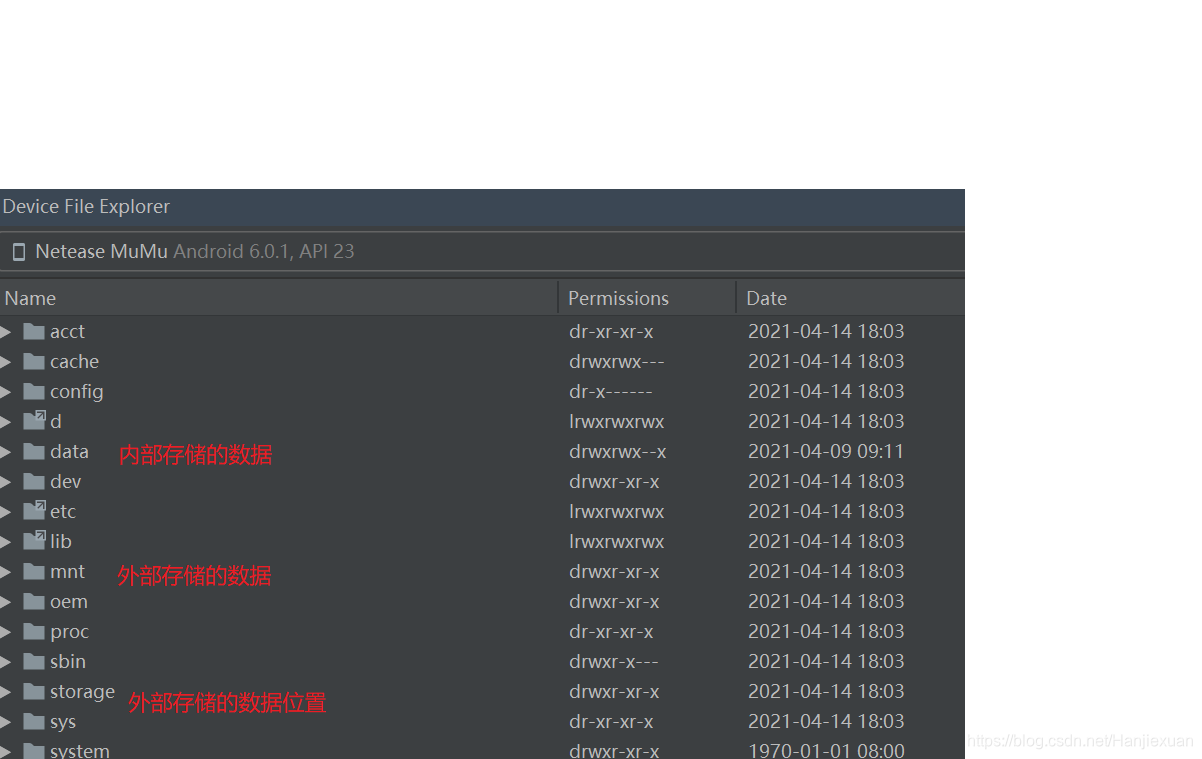
4.内部存储,在data文件下,一个app文件夹,一个时data文件夹是需要关注的。app文件夹存放apk文件;data文件夹存放这,在使用sharedPreferenced的时候,将数据持久化存储于本地,其实就是存在这个文件中的xml文件里,App里边的数据库文件就存储于databases文件夹中,还有我们的普通数据存储在files中,缓存文件存储在cache文件夹中。
使用:getCacheDir()方法用于获取/data/data//cache目录
getFilesDir()方法用于获取/data/data//files目录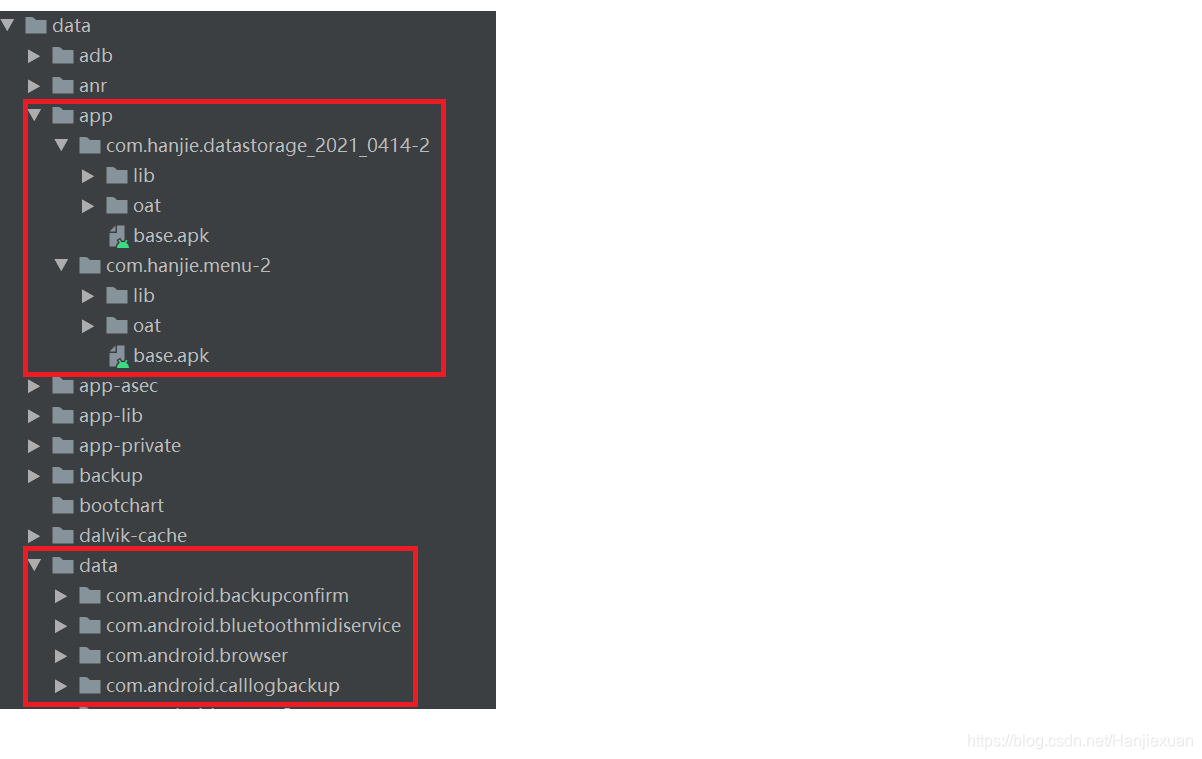
4.外部存储
一般来说,在storage文件夹中有一个sdcard文件夹,这个文件夹中的文件又分为两类,一类是公有目录,还有一类是私有目录。使用:Environment.getExternalStorageDirectory().getAbsolutePath()+"/hanjie.txt";
Environment.getExternalStorageDirectory()方法是获取外部存储的公有文件的路径。getAbsolutePath()获取的是绝对路径。/hanjie.txt是文件名。
二:总结
1.Android系统私有的外部存储,也就是与此app相关的内容,是随着应用程序的卸载而卸载的,公有的外部存储则不会。
2.Android中操作外部存储时需要添加读写外部存储的权限
<uses-permission android:name="android.permission.READ_EXTERNAL_STORAGE" />
<uses-permission android:name="android.permission.WRITE_EXTERNAL_STORAGE" />
<uses-permission android:name="android.permission.MANAGE_EXTERNAL_STORAGE" />
3.注意:在AndroidAPI6.0之后,根目录文件存储时需要用户授权,即使在AndroidManifest.xml文件中配置了存储权限,也需要动态授权,用户不受权是无法使用的
三:外部存储案例
1.效果,先将数据保存,再将数据读取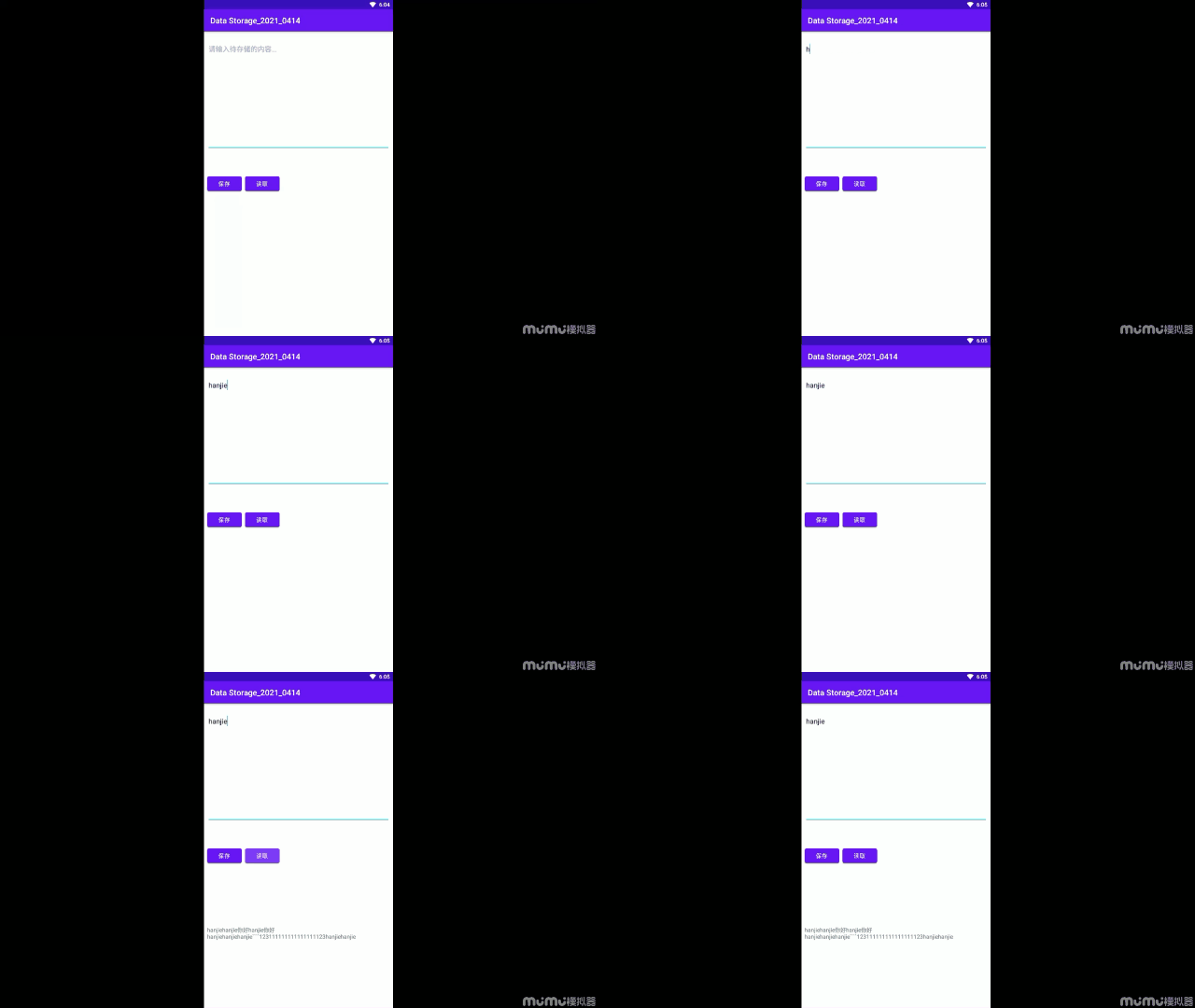
2.在文件夹中查看保存的文件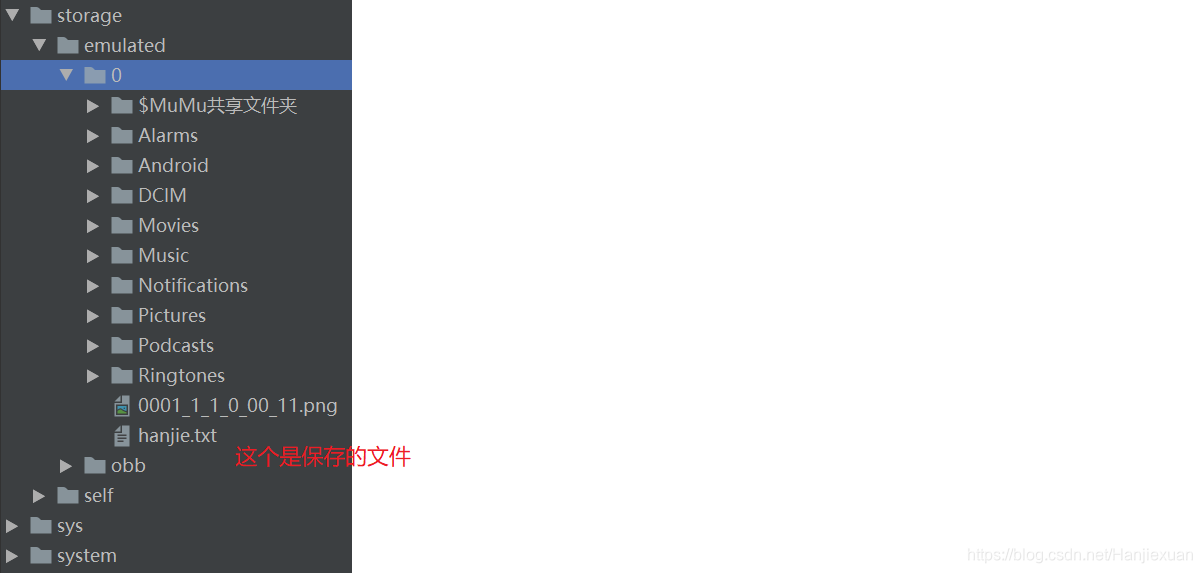
3.代码
3.1.ExternalActivity代码
package com.hanjie.datastorage_2021_0414;


import android.Manifest;
import android.content.pm.PackageManager;
import android.os.Bundle;

import android.os.Environment;
import android.util.Log;
import android.view.View;
import android.widget.EditText;
import android.widget.TextView;

import androidx.annotation.NonNull;
import androidx.appcompat.app.AppCompatActivity;
import androidx.core.app.ActivityCompat;
import androidx.core.content.ContextCompat;

import java.io.File;
import java.io.FileInputStream;
import java.io.FileNotFoundException;
import java.io.FileOutputStream;
import java.io.IOException;


public class ExternalActivity extends AppCompatActivity {

    private EditText infoEdt;
    private TextView txt;
    @Override
    protected void onCreate(Bundle savedInstanceState) {
        super.onCreate(savedInstanceState);
        setContentView(R.layout.activity_external);
        infoEdt = findViewById(R.id.info_edt);
        txt = findViewById(R.id.textView);

         int permisson =ContextCompat.checkSelfPermission(this, Manifest.permission.WRITE_EXTERNAL_STORAGE);
         if (permisson!= PackageManager.PERMISSION_GRANTED){
             //动态申请权限
             ActivityCompat.requestPermissions(this,new String[]{Manifest.permission.WRITE_EXTERNAL_STORAGE},1);

         }
    }

    @Override
    public void onRequestPermissionsResult(int requestCode, @NonNull String[] permissions, @NonNull int[] grantResults) {
        super.onRequestPermissionsResult(requestCode, permissions, grantResults);
        if (requestCode==1){

        }
    }

    public void operate(View v){
        String path = Environment.getExternalStorageDirectory().getAbsolutePath()+"/imooc.txt";
        Log.e("hanjie",path);

        switch (v.getId()){
            case R.id.save_btn:
                File f = new File(path);
                try {
                    if (!f.exists()) {
                        f.createNewFile();
                    }
                    FileOutputStream fos = new FileOutputStream(path,true);
                    String str = infoEdt.getText().toString();
                    fos.write(str.getBytes());
                    fos.close();
                } catch(IOException e){
                    e.printStackTrace();
                }

                break;
            case R.id.read_btn:
                try {
                    FileInputStream fis = new FileInputStream(path);
                    byte [] b = new byte[1024];
                    int len = fis.read(b);
                    String str2 = new String(b,0,len);
                    txt.setText(str2);
                } catch (FileNotFoundException e) {
                    e.printStackTrace();
                } catch (IOException e) {
                    e.printStackTrace();
                }
                break;
        }
    }
}
3.2.activity_external.xml布局
<?xml version="1.0" encoding="utf-8"?>
<androidx.constraintlayout.widget.ConstraintLayout xmlns:android="http://schemas.android.com/apk/res/android"
    xmlns:app="http://schemas.android.com/apk/res-auto"
    xmlns:tools="http://schemas.android.com/tools"
    android:layout_width="match_parent"
    android:layout_height="match_parent"
    >


    <EditText
        android:id="@+id/info_edt"
        android:layout_width="match_parent"
        android:layout_height="wrap_content"
        android:layout_marginStart="8dp"
        android:layout_marginLeft="8dp"
        android:layout_marginTop="22dp"
        android:layout_marginEnd="8dp"
        android:layout_marginRight="8dp"
        android:maxLines="12"
        android:minLines="12"
        android:hint="请输入待存储的内容..."
        android:gravity="left|top"
        app:layout_constraintEnd_toEndOf="parent"
        app:layout_constraintStart_toStartOf="parent"
        app:layout_constraintTop_toTopOf="parent" />

    <Button
        android:id="@+id/read_btn"
        android:layout_width="wrap_content"
        android:layout_height="wrap_content"
        android:layout_marginStart="8dp"
        android:layout_marginLeft="8dp"
        android:layout_marginTop="8dp"
        android:layout_marginBottom="8dp"
        android:text="读取"
        app:layout_constraintBottom_toBottomOf="parent"
        app:layout_constraintStart_toEndOf="@+id/save_btn"
        app:layout_constraintTop_toTopOf="parent"
        android:onClick="operate" />

    <Button
        android:id="@+id/save_btn"
        android:layout_width="wrap_content"
        android:layout_height="wrap_content"
        android:layout_marginStart="8dp"
        android:layout_marginLeft="8dp"
        android:layout_marginTop="8dp"
        android:layout_marginBottom="8dp"
        android:text="保存"
        app:layout_constraintBottom_toBottomOf="parent"
        app:layout_constraintStart_toStartOf="parent"
        app:layout_constraintTop_toTopOf="parent"
        android:onClick="operate" />

    <TextView
        android:id="@+id/textView"
        android:layout_width="match_parent"
        android:layout_height="176dp"
        android:layout_marginStart="8dp"
        android:layout_marginLeft="8dp"
        android:layout_marginEnd="8dp"
        android:layout_marginRight="8dp"
        android:layout_marginBottom="32dp"
        app:layout_constraintBottom_toBottomOf="parent"
        app:layout_constraintEnd_toEndOf="parent"
        app:layout_constraintStart_toStartOf="parent" />
</androidx.constraintlayout.widget.ConstraintLayout>
3.3:内部存储案例
3.3.1:InternalActivity代码
在这里面查看保存的内容,即data/data/包名/files。如果没有的话,可以多刷新几次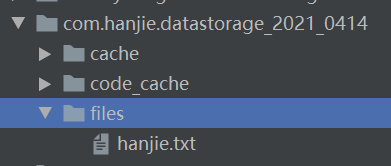
package com.hanjie.datastorage_2021_0414;

import android.Manifest;
import android.os.Build;

import android.os.Bundle;
import android.view.View;
import android.widget.EditText;
import android.widget.TextView;

import androidx.appcompat.app.AppCompatActivity;

import java.io.File;
import java.io.FileInputStream;
import java.io.FileNotFoundException;
import java.io.FileOutputStream;
import java.io.IOException;


public class InternalActivity extends AppCompatActivity {
    EditText edt;
    TextView txt;
    @Override
    protected void onCreate(Bundle savedInstanceState) {
        super.onCreate(savedInstanceState);
        setContentView(R.layout.activity_internal);
        edt = findViewById(R.id.editText);
        txt = findViewById(R.id.textView);
    }

    public void operate(View v){
        File f= new File(getFilesDir(),"hanjie.txt");
        switch (v.getId()){
            case R.id.save_btn:

                try {
                    if (!f.exists()) {
                        f.createNewFile();
                    }
                    FileOutputStream fos = new FileOutputStream(f);
                    fos.write(edt.getText().toString().getBytes());
                    fos.close();
                    } catch(IOException e){
                        e.printStackTrace();
                }
                break;
            case R.id.read_btn:
                try {
                    FileInputStream fis = new FileInputStream(f);
                    byte [] b = new byte[1024];
                    int len = fis.read(b);
                    String str2 = new String(b,0,len);
                    txt.setText(str2);
                } catch (FileNotFoundException e) {
                    e.printStackTrace();
                } catch (IOException e) {
                    e.printStackTrace();
                }

                break;
        }

    }
}
布局页面和activity_external.xml布局页面内容一样,使用的时候改一下名字就可以了
版权声明:本文为hanjiexuan原创文章,遵循CC 4.0 BY-SA版权协议,转载请附上原文出处链接和本声明。