PostgreSQL
PostgreSQL使用
配置环境变量后 psql -U postgres ,输密码进入
\l 查看所有数据库;
新建数据库 create database name;
\c database-name 进入数据库;
\d 查看所有表 ;
\d table-name 进入某个表;
\x 竖着看;
\y 横着看;
导出table 首先进入/home/postgres/bin目录
./pg_dump -U postgres -t table_name database_name > /home/postgres/backup/table_name.sql导入table 首先进入/home/postgres/bin目录
./psql -d postgres -U postgres -f /home/postgres/backup/mfv.sql导出database 首先进入/home/postgres/bin目录
./pg_dump -h localhost -U postgres postgres > ./old-backup.sql导入database 首先进入/home/postgres/bin目录
./psql -U postgres(用户名) 数据库名(缺省时同用户名) < data/dum.sql
./psql -U postgres old_backup < /home/postgres/backup/old-backup.sql删除数据
delete from table_name;删除表结构
DROP TABLE table_name;
PostgreSQL安装
创建用户和database
create user v_user with password 'xxxxx';
create database vdb owner v_user;
grant all privileges on database vdb to v_user;

create database test;

CREATE TABLE ttest(
   id int,
   gender varchar,
   name varchar,
   PRIMARY KEY( id )
);

INSERT INTO ttest (id, gender, name) VALUES (1, 'male', 'xiaohong');

su - postgres
psql db_name      登到某个数据库
\q                退出


# 查看所有数据库表
select * from pg_tables where schemaname = 'public';
PostgreSQL数据库优化
数据库优化

1.修改conf
find / -name postgresql.conf
vim /home/postgres/data/postgresql.conf

2.重启
find / pg_ctl
/home/postgres/bin/pg_ctl
su - postgres
cd /home/postgres/bin
pg_ctl stop/restart/start
-----------------导入xxx数据步骤--------------------
登入数据库 切到其它库
\c old_backup

SELECT pg_terminate_backend(pg_stat_activity.pid)
FROM pg_stat_activity
WHERE datname='postgres' AND pid<>pg_backend_pid();

drop掉验证有问题的库
drop database postgres;


su - postgres

psql -h localhost -d old_backup -U postgres

create database postgres;

cd /home/postgres/bin

导入xxx数据
./psql -U postgres postgres < /home/postgres/backup/nang-postgres.sql
记录一次数据库慢查询解决
postgres=# explain analyze select count(*) from port where is_deleted is null;
                                                      QUERY PLAN
-----------------------------------------------------------------------------------------------------------------------
 Aggregate  (cost=773375.20..773375.21 rows=1 width=8) (actual time=60998.772..60998.772 rows=1 loops=1)
   ->  Seq Scan on port  (cost=0.00..772952.22 rows=169191 width=0) (actual time=0.044..60986.159 rows=109963 loops=1)
         Filter: (is_deleted IS NULL)
         Rows Removed by Filter: 27753
 Planning time: 0.055 ms
 Execution time: 60998.852 ms
(6 rows)
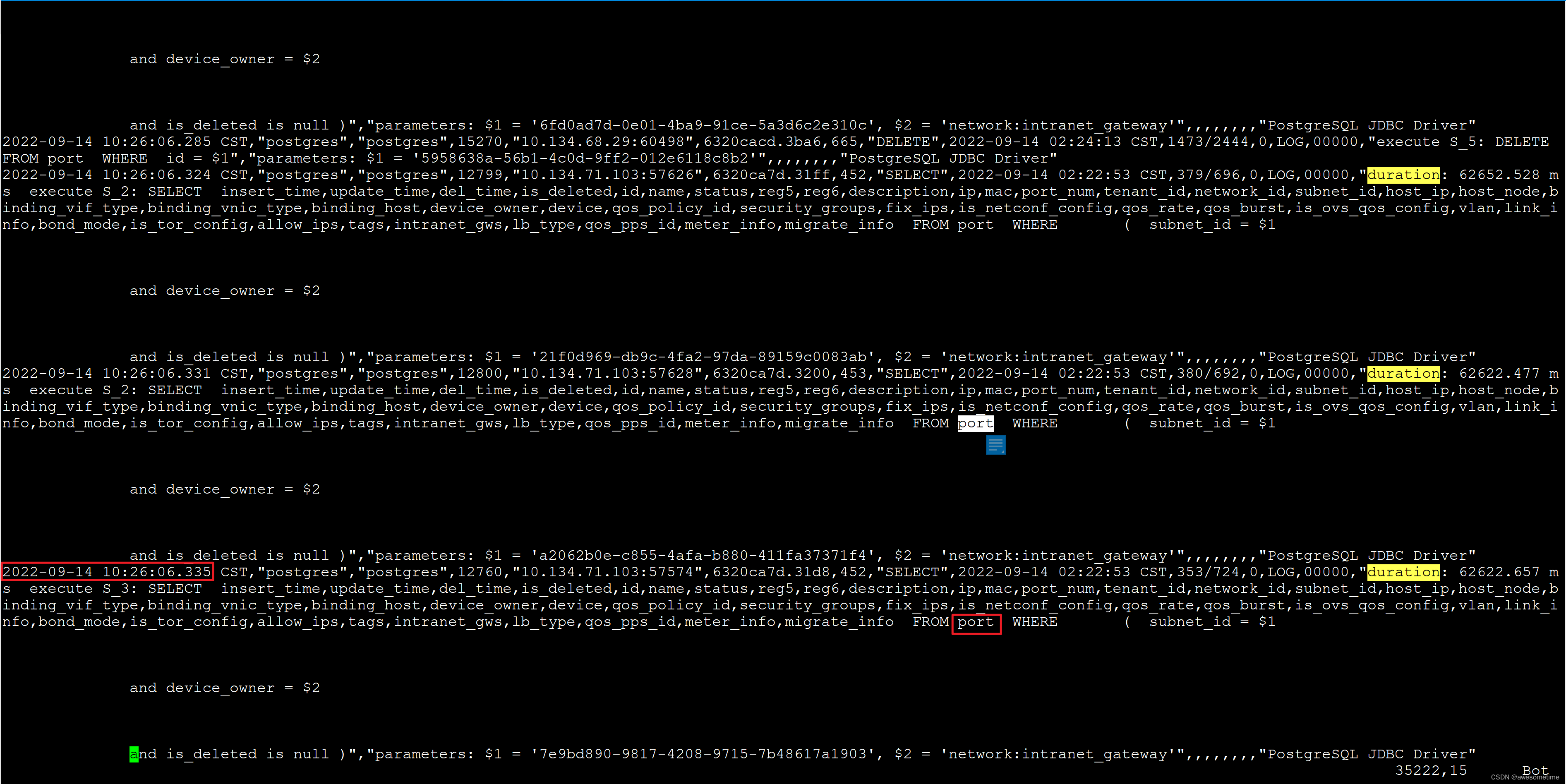
查看表大小 800MB:, 表记录大概4000条。
SELECT pg_size_pretty( pg_total_relation_size(‘int_twilio_twilionumber’) );
大小 6G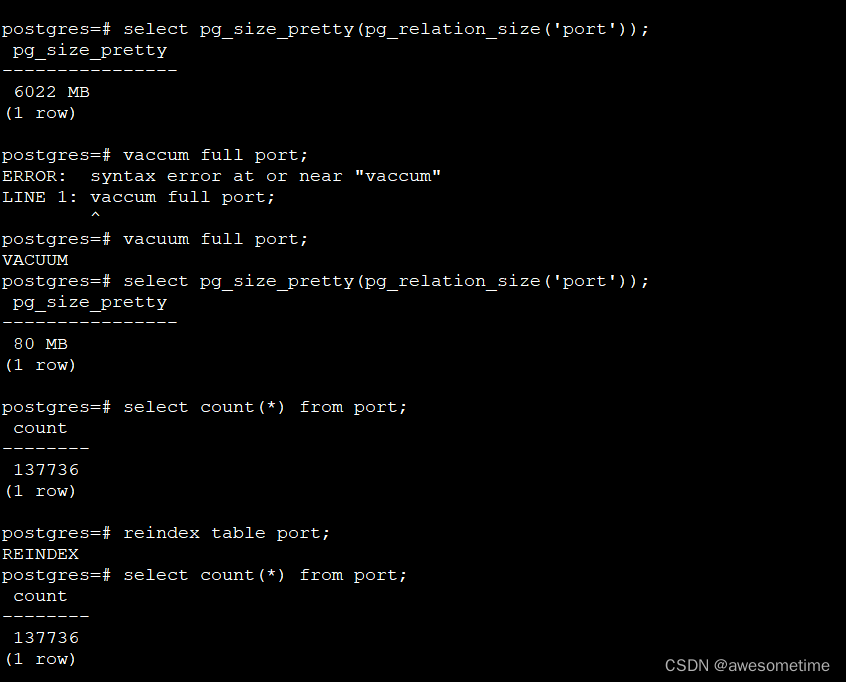
查看当时pg stat:
select * from pg_stat_activity where query like ‘select * from int_twilio_twilionumber%’ order by backend_start desc limit 20
发现阻塞在IO操作上, 怀疑是vacuum有问题。用同样的数据创建一个新表 发现查询很快。
CREATE TABLE test_twilio_twilionumber AS
SELECT
*
FROM
int_twilio_twilionumber执行vacuum操作,问题解决。 该操作很慢! 而且会锁表。
vacuum (VERBOSE, analyze) int_twilio_twilionumber
vacuum full int_twilio_twilionumber
手动清理收缩数据库表
select pg_size_pretty(pg_relation_size(‘port’));
vacuum full port;
reindex table port;
CREATE INDEX port_mac_index ON port (mac);
解决:
postgresql表重建
postgresql数据库中的表需要重建,但是表被物化视图使用没法直接重建怎么办?

1.创建临时表,包括表结构和索引等对象

create table table_name_1 (like table_name INCLUDING all);

2.插入原表数据到临时表

insert into table_name_1 select * from table_name;

3.原表重命名为原表2

alter table table_name rename to table_name_2;

4.新表重命名为原表

alter table table_name_1 rename to table_name;

5.清空删除过程临时表

truncate table table_name_2;

drop table table_name_2;
新建表大小 80M
could not read block 8 in file “base/13325/16507“: read only 0 of 8192 bytes错误 解决
PostgreSQL could not read block 8 in file “base/13325/16507“: read only 0 of 8192 bytes错误
原因:
则表示数据表文件损坏。这通常是由于异常断电或误操作导致的。这里“16384”是发生问题的数据库的对象id(oid), “17330”表示发生问题的表的文件结点(filenode)
应用访问PGSQL主从库时做了高可用实施,实施过程中反复切主从,导致表的索引丢失,所以查询数据失败报错。
解决办法:
创建数据对应的表的索引