实现环境
CentOS7.6(Nginx编译安装带Nginx_upstream_check_module模块) IP 192.168.10.101
CentOS7.6(Nginx网站1)
CentOS7.6(Nginx网站2)
实验所需软件包
Inde 项目排序
Upstream upstream名称
Name 后端地址
Status 状态地址 (正常为up|异常为down)
Fall counts down机时间 (以秒为单位)
Check type 监控类型 (默认tcp)
具体参数可以查看官方文档https://github.com/yaoweibin/nginx_upstream_check_module
模块介绍
Active connections: 当前活跃的连接数
12----> 一共处理了多少个链接(请求)
12----> 成功创建多少次握手
15–> 总共创建了多少个请求
Reading:当前读取客户端heardr的数量
Writing:当前返回给客户端heardr的数量 #如果这个指标飙升,说明是后面的节点挂掉了,例如数据库等。
Waiting:大体意思是已经处理完,等待下次请求的数量
提示:我们只需要关注活动链接即可
http://nginx.org/download/nginx-1.14.2.tar.gz (Nginx软件包)
https://github.com/yaoweibin/nginx_upstream_check_module/ 模块地址
Nginx检测机安装依赖
yum install -y gcc glibc gcc-c++ prce-devel openssl-devel pcre-devel lua-devel libxml2 libxml2-dev libxslt-devel perl-ExtUtils-Embed GeoIP GeoIP-devel GeoIP-data
准备所需软件包
解压Nginx并给Nginx打上补丁 需用到patch软件包,直接安装即可
进入Nginx目录之后执行 patch -p1 < …/nginx_upstream_check_module-master/check_1.14.0+.patch 一定指定自己版本的Nginx模块哦!!!!
然后编译安装Nginx(记得创建Nginx运行用户!)
./configure --prefix=/usr/local/nginx --user=nginx --group=nginx --with-http_ssl_module --with-http_stub_status_module --add-module=/opt/nginx_upstream_check_module-master
编译完成之后做链接 ln -s /usr/local/nginx/sbin/* /usr/local/sbin/
然后启动nginx进行测试 netstat -anpt | grep nginx 能查到进程则代表Nginx启动正常,
接着去配置模块
首先我们需要有一个upstream的模块来调度我们后端的服务器
upstream web {
server 192.168.10.102:80;
server 192.168.10.103:80;
check interval=3000 rise=2 fall=5 timeout=1000 type=tcp;
}
然后需要再Server配置内调用这个组,并且我们需要开启status的模块和状态检测模块
location /status1 {
stub_status on;
access_log off;
}
location /status2 {
check_status;
access_log off;
}
配置信息介绍
check interval=3000 rise=2 fall=5 timeout=1000 type=tcp;
interval检测间隔时间,单位为毫秒
rsie请求2次正常的话,标记此后端的状态为up
type 类型为tcp
fall表示请求5次都失败的情况下,标记此后端的状态为down
timeout为超时时间,单位为毫秒
重启Nginx进行查看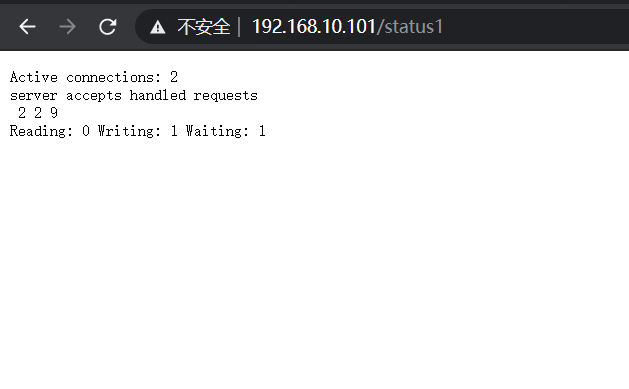
普通状态检测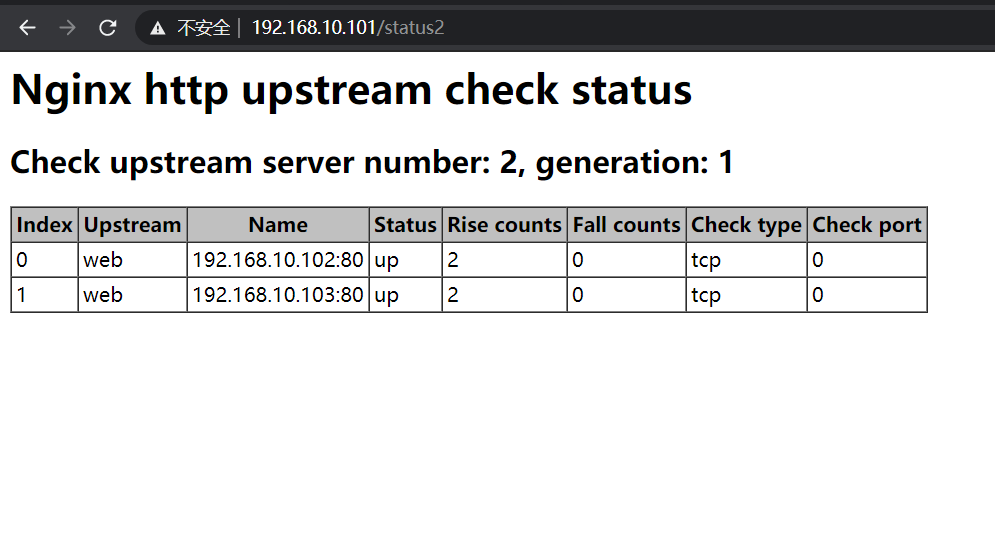
加模块后的检测。
尝试down掉后方服务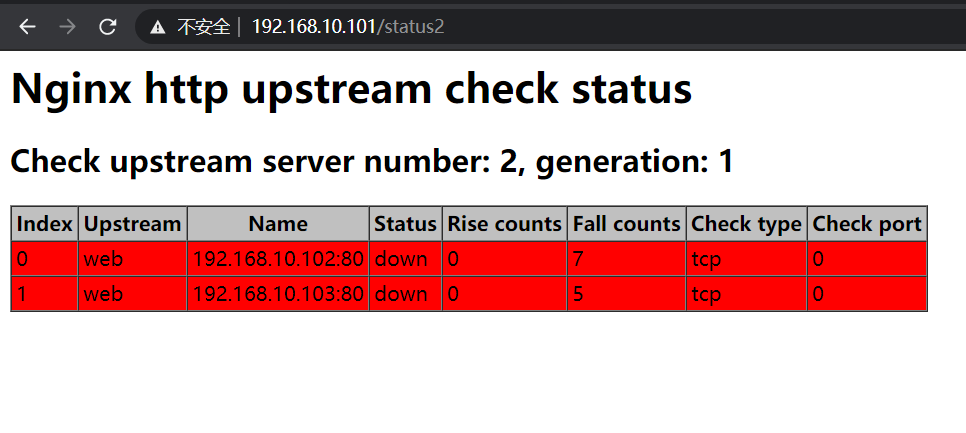
检测到down掉
到此模块使用方法完成!