一、错误提示
近日,在编译Geoserver源码过程中(其中编译命令是:mvn clean install -DskipTests -T 2C),出现了如下的错误:
[ERROR] Failed to execute goal com.diffplug.spotless:spotless-maven-plugin:2.20.0:apply (default) on project geoserver: Execution default of goal com.diffplug.spotless:spotless-maven-plugin:2.20.0:apply failed: Unable to resolve dependencies: Failed to collect dependencies at com.google.googlejavaformat:google-java-format:jar:1.7 -> com.google.errorprone:javac-shaded:jar:9+181-r4173-1: Failed to read artifact descriptor for com.google.errorprone:javac-shaded:jar:9+181-r4173-1: Could not transfer artifact com.google.errorprone:javac-shaded:pom:9+181-r4173-1 from/to aliyunmaven (https://maven.aliyun.com/repository/central): authorization failed for https://maven.aliyun.com/repository/central/com/google/errorprone/javac-shaded/9+181-r4173-1/javac-shaded-9+181-r4173-1.pom, status: 403 Forbidden -> [Help 1]
[ERROR]
[ERROR] To see the full stack trace of the errors, re-run Maven with the -e switch.
[ERROR] Re-run Maven using the -X switch to enable full debug logging.
[ERROR]
[ERROR] For more information about the errors and possible solutions, please read the following articles:
[ERROR] [Help 1] http://cwiki.apache.org/confluence/display/MAVEN/PluginExecutionException
二、原因分析
通过错误信息可以得知,因为javac-shaded-9+181-r4173-1.jar的依赖包无法从阿里云的maven仓库下载下来,报403权限问题。
三、解决办法
解决思路,通过手动更新本地的maven的依赖库中的相关目录(目录XX:\software\m2\repository\com\google\errorprone\javac-shaded),更新的资源来自mvnrepository,网站如下所示,我们可以根据自己的需求搜索相关MVN依赖https://mvnrepository.com/ https://mvnrepository.com/
四、实施步骤
1、根据错误提示信息“com.google.errorprone:javac-shaded”,在mvnrepository网站内搜索
搜索结果如下图所示:

2、进入到com.google.errorprone:javac-shaded依赖的详细描述页面
进入javac-shaded的详细描述,如下图所示:
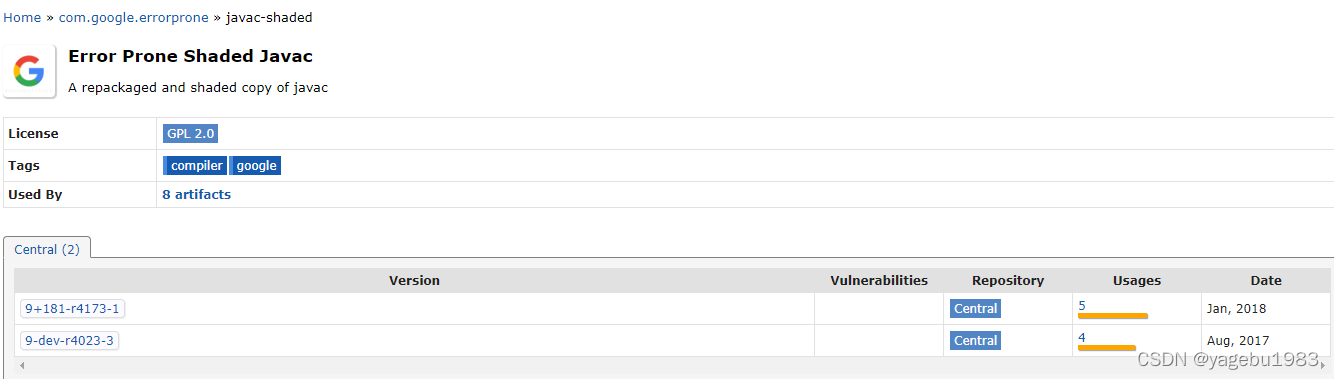
根据错误的提示信息确认相关版本信息“9+181-r4173-1”,点击进入详细描述页面,如下图所示:

3、下载相关jar和POM文件
在进入9+181-r4173-1页面后,点击File行中的“View All”链接,可以看到相关的jar和pom文件,按照我标红的文件名下载相关的文件,文件下载完成后,放入本地依赖库中,地址为:D:\software\m2\repository\com\google\errorprone\javac-shaded\9+181-r4173-1

4、重新编译Geoserver项目
利用mvn clean install -DskipTests -T 2C命令重新编译Geoserver环境,编译成功!效果如下图所示:
