网上关于测距的实现都是比较片面的,没有完整的例子,最近因为需求,有对相关需求进行实现,给出我的实现方案,供大家参考
效果图:
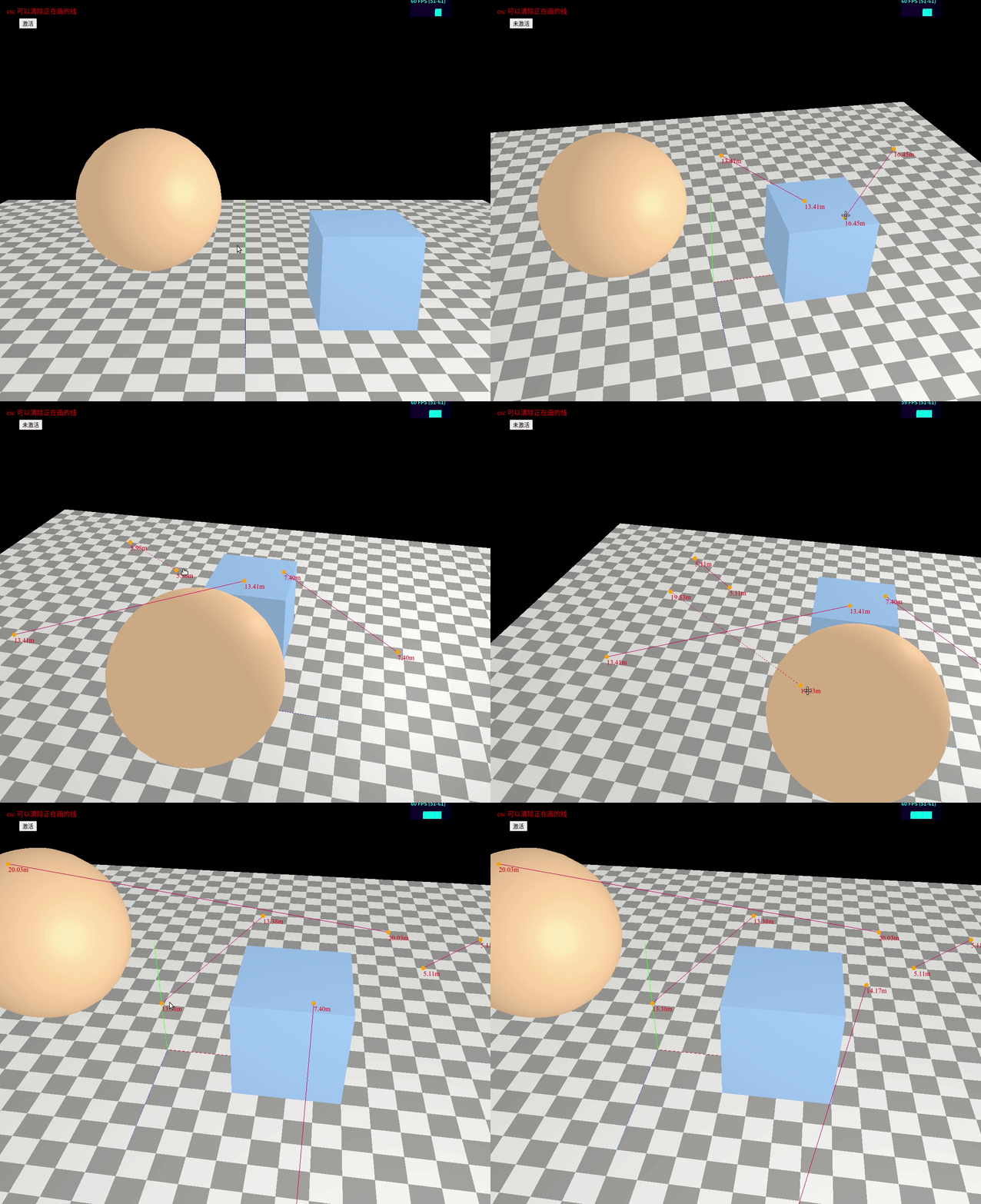
完整代码:
<!DOCTYPE html>
<html lang="en">
<head>
<meta charset="UTF-8">
<meta http-equiv="X-UA-Compatible" content="IE=edge">
<meta name="viewport" content="width=device-width, initial-scale=1.0">
<title>Document</title>
<style>
html,
body {
margin: 0;
height: 100%;
overflow: hidden;
}
#c {
width: 100%;
height: 100%;
display: block;
overflow: hidden;
}
</style>
</head>
<body>
<canvas id="c"></canvas>
<span style="position:absolute; color:red; left: 20px;top: 20px;">esc 可以清除正在画的线</span>
<button style="position:absolute; left: 50px;top: 50px;" id="btn">激活</button>
</body>
<script src="./lib/three.js"></script>
<script src="./lib/OrbitControls.js"></script>
<script src="https://cdn.bootcdn.net/ajax/libs/dat-gui/0.7.7/dat.gui.js"></script>
<script src="./lib/ColladaLoader.js"></script>
<script src="./lib/GLTFLoader.js"></script>
<script src="https://unpkg.com/stats.js@1.0.0/src/Stats.js"></script>
<script type="module">
function main() {
function WorldtoScreenPosition(pos) {
const worldVector = new THREE.Vector3(pos.x, pos.y, pos.z)
const standardVector = worldVector.project(camera)
const widthHalf = canvas.width / 2
const heightHalf = canvas.height / 2
return {
x: Math.round(standardVector.x * widthHalf + widthHalf),
y: Math.round(-standardVector.y * heightHalf + heightHalf),
z: 1
}
}
let isActive = false
let btn = document.getElementById('btn')
btn.onclick = function () {
isActive = !isActive
if (isActive) {
renderer.domElement.style.cursor = 'crosshair'
btn.innerHTML = '未激活'
// controls.enableRotate = false
} else {
renderer.domElement.style.cursor = 'unset'
btn.innerHTML = '激活'
// controls.enableRotate = true
}
}
const canvas = document.querySelector('#c');
const renderer = new THREE.WebGLRenderer({ canvas });
const fov = 45;
const aspect = 2;
const near = 0.1;
const far = 10000;
const camera = new THREE.PerspectiveCamera(fov, aspect, near, far);
camera.position.set(0, 10, 20);
const controls = new THREE.OrbitControls(camera, canvas);
controls.target.set(0, 5, 0);
controls.update();
const scene = new THREE.Scene();
scene.background = new THREE.Color('black');
{
var myStats = new Stats()
myStats.domElement.style.position = "fixed"
myStats.domElement.style.right = "100px"
myStats.domElement.style.width = "100px"
myStats.domElement.style.top = "0"
document.querySelector('body').appendChild(myStats.domElement)
}
{
const axesHelper = new THREE.AxesHelper(5);
scene.add(axesHelper);
}
{
const planeSize = 40;
const loader = new THREE.TextureLoader();
const texture = loader.load('https://threejsfundamentals.org/threejs/resources/images/checker.png');
texture.wrapS = THREE.RepeatWrapping;
texture.wrapT = THREE.RepeatWrapping;
texture.magFilter = THREE.NearestFilter;
const repeats = planeSize / 2;
texture.repeat.set(repeats, repeats);
const planeGeo = new THREE.PlaneGeometry(planeSize, planeSize);
const planeMat = new THREE.MeshPhongMaterial({
map: texture,
side: THREE.DoubleSide,
});
const mesh = new THREE.Mesh(planeGeo, planeMat);
mesh.rotation.x = Math.PI * -.5;
scene.add(mesh);
}
{
const cubeSize = 4;
const cubeGeo = new THREE.BoxGeometry(cubeSize, cubeSize, cubeSize);
const cubeMat = new THREE.MeshStandardMaterial({ color: '#8AC' });
const cube = new THREE.Mesh(cubeGeo, cubeMat);
cube.position.set(cubeSize + 1, cubeSize / 2, 0);
scene.add(cube);
}
{
const sphereRadius = 3;
const sphereWidthDivisions = 32;
const sphereHeightDivisions = 16;
const sphereGeo = new THREE.SphereGeometry(sphereRadius, sphereWidthDivisions, sphereHeightDivisions);
const sphereMat = new THREE.MeshPhongMaterial({ color: '#CA8' });
const mesh = new THREE.Mesh(sphereGeo, sphereMat);
mesh.position.set(-sphereRadius - 1, sphereRadius + 2, 0);
scene.add(mesh);
}
{
const color = 0xFFFFFF;
const intensity = 1;
const light = new THREE.AmbientLight(color, intensity);
scene.add(light);
const light2 = new THREE.PointLight(0xffffff, 0.3)
light2.position.set(10, 10, 10)
scene.add(light2)
}
//---------------------------------------------测距功能实现
let lineId = 0
let drawingLine = false
let markers = {} // {1:[],2:[]}
let textDoms = {}
let pointsDom = {}
//esc删除绘制
window.addEventListener('keydown', function (event) {
if (event.key === 'Escape') {
//清除没画完的线
if (drawingLine) {
[...textDoms[lineId], ...pointsDom[lineId]].forEach(item => item.remove())
markers[lineId].forEach(item => scene.remove(item))
markers[lineId] = null
textDoms[lineId] = null
pointsDom[lineId] = null
drawingLine = false
}
}
})
const raycaster = new THREE.Raycaster()
let intersects
const mouse = new THREE.Vector2()
renderer.domElement.addEventListener('click', onClick, false)
function onClick() {
if (isActive && event.button === 0) {
raycaster.setFromCamera(mouse, camera)
intersects = raycaster.intersectObjects(scene.children)
if (intersects.length === 0) return
if (!drawingLine) {
//加入距离文字
let text1 = document.createElement('span')
text1.style.position = 'absolute'
text1.style.top = '0'
text1.style.color = 'red'
text1.style.pointerEvents = 'none'
let text2 = text1.cloneNode()
document.body.appendChild(text1)
document.body.appendChild(text2)
textDoms[lineId] = [text1, text2]
//加入2d的点
let point2d1 = document.createElement('div')
point2d1.style.position = 'absolute'
point2d1.style.width = '10px'
point2d1.style.height = '10px'
point2d1.style.borderRadius = '50%'
point2d1.style.pointerEvents = 'none'
point2d1.style.cursor = 'pointer'
point2d1.style.transform = 'translate(-50%,-50%)'
point2d1.style.top = '0'
point2d1.style.background = 'orange'
let point2d2 = point2d1.cloneNode()
document.body.appendChild(point2d1)
document.body.appendChild(point2d2)
pointsDom[lineId] = [point2d1, point2d2]
//加入3d中的两圆球
let marker1 = new THREE.Mesh(
new THREE.SphereGeometry(0.1, 10, 20),
new THREE.MeshBasicMaterial({
color: 0xff5555,
})
);
let marker2 = marker1.clone()
markers[lineId] = [marker1, marker2]
scene.add(marker1, marker2)
//构建虚线
const geometry = new THREE.BufferGeometry().setFromPoints(
[intersects[0].point, intersects[0].point.clone()]
)
let line = new THREE.LineSegments(
geometry,
new THREE.LineDashedMaterial({
color: 0xff5555,
transparent: true,
depthTest: false,
dashSize: 0.1,//短划线的大小
gapSize: 0.1//短划线之间的距离
})
)
//这行代码很关键,让屏幕外区域的点,正确显示
line.frustumCulled = false
markers[lineId].push(line)
scene.add(line)
marker1.lineId = marker2.lineId = line.lineId = lineId
drawingLine = true
let cacheId = lineId
line.onBeforeRender = function () {
//实时渲染text和2d的点
const positions = line.geometry.attributes.position.array
const v0 = new THREE.Vector3(
positions[0],
positions[1],
positions[2]
)
const v1 = new THREE.Vector3(
positions[3],
positions[4],
positions[5]
)
const distance = v0.distanceTo(v1)
let [text1, text2] = textDoms[cacheId]
text1.innerHTML = distance.toFixed(2) + 'm'
text2.innerHTML = distance.toFixed(2) + 'm'
let point1 = new THREE.Vector3().lerpVectors(v0, v1, 0)
let point2 = new THREE.Vector3().lerpVectors(v0, v1, 1)
point1 = WorldtoScreenPosition(point1)
point2 = WorldtoScreenPosition(point2)
text1.style.left = point1.x + "px"
text1.style.top = point1.y + 5 + "px"
text2.style.left = point2.x + "px"
text2.style.top = point2.y + 5 + "px"
let [point2d1, point2d2] = pointsDom[cacheId]
point1 = WorldtoScreenPosition(v0)
point2 = WorldtoScreenPosition(v1)
point2d1.style.left = point1.x + "px"
point2d1.style.top = point1.y + "px"
point2d2.style.left = point2.x + "px"
point2d2.style.top = point2.y + "px"
//实时渲染3d的两球
let [marker1, marker2] = markers[cacheId]
marker1.position.set(v0)
marker2.position.set(v1)
}
} else {
let line = markers[lineId][2]
//保存旧的material
line.oldMaterial = line.material
//虚线变实线
line.material = new THREE.LineBasicMaterial({
color: 0xff5555,
transparent: true,
depthTest: false
})
updateLinePoint(line, intersects[0].point, 3)
//让2d中的两点可拖动
let [point2d1, point2d2] = pointsDom[lineId]
point2d1.style.pointerEvents = 'unset'
point2d2.style.pointerEvents = 'unset'
//监听两点的拖拽
draggablePoint(point2d1, lineId)
draggablePoint(point2d2, lineId)
lineId++
drawingLine = false
}
}
}
document.addEventListener('mousemove', onDocumentMouseMove, false)
function onDocumentMouseMove(event) {
event.preventDefault()
mouse.x = (event.clientX / renderer.domElement.offsetWidth) * 2 - 1
mouse.y = -(event.clientY / renderer.domElement.offsetHeight) * 2 + 1
if (drawingLine) {
raycaster.setFromCamera(mouse, camera)
intersects = raycaster.intersectObjects(scene.children)
if (intersects.length === 0) return
let line = markers[lineId][2]
line.computeLineDistances()
updateLinePoint(line, intersects[0].point, 3)
}
}
function draggablePoint(el, id) {
let timeId = null
let index = pointsDom[id].findIndex(item => item === el)
let line = markers[id][2]
el.addEventListener('mousedown', (e) => {
timeId = setTimeout(() => {
console.log('长按')
changeMaterial(line)
//变虚线
timeId = null
//长按监听移动
document.addEventListener('mousemove', handlePointMove)
}, 100);
document.addEventListener('mouseup', handlePointUp)
})
function handlePointMove() {
//打出射线
raycaster.setFromCamera(mouse, camera)
intersects = raycaster.intersectObjects(scene.children)
//排除含有lineId的物体
intersects = intersects.filter(item => !('lineId' in item.object))
if (intersects.length === 0) return
//变更线段两端点的位置
let arrayStart = index && 3
updateLinePoint(line, intersects[0].point, arrayStart)
}
function handlePointUp() {
if (timeId) {
console.log('点击')
clearTimeout(timeId)
timeId = null
} else {
changeMaterial(line)
}
document.removeEventListener('mouseup', handlePointUp)
document.removeEventListener('mousemove', handlePointMove)
}
}
function changeMaterial(object3d) {
let temp = object3d.oldMaterial
object3d.oldMaterial = object3d.material
object3d.material = temp
}
function updateLinePoint(line, point, arrayIndex) {
const positions = line.geometry.attributes.position.array
positions[arrayIndex] = point.x
positions[arrayIndex + 1] = point.y
positions[arrayIndex + 2] = point.z
line.geometry.attributes.position.needsUpdate = true
}
//------------------------------------------------------------
function resizeRendererToDisplaySize(renderer) {
const canvas = renderer.domElement;
const width = canvas.clientWidth;
const height = canvas.clientHeight;
const needResize = canvas.width !== width || canvas.height !== height;
if (needResize) {
renderer.setSize(width, height, false);
}
return needResize;
}
function render() {
myStats.begin()
if (resizeRendererToDisplaySize(renderer)) {
const canvas = renderer.domElement;
camera.aspect = canvas.clientWidth / canvas.clientHeight;
camera.updateProjectionMatrix();
}
renderer.render(scene, camera);
requestAnimationFrame(render);
myStats.end()
}
requestAnimationFrame(render);
}
main();
</script>
</html>
版权声明:本文为fesfsefgs原创文章,遵循CC 4.0 BY-SA版权协议,转载请附上原文出处链接和本声明。