注意:当前节点要加个sprite组件才能正常显示!!!!
// Learn TypeScript:
//  - https://docs.cocos.com/creator/manual/en/scripting/typescript.html
// Learn Attribute:
//  - https://docs.cocos.com/creator/manual/en/scripting/reference/attributes.html
// Learn life-cycle callbacks:
//  - https://docs.cocos.com/creator/manual/en/scripting/life-cycle-callbacks.html
const {ccclass, property} = cc._decorator;


export let _animation:cc.Animation//动画组建
export let _animationclip:cc.AnimationClip //动画图集
export let speed=1;
@ccclass
export default class NewClass extends cc.Component {


    // LIFE-CYCLE CALLBACKS:

    onLoad () {
         //加载动画资源
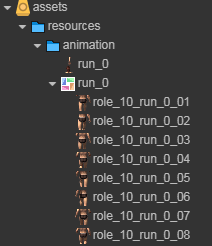
         cc.resources.load( "animation/run_0",
         cc.SpriteAtlas,
         (err, data) => {
             if (err) {
                 return;
             }
             _animation = this.node.addComponent(cc.Animation);//添加动画组建
            let frames:cc.SpriteFrame[] =data.getSpriteFrames();//this.sprAtlas.getSpriteFrames();//data.getSpriteFrames();
            var clip = cc.AnimationClip.createWithSpriteFrames(frames, frames.length);//创建动画帧图
			//添加偏移
            frames.forEach((v,k) => {
                var x=v['_offset']['x'];
                var y=v['_offset']['y'];
                console.log( speed/frames.length*k)
               // 添加帧事件
                clip.events.push({
                    frame: speed/frames.length*k,         // 秒
                    func: "setOffSet",// 回调函数名称
                    params: [x, y,k]    // 回调参数
                });
            });
			clip.name = "anim_001";
            clip.speed = speed;//速度
            clip.wrapMode = cc.WrapMode.Loop;//模式
            _animation.defaultClip=clip
            _animation.addClip(clip);
            _animation.play("anim_001");

         })
    }

    start () {

    }

    // update (dt) {}
    obj2string(obj){
        for (const [key, val] of Object.entries(obj)) {
            console.log("------")
            console.log(key, val)
            console.log("------")
        }
    }
	 //设置偏移量
    setOffSet(x:number,y:number,k:number){
        console.log("帧事件");
        console.log(x,y,k)
        this.node.setPosition(cc.v2(x,y))
    }
}
版权声明:本文为zhang804633234原创文章,遵循CC 4.0 BY-SA版权协议,转载请附上原文出处链接和本声明。