问题描述:
1. 捕获画面从视频文件
2. 使用前 20 帧来填充背景减法器的历史
3. 基于背景减法,使用第21帧识别运动的前景物体,我们将其视为行人。 为每个行人分配一个id和一个初始跟踪窗口,然后计算一个直方图
4. 对于每个后续帧,使用卡尔曼滤波器和均值偏移跟踪每个行人
实现步骤:
- 创造行人类,初始化每个行人的id和跟踪窗口
'''
1.pedestrain class:     接受一个 id ,一个 hsv 格式的初始帧,和一个初始跟踪窗口,
'''
import cv2
import numpy as np

class Pedestrian():
    '''
    一个被追踪行人,有一个状态,包括id,窗口,直方图和过滤器'''
    def __init__(self,id,hsv_frame,track_window):
        self.id = id
        self.track_window = track_window
        self.term_crit = (cv2.TERM_CRITERIA_COUNT| cv2.TERM_CRITERIA_EPS,10,1)

        x,y,w,h = track_window
        roi = hsv_frame[y:y+h,x:x+w]
        roi_hist = cv2.calcHist([roi],[0],None,[16],[0,180])
        self.roi_hist = cv2.normalize(roi_hist,roi_hist,0,255,cv2.NORM_MINMAX)
        self.kalman = cv2.KalmanFilter(4, 2)
        self.kalman.measurementMatrix = np.array(
            [[1, 0, 0, 0],
             [0, 1, 0, 0]], np.float32)
        self.kalman.transitionMatrix = np.array(
            [[1, 0, 1, 0],
             [0, 1, 0, 1],
             [0, 0, 1, 0],
             [0, 0, 0, 1]], np.float32)
        self.kalman.processNoiseCov = np.array(
            [[1, 0, 0, 0],
             [0, 1, 0, 0],
             [0, 0, 1, 0],
             [0, 0, 0, 1]], np.float32) * 0.03
        cx = x+w/2
        cy = y+h/2
        self.kalman.statePre = np.array(
            [[cx],[cy],[0],[0]],np.float32
        )

        self.kalman.statePost = np.array(
            [[cx],[cy],[0],[1]],np.float32
        )

    '''
    每一帧画面都调用
    '''
    def update(self,frame,hsv_frame):
        back_proj = cv2.calcBackProject(
            [hsv_frame],[0],self.roi_hist,[0,180],1
        )

        ret,self.track_window = cv2.meanShift(
            back_proj,self.track_window,self.term_crit
        )
        x,y,w,h = self.track_window
        center = np.array([x+w/2,y+h/2],np.float32)

        prediction = self.kalman.predict()
        estimate = self.kalman.correct(center)
        center_offset = estimate[:,0][:2] - center
        self.track_window = (x + int(center_offset[0]),
                             y + int(center_offset[1]), w, h)
        x, y, w, h = self.track_window
        '''
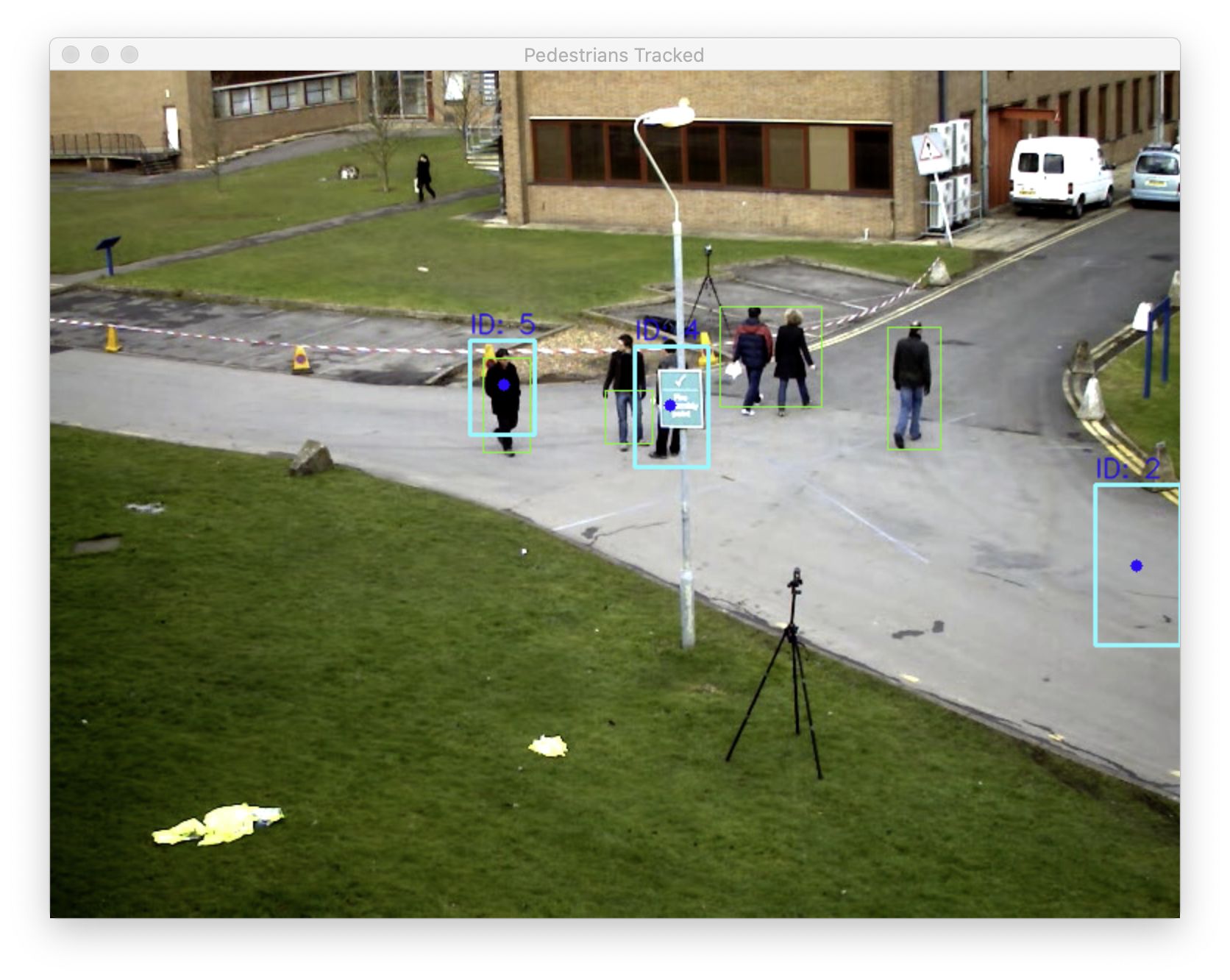
        总结更新方法,我们将卡尔曼滤波器预测绘制为蓝色圆圈,
        校正后的跟踪窗口为青色矩形,行人的id为矩形上方的蓝色文本'''
        cv2.circle(frame,(int(prediction[0]),int(prediction[1])),4,(255,0,0),-1)
        # Draw the corrected tracking window as a cyan rectangle.
        cv2.rectangle(frame, (x,y), (x+w, y+h), (255, 255, 0), 2)

        # Draw the ID above the rectangle in blue text.
        cv2.putText(frame, 'ID: %d' % self.id, (x, y-5),
                    cv2.FONT_HERSHEY_SIMPLEX, 0.6, (255, 0, 0),
                    1, cv2.LINE_AA)
- 载入视频文件(自定义),初始化背景减法器
'''
1.loading a video file ,initial a background subtractor
    and setting the background subtractor's history length'''
def main():
    cap = cv2.VideoCapture("pedestrians.avi")
    # 创建knn背景减法器
    bg_subtractor = cv2.createBackgroundSubtractorKNN()
    history_length = 20
    bg_subtractor.setHistory(history_length)


    erode_kernel = cv2.getStructuringElement(
        cv2.MORPH_ELLIPSE, (3, 3))
    dilate_kernel = cv2.getStructuringElement(
        cv2.MORPH_ELLIPSE, (8, 3))
    # 存储行人对象
    pedestrain = []
    # 帧数计数器,用来决定是否有足够的帧数添加到背景减法器
    num_history_frame_populated = 0

    while True:
        grabbed,frame = cap.read()
        if (grabbed is False):
            break
        '''如果背景减法器历史数据不够,将会继续添加'''
        #apply the knn background subtractor
        fg_mask = bg_subtractor.apply(frame)

        #let the b~g build up a history
        if num_history_frame_populated < history_length:
            num_history_frame_populated += 1
            continue

        '''一旦背景减法器的历史记录已满,我们对每个新捕获的帧进行更多处理,
        我们对前景蒙版执行阈值处理、腐蚀和膨胀,以及 然后我们检测可能是移动物体的轮廓'''
        # create the threshold image
        _,thresh = cv2.threshold(fg_mask,127,255,cv2.THRESH_BINARY)

        cv2.erode(thresh,erode_kernel,thresh,iterations=2)
        cv2.dilate(thresh,dilate_kernel,thresh,iterations=2)
        # detect contours in the threshold image
        contours ,hier = cv2.findContours(
            thresh,cv2.RETR_EXTERNAL,cv2.CHAIN_APPROX_SIMPLE
        )

        hsv_frame = cv2.cvtColor(frame, cv2.COLOR_BGR2HSV)
        '''
        一旦我们有了轮廓和框架的 hsv 版本,我们就可以检测和跟踪移动对象了。
        我们为每个轮廓找到并绘制一个边界矩形,该矩形足够大,可以作为行人,
        此外,如果我们还没有填充 行人列表,
        我们现在通过基于每个边界矩形(以及 hsv 图像的相应区域)添加一个新的行人对象来实现'''
        # draw rectangle around large contours but also create pedestrains maybe
        should_initialize_pedestrains = len(pedestrain) == 0
        id = 0
        for c in contours:
            if cv2.contourArea(c)>500:
                (x,y,w,h)= cv2.boundingRect(c)
                cv2.rectangle(frame,(x,y),(x+w,y+h),(0,255,0),1)
                if should_initialize_pedestrains:
                    pedestrain.append(
                        Pedestrian(id, hsv_frame,
                                   (x, y, w, h))
                    )
            id += 1
         # Update the tracking of each pedestrian.
        for i in pedestrain:
            i.update(frame, hsv_frame)

        cv2.imshow('Pedestrians Tracked', frame)

        k = cv2.waitKey(110)
        if k == 27:  # Escape
            break
- 运行函数
if __name__ == "__main__":
    main()
运行截图:
参考:
《Learning OpenCV 4 Computer Vision with Python 3 - Third Edition》
版权声明:本文为dannnnnnnnnnnn原创文章,遵循CC 4.0 BY-SA版权协议,转载请附上原文出处链接和本声明。