本人博文中有生成jacoco的html报告,即在连接服务端生成本地exec文件后,本地生成html报告,但是生成报告时,需要一长串bat脚本,对于不熟悉的人不方便,bat脚本如下所示:
java -jar D:\自动化开展\jacoco\lib\jacococli.jar report D:\report\dcs.exec --classfiles D:\WEB-INF\classes --sourcefiles D:\dms_server-master\dcs\java\src --html D:dcs1 --xml report.xml
对于脚本的意思大家可以自行查看我之前写的博文Jacoco代码覆盖率环境搭建及源文件was not found during generation of report问题解决,一看这个这么长串的bat脚本, 是不是感觉头比较大,于是自己写了一个小工具,基于tkinter的GUI界面,代码如下:
# coding:utf-8
import subprocess
from tkinter import filedialog
from tkinter import *
import tkinter

win = tkinter.Tk()
win.title("生成HTML报告")
win.geometry("500x400+120+50")


# 获取jacococli文件路径
def getCliPath():
    FilePath = filedialog.askopenfilename()
    jacococliPath.set(FilePath)

# 对exec文件路径赋值
def getCliPath1():
    FilePath = filedialog.askopenfilename()
    execPath.set(FilePath)

# 获取class源文件路径
def classPath():
    FilePath = filedialog.askdirectory()
    classPath.set(FilePath)

# 获取source文件路径
def sourcePath():
    FilePath = filedialog.askdirectory()
    sourcePath.set(FilePath)

# 保存HTML文件
def htmlPath():
    FilePath = filedialog.askdirectory()
    htmlPath.set(FilePath)

# 获取jacococli.jar路径
jacococliPath = tkinter.StringVar()
button = tkinter.Button(win,text="获取jacococli.jar路径", command=getCliPath)
button.pack()
button.place(x=20, y=30)
extry = tkinter.Entry(win, font=('微软雅黑', 12), textvariable=jacococliPath)
extry.place(x=200, y=30)

# 获取exec路径
button = tkinter.Button(win, text="获取exec路径", command=getCliPath1)
button.pack()
button.place(x=20, y=0)
execPath = tkinter.StringVar()
extry1 = tkinter.Entry(win, font=('微软雅黑', 12), textvariable=execPath)
extry1.place(x=200,y=0)

# 获取classPath路径
button = tkinter.Button(win, text="获取classPath路径", command=classPath)
button.pack()
button.place(x=20, y=60)
classPath = tkinter.StringVar()
extry2 = tkinter.Entry(win, font=('微软雅黑', 12), textvariable=classPath)
extry2.place(x=200,y=60)

# 获取sourcePath路径
button = tkinter.Button(win, text="获取sourcePath路径", command=sourcePath)
button.pack()
button.place(x=20, y=90)
sourcePath = tkinter.StringVar()
extry3 = tkinter.Entry(win, font=('微软雅黑', 12), textvariable=sourcePath)
extry3.place(x=200,y=90)

# 保存html路径
button = tkinter.Button(win, text="保存html路径", command=htmlPath)
button.pack()
button.place(x=20, y=120)
htmlPath = tkinter.StringVar()
extry4 = tkinter.Entry(win, font=('微软雅黑', 12), textvariable=htmlPath)
extry4.place(x=200,y=120)

# 生成html报告,用的是python subprocess.Popen()函数调用本地bat脚本
def func():
    jacococli = extry.get()
    print "java -jar " + jacococli
    execPath = extry1.get()
    classPath = extry2.get()
    sourcePath = extry3.get()
    htmlPath = extry4.get()
    c = subprocess.Popen(
        "java -jar " + jacococli + " report " + execPath + " --classfiles " + classPath + "  --sourcefiles " + sourcePath + "  --html " + htmlPath + " --xml report.xml")

# 设置button按钮
button = tkinter.Button(
    win,
    text="生成报告",
    command=func
)
button.pack()
button.place(x=200, y=200)
win.mainloop()

小工具写好之后 ,小白就可以直接操作了,能正常取到文件就可以了,后续可以继续优化GUI,但是本人比较懒
为了更好的使用,可以用python的pyinstaller打成exe可执行文件,如图所示:
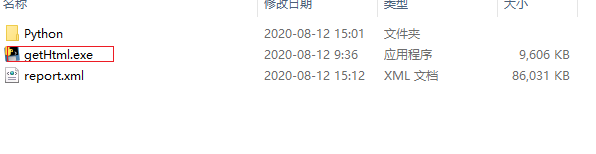
这样直接可以在跨机器使用,满足其他小伙伴的需求
版权声明:本文为zhichuan0307原创文章,遵循CC 4.0 BY-SA版权协议,转载请附上原文出处链接和本声明。