Mac下iterm2远程linux无法使用rz并提示waiting to receive.**B0100000023be50,如图
解决
mac上的终端不支持rz和sz,需要在iterm2配置一下
1.首选在mac下安装lrzsz
brew install lrzsz
2.本地新建两个脚本,国外大神写的开源脚本
(1)新建sz脚本 vim /usr/local/bin/iterm2-recv-zmodem.sh
复制一下j代码编辑保存
#!/bin/bash
# Author: Matt Mastracci (matthew@mastracci.com)
# AppleScript from http://stackoverflow.com/questions/4309087/cancel-button-on-osascript-in-a-bash-script
# licensed under cc-wiki with attribution required
# Remainder of script public domain

osascript -e 'tell application "iTerm2" to version' > /dev/null 2>&1 && NAME=iTerm2 || NAME=iTerm
if [[ $NAME = "iTerm" ]]; then
    FILE=`osascript -e 'tell application "iTerm" to activate' -e 'tell application "iTerm" to set thefile to choose folder with prompt "Choose a folder to place received files in"' -e "do shell script ("echo "&(quoted form of POSIX path of thefile as Unicode text)&"")"`
else
    FILE=`osascript -e 'tell application "iTerm2" to activate' -e 'tell application "iTerm2" to set thefile to choose folder with prompt "Choose a folder to place received files in"' -e "do shell script ("echo "&(quoted form of POSIX path of thefile as Unicode text)&"")"`
fi

if [[ $FILE = "" ]]; then
    echo Cancelled.
    # Send ZModem cancel
    echo -e \x18\x18\x18\x18\x18
    sleep 1
    echo
    echo # Cancelled transfer
else
    cd "$FILE"
    # /usr/local/bin/rz 这个需要根据自己安装的文件位置编写
    /usr/local/bin/rz -E -e -b
    sleep 1
    echo
    echo
    echo # Sent -> $FILE
fi
(1)新建rz脚本 vim /usr/local/bin/iterm2-send-zmodem.sh
复制一下j代码编辑保存
#!/bin/bash
# Author: Matt Mastracci (matthew@mastracci.com)
# AppleScript from http://stackoverflow.com/questions/4309087/cancel-button-on-osascript-in-a-bash-script
# licensed under cc-wiki with attribution required
# Remainder of script public domain

osascript -e 'tell application "iTerm2" to version' > /dev/null 2>&1 && NAME=iTerm2 || NAME=iTerm
if [[ $NAME = "iTerm" ]]; then
	FILE=`osascript -e 'tell application "iTerm" to activate' -e 'tell application "iTerm" to set thefile to choose file with prompt "Choose a file to send"' -e "do shell script (\"echo \"&(quoted form of POSIX path of thefile as Unicode text)&\"\")"`
else
	FILE=`osascript -e 'tell application "iTerm2" to activate' -e 'tell application "iTerm2" to set thefile to choose file with prompt "Choose a file to send"' -e "do shell script (\"echo \"&(quoted form of POSIX path of thefile as Unicode text)&\"\")"`
fi
if [[ $FILE = "" ]]; then
	echo Cancelled.
	# Send ZModem cancel
	echo -e \\x18\\x18\\x18\\x18\\x18
	sleep 1
	echo
	echo \# Cancelled transfer
else
        # /usr/local/bin/sz 这个需要根据自己安装的文件位置编写
	/usr/local/bin/sz "$FILE" --escape --binary --bufsize 4096
	sleep 1
	echo
	echo \# Received $FILE
fi
然后给这两个文件赋予权限
chmod 777 /usr/local/bin/iterm2-*
3.接下来配置iterm2,选择你的Profiles的进行配置
点击 iTerm2 的设置界面 Perference-> Profiles -> Default -> Advanced -> Triggers 的 Edit 按钮

如下配置,就完成了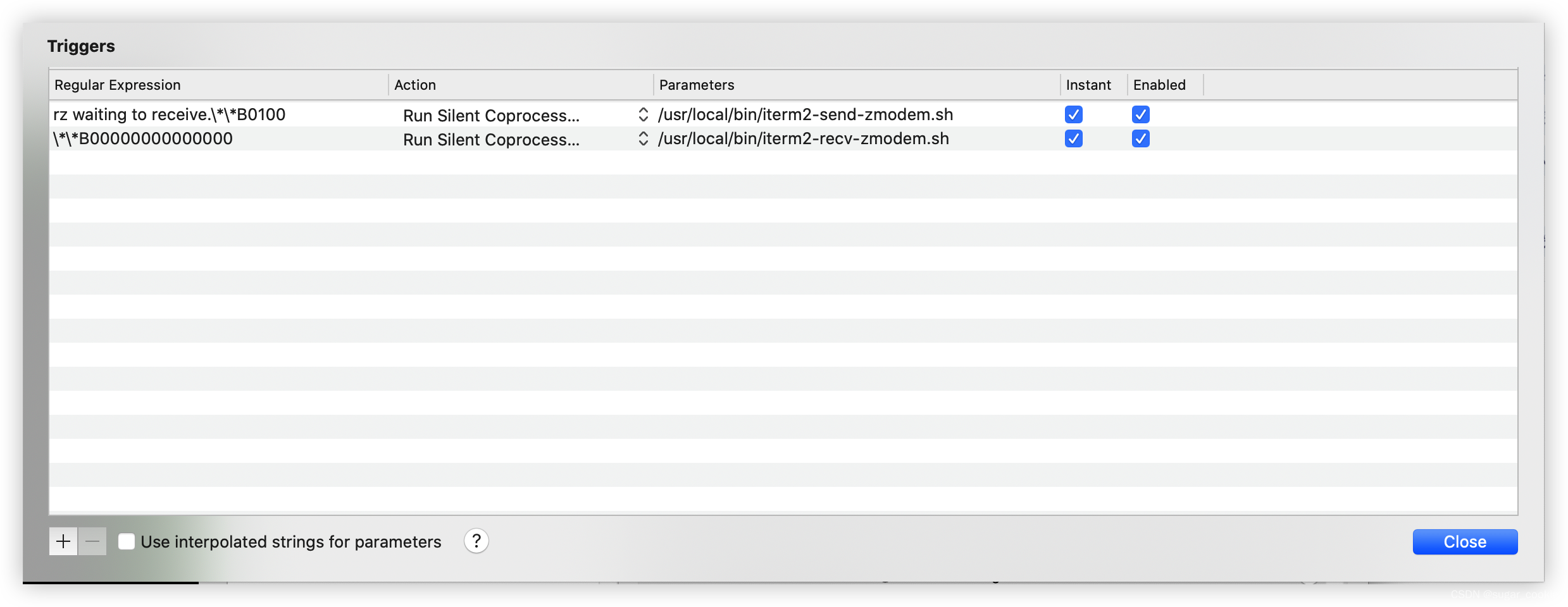
Regular expression: rz waiting to receive.\*\*B0100
Action: Run Silent Coprocess
Parameters: /usr/local/bin/iterm2-send-zmodem.sh

Regular expression: rz waiting to receive.\*\*B0100
Action: Run Silent Coprocess
Parameters: /usr/local/bin/iterm2-recv-zmodem.sh
注意
- 上面是iterm2-send-zmodem.sh 下面是iterm2-recv-zmodem.sh 一定不能放反位置了 要不然上传下载命令执行也会反着的
- 服务器上也要安装 lrzsz
# centos yum install lrzsz #ubuntu apt-get install lrzsz - iterm使用rz命令Received显示成功,但是ls找不到文件,可能登录的时候使用了expect脚本,手动登录试一下,
ssh -p 22 root@118.190.0.249
版权声明:本文为sugar_cookie原创文章,遵循CC 4.0 BY-SA版权协议,转载请附上原文出处链接和本声明。