我们先从官网下载seata-server,这里下载的是seata-server-1.0.0.zip,下载地址:https://github.com/seata/seata/releases
这里我们使用Nacos作为注册中心,Nacos的安装及使用可以参考:Spring Cloud入门-Nacos实现注册和配置中心(Hoxton版本)
解压seata-server安装包到指定目录,修改conf目录下的file.conf配置文件,主要修改自定义事务组名称,事务日志存储模式为db及数据库连接信息;
service {
#transaction service group mapping
#修改事务组名称为:my_test_tx_group,和客户端自定义的名称对应
vgroup_mapping.my_test_tx_group = “default”
#only support when registry.type=file, please don’t set multiple addresses
default.grouplist = “127.0.0.1:8091”
#disable seata
disableGlobalTransaction = false
}
transaction log store, only used in seata-server
store {
store mode: file、db
#修改此处将事务信息存储到数据库中
mode = “db”
file store property
file {
store location dir
dir = “sessionStore”
}
database store property
db {
the implement of javax.sql.DataSource, such as DruidDataSource(druid)/BasicDataSource(dbcp) etc.
datasource = “dbcp”
mysql/oracle/h2/oceanbase etc.
db-type = “mysql”
driver-class-name = “com.mysql.cj.jdbc.Driver”
#修改数据库连接地址
url = “jdbc:mysql://127.0.0.1:3306/seata-server?useUnicode=true&characterEncoding=utf-8&autoReconnect=true&allowMultiQueries=true&useSSL=false&tinyInt1isBit=false&serverTimezone=GMT%2B8”
#修改数据库用户名
user = “root”
#修改数据库密码
password = “root”
}
}
由于我的MySQL是8.0以上的版本,所以驱动需要跟换为8.0以上的,同时修改file.conf的driver-class-name配置
driver-class-name = “com.mysql.cj.jdbc.Driver”
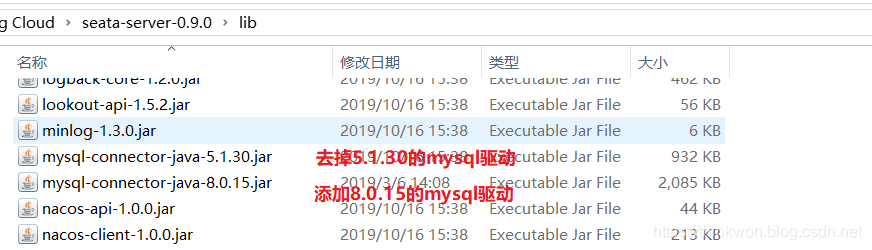
由于我们使用了db模式存储事务日志,所以我们需要创建一个seata-server数据库,建表sql在seata-server的/conf/db_store.sql中;
修改conf目录下的registry.conf配置文件,指明注册中心为nacos,及修改nacos连接信息即可;
registry {
file 、nacos 、eureka、redis、zk、consul、etcd3、sofa
type = “nacos” #改为nacos
nacos {
serverAddr = “localhost:8848” #改为nacos的连接地址
namespace = “”
cluster = “default”
}
}
先启动Nacos,再使用seata-server中/bin/seata-server.bat文件启动seata-server。
创建业务数据库
seata-order:存储订单的数据库;
seata-storage:存储库存的数据库;
seata-account:存储账户信息的数据库。
初始化业务表
order表
CREATE TABLE order (
id bigint(11) NOT NULL AUTO_INCREMENT,
user_id bigint(11) DEFAULT NULL COMMENT ‘用户id’,
product_id bigint(11) DEFAULT NULL COMMENT ‘产品id’,
count int(11) DEFAULT NULL COMMENT ‘数量’,
money decimal(11,0) DEFAULT NULL COMMENT ‘金额’,
PRIMARY KEY (id)
) ENGINE=InnoDB AUTO_INCREMENT=7 DEFAULT CHARSET=utf8;
ALTER TABLE seata-order.order ADD COLUMN status int(1) DEFAULT NULL COMMENT ‘订单状态:0:创建中;1:已完结’ AFTER money ;
storage表
CREATE TABLE storage (
id bigint(11) NOT NULL AUTO_INCREMENT,
product_id bigint(11) DEFAULT NULL COMMENT ‘产品id’,
total int(11) DEFAULT NULL COMMENT ‘总库存’,
used int(11) DEFAULT NULL COMMENT ‘已用库存’,
residue int(11) DEFAULT NULL COMMENT ‘剩余库存’,
PRIMARY KEY (id)
) ENGINE=InnoDB AUTO_INCREMENT=2 DEFAULT CHARSET=utf8;
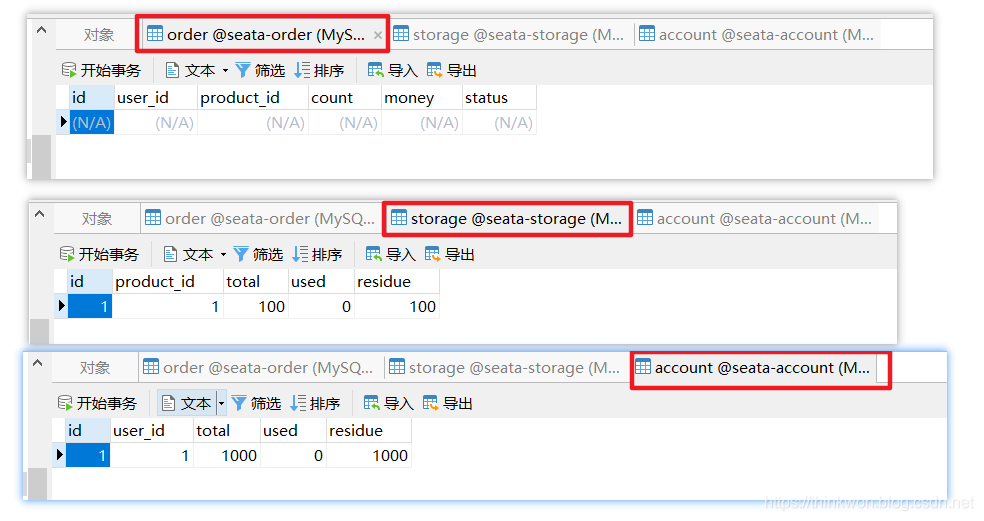
INSERT INTO seata-storage.storage (id, product_id, total, used, residue) VALUES (‘1’, ‘1’, ‘100’, ‘0’, ‘100’);
account表
CREATE TABLE account (
id bigint(11) NOT NULL AUTO_INCREMENT COMMENT ‘id’,
user_id bigint(11) DEFAULT NULL COMMENT ‘用户id’,
total decimal(10,0) DEFAULT NULL COMMENT ‘总额度’,
used decimal(10,0) DEFAULT NULL COMMENT ‘已用余额’,
residue decimal(10,0) DEFAULT ‘0’ COMMENT ‘剩余可用额度’,
PRIMARY KEY (id)
) ENGINE=InnoDB AUTO_INCREMENT=2 DEFAULT CHARSET=utf8;
INSERT INTO seata-account.account (id, user_id, total, used, residue) VALUES (‘1’, ‘1’, ‘1000’, ‘0’, ‘1000’);
创建日志回滚表
使用Seata还需要在每个数据库中创建日志表,建表sql在seata-server的/conf/db_undo_log.sql中。
完整数据库示意图
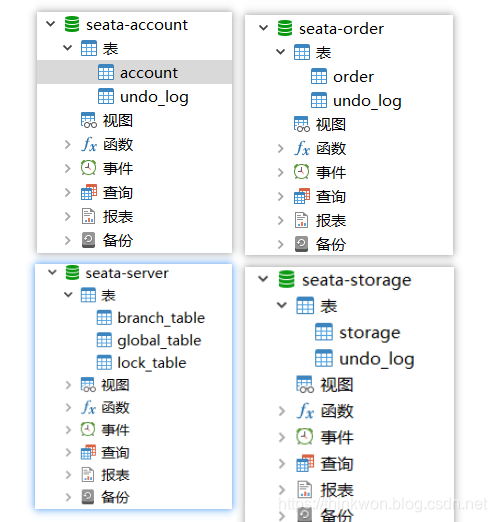
这里我们会创建三个服务,一个订单服务,一个库存服务,一个账户服务。当用户下单时,会在订单服务中创建一个订单,然后通过远程调用库存服务来扣减下单商品的库存,再通过远程调用账户服务来扣减用户账户里面的余额,最后在订单服务中修改订单状态为已完成。该操作跨越三个数据库,有两次远程调用,很明显会有分布式事务问题。
对seata-order-service、seata-storage-service和seata-account-service三个seata的客户端进行配置,它们配置大致相同,我们下面以seata-order-service的配置为例;
修改application.yml文件,自定义事务组的名称;
spring:
application:
name: seata-order-service
cloud:
alibaba:
seata:
#自定义事务组名称需要与seata-server中的对应
tx-service-group: my_test_tx_group
添加并修改file.conf配置文件,主要是修改自定义事务组名称;
transport {
tcp udt unix-domain-socket
type = “TCP”
#NIO NATIVE
server = “NIO”
#enable heartbeat
heartbeat = true
#thread factory for netty
thread-factory {
boss-thread-prefix = “NettyBoss”
worker-thread-prefix = “NettyServerNIOWorker”
server-executor-thread-prefix = “NettyServerBizHandler”
share-boss-worker = false
client-selector-thread-prefix = “NettyClientSelector”
client-selector-thread-size = 1
client-worker-thread-prefix = “NettyClientWorkerThread”
netty boss thread size,will not be used for UDT
boss-thread-size = 1
#auto default pin or 8
worker-thread-size = 8
}
shutdown {
when destroy server, wait seconds
wait = 3
}
serialization = “seata”
compressor = “none”
}
service {
#vgroup->rgroup
vgroup_mapping.my_test_tx_group = “default”
#only support single node
default.grouplist = “127.0.0.1:8091”
#degrade current not support
enableDegrade = false
#disable
disable = false
#unit ms,s,m,h,d represents milliseconds, seconds, minutes, hours, days, default permanent
max.commit.retry.timeout = “-1”
max.rollback.retry.timeout = “-1”
disableGlobalTransaction = false
}
client {
async.commit.buffer.limit = 10000
lock {
retry.internal = 10
retry.times = 30
}
report.retry.count = 5
tm.commit.retry.count = 1
tm.rollback.retry.count = 1
}
transaction {
undo.data.validation = true
undo.log.serialization = “jackson”
undo.log.save.days = 7
#schedule delete expired undo_log in milliseconds
undo.log.delete.period = 86400000
undo.log.table = “undo_log”
}
support {
spring
spring {
auto proxy the DataSource bean
datasource.autoproxy = false
}
}
添加并修改registry.conf配置文件,主要是将注册中心改为nacos;
registry {
file 、nacos 、eureka、redis、zk
type = “nacos”
nacos {
serverAddr = “localhost:8848”
namespace = “”
cluster = “default”
}
eureka {
serviceUrl = “http://localhost:8761/eureka”
application = “default”
weight = “1”
}
redis {
serverAddr = “localhost:6381”
db = “0”
}
zk {
cluster = “default”
serverAddr = “127.0.0.1:2181”
session.timeout = 6000
connect.timeout = 2000
}
file {
name = “file.conf”
}
}
config {
file、nacos 、apollo、zk
type = “file”
nacos {
serverAddr = “localhost”
namespace = “”
cluster = “default”
}
apollo {
app.id = “fescar-server”
apollo.meta = “http://192.168.1.204:8801”
}
zk {
serverAddr = “127.0.0.1:2181”
session.timeout = 6000
connect.timeout = 2000
}
file {
name = “file.conf”
}
}
在启动类中取消数据源的自动创建:
@EnableFeignClients
@EnableDiscoveryClient
@MapperScan(basePackages = {“com.jourwon.springcloud.mapper”})
@SpringBootApplication(exclude = DataSourceAutoConfiguration.class)
public class SeataOrderServiceApplication {
public static void main(String[] args) {
SpringApplication.run(SeataOrderServiceApplication.class, args);
}
}
创建配置使用Seata对数据源进行代理:
@Configuration
public class DataSourceProxyConfig {
@Value("${mybatis.mapper-locations}")
private String mapperLocations;
@Bean
@ConfigurationProperties(prefix = “spring.datasource”)
public DataSource druidDataSource(){
return new DruidDataSource();
}
@Bean
public DataSourceProxy dataSourceProxy(DataSource dataSource) {
return new DataSourceProxy(dataSource);
}
@Bean
public SqlSessionFactory sqlSessionFactoryBean(DataSourceProxy dataSourceProxy) throws Exception {
SqlSessionFactoryBean sqlSessionFactoryBean = new SqlSessionFactoryBean();
sqlSessionFactoryBean.setDataSource(dataSourceProxy);
sqlSessionFactoryBean.setMapperLocations(new PathMatchingResourcePatternResolver()
.getResources(mapperLocations));
sqlSessionFactoryBean.setTransactionFactory(new SpringManagedTransactionFactory());
return sqlSessionFactoryBean.getObject();
}
}
使用@GlobalTransactional注解开启分布式事务:
@Service
public class OrderServiceImpl implements OrderService {
private static final Logger LOGGER = LoggerFactory.getLogger(OrderServiceImpl.class);
@Autowired
private OrderMapper orderMapper;
@Autowired
private StorageService storageService;
@Autowired
private AccountService accountService;
/**
- 创建订单->调用库存服务扣减库存->调用账户服务扣减账户余额->修改订单状态
*/
@Override
@GlobalTransactional(name = “my-test-create-order”,rollbackFor = Exception.class)
public void create(Order order) {
LOGGER.info("------->下单开始");
//本应用创建订单
orderMapper.create(order);
//远程调用库存服务扣减库存
LOGGER.info("-
《一线大厂Java面试题解析+后端开发学习笔记+最新架构讲解视频+实战项目源码讲义》
【docs.qq.com/doc/DSmxTbFJ1cmN1R2dB】 完整内容开源分享
------>order-service中扣减库存开始");
storageService.decrease(order.getProductId(),order.getCount());
LOGGER.info("------->order-service中扣减库存结束");
//远程调用账户服务扣减余额
LOGGER.info("------->order-service中扣减余额开始");
accountService.decrease(order.getUserId(),order.getMoney());
LOGGER.info("------->order-service中扣减余额结束");
//修改订单状态为已完成
LOGGER.info("------->order-service中修改订单状态开始");
orderMapper.update(order.getUserId(),0);
LOGGER.info("------->order-service中修改订单状态结束");
LOGGER.info("------->下单结束");
}
}
运行seata-order-service、seata-storage-service和seata-account-service三个服务;
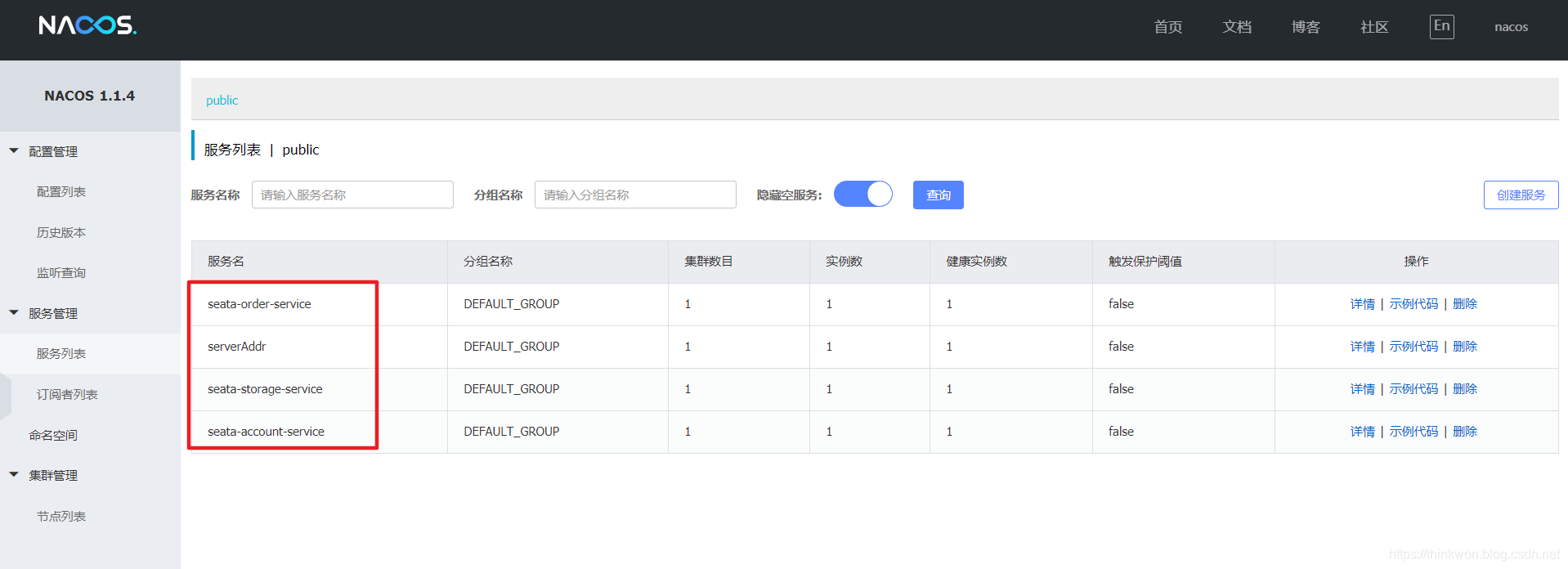
seata-server和上面三个服务启动成功后,nacos的服务列表如下:
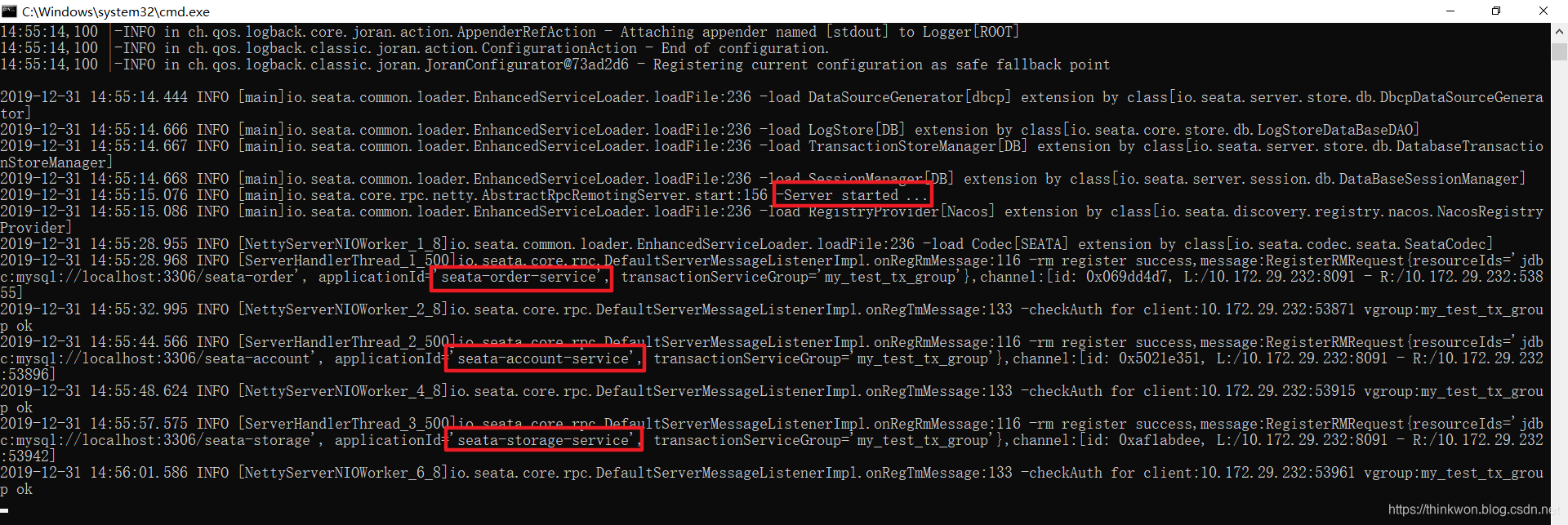
seata-server控制台的界面如下:
数据库初始信息状态:
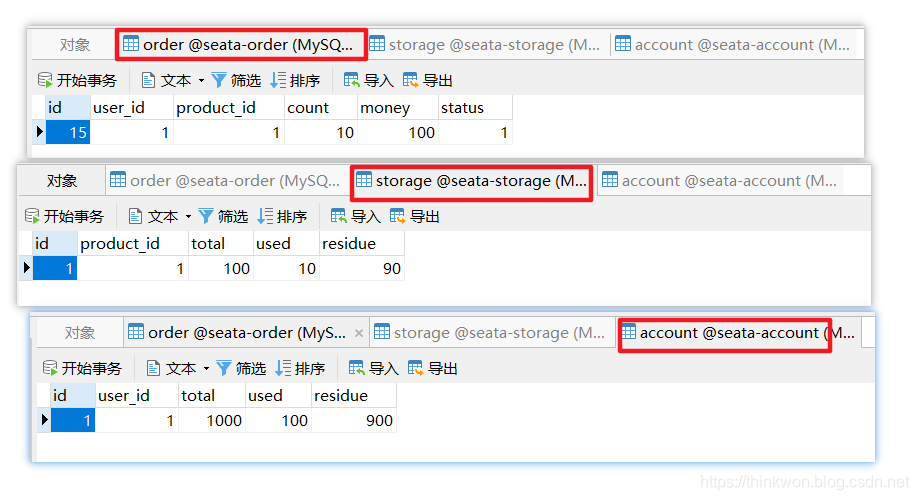
调用接口进行下单操作后查看数据库:http://localhost:8180/order/create?userId=1&productId=1&count=10&money=100
返回信息
{“data”:null,“message”:“订单创建成功!”,“code”:200}
seata-order-service服务日志如下
2019-12-31 16:43:03.065 INFO 4848 — [nio-8180-exec-1] c.j.s.service.impl.OrderServiceImpl : ------->下单开始
2019-12-31 16:43:03.081 WARN 4848 — [nfigOperate_2_2] io.seata.config.FileConfiguration : Could not found property client.rm.report.retry.count, try to use default value instead.
2019-12-31 16:43:03.082 WARN 4848 — [nfigOperate_2_2] io.seata.config.FileConfiguration : Could not found property client.report.success.enable, try to use default value instead.
2019-12-31 16:43:03.082 WARN 4848 — [nfigOperate_2_2] io.seata.config.FileConfiguration : Could not found property client.rm.lock.retry.policy.branch-rollback-on-conflict, try to use default value instead.
2019-12-31 16:43:03.171 INFO 4848 — [nio-8180-exec-1] c.j.s.service.impl.OrderServiceImpl : ------->order-service中扣减库存开始
2019-12-31 16:43:03.611 INFO 4848 — [orage-service-1] c.netflix.config.ChainedDynamicProperty : Flipping property: seata-storage-service.ribbon.ActiveConnectionsLimit to use NEXT property: niws.loadbalancer.availabilityFilteringRule.activeConnectionsLimit = 2147483647
2019-12-31 16:43:03.639 INFO 4848 — [orage-service-1] c.netflix.loadbalancer.BaseLoadBalancer : Client: seata-storage-service instantiated a LoadBalancer: DynamicServerListLoadBalancer:{NFLoadBalancer:name=seata-storage-service,current list of Servers=[],Load balancer stats=Zone stats: {},Server stats: []}ServerList:null
2019-12-31 16:43:03.644 INFO 4848 — [orage-service-1] c.n.l.DynamicServerListLoadBalancer : Using serverListUpdater PollingServerListUpdater
2019-12-31 16:43:03.669 INFO 4848 — [orage-service-1] c.netflix.config.ChainedDynamicProperty : Flipping property: seata-storage-service.ribbon.ActiveConnectionsLimit to use NEXT property: niws.loadbalancer.availabilityFilteringRule.activeConnectionsLimit = 2147483647
2019-12-31 16:43:03.670 INFO 4848 — [orage-service-1] c.n.l.DynamicServerListLoadBalancer : DynamicServerListLoadBalancer for client seata-storage-service initialized: DynamicServerListLoadBalancer:{NFLoadBalancer:name=seata-storage-service,current list of Servers=[10.172.29.232:8181],Load balancer stats=Zone stats: {unknown=[Zone:unknown; Instance count:1; Active connections count: 0; Circuit breaker tripped count: 0; Active connections per server: 0.0;]
},Server stats: [[Server:10.172.29.232:8181; Zone:UNKNOWN; Total Requests:0; Successive connection failure:0; Total blackout seconds:0; Last connection made:Thu Jan 01 08:00:00 CST 1970; First connection made: Thu Jan 01 08:00:00 CST 1970; Active Connections:0; total failure count in last (1000) msecs:0; average resp time:0.0; 90 percentile resp time:0.0; 95 percentile resp time:0.0; min resp time:0.0; max resp time:0.0; stddev resp time:0.0]
]}ServerList:com.alibaba.cloud.nacos.ribbon.NacosServerList@438c717d
2019-12-31 16:43:03.919 INFO 4848 — [nio-8180-exec-1] c.j.s.service.impl.OrderServiceImpl : ------->order-service中扣减库存结束
2019-12-31 16:43:03.920 INFO 4848 — [nio-8180-exec-1] c.j.s.service.impl.OrderServiceImpl : ------->order-service中扣减余额开始
2019-12-31 16:43:03.958 INFO 4848 — [count-service-1] c.netflix.config.ChainedDynamicProperty : Flipping property: seata-account-service.ribbon.ActiveConnectionsLimit to use NEXT property: niws.loadbalancer.availabilityFilteringRule.activeConnectionsLimit = 2147483647
2019-12-31 16:43:03.959 INFO 4848 — [count-service-1] c.netflix.loadbalancer.BaseLoadBalancer : Client: seata-account-service instantiated a LoadBalancer: DynamicServerListLoadBalancer:{NFLoadBalancer:name=seata-account-service,current list of Servers=[],Load balancer stats=Zone stats: {},Server stats: []}ServerList:null
2019-12-31 16:43:03.960 INFO 4848 — [count-service-1] c.n.l.DynamicServerListLoadBalancer : Using serverListUpdater PollingServerListUpdater
2019-12-31 16:43:03.970 INFO 4848 — [count-service-1] c.netflix.config.ChainedDynamicProperty : Flipping property: seata-account-service.ribbon.ActiveConnectionsLimit to use NEXT property: niws.loadbalancer.availabilityFilteringRule.activeConnectionsLimit = 2147483647
2019-12-31 16:43:03.970 INFO 4848 — [count-service-1] c.n.l.DynamicServerListLoadBalancer : DynamicServerListLoadBalancer for client seata-account-service initialized: DynamicServerListLoadBalancer:{NFLoadBalancer:name=seata-account-service,current list of Servers=[10.172.29.232:8182],Load balancer stats=Zone stats: {unknown=[Zone:unknown; Instance count:1; Active connections count: 0; Circuit breaker tripped count: 0; Active connections per server: 0.0;]
},Server stats: [[Server:10.172.29.232:8182; Zone:UNKNOWN; Total Requests:0; Successive connection failure:0; Total blackout seconds:0; Last connection made:Thu Jan 01 08:00:00 CST 1970; First connection made: Thu Jan 01 08:00:00 CST 1970; Active Connections:0; total failure count in last (1000) msecs:0; average resp time:0.0; 90 percentile resp time:0.0; 95 percentile resp time:0.0; min resp time:0.0; max resp time:0.0; stddev resp time:0.0]
]}ServerList:com.alibaba.cloud.nacos.ribbon.NacosServerList@2be5bb61
2019-12-31 16:43:03.988 INFO 4848 — [nio-8180-exec-1] c.j.s.service.impl.OrderServiceImpl : ------->order-service中扣减余额结束
2019-12-31 16:43:03.988 INFO 4848 — [nio-8180-exec-1] c.j.s.service.impl.OrderServiceImpl : ------->order-service中修改订单状态开始
2019-12-31 16:43:03.992 INFO 4848 — [nio-8180-exec-1] c.j.s.service.impl.OrderServiceImpl : ------->order-service中修改订单状态结束
2019-12-31 16:43:03.992 INFO 4848 — [nio-8180-exec-1] c.j.s.service.impl.OrderServiceImpl : ------->下单结束
我们在seata-account-service中制造一个超时异常后,调用下单接口:
@Service
public class AccountServiceImpl implements AccountService {
private static final Logger LOGGER = LoggerFactory.getLogger(AccountServiceImpl.class);
@Autowired
private AccountMapper accountMapper;
/**
- 扣减账户余额
*/
@Override