最近刚开始学做qt界面,网上很多例子。自己摸索后,才会有更深刻的总结。
方法1:对QPushButton的美化,很多人都用setFlat(),将QPushButton扁平后,再美化。
但是它有一个缺点,就是无法再通过SetStyleSheet()对它上色。除非用QPalette:Button系统的颜色。这个就不太方便了。
方法2:或者网上说的QLinkButton,但是它无法将字体充满在button内部。
但是实际上不需要上述方法,照样使用qt原风格的Button,

只需要在qss中修改它的风格就好了,而且不影响背景着色。
QPushButton#fileBtn,#helpBtn,#settingBtn{
    border: 1px solid #C0C0C0;
    background-color:#C0C0C0;
    border-style: solid;
    border-radius:0px;
    width: 40px;  //和你的控件大小一致
    height:20px;  //和你的控件大小一致
    padding:0 0px;
    margin:0 0px;
}
QPushButton#expBtn{
    border: 1px solid #C0C0C0;
    background-color:#FFFFFF;
    border-style: solid;
    border-radius:0px;
    width: 100px;
    height:20px;
    padding:0 0px;
}
QPushButton#fileBtn:hover,#helpBtn:hover,#settingBtn:hover,#expBtn:hover{
    border: 1px solid #E3C46F;
    background-color:#FEF4BF;
    border-style: solid;
    border-radius:2px;
    width: 40px;
    height:20px;
    padding:0 0px;
}
QPushButton#fileBtn:pressed,#helpBtn:pressed,#settingBtn:pressed,#expBtn:pressed{
    background-color:#EAF0FF;
    border: 1px solid #AAB4C4;
    width: 40px;
    height:20px;
    padding:0 0px;
    border-radius:1px;
}
运行后效果如下图:
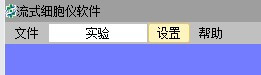
固定按钮的大小
QPushButton {
    min-height: 150px;
    min-width: 150px;
    max-width: 150px;
    max-height: 150px;
}