前言
活到老,学到老。
需要用到asp.net core写个小工具,n+n年前曾经用过asp写过一个小网站,但,asp.net core跟asp只是名字相似罢了。
前段时间学习了一下,在此写些文字分享一下,权当是笔记吧,希望能做到温故而知新。感觉知识点还是蛮多的,好在之前有学习过C#和WPF,对学习asp.net core还是非常有帮助的。最终目的是做一个前后端分离的小工具站点并用Docker部署,不知晓最后能不能完成目标,也无法估计需要多长时间,且学且做了。
网上一搜,相关的信息太多了,但说到要找到最适合自己的教程资料却也殊为不易,因为乱花迷人眼啊,这就需要看运气和个人的学习习惯了。分享下鄙人主要的学习资料来源:
https://dotnettutorials.net/lesson/introduction-to-asp-net-core/ 网站

个人觉得此网站上的asp.net core教程写得比较通俗易懂,非常适合快速入门。注意有些页面(章节)会有重复的内容。《Pro ASP.NET Core 3 – Eighth Edition》
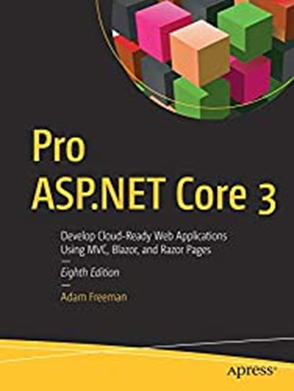
叙述详细,文字比较多,需要耐心和时间才能看下去。目前只看了前面三部分,第四部分(高级功能)有需要时再参考。基本上按书的例程做了一遍(除了单元测试的部分),感觉上:有些懂了、有些似懂非懂、有些还没有懂。
开发环境
这是一个后端WebAPI的建立过程笔记,环境如下:
VisualStudio 2019
{
.NET Core 3.1
Microsoft.EntityFrameworkCore(5.0.13)
Microsoft.EntityFrameworkCore.Tools(5.0.13)
Pomelo.EntityFrameworkCore.MySql(5.0.4)
}
MySQL管理器:HeidiSQL,Ver:11.3
MySQL:不折腾,直接采用小皮面板(PHPStudy),Ver:5.7.26;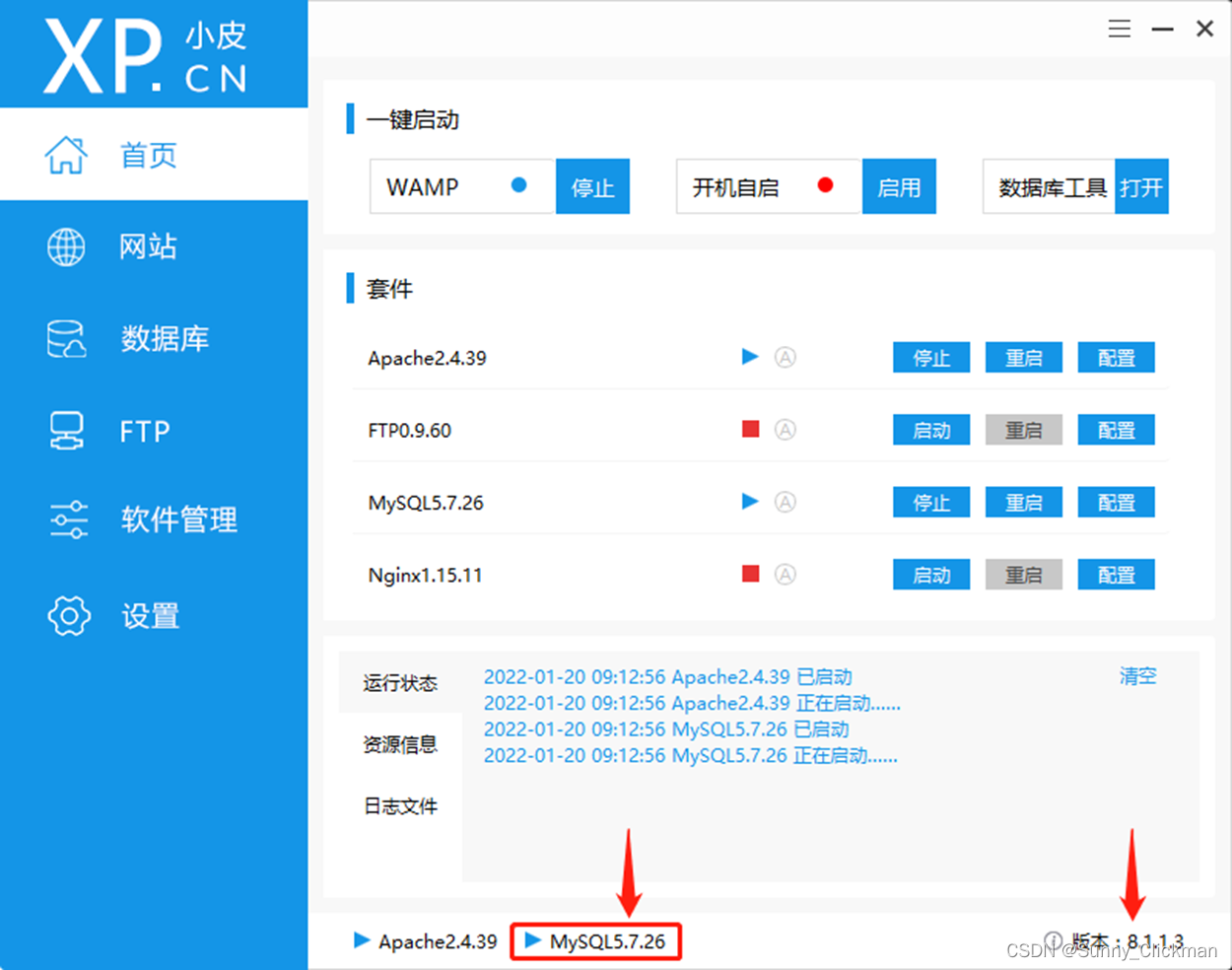
建立WebAPI项目
项目创建
从零开始,创建一个名为:MyFirstWebAPI的Project,比较简单,参考下列截图: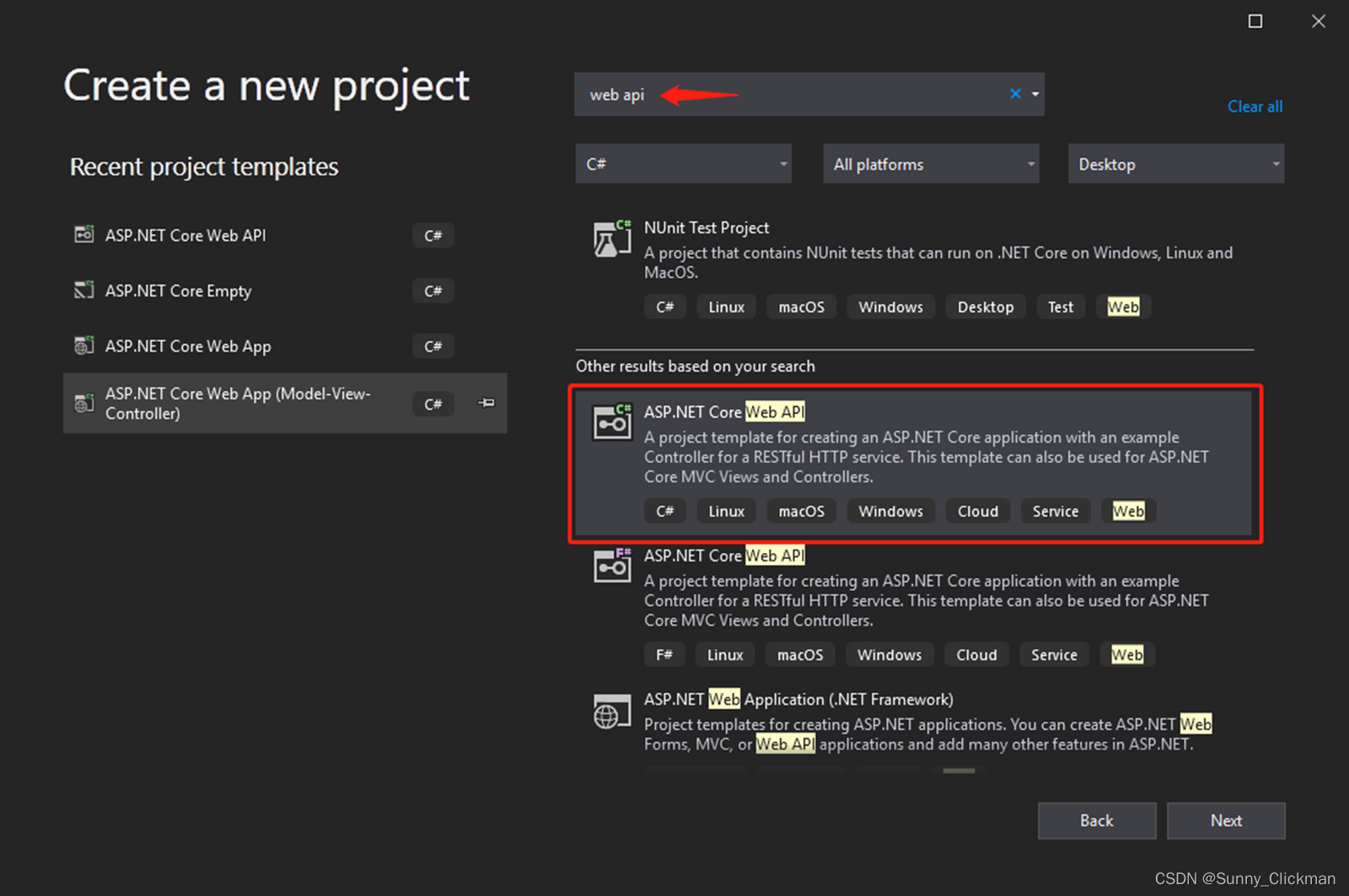
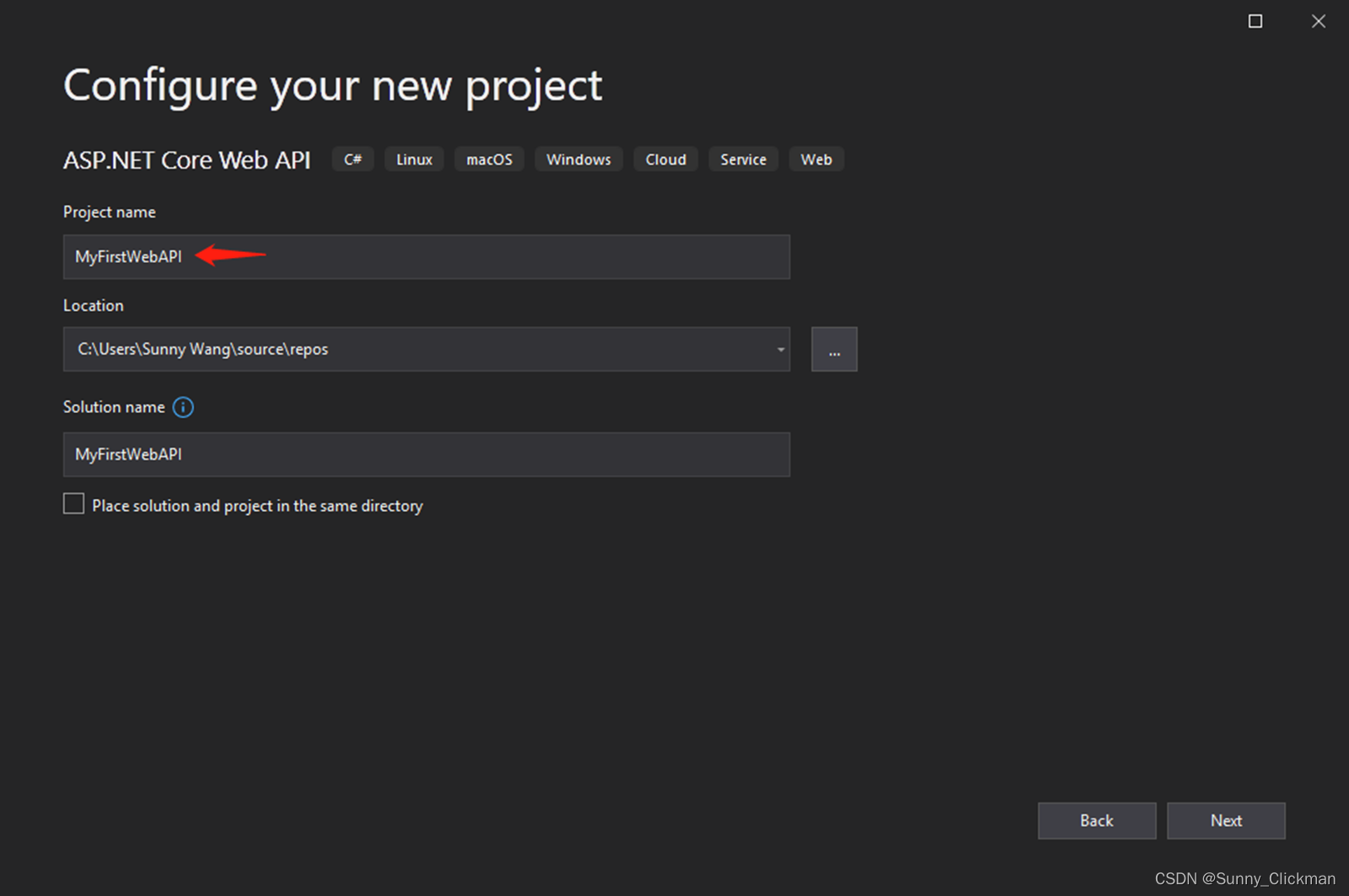
确保Target Framework为 .NET Core 3.1,Authentication Type为None,不启用HTTPS和Docker。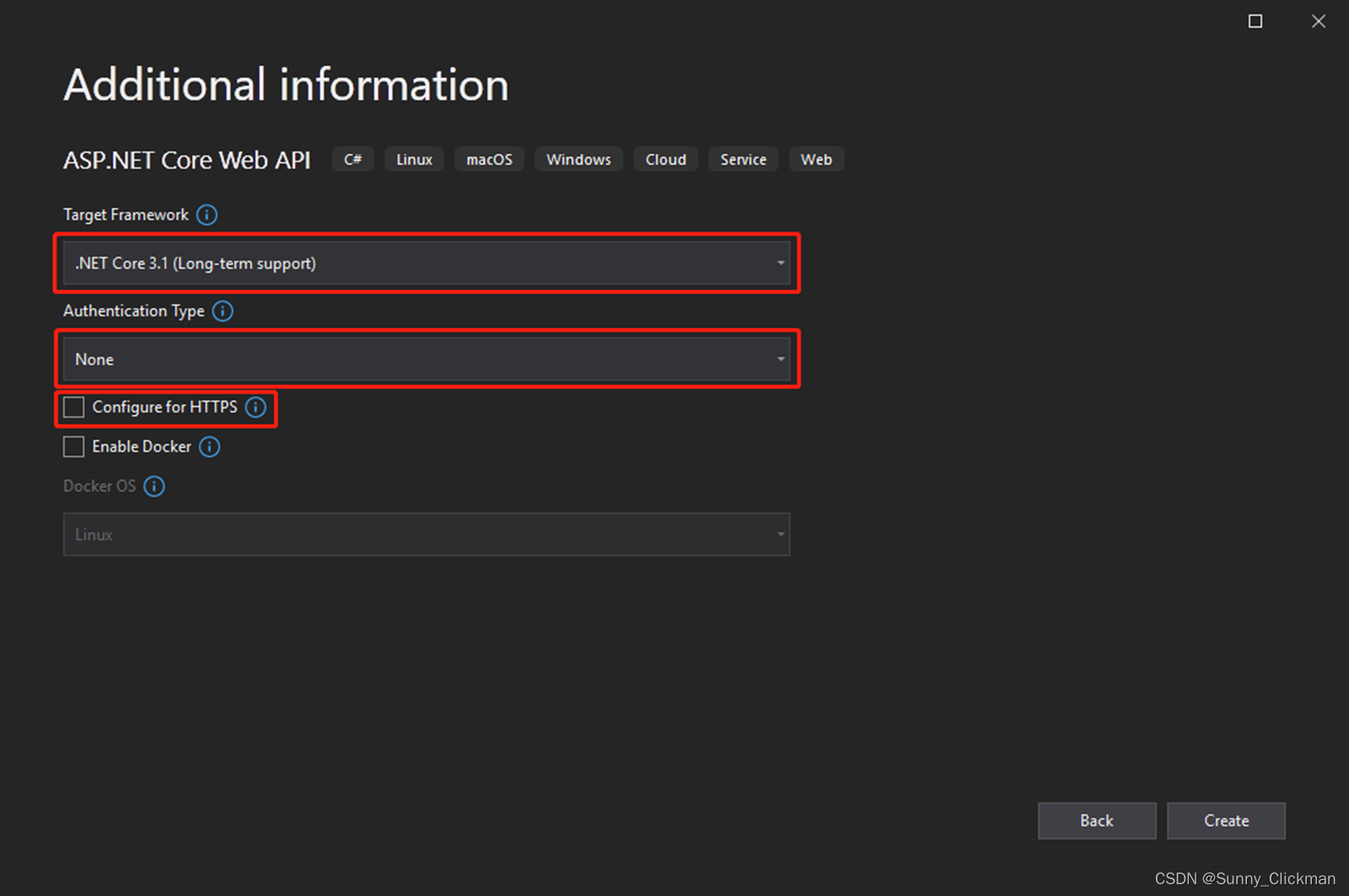
安装依赖包
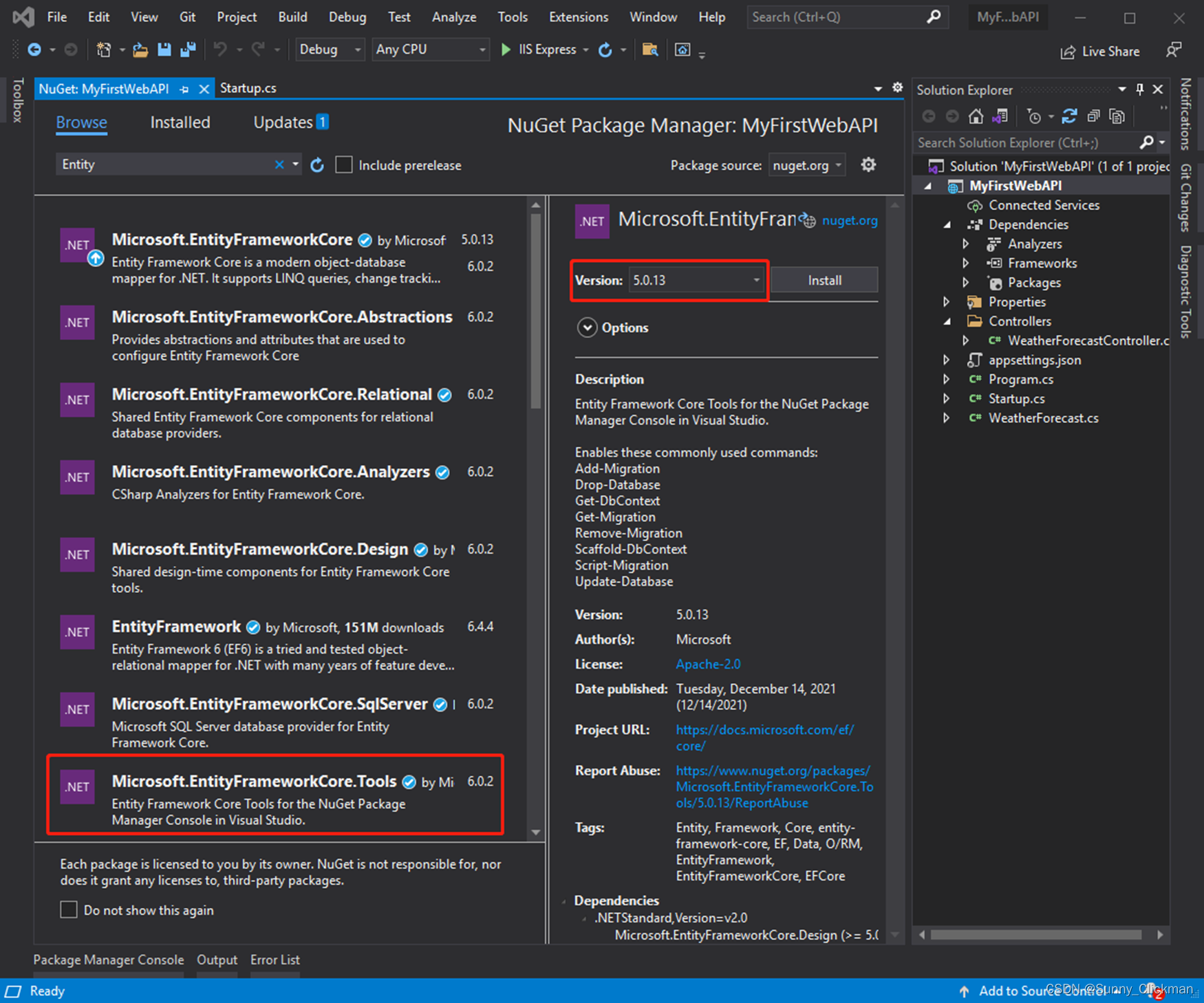
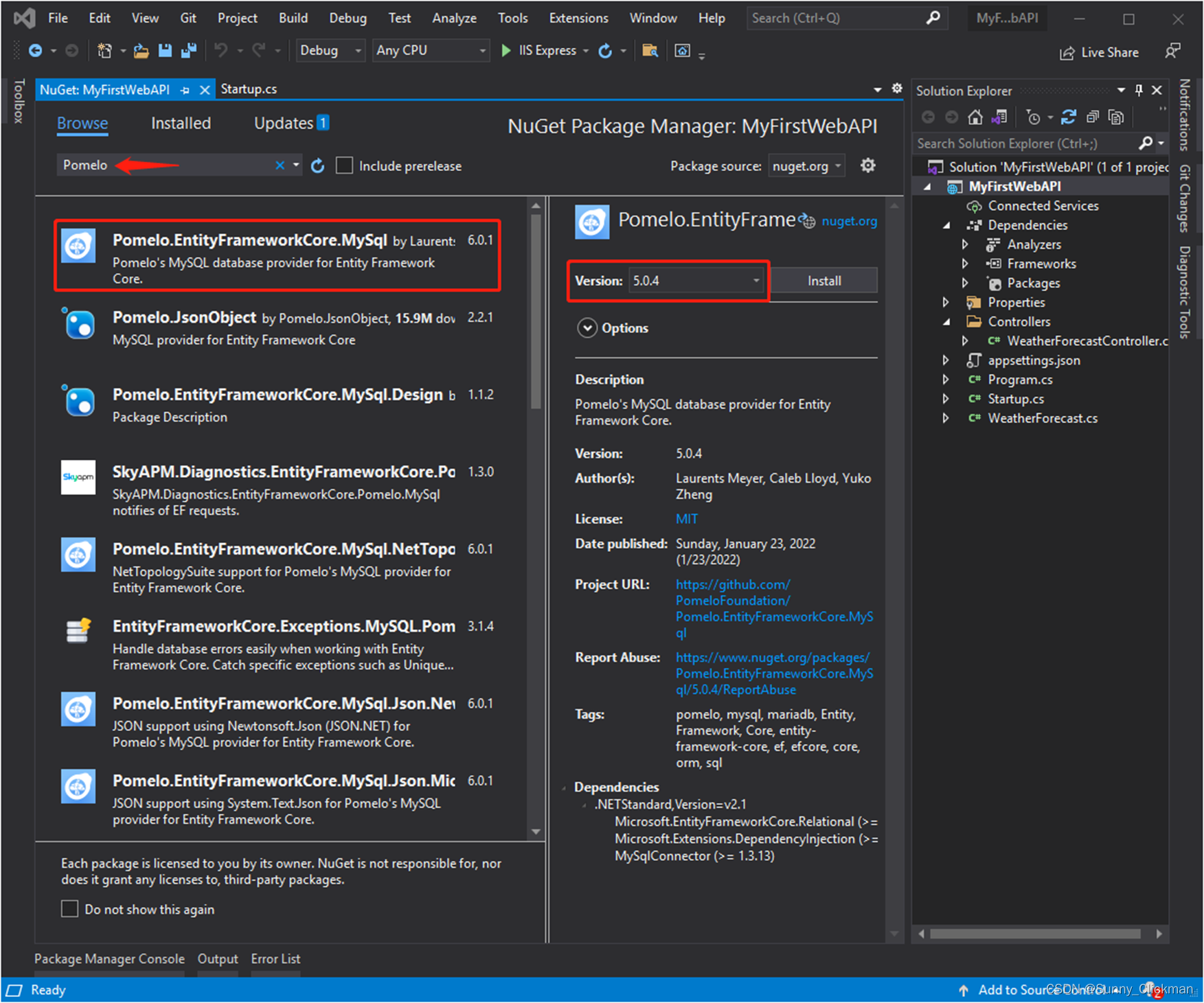
通过NuGet Package Manager安装以下依赖包(注意版本!):
Microsoft.EntityFrameworkCore(5.0.13)
Microsoft.EntityFrameworkCore.Tools(5.0.13)
Pomelo.EntityFrameworkCore.MySql(5.0.4)
同样比较简单,参考下列截图:
代码构建步骤
基本上,建立一个EntityFramework+Pomelo+MySQL的WebAPI,大概有11个步骤(位置)需要添加/修改相应代码,详细参考下图(图中的第一步已在上面【安装依赖包】小节完成):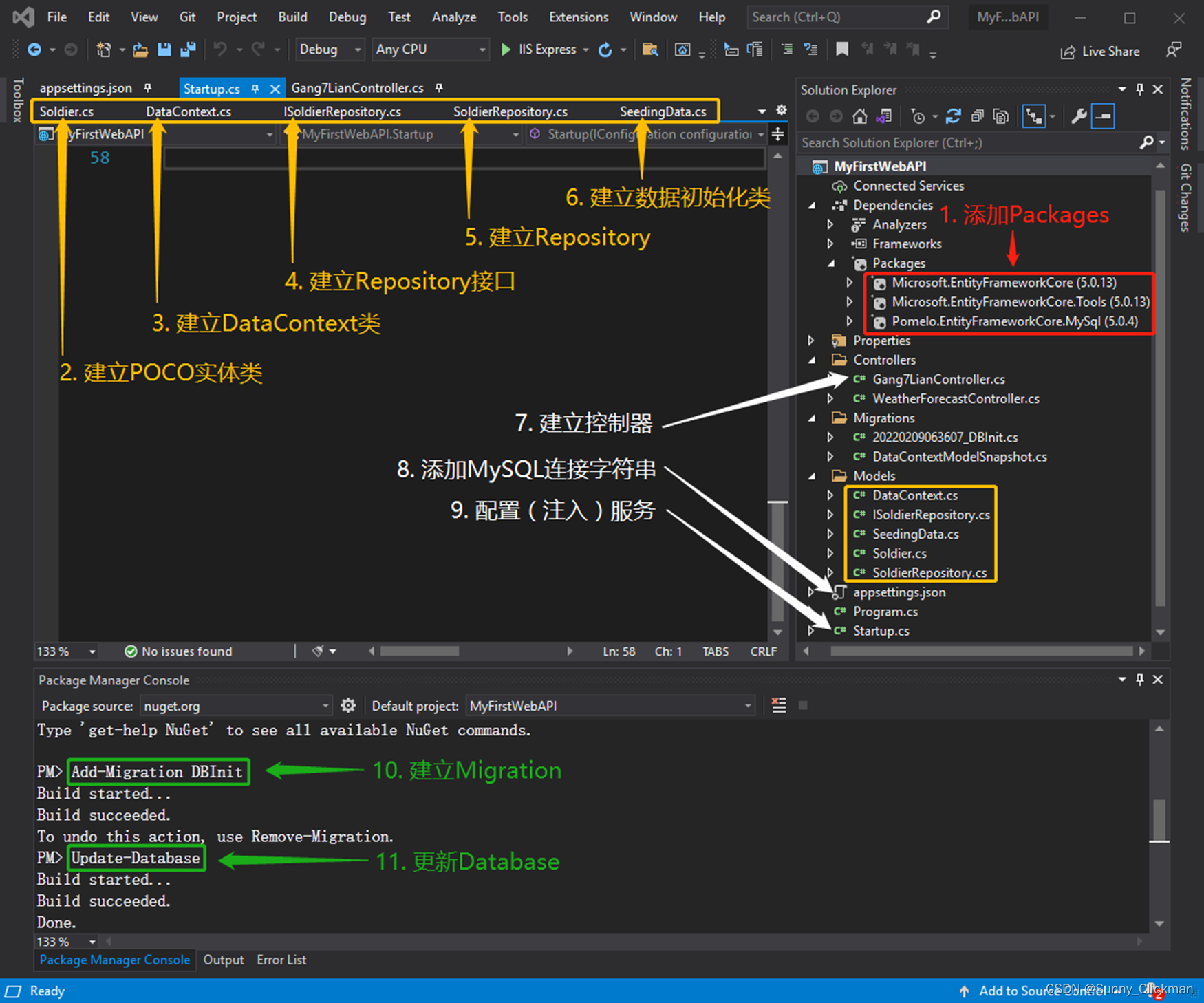
1. 添加依赖包(参考:【安装依赖包】小节)
2. 建立POCO实体类(Soldier.cs)
using System.ComponentModel.DataAnnotations;

namespace MyFirstWebAPI.Models
{
	/// <summary>
	/// 定义Soldier实体类
	/// </summary>
	public class Soldier
	{
		/// <summary>
		///  标识主键
		/// </summary>
		[Key]
		public int Id { get; set; }

		public string FirstName { get; set; }

		public string LastName { get; set; }

		public string Number { get; set; }
	}
}
3. 建立DataContext类(DataContext.cs)
using Microsoft.EntityFrameworkCore;

namespace MyFirstWebAPI.Models
{
	public class DataContext : DbContext
	{
		public DataContext(DbContextOptions<DataContext> opts)
		: base(opts) { }

		/// <summary>
		/// 取得Gang7Lian数据表
		/// </summary>
		public DbSet<Soldier> Gang7Lian { get; set; }
	}
}
4. 建立Repository接口(ISoldierRepository.cs 注意:是接口!)
using System.Collections.Generic;
using System.Threading.Tasks;

namespace MyFirstWebAPI.Models
{
	/// <summary>
	/// 定义ISoldierRepository接口
	/// </summary>
	public interface ISoldierRepository
	{
		// 定义GetAll方法
		Task<List<Soldier>> GetAll();
	}
}
5. 建立Repository类以实现ISoldierRepository接口(SoldierRepository.cs)
using Microsoft.EntityFrameworkCore;
using System.Collections.Generic;
using System.Threading.Tasks;

namespace MyFirstWebAPI.Models
{
	/// <summary>
	/// SoldierRepository数据仓库
	/// (实现ISoldierRepository接口)
	/// </summary>
	public class SoldierRepository : ISoldierRepository
	{
		private DataContext context;

		/// <summary>
		/// 注入DataContext服务
		/// </summary>
		/// <param name="ctx"></param>
		public SoldierRepository(DataContext ctx)
		{
			context = ctx;
		}

		/// <summary>
		/// GetAll方法实现
		/// </summary>
		/// <returns>List<Soldier></returns>
		public async Task<List<Soldier>> GetAll()
		{
			// throw new NotImplementedException();

			List<Soldier> soldiers = await context.Gang7Lian.ToListAsync<Soldier>();

			return soldiers;
		}
	}
}
6. 建立SeedingData类以填充测试数据(SeedingData.cs)
using Microsoft.AspNetCore.Builder;
using Microsoft.EntityFrameworkCore;
using Microsoft.Extensions.DependencyInjection;
using System.Linq;

namespace MyFirstWebAPI.Models
{
	/// <summary>
	/// 定义SeedingData类
	/// 向数据库自动填充初始数据
	/// </summary>
	public static class SeedingData
	{
		/// <summary>
		/// Gang7Lian数据表初始数据填充
		/// </summary>
		/// <param name="app">IApplicationBuilder对象</param>
		public static async void EnsureThe7thCompanyPopulated(IApplicationBuilder app)
		{
			// 取得DataContext服务
			DataContext dataContext = app.ApplicationServices
			.CreateScope().ServiceProvider.GetRequiredService<DataContext>();

			// 如果存在Pending的Migration操作则自动执行
			// 在开发期间,我们有时会Reset数据库
			// 这三行代码会自动Rebuild数据库和表,很是方便
			if (dataContext.Database.GetPendingMigrations().Any())
			{
				dataContext.Database.Migrate();
			}

			// 如果表格为空(没有数据),则自动填入初始数据
			if (!dataContext.Gang7Lian.Any())
			{
				dataContext.Gang7Lian.AddRange(
					new Soldier
					{
						FirstName = "生",
						LastName = "梅",
						Number = "135-183108"
					},
					new Soldier
					{
					FirstName = "从戎",
						LastName = "余",
						Number = "221-183108"
					},
					new Soldier
					 {
						 FirstName = "河",
						 LastName = "平",
						 Number = "280-183108"
					 },
					new Soldier
					{
						FirstName = "长贵",
						LastName = "何",
						Number = "335-183108"
					},
					new Soldier
					{
						FirstName = "持正",
						LastName = "李",
						Number = "572-183108"
					},
					new Soldier
					{
						FirstName = "志毅",
						LastName = "刘",
						Number = "657-183108"
					},
					new Soldier
					{
						FirstName = "小山",
						LastName = "张",
						Number = "176-183108"
					},
					new Soldier
					{
						FirstName = "龙",
						LastName = "巴",
						Number = "533-183108"
					},
					new Soldier
					{
						FirstName = "强",
						LastName = "宣",
						Number = "565-183108"
					},
					new Soldier
					{
						FirstName = "千里",
						LastName = "伍",
						Number = "162-183108"
					},
					new Soldier
					{
						FirstName = "百里",
						LastName = "伍",
						Number = "161-183108"
					},
					new Soldier
					{
						FirstName = "睢生",
						LastName = "雷",
						Number = "017-183108-81192"
					},
					new Soldier
					{
						FirstName = "万里",
						LastName = "伍",
						Number = "677-183108"
					},
					new Soldier
					{
						FirstName = "子为",
						LastName = "谈",
						Number = "160-183108"
					}
					);

				await dataContext.SaveChangesAsync();
			}
		}
	}
}
7. 建立Gang7Lian控制器类(Gang7LianController.cs 使用API Controller – Empty模板)
using Microsoft.AspNetCore.Mvc;
using System.Collections.Generic;
using System.Threading.Tasks;
using MyFirstWebAPI.Models;

namespace MyFirstWebAPI.Controllers
{
	[Route("api/[controller]")]
	[ApiController]
	public class Gang7LianController : ControllerBase
	{
		private ISoldierRepository _soldierRepository;

		/// <summary>
		/// 注入SoldierRepository服务
		/// </summary>
		/// <param name="soldierRepository"></param>
		public Gang7LianController(ISoldierRepository soldierRepository)
		{
			_soldierRepository = soldierRepository;
		}

		[HttpGet]
		public async Task<List<Soldier>> Get()
		{
			List<Soldier> gang7Lian = await _soldierRepository.GetAll();

			return gang7Lian;
		}
	}
}
8. 修改appsettings.json以添加MySQL连接字符串
{
  "Logging": {
    "LogLevel": {
      "Default": "Information",
      "Microsoft": "Warning",
      "Microsoft.Hosting.Lifetime": "Information"
    }
  },
  "AllowedHosts": "*",
  "ConnectionStrings": {
    "DefaultConnection": "server=localhost; port=3306; database=CPV; user=root; password=root; Persist Security Info=False; Connect Timeout=300"
  }
}
9. 修改Startup.cs以完成服务配置及调用SeedingData填充初始数据
using Microsoft.AspNetCore.Builder;
using Microsoft.AspNetCore.Hosting;
using Microsoft.EntityFrameworkCore;
using Microsoft.Extensions.Configuration;
using Microsoft.Extensions.DependencyInjection;
using Microsoft.Extensions.Hosting;
using MyFirstWebAPI.Models;

namespace MyFirstWebAPI
{
	public class Startup
	{
		public Startup(IConfiguration configuration)
		{
			Configuration = configuration;
		}

		public IConfiguration Configuration { get; }

		// This method gets called by the runtime. Use this method to add services to the container.
		public void ConfigureServices(IServiceCollection services)
		{
			// 获取MySQL连接字符串
			string mySqlConnectionStr = Configuration.GetConnectionString("DefaultConnection");
			// 使用AddDbContextPool添加MySQL服务
			services.AddDbContextPool<DataContext>(options => options.UseMySql(mySqlConnectionStr, ServerVersion.AutoDetect(mySqlConnectionStr)));

			// 使用AddTransient添加SoldierRepository服务
			services.AddTransient<ISoldierRepository, SoldierRepository>();

			services.AddControllers();
		}

		// This method gets called by the runtime. Use this method to configure the HTTP request pipeline.
		public void Configure(IApplicationBuilder app, IWebHostEnvironment env)
		{
			if (env.IsDevelopment())
			{
				app.UseDeveloperExceptionPage();
			}

			app.UseRouting();

			app.UseAuthorization();

			app.UseEndpoints(endpoints =>
			{
				endpoints.MapControllers();
			});

			// 调用SeedingData确保数据初始化
			SeedingData.EnsureThe7thCompanyPopulated(app);
		}
	}
}
10. 在Package Manager Console中运行建立命令:Add-Migration DBInit以创建初始EF Migration
PM> Add-Migration DBInit
11. 在Package Manager Console中运行建立命令:Update-Database执行更新
PM> Update-Database
运行程序
运行程序并访问地址:http://localhost:28193/api/Gang7Lian(注意路径为: /api/[控制器名称])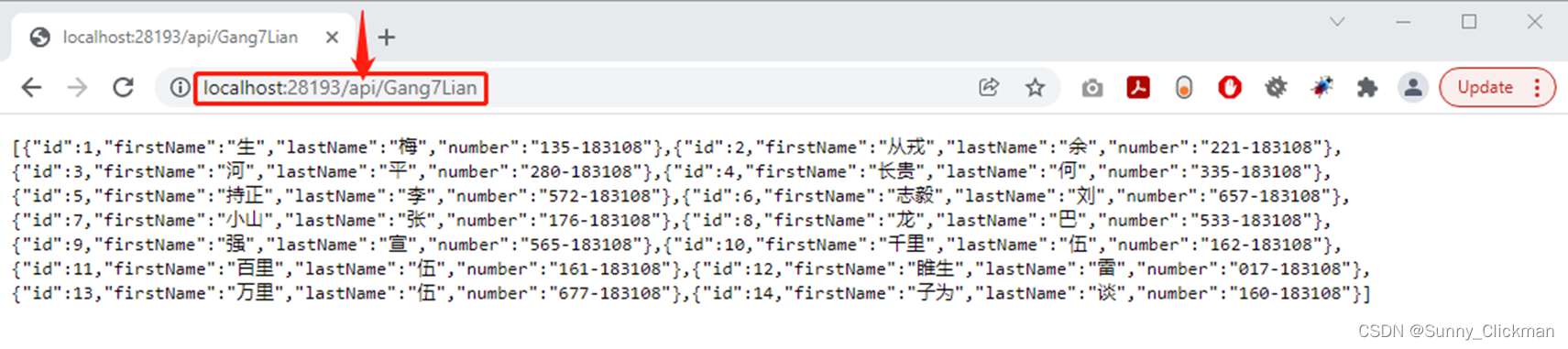
在HeidiSQL管理器中可看到自动建立的数据库和表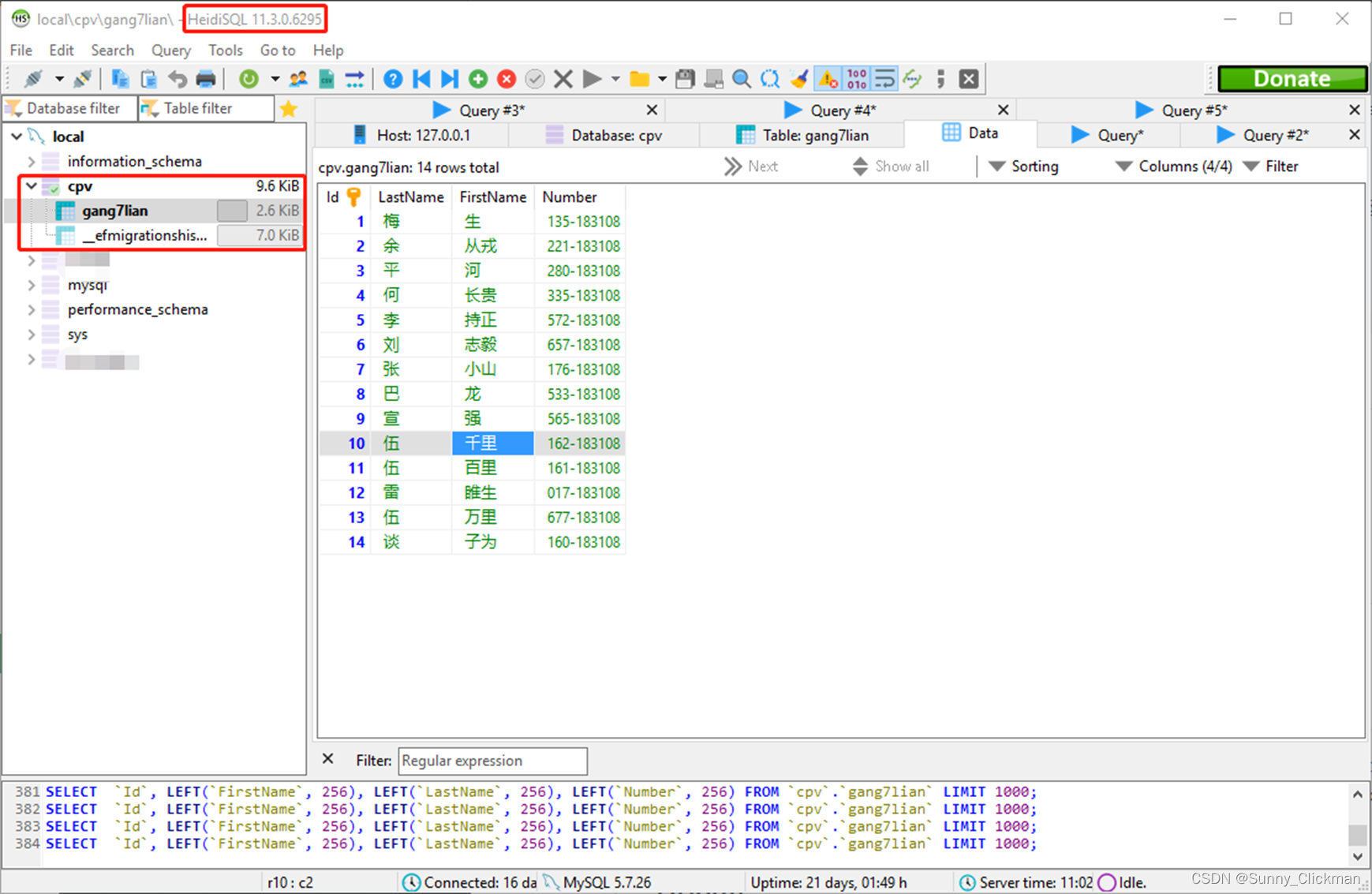
后记
注意:文及代码中的说明和注解均为根据个人理解描述,如有疑问,请自行Google/Baidu查证,以免被误导!
MySQL Provider其实有两个:Pomelo.EntityFrameworkCore.MySql(开源)和MySql.Data.EntityFrameworkCore(官方),可参考:
https://stackoverflow.com/questions/48703318/mysql-data-entityframeworkcore-vs-pomelo-entityframeworkcore-mysql
AddDbContext和AddDbContextPool的区别,可参考:
https://stackoverflow.com/questions/48443567/adddbcontext-or-adddbcontextpool
如需要更高的性能,可考虑使用Dapper,可参考:
https://www.nuget.org/packages/Dapper
https://github.com/anzolin/AspNetCoreDapperMySql
可考虑使用JWT(JSON Web Token)认证以增强API的安全性,可参考:
https://jasonwatmore.com/post/2019/10/11/aspnet-core-3-jwt-authentication-tutorial-with-example-api