CSS 提供了 3 种机制来设置盒子的摆放位置,分别是普通流(标准流),浮动和定位,其中浮动让盒子从普通流中浮起来,浮动元素具有行内块特性,表现为让多个块级元素在一行显示。
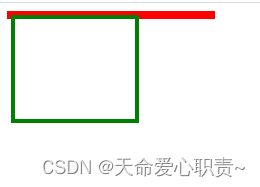
为什么要清除浮动,因为浮动的盒子脱离标准流,如果父盒子没有设置高度的话,下面的盒子就会撑上来。
未添加浮动:
<style>
    #father{
        width: 200px;
        border: 4px solid red;
    }
    #son{
        width: 120px;
        height: 100px;
        border: 4px solid green;
    }
</style>
<body>
    <div id="father">
        <div id="son"></div>
    </div>
</body>
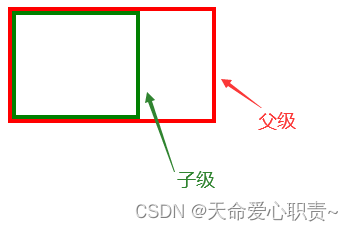
未添加浮动效果:(父级元素未设置高度,由子元素撑开)
添加浮动:
    #son{
        float: left;
        width: 120px;
        height: 100px;
        border: 4px solid green;
    }
添加浮动效果:(子元素脱离标准流,父元素无法被撑开,就扁了)
下边来介绍清除浮动的方法,让盒子重新撑起来。
1.额外标签法
在最后一个浮动标签后,新加一个标签,给其设置clear:both;(不推荐)
<style>
    #father{
        width: 200px;
        border: 4px solid red;
    }
    #son{
        float: left;
        width: 120px;
        height: 100px;
        border: 4px solid green;
    }
    #new{
        clear: left;
        /* clear: left;清除左浮动 */
        /* clear: both;清除全部 */
        /* clear: right;清除右浮动 */
    }
</style>
<body>
    <div id="father">
        <div id="son"></div>
        <div id="new"></div>
    </div>
</body>
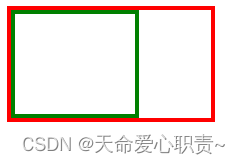
清除浮动后效果:
2.父级添加overflow属性
父元素添加overflow:hidden(不推荐)
<style>
    #father{
        width: 200px;
        border: 4px solid red;
        overflow: hidden;
    }
    #son{
        float: left;
        width: 120px;
        height: 100px;
        border: 4px solid green;
    }
</style>
<body>
    <div id="father">
        <div id="son"></div>
    </div>
</body>
效果和以上清除浮动效果相同。
3.使用after伪元素清除浮动(推荐使用)
<style>
    #father{
        width: 200px;
        border: 4px solid red;
    }
    /*伪元素是行内元素 正常浏览器清除浮动方法*/
    #father:after{
        content: "";
        display: block;
        height: 0;
        clear:both;
        visibility: hidden;
    }
   /* #father{
         *zoom: 1;
        }*/
/*ie6清除浮动的方式 *号只有IE6-IE7执行,其他浏览器不执行*/
    #son{
        float: left;
        width: 120px;
        height: 100px;
        border: 4px solid green;
    }
</style>
<body>
    <div id="father">
        <div id="son"></div>
    </div>
</body>
效果和以上清除浮动效果相同。
4.使用before和after双伪元素清除浮动
<style>
    #father{
        width: 200px;
        border: 4px solid red;
    }
    #father:after,
    #father:before{
        content: "";
        display: table;
    }
    #father:after{
         clear: both;
    }
    #father{
         *zoom: 1;
    }
    #son{
        float: left;
        width: 120px;
        height: 100px;
        border: 4px solid green;
    }
</style>
<body>
    <div id="father">
        <div id="son"></div>
    </div>
</body>
效果和以上清除浮动效果相同。
个人觉得用浮动来布局属于有点少见的了,除了一些组件库之外,定位、flex(css3出现的)、grid网格布局、栅格系统布局(可以适用于多端设备 )等布局方法还是不错不错的。
版权声明:本文为m0_62021563原创文章,遵循CC 4.0 BY-SA版权协议,转载请附上原文出处链接和本声明。