springboot+maven+eclipse 实现增删改查
1、搭建环境
(1)、搭建环境准备工作
a、官网下载eclipse
b、官网下载maven,并配置maven环境,和本地仓库路径
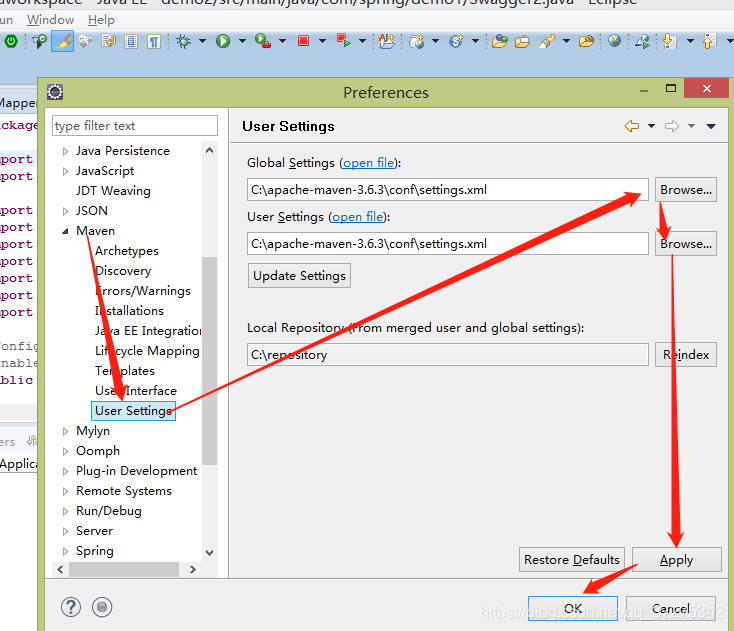
c、eclipse配置maven
(2)、新建项目
(1)file—》new—》maven project
(2)点击next
(3)next
(4)finish完成
(5)哈哈到此环境就搭建完了
2、代码和框架构架
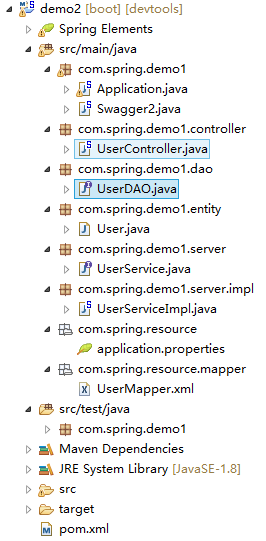
(1)、dao
@Mapper
public interface UserDAO extends BaseMapper<User>{

	List<User> selectUser();
	List<User> selectByUserId(String userId);
	void addUser(User user);
	void updateUser(User user);
}
(2)、server
public interface UserService {
	List<User> getUser();
	void addUser(User user);
	List<User> selectByUserId(String userId);
	void updateUser(User user);
}
(3)、serverimpl
@Service("UserService")
public class UserServiceImpl implements UserService{
	@Autowired
	private UserDAO userDao;

	@Override
	public List<User> getUser() {
		return   userDao.selectUser();
	}

	@Override
	public void addUser(User user) {
		userDao.addUser(user);
	}

	@Override
	public List<User> selectByUserId(String userId) {
		List<User> selectByUserId = userDao.selectByUserId(userId);
		return selectByUserId;
	}

	@Override
	public void updateUser(User user) {
		userDao.updateUser(user);
	}
}
(4)、entity
public class User {

	  private String userId ;
	  private String userCode ;
	  private String userName;
		public String getUserId() {
			return userId;
		}
		public void setUserId(String userId) {
			this.userId = userId;
		}
		public String getUserCode() {
			return userCode;
		}
		public void setUserCode(String userCode) {
			this.userCode = userCode;
		}
		public String getUserName() {
			return userName;
		}
		public void setUserName(String userName) {
			this.userName = userName;
		}
		@Override
		public String toString() {
			return "User [userId=" + userId + ", userCode=" + userCode + ", userName=" + userName + "]";
		}

	}
(5)、application.properties
server.port=8081
context-path:/demo2

spring.application.name=demo1
server.tomcat.uri-encoding=utf-8

spring.datasource.driver-class-name=com.mysql.jdbc.Driver
spring.datasource.url = jdbc:mysql://localhost:3306/mysql?setUnicode=true&characterEncoding=utf8
spring.datasource.username=root
spring.datasource.password=123456
spring.datasource.max-idle=10
spring.datasource.max-wait=10000
spring.datasource.min-idle=5
spring.datasource.initial-size=5

server.servlet.session.timeout=30m
mybatis.typeAliasesPackage=com.spring.boottest.entity
mybatis.mapper-locations=classpath:mapper/*Mapper.xml

spring.thymeleaf.content-type: text/html
spring.thymeleaf.cache: false
spring.thymeleaf.mode: LEGACYHTML5
(6)、mapper
<?xml version="1.0" encoding="UTF-8"?>
<!DOCTYPE mapper PUBLIC "-//mybatis.org//DTD Mapper 3.0//EN" "http://mybatis.org/dtd/mybatis-3-mapper.dtd">
<mapper namespace="com.spring.demo1.dao.UserDAO">
    <!-- 通用查询映射结果 -->
    <resultMap id="BaseResultMap" type="com.spring.demo1.entity.User">
        <id column="userId" property="userId" />
        <result column="userCode" property="userCode" />
        <result column="userName" property="userName" />
    </resultMap>
	<select id="selectUser"  resultType="com.spring.demo1.entity.User">
        SELECT * FROM userstu
    </select>
    <select id="selectByUserId"  resultType="com.spring.demo1.entity.User" parameterType="String">
        SELECT * FROM userstu where userId=#{userId}
    </select>
    <insert id="addUser" parameterType="com.spring.demo1.entity.User">
    	insert into userstu(userId,userCode,userName)values(#{userId},#{userCode},#{userName})
    </insert>

    <update id="updateUser" parameterType="com.spring.demo1.entity.User">
    	update userstu set userCode = #{userCode},userName = #{userName} where userId = #{userId}
    </update>
</mapper>
(7)、controller
@RestController
@RequestMapping(value="/test")
public class UserController {
	 @Autowired
	 private UserService userService;

	 @ApiOperation(value="获取用户列表")
	 @GetMapping(value = "/select/get/v1.0")
	 public List<User> select(){
		 List<User> user = userService.getUser();
		 return user;
	 }

	 @ApiOperation(value="通过用户ID获取用户信息")
	 @GetMapping(value = "/{userId}/selectByUserId/v1.0")
	 public List<User> selectByUserId(@PathVariable String userId){
		 List<User> selectByUserId = userService.selectByUserId(userId);
		 return selectByUserId;
	 }

	 @ApiOperation(value="添加用户信息")
	 @PutMapping(value = "/addUser/v1.0")
	 public void addUser(@RequestBody User user){
		if(null != user){
			userService.addUser(user);
		}
	 }

	 @ApiOperation(value="通过用户Id修改用户信息")
	 @PostMapping(value = "/udapte/v1.0")
	 public void updateUser(@RequestBody User user){
		if(null != user){
			userService.updateUser(user);
		}
	 }
}
(8)、Application.java
@MapperScan("com.spring.demo1.dao")
@EnableCaching
@EnableAutoConfiguration(exclude = { JpaRepositoriesAutoConfiguration.class })
@SpringBootApplication(exclude = { DataSourceTransactionManagerAutoConfiguration.class })
public class Application
{
    public static void main(String[] args)
    {
    	 SpringApplication.run(Application.class, args);
    }

}
(9)、Swagger2.java
@Configuration
@EnableSwagger2
public class Swagger2 {

    @Bean
    public Docket createRestApi() {
        return new Docket(DocumentationType.SWAGGER_2)
                .apiInfo(apiInfo())
                .select()
                .apis(RequestHandlerSelectors.basePackage("com.spring.demo1.controller"))
                .paths(PathSelectors.any())
                .build();
    }

    @SuppressWarnings("deprecation")
	private ApiInfo apiInfo() {
        return new ApiInfoBuilder()
                .title("用户基本信息API")
                .description("更多Spring Boot相关文章请关注:http://blog.didispace.com/")
                .termsOfServiceUrl("http://blog.didispace.com/")
                .contact(":XXX")
                .build();
    }

}
(10)、pom.xml
<project xmlns="http://maven.apache.org/POM/4.0.0" xmlns:xsi="http://www.w3.org/2001/XMLSchema-instance"
  xsi:schemaLocation="http://maven.apache.org/POM/4.0.0 http://maven.apache.org/xsd/maven-4.0.0.xsd">
  <modelVersion>4.0.0</modelVersion>
  <groupId>com.spring</groupId>
  <artifactId>demo1</artifactId>
  <version>0.0.1-SNAPSHOT</version>
  <packaging>jar</packaging>
  <name>demo1</name>
  <url>http://maven.apache.org</url>
  <properties>
    <project.build.sourceEncoding>UTF-8</project.build.sourceEncoding>
    <maven.compiler.source>1.8</maven.compiler.source>
    <maven.compiler.target>1.8</maven.compiler.target>
  </properties>
	<parent>
        <groupId>org.springframework.boot</groupId>
        <artifactId>spring-boot-starter-parent</artifactId>
        <version>2.0.5.RELEASE</version>
	</parent>
    <dependencies>
    	<dependency>
		    <groupId>mysql</groupId>
		    <artifactId>mysql-connector-java</artifactId>
		</dependency>
     	 <dependency>
            <groupId>org.apache.commons</groupId>
            <artifactId>commons-lang3</artifactId>
         </dependency>
      	<dependency>
            <groupId>org.apache.httpcomponents</groupId>
            <artifactId>httpclient</artifactId>
        </dependency>
        <dependency>
            <groupId>org.springframework.boot</groupId>
            <artifactId>spring-boot-starter</artifactId>
        </dependency>
        <!-- web开发包:包含Tomcat和Springmvc -->
        <dependency>
            <groupId>org.springframework.boot</groupId>
            <artifactId>spring-boot-starter-web</artifactId>
        </dependency>
          <dependency>
            <groupId>org.mybatis.spring.boot</groupId>
            <artifactId>mybatis-spring-boot-starter</artifactId>
            <version>1.3.2</version>
        </dependency>
        <dependency>
	      <groupId>junit</groupId>
	      <artifactId>junit</artifactId>
	      <scope>test</scope>
    	</dependency>
    	<!-- spring-boot热部署 -->
		<dependency>
		    <groupId>org.springframework.boot</groupId>
		    <artifactId>spring-boot-devtools</artifactId>
		</dependency>
		<dependency>
			<groupId>tk.mybatis</groupId>
			<artifactId>mapper-spring-boot-starter</artifactId>
			<version>2.0.0</version>
		</dependency>
		<!-- thymeleaf -->
		<dependency>
		    <groupId>org.springframework.boot</groupId>
		    <artifactId>spring-boot-starter-thymeleaf</artifactId>
		</dependency>
		<dependency>
			<groupId>net.sourceforge.nekohtml</groupId>
			<artifactId>nekohtml</artifactId>
		</dependency>
		<!--帮助页面-->
        <dependency>
            <groupId>io.springfox</groupId>
            <artifactId>springfox-swagger2</artifactId>
            <version>2.6.1</version>
        </dependency>

        <dependency>
            <groupId>io.springfox</groupId>
            <artifactId>springfox-swagger-ui</artifactId>
            <version>2.6.1</version>
        </dependency>
    </dependencies>
	<!-- 这个插件,可以将应用打包成一个可执行的jar包;-->
	<build>
    	<plugins>
       		 <plugin>
            	<groupId>org.springframework.boot</groupId>
            	<artifactId>spring-boot-maven-plugin</artifactId>
        	</plugin>
    	</plugins>
    	<resources>
    	<resource>
        		<directory>src/main/java</directory>
       		    <includes>
            		<include>**/*.yml</include>
            		<include>**/*.properties</include>
           		    <include>**/*.xml</include>
        		</includes>
       		    <filtering>false</filtering>
    	</resource>
   		<resource>
        	<directory>src/main/java/com/spring/resource</directory>
        	<includes>
           		 <include>**/*.yml</include>
           		 <include>**/*.properties</include>
           		 <include>**/*.xml</include>
       		</includes>
        	<filtering>false</filtering>
   		    </resource>
  	    </resources>
</build>
</project>
3、访问地址和结果展示
(1)请求地址
http://localhost:8081/swagger-ui.html
(2)、结果展示
版权声明:本文为qq_37275342原创文章,遵循CC 4.0 BY-SA版权协议,转载请附上原文出处链接和本声明。