<template>
  <div class="showLangResultbox" ref="scrollTo">
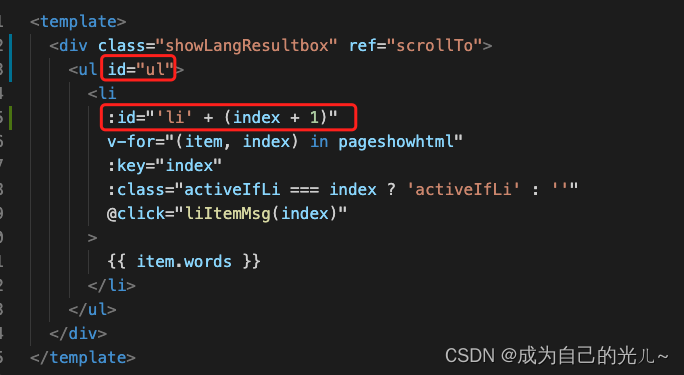
    <ul id="ul">
      <li
        :id="'li' + (index + 1)"
        v-for="(item, index) in pageshowhtml"
        :key="index"
        :class="activeIfLi === index ? 'activeIfLi' : ''"
        @click="liItemMsg(index)"
      >
        {{ item.words }}
      </li>
    </ul>
  </div>
</template>

<script>
export default {
  props: ['resultShow', 'activeIfSvg'],
  data() {
    return {
      pageshowhtml: '',
      activeIfLi: '',
    }
  },
  methods: {
    liItemMsg(index) {
      this.activeIfLi = index
      this.$emit('activeLiTrans', this.activeIfLi)
      // console.log('rightindex',index)
    },
  },
  watch: {
    resultShow(newVal, oldVal) {
      // 监听 num 属性的数据变化
      // 作用 : 只要 num 的值发生变化,这个方法就会被调用
      // 第一个参数 : 新值
      // 第二个参数 : 旧值,之前的值
      this.pageshowhtml = newVal.result.ocr_results
    },
    activeIfSvg(newVal, oldVal) {
      this.activeIfLi = newVal
      let target = document.getElementById(`li${newVal + 1}`)
      // console.log(target.offsetTop,target.offsetTop)
      this.$refs.scrollTo.scrollTo(0, target.offsetTop)
    }
  }
}
</script>

<style lang="scss" scoped>
* {
  margin: 0;
  padding: 0;
}
.showLangResultbox {
  width: 100%;
  height: 100%;
  overflow: auto;
  position: relative;
  ul{
    position: absolute;
  }
  li {
    list-style: none;
    line-height: 40px;
    padding-left: 15px;
    cursor: pointer;
  }
  .activeIfLi {
    border-left: 3px solid #4c7bff;
    color: #4c7bff;
    font-weight: 700;
  }
}
</style>
重要代码:

版权声明:本文为qq_51196135原创文章,遵循CC 4.0 BY-SA版权协议,转载请附上原文出处链接和本声明。