- SharePreference:作为Android数据持久化的一种,具有一定的便捷性,适合存储一些体积小的数据。
- 存储数据方式:键值对的方式,类似于Map;
- 利用SharePreference.Editor对象存储数据;
- 利用SharePreferences对象读取数据;
- 存储数据
SharedPreferences.Editor editor = getSharedPreferences("data",MODE_PRIVATE).edit();
                editor.putString("name","Damon");
                editor.putInt("age",28);
                editor.putBoolean("sex",false);
                editor.commit();
- 读取数据
SharedPreferences preferences = getSharedPreferences("data",MODE_PRIVATE);
                String name = preferences.getString("name",null);
                Integer age = preferences.getInt("age",18);
                Boolean sex = preferences.getBoolean("sex",false);
- 实践参考代码:
public class Main2Activity extends AppCompatActivity {

    private Button writeButton;
    private Button readButton;

    @Override
    protected void onCreate(Bundle savedInstanceState) {
        super.onCreate(savedInstanceState);
        setContentView(R.layout.activity_main2);
        writeButton = (Button) findViewById(R.id.writeButton);
        readButton = (Button) findViewById(R.id.readButton);

        writeButton.setOnClickListener(new View.OnClickListener() {
            @Override
            public void onClick(View view) {

                SharedPreferences.Editor editor = getSharedPreferences("data",MODE_PRIVATE).edit();
                editor.putString("name","Damon");
                editor.putInt("age",28);
                editor.putBoolean("sex",false);
                editor.commit();
            }
        });

        readButton.setOnClickListener(new View.OnClickListener() {
            @Override
            public void onClick(View view) {

                SharedPreferences preferences = getSharedPreferences("data",MODE_PRIVATE);
                String name = preferences.getString("name",null);
                Integer age = preferences.getInt("age",18);
                Boolean sex = preferences.getBoolean("sex",false);

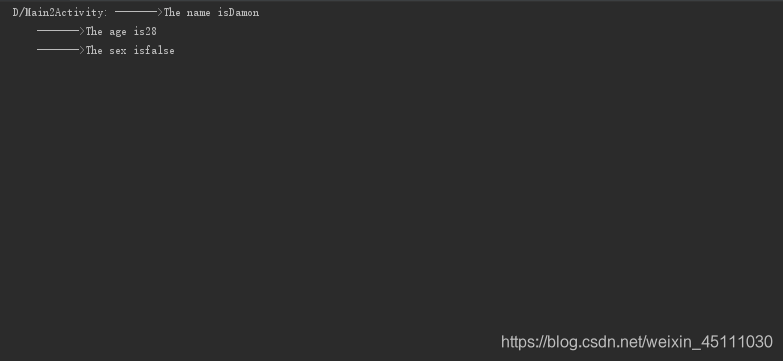
                Log.d("Main2Activity","------->" + name + age + sex);
            }
        });
    }
}
- 相关xml
<LinearLayout
        android:layout_width="match_parent"
        android:layout_height="match_parent"
        android:orientation="vertical">

        <Button
            android:layout_width="match_parent"
            android:layout_height="wrap_content"
            android:id="@+id/writeButton"
            android:textAllCaps="true"
            android:text="Write"/>

        <Button
            android:layout_width="match_parent"
            android:layout_height="wrap_content"
            android:id="@+id/readButton"
            android:textAllCaps="true"
            android:text="Read"/>

    </LinearLayout>
- 控制台数据输出
版权声明:本文为weixin_45111030原创文章,遵循CC 4.0 BY-SA版权协议,转载请附上原文出处链接和本声明。