一、自定义命令行 - 基本使用教程案例
1、建立命令类文件,新建application/index/command/Test.php<?php
// +----------------------------------------------------------------------
// | Title : 自定义命令行类
// +----------------------------------------------------------------------
// | Author: xiaochuan <28126649@qq.com>
// +----------------------------------------------------------------------
// | WebUrl: www.youhutong.com
// +----------------------------------------------------------------------
// | Date : 2019-01-28
// +----------------------------------------------------------------------
namespace app\index\command;
use think\console\Command;
use think\console\Input;
use think\console\Output;
class Test extends Command
{
protected function configure()
{
$this->setName('test')->setDescription('test命令');
}
protected function execute(Input $input, Output $output)
{
$output->writeln('Hello World');
}
}
?>
2、配置command.php文件,目录在application/command.php<?php
// +----------------------------------------------------------------------
// | ThinkPHP [ WE CAN DO IT JUST THINK ]
// +----------------------------------------------------------------------
// | Copyright (c) 2006-2016 http://thinkphp.cn All rights reserved.
// +----------------------------------------------------------------------
// | Licensed ( http://www.apache.org/licenses/LICENSE-2.0 )
// +----------------------------------------------------------------------
// | Author: yunwuxin <448901948@qq.com>
// +----------------------------------------------------------------------
return [
'app\index\command\Test',
];
?>
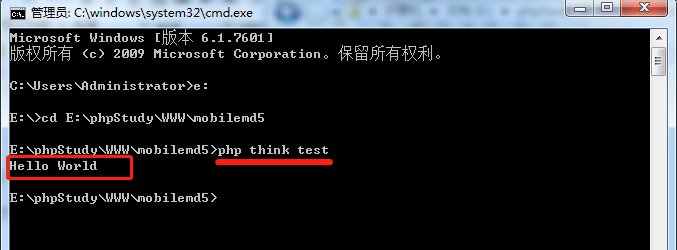
3、打开cmd命令窗口切换目录到站点根目录,也就是think文件所在目录,然后执行:
php think test
然后会看到输出:Hello World
二、自定义命令行 - 高级使用教程案例
1、建立命令类文件,新建application/index/command/Test.php<?php
// +----------------------------------------------------------------------
// | Title : 自定义命令行类
// +----------------------------------------------------------------------
// | Author: xiaochuan <28126649@qq.com>
// +----------------------------------------------------------------------
// | WebUrl: www.youhutong.com
// +----------------------------------------------------------------------
// | Date : 2019-01-28
// +----------------------------------------------------------------------
namespace app\index\command;
use think\console\Command;
use think\console\Input;
use think\console\Output;
use think\Request;
use think\console\input\Argument;
class Test extends Command
{
protected function configure()
{
$this->setName('test')
->setDefinition([
# 要传送过去的值,按顺序赋值. 如 php think test 参数1 参数2 参数2
# 参数间用空格隔开
new Argument('input1', Argument::OPTIONAL, '参数1'),
new Argument('input2', Argument::OPTIONAL, '参数2'),
new Argument('input3', Argument::OPTIONAL, '参数3'),
# ...
])
->setDescription('test命令');
}
protected function execute(Input $input, Output $output)
{
# 获取命令值入的值
$request = Request::instance([
'get'=>$input->getArguments()
]);
# 调用方法:方法里接收值的方式:
# input('get.input1') input('get.input2') input('get.input3')
# 这我们调用index模块 - indexk控制器 - index方法
$output->writeln(controller('index/index')->index());
}
}
?>
2、编写index模块index控制器,并写好index方法,目录application/index/controller/Index.php<?php
// +----------------------------------------------------------------------
// | Title : 自定义命令行 - 程序逻辑代码处理工作类
// +----------------------------------------------------------------------
// | Author: xiaochuan <28126649@qq.com>
// +----------------------------------------------------------------------
// | WebUrl: www.youhutong.com
// +----------------------------------------------------------------------
// | Date : 2019-01-28
// +----------------------------------------------------------------------
namespace app\index\controller;
use think\Controller;
use app\common\Test as c_test;
class Index extends Controller
{
/**
* 程序逻辑处理
* @access public
*/
public function index()
{
$post[] = (string)input('get.input1');
$post[] = (string)input('get.input2');
$post[] = (string)input('get.input3');
return json_encode($post, true);
}
}
?>
3、配置command.php文件,目录在application/command.php<?php
// +----------------------------------------------------------------------
// | ThinkPHP [ WE CAN DO IT JUST THINK ]
// +----------------------------------------------------------------------
// | Copyright (c) 2006-2016 http://thinkphp.cn All rights reserved.
// +----------------------------------------------------------------------
// | Licensed ( http://www.apache.org/licenses/LICENSE-2.0 )
// +----------------------------------------------------------------------
// | Author: yunwuxin <448901948@qq.com>
// +----------------------------------------------------------------------
return [
'app\index\command\Test',
];
?>
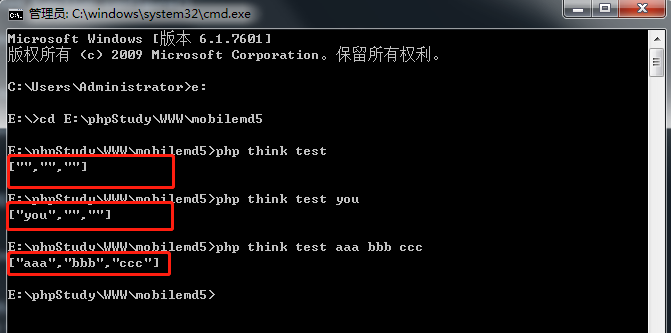
4、打开cmd命令窗口切换目录到站点根目录,也就是think文件所在目录,然后分别执行:
php think test 没有传参数,然后会看到输出:["","",""]
php think test you 传一个参数,然后会看到输出:["you","",""]
php think test liu 123 传二个参数,然后会看到输出:["liu","123",""]
php think test aaa bbb ccc 传三个参数,然后会看到输出:["aaa","bbb","ccc"]
浏览器启用弹出窗口过滤功能,将无法跳转到下载页。在浏览器地址栏右边符号提示处点击允许就可以了!
郑重声明:
1、本站源码仅供个人学习研究和交流使用,请于下载后二十四小时内删除
2、本站大多资源来源于互联网、用户分享,仅供学习交流使用,本站不提供任何技术支持
3、本站联系方式Email:admin@youhutong.com ,收到邮件会第一时间处理。
4、如侵犯到任何版权问题,请立即告知本站(立即在线告知),本站将及时删除并致以最深的歉意