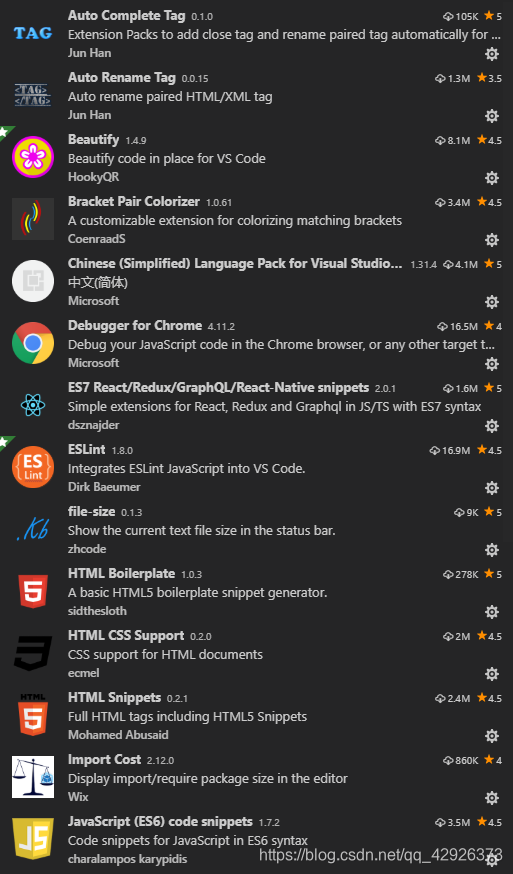
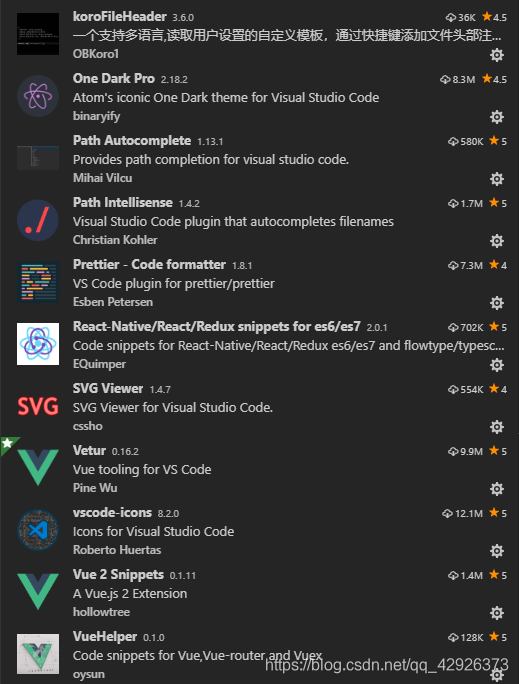
常用插件(vscode)
settings.json(vscode)
{
  "editor.tabSize": 2, // 制表符符号eslint
  "editor.fontSize": 14, // vscode字体大小
  "editor.quickSuggestions": {
    "other": true,
    "comments": true,
    "strings": true
  },
  // eslint 格式化配置
  "eslint.validate": [
    "javascript",
    "javascriptreact",
    {
      "language": "html",
      "autoFix": true
    },
    {
      "language": "vue",
      "autoFix": true
    }
  ],
  "editor.formatOnSave": true, // 每次保存自动格式化
  "eslint.autoFixOnSave": true, // 每次保存的时候将代码按eslint格式进行修复
  "vetur.format.defaultFormatter.html": "js-beautify-html",
  "vetur.format.defaultFormatter.js": "vscode-typescript", //让vue中的js按编辑器自带的ts格式进行格式化
  "vetur.format.defaultFormatterOptions": {
    "prettier": {
      "singleQuote": true, //使用单引号替代双引号
      "semi": false, //去掉代码结尾的分号
      "eslintIntegration": true // 让prettier使用eslint的代码格式进行校验
    },
    "js-beautify-html": {
      "wrap_attributes": "force-aligned" //属性强制折行对齐
    }
  },
  "javascript.format.insertSpaceBeforeFunctionParenthesis": true, //让函数(名)和后面的括号之间加个空格
  // fileHeader配置
  "fileheader.customMade": {
    "Description": "",
    "Author": "Anles",
    "Motto": "A madman with dreams",
    "Github": "https://github.com/122177638",
    "Date": "Do not edit",
    "LastEditors": "Anles",
    "LastEditTime": "Do not edit"
  },
}
版权声明:本文为qq_42926373原创文章,遵循CC 4.0 BY-SA版权协议,转载请附上原文出处链接和本声明。