通过rtde实时控制ur机械臂
rtde官网:
https://sdurobotics.gitlab.io/ur_rtde/
兼容机器人
来自 CB3/CB3.1 软件 3.3 的所有 CB 系列
所有 e 系列
兼容的操作系统
目前测试:
Ubuntu 16.04
Ubuntu 18.04
Ubuntu 20.04
macOS 10.14
Windows 10 专业版 x64
rtde可以实时控制ur,控制频率较高,可以进行力控等方面的二次开发。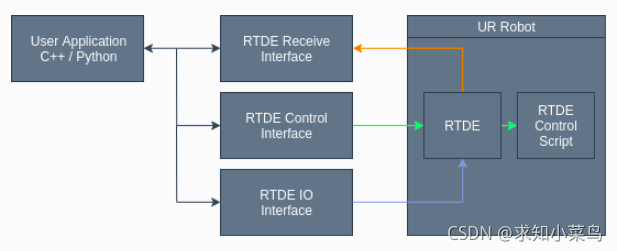
RTDE安装
参考连接:
https://sdurobotics.gitlab.io/ur_rtde/installation/installation.html
(未完成)通过ur_rtde工具包使用C++和python控制UR机器人和Robotiq执行末端记录
上边源码安装未完成报错原因可能是pybind11版本问题。
简单安装:
pip install --user ur_rtde
源码安装同时使用python2.7
# python 2.7
pip install --user pybind11==2.0.0
# python 3.6
pip3 install --user pybind11

# 源码安装ur_rtde
git clone https://gitlab.com/sdurobotics/ur_rtde.git
cd ur_rtde
mkdir build
cd build

# 默认安装 python3
cmake ..
# 使用python 2.7
cmake -DPYBIND11_PYTHON_VERSION=2.7 ..
# 不使用python
cmake -DPYTHON_BINDINGS:BOOL=OFF ..

make
sudo make install
注释:pybind11==2.0.0安装是测试没有问题的版本
之后就可以使用了。
如果编译时候出现错误:
-- Boost version: 1.65.1
-- Found the following Boost libraries:
--   system
--   thread
--   program_options
--   chrono
--   date_time
--   atomic
CMake Error at CMakeLists.txt:78 (add_subdirectory):
  The source directory

    /home/li/ur_rtde_control/ur_rtde/pybind11

  does not contain a CMakeLists.txt file.


CMake Error at CMakeLists.txt:195 (pybind11_add_module):
  Unknown CMake command "pybind11_add_module".


-- Configuring incomplete, errors occurred!
See also "/home/li/ur_rtde_control/ur_rtde/build/CMakeFiles/CMakeOutput.log".
See also "/home/li/ur_rtde_control/ur_rtde/build/CMakeFiles/CMakeError.log".
解决办法:
参考链接:
CMake Error at CMakeLists.txt:1000 (add_subdirectory):
因为pybind11下没有所需要的文件,需要克隆下载,第一步,删掉ur_rtde文件夹下的pybind11文件夹,在ur_rtde文件夹目录下克隆pybind11。
git clone https://github.com/pybind/pybind11.git
注意,目录格式,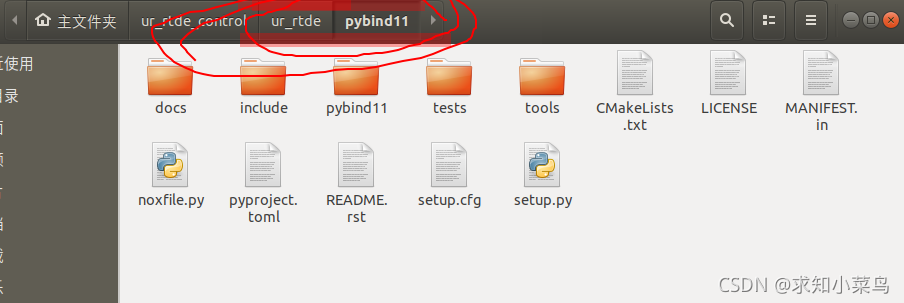
版权声明:本文为weixin_45839124原创文章,遵循CC 4.0 BY-SA版权协议,转载请附上原文出处链接和本声明。