QT本身就是带有插件系统的,可以使用QT自身携带的插件系统开发自己的插件。插件的好处:就是可以使多人同时开发,在使用的时候再加载起来。下面通过一个Demo来实现插件的管理。
1.定义接口
首先新建一个含有计算的接口工程: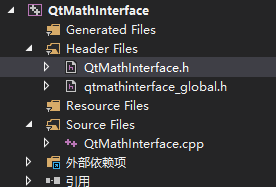
QtMathInterface.h
#pragma once
#include <QtPlugin>
#include "qtmathinterface_global.h"

class QTMATHINTERFACE_EXPORT QtMathInterface {
public:
	QtMathInterface();
	virtual double mathRusult(double arg1, double arg2) = 0;
};

#define Math_interface_iid "Math_interface_iid"
Q_DECLARE_INTERFACE(QtMathInterface, Math_interface_iid)
QtMathInterface.cpp 这个Cpp可有可无
#include "QtMathInterface.h"

QtMathInterface::QtMathInterface() {
}
2. 定义第一个插件:加法。
同样新建一个DLL工程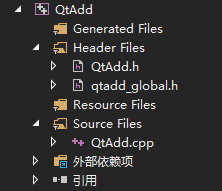
qtadd_global.h
#pragma once

#include <QtCore/qglobal.h>

#ifndef BUILD_STATIC
# if defined(QTADD_LIB)
#  define QTADD_EXPORT Q_DECL_EXPORT
# else
#  define QTADD_EXPORT Q_DECL_IMPORT
# endif
#else
# define QTADD_EXPORT
#endif

#pragma comment(lib,"../x64/Release/QtMathInterface.lib")
QtAdd.h
#pragma once
#include <QObject>
#include "qtadd_global.h"
#include "../QtMathInterface/QtMathInterface.h"

class QTADD_EXPORT QtAdd
	:public QObject
	,public QtMathInterface
{
	Q_OBJECT
	Q_PLUGIN_METADATA(IID Math_interface_iid FILE "QtMath.json")
	Q_INTERFACES(QtMathInterface)
public:
	QtAdd();

	double mathRusult(double arg1, double arg2)override;
};
QtAdd.cpp
#include "QtAdd.h"

QtAdd::QtAdd() {
}

double QtAdd::mathRusult(double arg1, double arg2) {
	return arg1 + arg2;
}
添加QtMath.json文件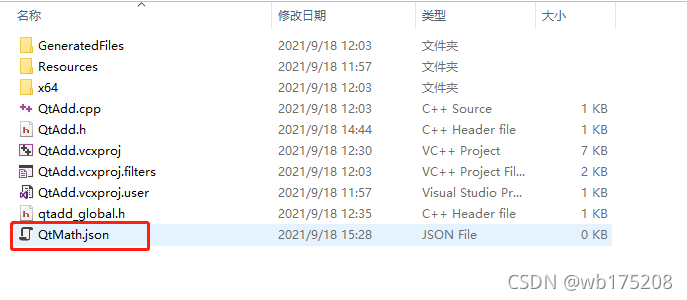
文件内容:
{
    "version":100
}
3. 定义第二个插件:减法。
新建一个DLL工程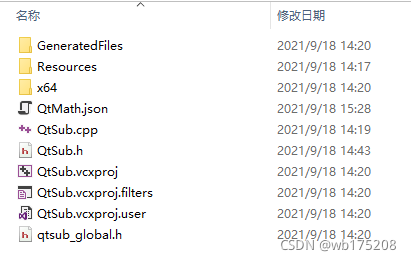
qtsub_global.h
#pragma once

#include <QtCore/qglobal.h>

#ifndef BUILD_STATIC
# if defined(QTSUB_LIB)
#  define QTSUB_EXPORT Q_DECL_EXPORT
# else
#  define QTSUB_EXPORT Q_DECL_IMPORT
# endif
#else
# define QTSUB_EXPORT
#endif
#pragma comment(lib,"../x64/Release/QtMathInterface.lib")
QtSub.h
#pragma once
#include <QObject>
#include "qtsub_global.h"
#include "../QtMathInterface/QtMathInterface.h"

class QTSUB_EXPORT QtSub
	: public QObject
	, public QtMathInterface
{
	Q_OBJECT
	//使用Q_PLUGIN_METADATA ()宏导出插件。
	Q_PLUGIN_METADATA(IID Math_interface_iid FILE "QtMath.json")
	//使用Q_INTERFACES ()宏告诉Qt的元对象系统有关接口的信息
	Q_INTERFACES(QtMathInterface)
public:
	QtSub();

	double mathRusult(double arg1, double arg2)override;
};
QtSub.cpp
#include "QtSub.h"

QtSub::QtSub()
{
}

double QtSub::mathRusult(double arg1, double arg2) {
	return arg1 - arg2;
}
4. 编写调用程序
新建一个GUI工程。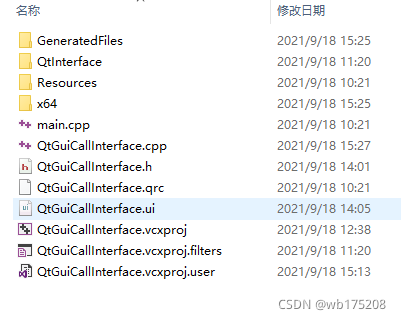
QtGuiCallInterface.h
#pragma once

#include <QtWidgets/QMainWindow>
#include "ui_QtGuiCallInterface.h"
#pragma comment(lib,"../x64/Release/QtMathInterface.lib")

class QtMathInterface;

class QtGuiCallInterface : public QMainWindow
{
	Q_OBJECT

public:
	QtGuiCallInterface(QWidget *parent = Q_NULLPTR);

private:
	void init();

private slots:
	void slotCal();
private:
	Ui::QtGuiCallInterfaceClass ui;

	QtMathInterface* _mathInterface = nullptr;
};
QtGuiCallInterface.cpp
#include <QDir>
#include <QMessageBox>
#include <QDebug>
#include <QPluginLoader>
#include "QtGuiCallInterface.h"
#include "../QtMathInterface/QtMathInterface.h"

QtGuiCallInterface::QtGuiCallInterface(QWidget *parent)
	: QMainWindow(parent) {
	ui.setupUi(this);
	init();
}

void QtGuiCallInterface::init() {
	connect(ui.pushButtonCal, SIGNAL(clicked()), this, SLOT(slotCal()));

	// 进入插件目录
	QDir pluginsDir(qApp->applicationDirPath());
	pluginsDir.cd("Plugin");

	// 遍历插件目录
	foreach(QString fileName, pluginsDir.entryList(QDir::Files)) {
		QPluginLoader pluginLoader(pluginsDir.absoluteFilePath(fileName));
		QObject *plugin = pluginLoader.instance();
		if (plugin) {
			_mathInterface = qobject_cast<QtMathInterface *>(plugin);
			if (_mathInterface == nullptr) {
				QMessageBox::information(this, "错误", "插件加载失败");
			}
		}
	}
}

void QtGuiCallInterface::slotCal() {
	double arg1 = ui.lineEdit1->text().toDouble();
	double arg2 = ui.lineEdit2->text().toDouble();
	double rest = _mathInterface->mathRusult(arg1, arg2);
	ui.lineEditRes->setText(QString::number(rest));
}
把编写好的加法插件拷到Plugin目录下面,运行程序,展示就是加法运算: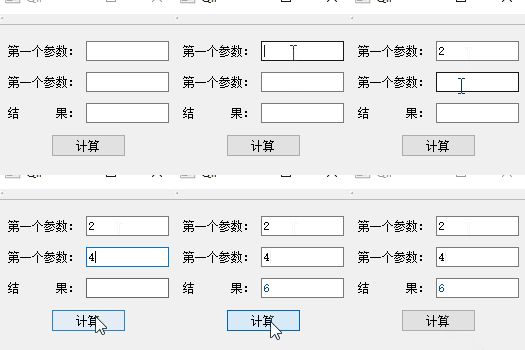
把减法插件放到Plugin目录下面,再次运行程序,展示就是减法运算: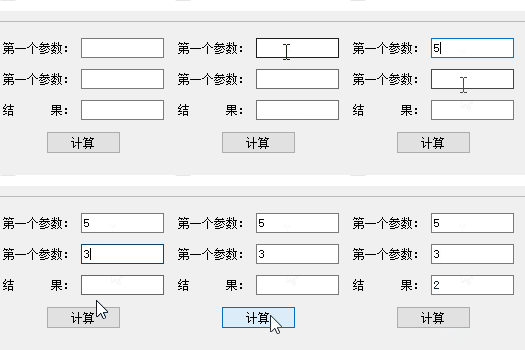
aaa
版权声明:本文为wb175208原创文章,遵循CC 4.0 BY-SA版权协议,转载请附上原文出处链接和本声明。