第1关:认识Pregel API
简介
Spark GraphX中提供了方便开发者的基于谷歌Pregel API的迭代算法,因此可以用Pregel的计算框架来处理Spark上的图数据。GraphX的Pregel API提供了一个简明的函数式算法设计,用它可以在图中方便的迭代计算,如最短路径、关键路径、n度关系等,也可以通过对一些内部数据集的缓存和释放缓存操作来提升性能。
编程要求
根据图1运用pregel函数找出距离Ann最远的顶点。补全代码中的内容,使得程序运行结果如预期输出。具体请参见后续测试样例。
测试说明
平台会对你编写的代码进行测试:
测试输入:
预期输出:
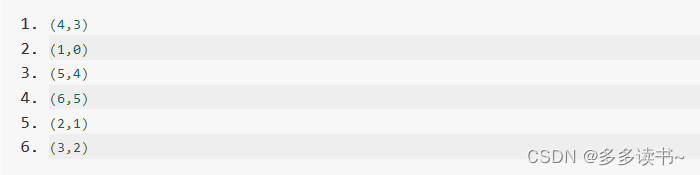
import org.apache.log4j.{Level, Logger}
import org.apache.spark.{SparkConf, SparkContext}
import org.apache.spark.graphx._

object farthest_distance{
  def main(args: Array[String]): Unit = {
    val conf = new SparkConf().setAppName("farthest distance").setMaster("local[4]")
    val sc = new SparkContext(conf) //屏蔽日志
    Logger.getLogger("org.apache.spark").setLevel(Level.WARN)
    Logger.getLogger("org.eclipse.jetty.server").setLevel(Level.OFF)
    //构造图
    val myVertices = sc.parallelize(Array((1L,"Ann"),(2L,"Bill"),(3L,"Diane"),(4L,"Cody"),(5L,"Adam"),(6L,"Bob")))
    val myEdges = sc.parallelize(Array(Edge(1L,2L,""),Edge(2L,3L,""),Edge(2L,4L,""),Edge(3L,4L,""),Edge(4L,5L,"C"),Edge(4L,6L,""),Edge(5L,6L,""))) //构造EdgeRDD
    val myGraph = Graph(myVertices,myEdges)
    //**************Begin*************************

    //使用pregel函数找到距离Ann(1号)最远的顶点
    val g=Pregel(myGraph.mapVertices((vid,vd) => 0),0,
      activeDirection=EdgeDirection.Out)(
      (id:VertexId, vd:Int, a:Int) => math.max(vd,a),
      (et:EdgeTriplet[Int,String]) => Iterator((et.dstId,et.srcAttr+1)),
      (a:Int,b:Int) => math.max(a,b))
    //得到返回的新图的顶点集合
    val result = g.vertices.collect
    println("")
    //输出结果
    result.foreach(println)

    //**************End**************************
  }
}
第2关:寻找社交媒体中的“影响力用户”
任务描述
本关主题是在Twitter数据中,寻找“影响力用户”,简单而言就是找图中出度最大的节点。一个独立的推特用户可以通过他/她的推文影响到N个级别,即followers of followers of followers… 。本关卡只考虑2级,即一个用户的followers of followers。
在txt文件中每一行代表一个关系,前面一个是followee名称和id,后一个是follower的名称和id,其中用逗号隔开。图中的箭头是从followee指向follower,所以也可以表示成寻找被关注最多的人。twitter-graph-data.txt文件内容如图2所示。由于图中没有给每一条边的属性,所以默认就是1,或者也可以赋值成其他的一些提示信息。
编程要求
根据算法提示和代码中的注释,补全代码中的内容,以使得程序运行结果如预期输出。
测试说明
平台会对你编写的代码进行测试:
测试输入:
预期输出: User36 has maximum influence on network with 95 influencers.
import org.apache.spark.graphx.{Edge, EdgeDirection, Graph, VertexId}
import org.apache.spark.rdd.RDD
import org.apache.spark.{SparkConf, SparkContext}
object Twitter_test{
  def main(args: Array[String]): Unit = {
    val conf = new SparkConf().setAppName("Twitter Influencer").setMaster("local[*]")
    val sparkContext = new SparkContext(conf)
    sparkContext.setLogLevel("ERROR")
    //读取文件
    val twitterData = sparkContext.textFile("/root/data/twitter-graph-data.txt")
    //分别从文本文件中提取followee和follower的数据
    val followeeVertices: RDD[(VertexId, String)] = twitterData.map(_.split(",")).map {
      arr =>
        val user = arr(0).replace("((", "")
        val id = arr(1).replace(")", "")
        (id.toLong, user)
    }
    //根据followee的提取方法,提取follower的数据
    val followerVertices: RDD[(VertexId, String)] = twitterData.map(_.split(",")).map {
      arr =>
        val user = arr(2).replace("(", "")
        val id = arr(3).replace("))", "")
        (id.toLong, user)
    }
    //根据提取的数据创建图
    val vertices = followeeVertices.union(followerVertices)
    val edges: RDD[Edge[String]] = twitterData.map(_.split(",")).map { arr =>
      val followeeId = arr(1).replace(")", "").toLong
      val followerId = arr(3).replace("))", "").toLong
      Edge(followeeId, followerId, "follow")
    }
    val defaultUser = ("")
    val graph = Graph(vertices, edges, defaultUser)
    //使用Pregel API和广度优先遍历算法,最大迭代次数为2
    val subGraph = graph.pregel("", 2, EdgeDirection.In)((_, attr, msg) =>
      attr + "," + msg,
      //sendMsg函数,发送follower的属性到源顶点,
      //以便可以在Twitter上累积跟随个人用户的所有2级用户。
      triplet => Iterator((triplet.srcId, triplet.dstAttr)),
      //mergeMsg函数将属性用“,”连接
      (a, b) => (a + "," + b))
    //**************Begin*************************

    //找到拥有最多followers of followers的用户,对subGraph的顶点属性进行切分,除去重复属性,并计算长度
    val lengthRDD = subGraph.vertices.map(vertex =>
      (vertex._1, vertex._2.split(",").distinct.length - 2))
      .max()(new Ordering[Tuple2[VertexId, Int]]() {
        override def compare(x: (VertexId, Int), y: (VertexId, Int)): Int =
          Ordering[Int].compare(x._2, y._2)
      })
    //找出拥有一个最多跟随者的顶点
    val userId = graph.vertices.filter(_._1 == lengthRDD._1).map(_._2).collect().head
    println("")
    //输出结果
    println(userId + " has maximum influence on network with " + lengthRDD._2 + " influencers.")

    //**************End**************************
    sparkContext.stop()
  }
}