

1、点击文件
2、在弹出的页面中选择首选项
3、在首选项的弹出的页面选择用户片段
4、在弹出的页面选择新代码片段
在这里我创建的文件为javascript.json
{
	// Place your snippets for javascript here. Each snippet is defined under a snippet name and has a prefix, body and
	// description. The prefix is what is used to trigger the snippet and the body will be expanded and inserted. Possible variables are:
	// $1, $2 for tab stops, $0 for the final cursor position, and ${1:label}, ${2:another} for placeholders. Placeholders with the
	// same ids are connected.
	// Example:
	// "Print to console": {
	// 	"prefix": "log",
	// 	"body": [
	// 		"console.log('$1');",
	// 		"$2"
	// 	],
	// 	"description": "Log output to console"
	// }
	"Print to console": {
		"prefix": "log",
		"body": [
			"console.log('$1');",
			"$2"
		],
		"description": "Log output to console"
	},
	"create Annotation": {
		"prefix": "/**",
		"body": [
			"/**",
			"* @Description",
			"* @author xx",
			"* @date ${CURRENT_YEAR}-${CURRENT_MONTH}-${CURRENT_DATE} ${CURRENT_HOUR}:${CURRENT_MINUTE}:${CURRENT_SECOND}",
		    "*/"
		],
		"description": "创建注释"
	}
}
在函数中输入/**会提示如下图1,选中该项则图2
图1
图2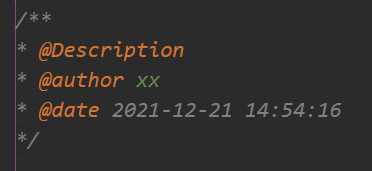
版权声明:本文为weixin_44980864原创文章,遵循CC 4.0 BY-SA版权协议,转载请附上原文出处链接和本声明。