目录
0x00 验证码:
如果是完整版:
0.config中配置验证码
1.如果开启了强制路由则配置路由,如果没有开启,则前端可以直接访问/captcha 来获取验证码图片
2.后端可以直接调用 captcha_check($data['code'])来判断验证码是否正确
如果是核心版,需要先composer 验证码类
1.首先在tp根目录下,通过composer获取验证码代码
如果下载速度过慢,建议修改中文镜像,composer
2.在index.html中加入:
   <div>{:captcha_img()}</div>
   //或者
   <img src="{:captcha_src()}" alt="">
但是以上这种写法不能在后端验证验证码是否正确,也不能对验证码进行设置。
建议如下写法:
首先在,indexController中的类中创建一个验证码函数
public function captcha(){
    $captcha = new Captcha();
    //生成验证码
    return $captcha->entry();
  }
当然,要先引入对应命名空间下的Captcha类,use think\captcha\Captcha;
因为vendor下src下的captcha类的命名空间就是这样写的:
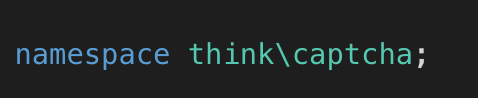
然后在route.php下配置对应路由:
Route::get('captcha','index/IndexController/captcha');index.html
<img src="/tp5.0.11/public/index.php/captcha" alt="">0x01 配置验证码:
可以直接写在config.php下

也可以:
public function captcha(){
    $config = [
      'fontSize'=>30,
      'length'=>4,
      'imageW'=>200,
      'imageH'=>50,
    ];
    $captcha = new Captcha($config);
    //生成验证码
    return $captcha->entry();
  }
如果一个配置很多文件都要用的话,建议在application/extra(创建该文件夹)下创建一个captcha.php,将配置写在该文件中
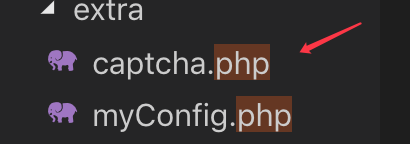
<?php
return [
    'fontSize'=>30,
      'length'=>4,
      'imageW'=>200,
      'imageH'=>50,
];
然后在indexController.php中获取该文件的内容即可
  public function captcha(){
    $config = Config::get('captcha')
    $captcha = new Captcha($config);
    //生成验证码
    return $captcha->entry();
  }
后端如何验证输入的验证码是否正确呢?
先new Captcha() 然后调用cap->check()将接收到的用户输入的验证码传入该函数,如果用户输入的正确,那么该函数就返回true,如果用户输入错误,就返回false
public function register(Request $request){
      $validate = validate('UserValidate');
      $cap = new Captcha();
      $arr_data = $request->param();
      if(!$validate->check($arr_data)){
          $this->error($validate->getError(),'/tp5.0.11/public/index.php/index');
      }else{
          dump($arr_data);
          $res = $cap->check($arr_data['captcha']);
          dump($res);
      }
  }
还有一种更简单的方式:
tp5内置了对验证码验证的功能,即在规则中添加对验证码的验证即可
验证码input框的name =>'require| length:验证码的长度|captcha'
captcha对验证码的内容进行验证。
 protected $rule = [
        'username'=>'require|length:6,12|token',
        'email'=>'require|email',
        'pwd'=>'require',
        'captcha'=>'require|length:4|captcha'
    ];
版权声明:本文为weixin_43415644原创文章,遵循CC 4.0 BY-SA版权协议,转载请附上原文出处链接和本声明。