UITableView在iOS开发中用处很广,当然其用法也是有些复杂的,特别是在设计UITableViewCell的时候,使用和处理cell是一个不小的挑战,对于cell位置的移动我们可以使用- (void)tableView:(UITableView )tableView moveRowAtIndexPath:(NSIndexPath)sourceIndexPath toIndexPath:(NSIndexPath *)destinationIndexPath方法来做到,移动cell的方式无非就是在同一个section之间的移动和在不同的section之间移动,但是cell的位置改变是一个难点,我做了一个小demo,总结了一些经验,解决了这两个问题。
1、同一个section之间cell位置的移动
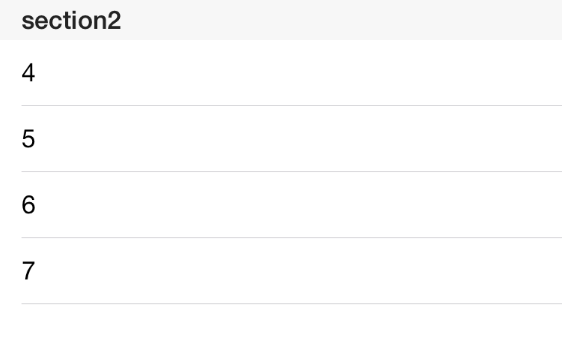
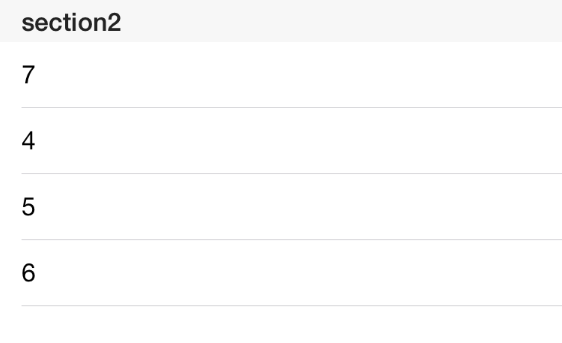
点击section2的一个cell之后,这个cell移动到这个section的顶部位置,而原来的第一条cell则按顺序移动到第二位,代码如下:
- (void)tableView:(UITableView *)tableView didSelectRowAtIndexPath:(NSIndexPath *)indexPath{
    //取消cell被点击时出现的背景阴影
    [tableView deselectRowAtIndexPath:indexPath animated:YES];
    //sourceIndexPath是被点击cell的IndexPath
    NSIndexPath *sourceIndexPath = [NSIndexPath indexPathForRow:indexPath.row inSection:1];
    //destinationIndexPath是section2顶部第一条cell的位置
    NSIndexPath *destinationIndexPath = [NSIndexPath indexPathForRow:0 inSection:1];
    //获取被点击cell对应的数据
    NSString *str1 = [dataListSecond objectAtIndex:indexPath.row];
    //对数据源进行操作,修改数据源
    [dataListSecond removeObject:str1];
    [dataListSecond insertObject:str1 atIndex:0];
    //移动cell的位置
    [myTable moveRowAtIndexPath:sourceIndexPath toIndexPath:destinationIndexPath];
    }
效果如图:
2、在不同section之间移动cell
跨section移动cell,section1中的cell始终只有一条,点击section2中的任意一条cell,移动这条cell至section1,而section1中原来的cell被移动到section2中顶部cell的位置,代码如下
 - (void)tableView:(UITableView *)tableView didSelectRowAtIndexPath:(NSIndexPath *)indexPath{
    [tableView deselectRowAtIndexPath:indexPath animated:YES];
    //sourceIndexPath是section2中被点击cell的IndexPath
    NSIndexPath *sourceIndexPath = [NSIndexPath indexPathForRow:indexPath.row inSection:1];
    //destinationIndexPath是section2顶部第一条cell的位置
    NSIndexPath *destinationIndexPath = [NSIndexPath indexPathForRow:0 inSection:0];
    //获取被点击cell对应的数据
    NSString *str1 = [dataListSecond objectAtIndex:indexPath.row];
    //删除section2的数据源中被点击cell对应的数据
    [dataListSecond removeObject:str1];
    //在section1对应的数据源中插入被点击cell对应的数据
    [dataListOne insertObject:str1 atIndex:0];
    //从section2中移动cell至section1中
    [myTable moveRowAtIndexPath:sourceIndexPath toIndexPath:destinationIndexPath];
    if ([dataListOne count]>1) {
        //section1中原来的cell所在的indexPath
        NSIndexPath *newSource = [NSIndexPath indexPathForRow:1 inSection:0];
        //section2中顶部cell所在的indexPath
        NSIndexPath *newDestination = [NSIndexPath indexPathForRow:0 inSection:1];
        //获取section1中原来cell的数据
        NSString *str2 = [dataListOne objectAtIndex:1];
        //移除section1数据源中原来的数据
        [dataListOne removeObject:str2];
        //在section2中插入section1原来cell的数据,并放在数据源的第一位置
        [dataListSecond insertObject:str2 atIndex:0];
        //从section1中移动section1原有的cell至section2的顶部位置
        [myTable moveRowAtIndexPath:newSource toIndexPath:newDestination];
    }
}
效果如图


完整代码如下
.h文件
#import <UIKit/UIKit.h>
@interface ViewController : UIViewController<UITableViewDelegate,UITableViewDataSource>
@end
.m文件
#import "ViewController.h"

@interface ViewController ()
@property (strong, nonatomic) UITableView *myTable;
@property (strong, nonatomic) NSMutableArray *dataListOne;
@property (strong, nonatomic) NSMutableArray *dataListSecond;
@end

@implementation ViewController
@synthesize myTable;
@synthesize dataListOne,dataListSecond;
- (void)viewDidLoad {
    [super viewDidLoad];
    myTable = [[UITableView alloc]initWithFrame:CGRectMake(0, 20, [[UIScreen mainScreen]bounds].size.width, [[UIScreen mainScreen]bounds].size.height)];
    myTable.delegate = self;
    myTable.dataSource = self;
    myTable.tableFooterView = [[UIView alloc]initWithFrame:CGRectZero];
    dataListOne = [[NSMutableArray alloc]initWithObjects:@"1",nil];
    dataListSecond = [[NSMutableArray alloc]initWithObjects:@"4",@"5",@"6",@"7",nil];
    [self.view addSubview:myTable];
}
- (NSInteger)numberOfSectionsInTableView:(UITableView *)tableView{
    return 2;
}

- (NSInteger)tableView:(UITableView *)tableView numberOfRowsInSection:(NSInteger)section{
    switch (section) {
        case 0:
            return [dataListOne count];
        case 1:
            return [dataListSecond count];
        default:
            return 0;
    }
}
//创建cell并填充cell的内容
- (UITableViewCell *)tableView:(UITableView *)tableView cellForRowAtIndexPath:(NSIndexPath *)indexPath{
    static NSString *identifier = @"cell";
    UITableViewCell *cell = [tableView dequeueReusableCellWithIdentifier:identifier];
    if (!cell) {
        cell = [[UITableViewCell alloc]initWithStyle:UITableViewCellStyleDefault reuseIdentifier:identifier];
    }

    switch (indexPath.section) {
        case 0:
            cell.textLabel.text = [dataListOne objectAtIndex:indexPath.row];
            break;
        case 1:
            cell.textLabel.text = [dataListSecond objectAtIndex:indexPath.row];
            break;
        default:
            cell.textLabel.text = @"Unknown";
            break;
    }
    return cell;
}

- (NSString *)tableView:(UITableView *)tableView titleForHeaderInSection:(NSInteger)section{
    switch (section) {
        case 0:
            return @"section1";
        case 1:
            return @"section2";
        default:
            return @"Unknown";
    }
}

- (void)tableView:(UITableView *)tableView didSelectRowAtIndexPath:(NSIndexPath *)indexPath{
    [tableView deselectRowAtIndexPath:indexPath animated:YES];

    //sourceIndexPath是section2中被点击cell的IndexPath
    NSIndexPath *sourceIndexPath = [NSIndexPath indexPathForRow:indexPath.row inSection:1];
    //destinationIndexPath是section2顶部第一条cell的位置
    NSIndexPath *destinationIndexPath = [NSIndexPath indexPathForRow:0 inSection:0];
    //获取被点击cell对应的数据
    NSString *str1 = [dataListSecond objectAtIndex:indexPath.row];
    //删除section2的数据源中被点击cell对应的数据
    [dataListSecond removeObject:str1];
    //在section1对应的数据源中插入被点击cell对应的数据
    [dataListOne insertObject:str1 atIndex:0];
    //从section2中移动cell至section1中
    [myTable moveRowAtIndexPath:sourceIndexPath toIndexPath:destinationIndexPath];
    if ([dataListOne count]>1) {
        //section1中原来的cell所在的indexPath
        NSIndexPath *newSource = [NSIndexPath indexPathForRow:1 inSection:0];
        //section2中顶部cell所在的indexPath
        NSIndexPath *newDestination = [NSIndexPath indexPathForRow:0 inSection:1];
        //获取section1中原来cell的数据
        NSString *str2 = [dataListOne objectAtIndex:1];
        //移除section1数据源中原来的数据
        [dataListOne removeObject:str2];
        //在section2中插入section1原来cell的数据,并放在数据源的第一位置
        [dataListSecond insertObject:str2 atIndex:0];
        //从section1中移动section1原有的cell至section2的顶部位置
        [myTable moveRowAtIndexPath:newSource toIndexPath:newDestination];
    }
}
- (BOOL)tableView:(UITableView *)tableView canMoveRowAtIndexPath:(NSIndexPath *)indexPath{
    return YES;
}
版权声明:本文为abc649395594原创文章,遵循CC 4.0 BY-SA版权协议,转载请附上原文出处链接和本声明。