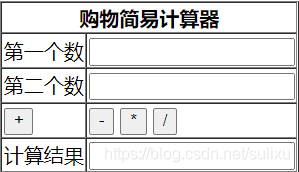
 要制作一个如图所示的简易计算器,首先要建立一个表单,制作出如图所示的样子。
<table border="1" cellspacing="0" >
			<tr><th colspan="2">购物简易计算器</th></tr>
			<tr>
				<td>第一个数</td>
			    <td><input type="text" id="inputId1" /></td>
			</tr>
			<tr>
				<td>第二个数</td>
			    <td><input type="text" id="inputId2" /></td>
			</tr>
			<tr>
				<td><button type="button" onclick="cal('+')" >+</button></td>
				<td><button type="button" onclick="cal('-')" >-</button>
				<button type="button" onclick="cal('*')" >*</button>
				<button type="button" onclick="cal('/')" >/</button></td>
			</tr>
			<tr>
				<td>计算结果</td>
				<td><input type="text" id="resultId"/></td>
			</tr>
		</table>
	onclick使用cal()方法,其实一开始我是使用add,sub,mul,div四种方法的,
	后来发现这四个方法除了算术运算符不一样,其他的地方都一样,所以选择使用
	一个方法,点击button,传给方法里的算术运算符不一样,代码如下:
	<script type="text/javascript">
		function cal(type){
			var num1 = document.getElementById('inputId1');
			var num2 = document.getElementById('inputId2');
			var result;
			switch(type){
				case '+':
				result = parseInt(num1.value) + parseInt(num2.value);
				break;
				case '-':
				result = parseInt(num1.value) - parseInt(num2.value);
				break;
				case '*':
				result = parseInt(num1.value) * parseInt(num2.value);
				break;
				case '/':
				result = parseInt(num1.value) / parseInt(num2.value);
				break;
			}
			var resultObj = document.getElementById('resultId');
			resultObj.value = result;
		}
	</script>
版权声明:本文为sulixu原创文章,遵循CC 4.0 BY-SA版权协议,转载请附上原文出处链接和本声明。