wx-charts
微信小程序主流的图表工具
基于 Canvas,体积小
支持图表类型
- 饼图 pie
- 圆环图 ring
- 线图 line
- 柱状图 column
- 区域图 area
- 雷达图 radar
如何使用
1. 直接拷贝编译好的文件 dist/wxcharts-min.js 到项目中(js下载地址)
import wxCharts from '../../utils/wxcharts-min.js'2. wxml 中定义
<canvas canvas-id="pieCanvas" disable-scroll="true" class="pieCanvas" style="width:300px; height:300px;"></canvas>canvas-id 与 new wxCharts({canvasId: ''}) 中的 canvasId 一致。
Demo
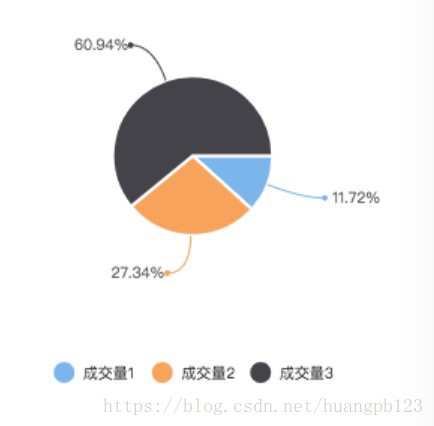
1. 饼图 pie
- new wxCharts({
- animation: true,
- canvasId: 'pieCanvas',
- type: 'pie',
- series: [{
- name: '成交量1',
- data: 15,
- }, {
- name: '成交量2',
- data: 35,
- }, {
- name: '成交量3',
- data: 78,
- }],
- width: 300,
- height: 300,
- })
2. 圆环图 ring
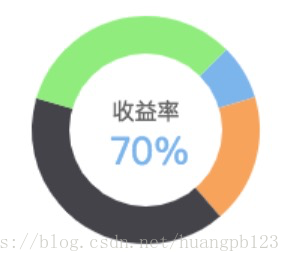
- new wxCharts({
- animation: true,
- canvasId: 'ringCanvas',
- type: 'ring',
- extra: {
- ringWidth: 25,
- pie: {
- offsetAngle: -45
- }
- },
- title: {
- name: '70%',
- color: '#7cb5ec',
- fontSize: 25
- },
- subtitle: {
- name: '收益率',
- color: '#666666',
- fontSize: 15
- },
- series: [{
- name: '成交量1',
- data: 15,
- stroke: false
- }, {
- name: '成交量2',
- data: 35,
- stroke: false
- }, {
- name: '成交量3',
- data: 78,
- stroke: false
- }, {
- name: '成交量4',
- data: 63,
- stroke: false
- }],
- disablePieStroke: true,
- width: 300,
- height: 300,
- dataLabel: false,
- legend: false,
- padding: 0
- })
3. 线图 line
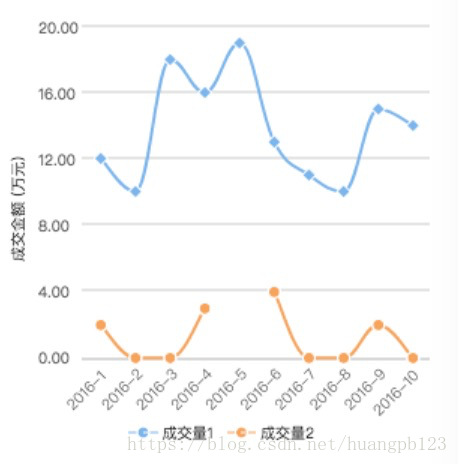
- new wxCharts({
- canvasId: 'lineCanvas',
- type: 'line',
- categories: [ '2016-1', '2016-2', '2016-3', '2016-4', '2016-5', '2016-6', '2016-7', '2016-8', '2016-9', '2016-10'],
- animation: true,
- series: [{
- name: '成交量1',
- data: [ 12, 10, 18, 16, 19, 13, 11, 10, 15, 14],
- format: function (val, name) {
- return val.toFixed( 2) + '万';
- }
- }, {
- name: '成交量2',
- data: [ 2, 0, 0, 3, null, 4, 0, 0, 2, 0],
- format: function (val, name) {
- return val.toFixed( 2) + '万';
- }
- }],
- xAxis: {
- disableGrid: true
- },
- yAxis: {
- title: '成交金额 (万元)',
- format: function (val) {
- return val.toFixed( 2);
- },
- min: 0
- },
- width: 300,
- height: 300,
- dataLabel: false,
- dataPointShape: true,
- extra: {
- lineStyle: 'curve'
- }
- })
4. 柱状图 column
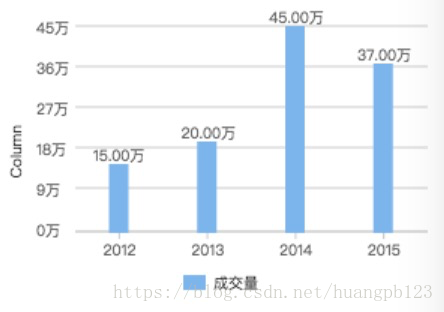
- new wxCharts({
- canvasId: 'columnCanvas',
- type: 'column',
- animation: true,
- categories: [ '2012', '2013', '2014', '2015'],
- series: [{
- name: '成交量',
- data: [ 15, 20, 45, 37],
- format: function (val, name) {
- return val.toFixed( 2) + '万';
- }
- }],
- yAxis: {
- format: function (val) {
- return val + '万';
- },
- title: 'Column',
- min: 0
- },
- xAxis: {
- disableGrid: false,
- type: 'calibration'
- },
- extra: {
- column: {
- width: 15
- }
- },
- width: 300,
- height: 200,
- });
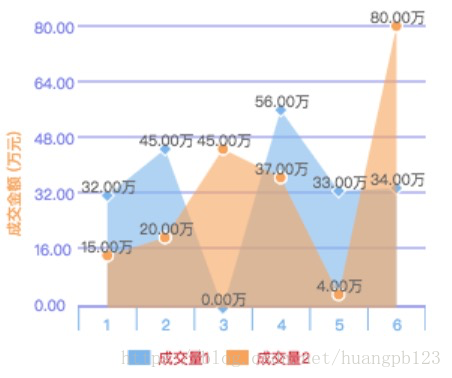
5. 区域图 area
- new wxCharts({
- canvasId: 'areaCanvas',
- type: 'area',
- categories: [ '1', '2', '3', '4', '5', '6'],
- animation: true,
- series: [{
- name: '成交量1',
- data: [ 32, 45, 0, 56, 33, 34],
- format: function (val) {
- return val.toFixed( 2) + '万';
- }
- }, {
- name: '成交量2',
- data: [ 15, 20, 45, 37, 4, 80],
- format: function (val) {
- return val.toFixed( 2) + '万';
- },
- }],
- yAxis: {
- title: '成交金额 (万元)',
- format: function (val) {
- return val.toFixed( 2);
- },
- min: 0,
- fontColor: '#8085e9',
- gridColor: '#8085e9',
- titleFontColor: '#f7a35c'
- },
- xAxis: {
- fontColor: '#7cb5ec',
- gridColor: '#7cb5ec'
- },
- extra: {
- legendTextColor: '#cb2431'
- },
- width: 300,
- height: 250
- });
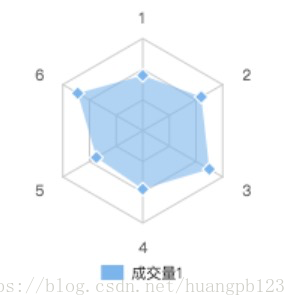
6. 雷达图 radar
- new wxCharts({
- canvasId: 'radarCanvas',
- type: 'radar',
- categories: [ '1', '2', '3', '4', '5', '6'],
- series: [{
- name: '成交量1',
- data: [ 90, 110, 125, 95, 87, 122]
- }],
- width: 300,
- height: 200,
- extra: {
- radar: {
- max: 150
- }
- }
- });
参数说明
- opts Object
- opts.canvasId String Required 对应wxml中的canvasId
- opts.type String Required 图表类型,可选值为:pie、line、column、area、ring、radar
- opts.width Number Required canvas宽度,单位px
- opts.height Number Required canvas高度,单位px
- opts.legend Boolean 是否显示图表下方各类别的标识,默认true
- opts.background String canvas背景颜色 ,默认#fff
- opts.animation Boolean 是否动画展示,默认true
- opts.enableScroll Boolean 是否开启图表可拖拽滚动,默认false,支持 line、area 图表类型(需配合绑定scrollStart, scroll, scrollEnd 方法)
- opts.categories Array Required 数据类别分类 (pie、ring 图表不需要)
- opts.dataLabel Boolean 是否在图表中显示数据内容值,默认true
- opts.dataPointShare Boolean 是否在图表中显示数据点图形标识,默认true
- opts.xAxis Object X轴配置
- opts.xAxis.gridColor String X轴网格颜色
- opts.xAxis.fontColor String X轴数据点颜色
- opts.xAxis.disableGrid Boolean 不绘制X轴网格,默认false
- opts.xAxis.type String 可选值:calibration(刻度),默认包含样式
- opts.yAxis Object Y轴配置
- opts.yAxis.format Function 自定义Y轴文案显示
- opts.yAxis.min Number Y轴起始值
- opts.yAxis.man Number Y轴终止值
- opts.yAxis.title String Y轴title
- opts.yAxis.gridColor String Y轴网格颜色
- opts.yAxis.fontColor String Y轴数据点颜色
- opts.yAxis.titleFontColor String Y轴title颜色
- opts.yAxis.disabled Boolean 不绘制Y轴,默认false
- opts.extra Object 其它非通用配置项
- opts.extra.ringWidth Number ring圆环宽度,单位px
- opts.extra.lineStyle String 仅对line、area图表有效,可选值:curve曲线、straight直线,默认straight
- opts.extra.column Object column图表相关配置
- opts.extra.column.width Number 柱状图每项的图形宽度,单位px
- opts.extra.legendTextColor String legend文案颜色
- opts.series Array Required 数据列表
数据列表series每项参数说明
- dataItem Object
- dataItem.data Array Required 饼图、圆环图为Number数据,如果传入null,图表该处出现断点
- dataItem.color String 不传入则使用系统默认的配色方案
- dataItem.name String 数据名称
- dataItem.format Function 自定义显示数据内容
ring 图表相关配置
- opts.title Object 仅支持 ring 图表类型
- opts.title.name String 标题内容
- opts.title.fontSize Number 标题字体大小,单位px
- opts.title.color String 标题颜色
- opts.title.offsetX Number 标题横向位置偏移量,单位px,默认0
- opts.subtitle Object 仅支持 ring 图表类型
- opts.subtitle.name String 副标题内容
- opts.subtitle.fontSize Number 副标题字体大小,单位px
- opts.subtitle.color String 副标题颜色
- opts.subtitle.offsetX Number 副标题横向位置偏移量,单位px,默认0
radar 图表相关配置
- opts.extra.radar Object radar图表相关配置
- opts.extra.radar.max Number 数据区间最大值,用于调整数据显示的比例,默认series data的最大值
- opts.extra.radar.labelColor String 各项标识文案的颜色,默认#666
- opts.extra.radar.gridColor String 雷达图网格颜色,默认#ccc
pie、ring 图表相关配置
- opts.disablePieStroke Boolean 不绘制pie、ring图表各区块的白色分割线,默认false
- opts.extra.pie Object pie、ring图表相关配置
- opts.extra.pie.offsetAngle Number 起始角度偏移度数,顺时针方向,起点为3点钟位置(比如要设置起点为12点钟位置,即逆时针偏移90度,传入-90即可),默认0
官网
https://github.com/xiaolin3303/wx-charts
版权声明:本文为weixin_40709898原创文章,遵循CC 4.0 BY-SA版权协议,转载请附上原文出处链接和本声明。