Last updated: 2022-09-21, 15:10
1. 简介
下面对 TensorFlow 的基础知识进行简要概述。
TensorFlow 是一个端到端的机器学习平台,支持:
- 基于多维数组的数值计算(类似 NumPy);
- GPU 和分布式处理;
- 自动微分;
- 模型的构建、训练和导出;
- …
2. 张量
TensorFlow 将高维数组称为张量(tensor),以 tf.Tensor 对象表示。下面是一个二维张量:
import tensorflow as tf

x = tf.constant([[1., 2., 3.],
                 [4., 5., 6.]])
print(x)
print(x.shape)
print(x.dtype)
tf.Tensor(
[[1. 2. 3.]
 [4. 5. 6.]], shape=(2, 3), dtype=float32)
(2, 3)
<dtype: 'float32'>
shape 和 dtype 是 tf.Tensor 最重要的两个属性:
Tensor.shape,张量在各个轴上的大小;Tensor.dtype,张量包含的元素的类型。
TensorFlow 为张量实现了标准数学运算,以及许多用于机器学习的运算。例如:
>>> x = tf.constant([[1., 2., 3.],
                     [4., 5., 6.]])
>>> x + x # 元素加
<tf.Tensor: shape=(2, 3), dtype=float32, numpy=
array([[ 2.,  4.,  6.],
       [ 8., 10., 12.]], dtype=float32)>
>>> 5 * x # 元素乘
<tf.Tensor: shape=(2, 3), dtype=float32, numpy=
array([[ 5., 10., 15.],
       [20., 25., 30.]], dtype=float32)>
>>> x @ tf.transpose(x) # 矩阵乘
<tf.Tensor: shape=(2, 2), dtype=float32, numpy=
array([[14., 32.],
       [32., 77.]], dtype=float32)>
>>> tf.concat([x, x, x], axis=0) # 拼接
<tf.Tensor: shape=(6, 3), dtype=float32, numpy=
array([[1., 2., 3.],
       [4., 5., 6.],
       [1., 2., 3.],
       [4., 5., 6.],
       [1., 2., 3.],
       [4., 5., 6.]], dtype=float32)>
>>> tf.nn.softmax(x, axis=-1)
<tf.Tensor: shape=(2, 3), dtype=float32, numpy=
array([[0.09003057, 0.24472848, 0.6652409 ],
       [0.09003057, 0.24472848, 0.6652409 ]], dtype=float32)>
>>> tf.reduce_sum(x)
<tf.Tensor: shape=(), dtype=float32, numpy=21.0>
!NOTE 通常支持 Tensor 输入的 TF 函数,也支持可以使用 tf.convert_to_tensor 转换为张量的数据类型。如下所示。
tf.convert_to_tensor([1, 2, 3])
<tf.Tensor: shape=(3,), dtype=int32, numpy=array([1, 2, 3])>
tf.reduce_sum([1, 2, 3])
<tf.Tensor: shape=(), dtype=int32, numpy=6>
在 CPU 上运行大型运算可能会很慢,TensorFlow 支持使用 GPU 等加速硬件快速执行操作。查看配置环境是否支持 GPU:
if tf.config.list_physical_devices('GPU'):
  print("TensorFlow **IS** using the GPU")
else:
  print("TensorFlow **IS NOT** using the GPU")
详情请参考 Tensor 指南。
3. 变量
tf.Tensor 对象不可变(immutable),在 TensorFlow 中使用 tf.Variable 存储可变张量(如模型的权重必须可变)。
>>> var = tf.Variable([0.0, 0.0, 0.0])
>>> var
<tf.Variable 'Variable:0' shape=(3,) dtype=float32, numpy=array([0., 0., 0.], dtype=float32)>
>>> var.assign([1, 2, 3])
<tf.Variable 'UnreadVariable' shape=(3,) dtype=float32, numpy=array([1., 2., 3.], dtype=float32)>
>>> var.assign_add([1, 1, 1])
<tf.Variable 'UnreadVariable' shape=(3,) dtype=float32, numpy=array([2., 3., 4.], dtype=float32)>
详情请参考变量指南。
4. 自动微分
梯度下降 及其相关算法是现代机器学习的基石。
为了实现梯度下降算法,TensorFlow 实现了自动微分(autodiff)功能,即使用微积分计算梯度。一般用来计算模型的误差(error)或损失(loss)相对权重(weight)的梯度。例如:
>>> x = tf.Variable(1.0)
>>> def f(x):
      y = x**2 + 2*x - 5
      return y
>>> f(x)
<tf.Tensor: shape=(), dtype=float32, numpy=-2.0>
在 x = 1.0 x=1.0x=1.0 时,y = f ( x ) = ( 1 2 + 2 × 1 − 5 ) = − 2 y=f(x)=(1^2+2\times 1-5)=-2y=f(x)=(12+2×1−5)=−2。
y yy 的导数 y ′ = f ′ ( x ) = ( 2 × x + 2 ) = 4 y'=f'(x)=(2\times x+2)=4y′=f′(x)=(2×x+2)=4。TensorFlow 可以自动完成该计算:
>>> with tf.GradientTape() as tape:
      y = f(x)
>>> g_x = tape.gradient(y, x)  # g(x) = dy/dx
>>> g_x
<tf.Tensor: shape=(), dtype=float32, numpy=4.0>
这里只是对单个标量 x 求导,TensorFlow 可以同时对任意数量的非标量张量计算梯度。
详情请参考 梯度和自动微分指南。
5. Graph 和 tf.function
除了像使用 Python 库一样交互式地使用 TensorFlow,TensorFlow 还支持:
- 性能优化,加快训练和推理;
- 导出模型,在训练完后保存模型。
要使用这些功能,需要使用 tf.function 将纯 TensorFlow 代码和常规 Python 代码区分开:
@tf.function
def my_func(x):
  print('Tracing.\n')
  return tf.reduce_sum(x)
第一次在 Python 中执行 tf.function,TensorFlow 会捕获一个完整的、优化的计算图(graph),用来表示函数中 TensorFlow 执行的计算。
>>> x = tf.constant([1, 2, 3])
>>> my_func(x)
Tracing.
<tf.Tensor: shape=(), dtype=int32, numpy=6>
再次调用 my_func,TensorFlow 只执行优化的 graph,跳过非 TensorFlow 操作。如下所示,再次调用 my_func 不打印 “Tracing”,因为 print 是 Python 函数,不是 TensorFlow 函数。
>>> x = tf.constant([10, 9, 8])
>>> my_func(x)
<tf.Tensor: shape=(), dtype=int32, numpy=27>
对不同签名(shape 和 dtype)的输入,graph 无法重用,此时会生成一个新的计算图:
x = tf.constant([10.0, 9.1, 8.2], dtype=tf.float32)
my_func(x)
Tracing.
<tf.Tensor: shape=(), dtype=float32, numpy=27.3>
捕获计算图有两个好处:
- 大多时候执行速度显著提高;
- 可以使用
tf.saved_model保存计算图。
详情请参考 Graph 指南。
6. Module, layer 和 model
tf.Module 类用于管理变量 tf.Variable 以及对变量进行的操作 tf.function。tf.Module 支持两个重要特性:
- 支持使用 tf.train.Checkpoint 保存和恢复变量值。该功能在训练模型期间十分有用,可用来快速保存和恢复模型状态;
- 支持使用
tf.saved_model导入和导出tf.Variable值和tf.function计算图。
下面演示导出 tf.Module 对象:
class MyModule(tf.Module):
  def __init__(self, value):
    self.weight = tf.Variable(value)

  @tf.function
  def multiply(self, x):
    return x * self.weight
>>> mod = MyModule(3)
>>> mod.multiply(tf.constant([1, 2, 3]))
<tf.Tensor: shape=(3,), dtype=int32, numpy=array([3, 6, 9])>
保存 Module:
>>> save_path = './saved'
>>> tf.saved_model.save(mod, save_path)
INFO:tensorflow:Assets written to: .saved\assets
保存的 SavedModel 不依赖于创建它的代码,保存后可以从 Python、其它绑定语言或 TensorFlow Serving 中重新加载该模型。也可以在 TensorFlow Lite 或 TensorFlow JS 中运行。
>>> reloaded = tf.saved_model.load(save_path)
>>> reloaded.multiply(tf.constant([1, 2, 3]))
<tf.Tensor: shape=(3,), dtype=int32, numpy=array([3, 6, 9])>
tf.keras.layers.Layer 和 tf.keras.Model 类都是在 tf.Module 的基础上构建,额外提供了便于构建、训练和保存模型的方法。
详情请参考 模块、层和模型指南。
7. 训练循环
现在将上面的功能组合在一起,创建一个简单的模型,并从头开始训练。
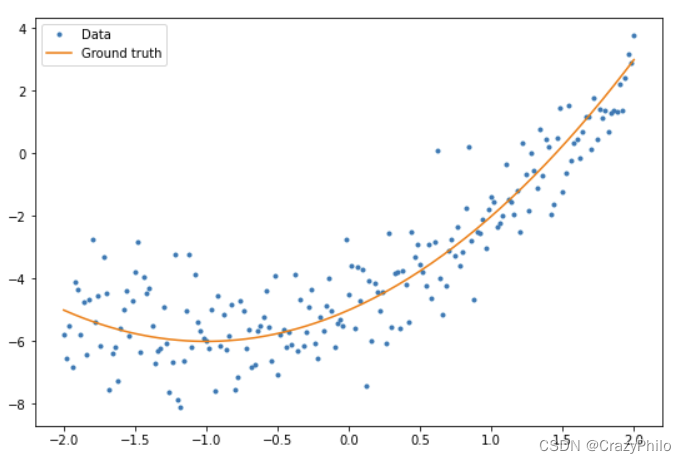
首先,生成一些样本数据,下面生成一组大致符合二次曲线的数据点:
import matplotlib
from matplotlib import pyplot as plt

matplotlib.rcParams['figure.figsize'] = [9, 6]
x = tf.linspace(-2, 2, 201)
x = tf.cast(x, tf.float32)

def f(x):
    y = x ** 2 + 2 * x - 5
    return y

y = f(x) + tf.random.normal(shape=[201])

plt.plot(x.numpy(), y.numpy(), '.', label='Data')
plt.plot(x, f(x), label='Ground truth')
plt.legend()
使用随机初始化的 weights 和 bias 创建模型:
class Model(tf.Module):

    def __init__(self):
        # 随机生成 weight 和 bias
        rand_init = tf.random.uniform(shape=[3], minval=0., maxval=5., seed=22)
        # 初始化模型参数
        self.w_q = tf.Variable(rand_init[0])
        self.w_l = tf.Variable(rand_init[1])
        self.b = tf.Variable(rand_init[2])

    @tf.function
    def __call__(self, x):
        # Quadratic Model : quadratic_weight * x^2 + linear_weight * x + bias
        return self.w_q * (x ** 2) + self.w_l * x + self.b
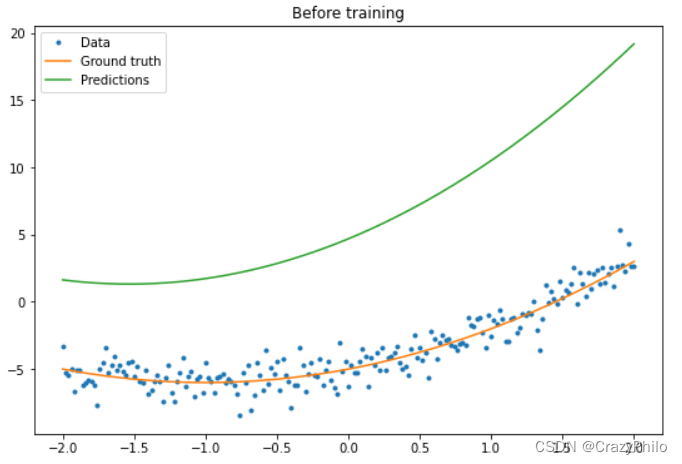
在训练前,先观察一下模型的表现:
quad_model = Model()
def plot_preds(x, y, f, model, title):
    plt.figure()
    plt.plot(x, y, '.', label='Data')
    plt.plot(x, f(x), label='Ground truth')
    plt.plot(x, model(x), label='Predictions')
    plt.title(title)
    plt.legend()
plot_preds(x, y, f, quad_model, 'Before training')
然后,为模型定义损失函数。
鉴于该模型旨在预测连续值,使用均方误差(MSE)作为损失函数就挺好。给定预测向量 y ^ \hat{y}y^ 和目标向量 y yy,MSE 定义为预测值和真实值之间平方差的均值。
M S E = 1 m ∑ i = 1 m ( y ^ i − y i ) 2 MSE=\frac{1}{m}\sum_{i=1}^m (\hat{y}_i-y_i)^2MSE=m1i=1∑m(y^i−yi)2
def mse_loss(y_pred, y):
    return tf.reduce_mean(tf.square(y_pred - y))
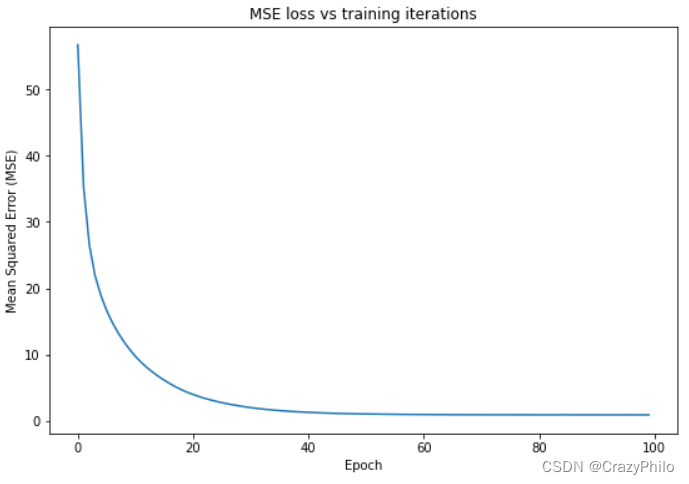
接下来编写训练循环。在循环中利用 MSE 损失函数及其相对输入的梯度,迭代更新模型参数。使用小批量(mini-batch)进行训练既省内存,又可以加快收敛速度。tf.data.Dataset 包含批处理和洗牌功能。
batch_size = 32
dataset = tf.data.Dataset.from_tensor_slices((x, y))
dataset = dataset.shuffle(buffer_size=x.shape[0]).batch(batch_size)
# 设置训练参数
epochs = 100
learning_rate = 0.01
losses = []

# 定义训练循环
for epoch in range(epochs):
    for x_batch, y_batch in dataset:
        with tf.GradientTape() as tape:
            batch_loss = mse_loss(quad_model(x_batch), y_batch)
        # 根据梯度更新模型参数
        grads = tape.gradient(batch_loss, quad_model.variables)
        for g, v in zip(grads, quad_model.variables):
            v.assign_sub(learning_rate * g)
    # 记录每个 epoch 模型的 loss
    loss = mse_loss(quad_model(x), y)
    losses.append(loss)
    if epoch % 10 == 0:
        print(f'Mean squared error for step {epoch}: {loss.numpy():0.3f}')

# Plot model results
print("\n")
plt.plot(range(epochs), losses)
plt.xlabel("Epoch")
plt.ylabel("Mean Squared Error (MSE)")
plt.title('MSE loss vs training iterations');
Mean squared error for step 0: 56.740
Mean squared error for step 10: 9.715
Mean squared error for step 20: 3.977
Mean squared error for step 30: 1.997
Mean squared error for step 40: 1.282
Mean squared error for step 50: 1.042
Mean squared error for step 60: 0.954
Mean squared error for step 70: 0.923
Mean squared error for step 80: 0.913
Mean squared error for step 90: 0.909
查看训练后模型的表现:
plot_preds(x, y, f, quad_model, 'After training')
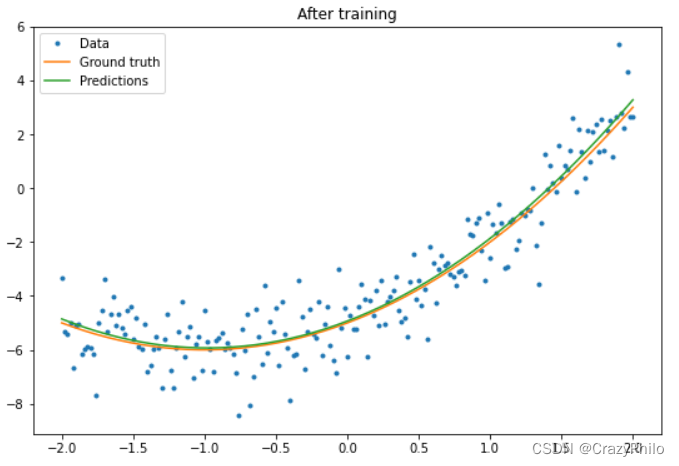
可以看到效果还不错。不过 tf.keras 模块提供了通用训练工具,不需要自己写 for 循环进行训练,上面的代码可以更简洁。例如,使用 Model.compile 和 Model.fit 实现训练循环。
首先使用 tf.keras.Sequential 创建一个 Keras Sequential 模型。Keras 中全连接层是最简单的 layer 之一,用 tf.keras.layers.Dense 表示。全连接层能够学习 Y = W X + b → Y=WX+\overrightarrow{b}Y=WX+b 形式的多维线性关系。为了学习 w 1 x 2 + w 2 x + b w_1x^2+w_2x+bw1x2+w2x+b 形式的非线性方程,Dense 的输入应为以 x 2 x^2x2 和 x xx 为特征的矩阵。可以用 tf.keras.layers.Lambda 执行这种堆叠转换。
new_model = tf.keras.Sequential([
    tf.keras.layers.Lambda(lambda x: tf.stack([x, x ** 2], axis=1)),
    tf.keras.layers.Dense(units=1, kernel_initializer=tf.random.normal)])
new_model.compile(
    loss=tf.keras.losses.MSE,
    optimizer=tf.keras.optimizers.SGD(learning_rate=0.01))

history = new_model.fit(x, y,
                        epochs=100,
                        batch_size=32,
                        verbose=0)

new_model.save('./my_new_model')
INFO:tensorflow:Assets written to: ./my_new_model\assets
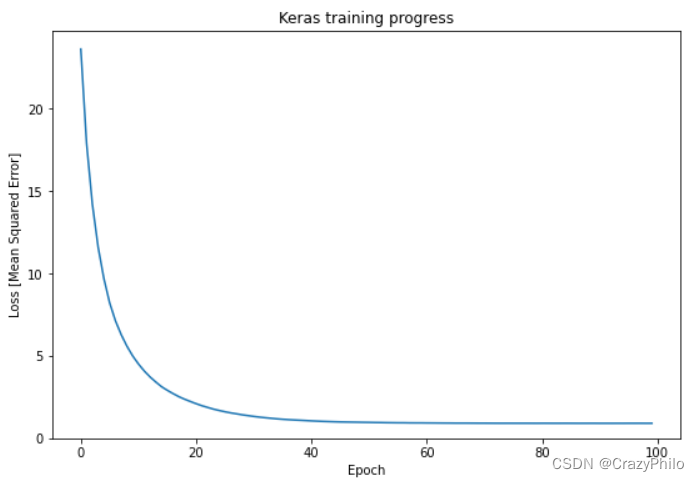
查看训练后模型的性能:
plt.plot(history.history['loss'])
plt.xlabel('Epoch')
plt.ylim([0, max(plt.ylim())])
plt.ylabel('Loss [Mean Squared Error]')
plt.title('Keras training progress');
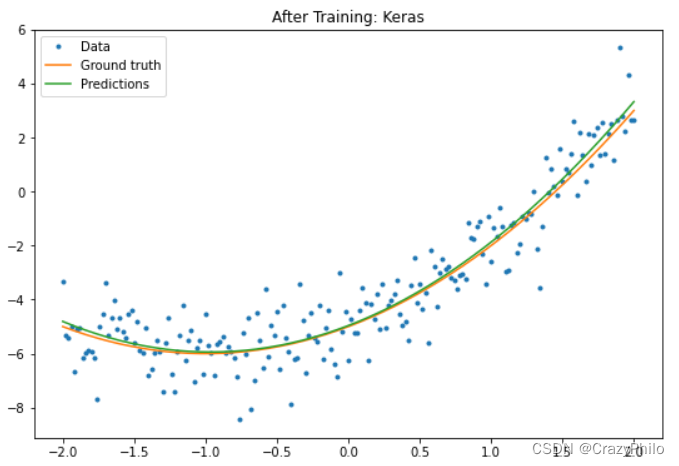
plot_preds(x, y, f, new_model, 'After Training: Keras')
详情请参考训练循环指南。
8. 参考
- https://www.tensorflow.org/guide/basics