前些天发现了一个巨牛的人工智能学习网站,通俗易懂,风趣幽默,忍不住分享一下给大家。点击跳转到网站。
一般情况下,springboot默认会在resource目录下生成一个配置文件(application.properties或application.yaml),但其实springboot允许配置多个配置文件(application.properties或application.yaml),但是这并不意味着这些配置文件一定会替换默认生成的配置文件,它们是互补的存在。如果在某些场景下需要把配置文件单独拿出来并且启动的时候加载进去,那么外部的配置文件将是一个很好的选择。
配置文件加载顺序
需要注意的是配置文件加载顺序加载顺序在springboot 2.4.0前后是不一样的。
springboot 2.4.0及其之前版本的配置文件加载顺序
file:./config/
file:./config/*/
file:./
classpath:config/
classpath:springboot 2.4.0之后版本的配置文件加载顺序
file:./config/*/
file:./config/
file:./
classpath:config/
classpath:
区别在于springboot 2.4.0之后的版本将file:./config/*/的在顺序调整为第一加载顺序。
file是指当前jar包所在路径。
classpath是指springboot resource文件夹下路径。
验证
前期准备
新建一个springboot项目
启动类如下:@SpringBootApplication
public class MqApplication {public static void main(String[] args) { ConfigurableApplicationContext applicationContext = SpringApplication.run(MqApplication.class, args); ConfigurableEnvironment environment = applicationContext.getEnvironment(); String property = environment.getProperty("spring.application.name"); System.out.println("current spring.application.name="+property); }}
配置文件:
spring.application.name=classpath
server.port=8080
为了验证 springboot 2.4.0之前和之后的版本加载顺序的不一样,会使用两个版本对比。
对比版本:springboot 2.4.3 和 springboot 2.3.5.RELEASE
下面是不同路径下配置不同端口和应用名以便验证。
路径
端口号
application.name
file:./config/*/
8084
file:./config/*/
file:./config/
8083
file:./config/
file:./
8082
file:./
classpath:config/
8081
classpath:config/
classpath:
8080
classpath:
验证配置文件加载顺序
根据上述表格,将配置文件分别复制到不同的路径下创建配置文件并按表格修改spring.application.name和server.port属性值。
启动项目,下面是两个版本的启动信息:
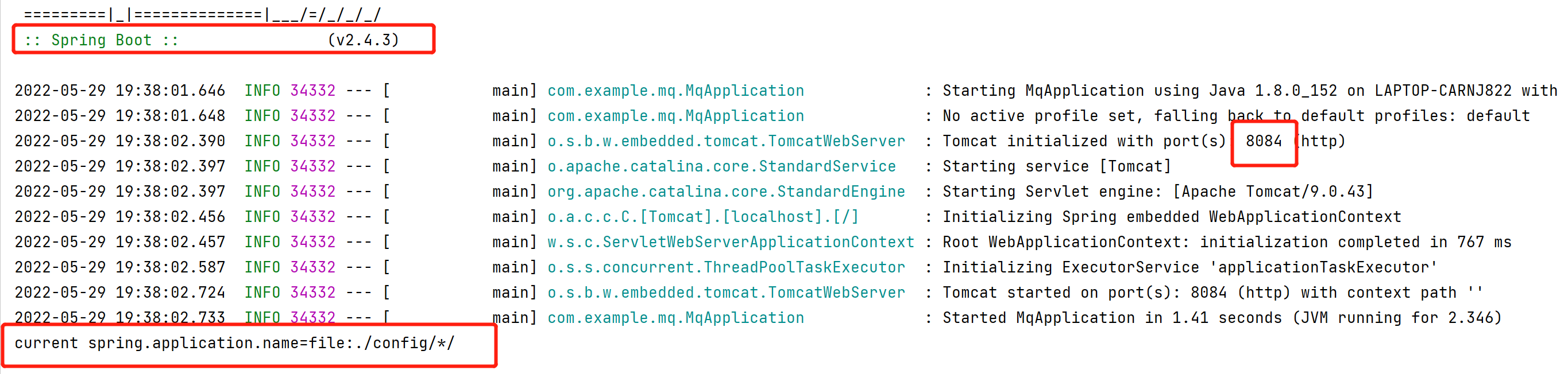
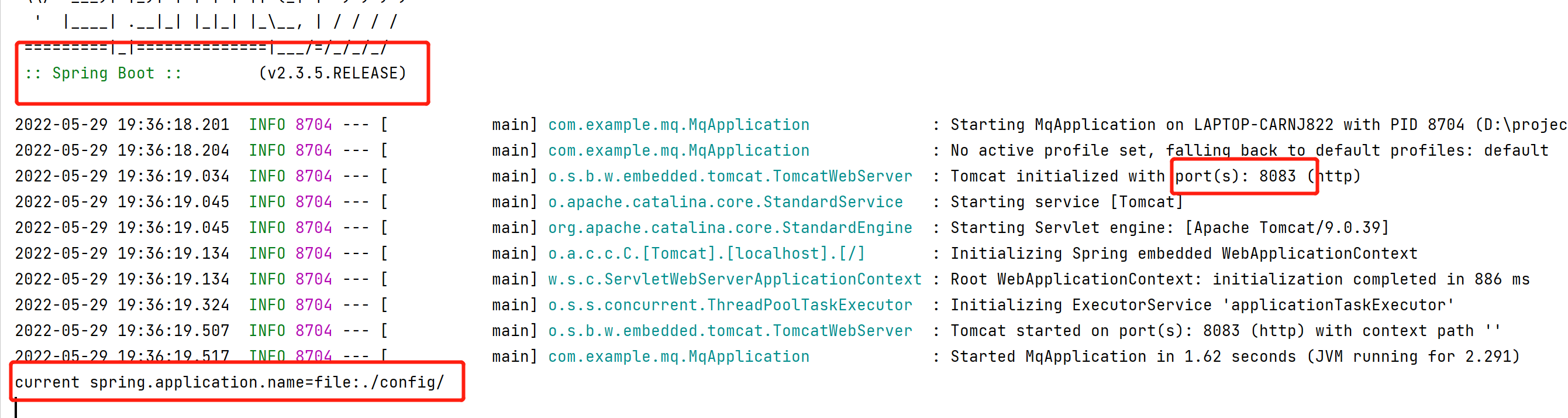
从两张图中可以得出结论:
- springboot 2.4.0前后配置文件加载顺序不一样
- 高优先级的会覆盖掉低优先级相同的属性
验证属性互补
- 修改配置文件:
classpath:配置文件
删除spring.application.name属性,增加server.error.path属性server.port=8080
server.error.path=/testfile:./配置文件
新增server.servlet.context-path属性spring.application.name=file:.
server.port=8082
server.servlet.context-path=file_contextfile:./config/*/配置文件
保持不变server.port=8084
spring.application.name=file:./config/*/
修改启动类main方法
在控制台打印server.error.pathpublic static void main(String[] args) {
ConfigurableApplicationContext applicationContext = SpringApplication.run(MqApplication.class, args);
ConfigurableEnvironment environment = applicationContext.getEnvironment();String property = environment.getProperty("spring.application.name"); System.out.println("current spring.application.name="+property); String errorPath = environment.getProperty("server.error.path"); System.out.println("errorPath="+errorPath); }启动项目
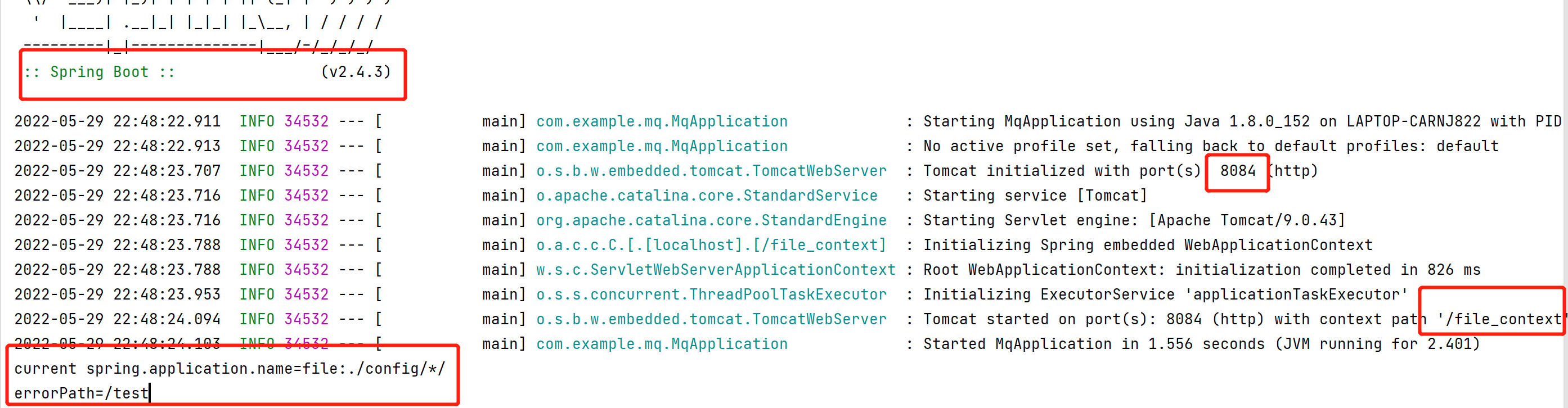
从上面截图中可以发现三个配置文件中的所有属性都被加载出来了,而且优先级高的配置文件中的属性会覆盖优先级低的配置文件中的属性。
总结
springboot中可以配置多个配置文件,并且这些配置文件是可以共存的。当属性相同时,优先级高的配置文件会覆盖优先级低的配置文件中的属性;当属性不同时,最终的配置会取各个配置文件中属性的并集。
能力一般,水平有限,如有错误,请多指出。
如果对你有用点个关注给个赞呗
更多文章可以关注一下我的微信公众号suncodernote
先自我介绍一下,小编13年上师交大毕业,曾经在小公司待过,去过华为OPPO等大厂,18年进入阿里,直到现在。深知大多数初中级java工程师,想要升技能,往往是需要自己摸索成长或是报班学习,但对于培训机构动则近万元的学费,着实压力不小。自己不成体系的自学效率很低又漫长,而且容易碰到天花板技术停止不前。因此我收集了一份《java开发全套学习资料》送给大家,初衷也很简单,就是希望帮助到想自学又不知道该从何学起的朋友,同时减轻大家的负担。添加下方名片,即可获取全套学习资料哦