代码:
<!DOCTYPE html>
<html lang="en">
<head>
    <meta charset="UTF-8">
    <title>Title</title>
</head>
<body>
    <table align="center" width="400px"  border="1px">
        <caption>新用户信息注册</caption>
        <form name="表单的名称" enctype="multipart/form-data" action="路径" method="提交方式">


        <tr height="40px">
            <td width="100px">
                用户名:
            </td>
            <td><input type="text"value="" placeholder="请输入账号:"></td>
        </tr>
        <tr height="40px">
            <td>密码:</td>
            <td><input type="password"value="" placeholder="请输入密码:"></td>
        </tr>
        <tr height="40px">
            <td>Email</td>
            <td><input type="email"value="" placeholder="请输入Email:"></td>
        </tr>
        <tr height="40px">
            <td>姓名:</td>
            <td><input type="text" placeholder="请输入姓名:"></td>
        </tr>
        <tr height="40px">
            <td>手机号:</td>
            <td><input type="tel" placeholder="请输入你的手机号:"></td>
        </tr>
        <tr height="40px">
            <td>性别:</td>
            <td><input type="radio" name="sex" value="男">男
                <input type="radio" name="sex" value="女">女</td>
        </tr>
        <tr height="40px">
            <td>出生日期:</td>
            <td><input type="date"></td>
        </tr>
        <tr height="40px">
            <td>验证码:</td>
            <td><input type="text"value="" placeholder="请输入验证码:"></td>
        </tr>
        <tr height="40px" align="center">
            <td colspan="2">
                <input type="submit" value="注册">
            </td>

        </tr>
        </form>
    </table>
</body>
</html>
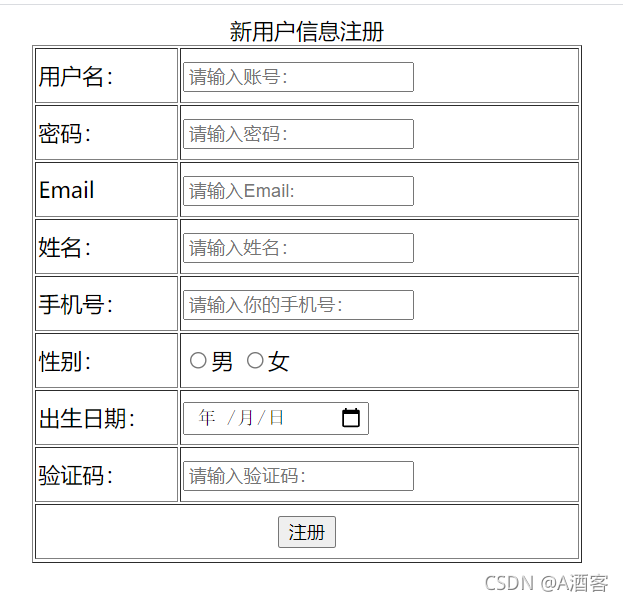
结果:
版权声明:本文为qq_54108380原创文章,遵循CC 4.0 BY-SA版权协议,转载请附上原文出处链接和本声明。