
Swagger
专业与开源,用于设计与共享APIs在线文档的工具,解决IT人员懒于更新与维护接口文档的通病,目前已逐渐成为行业规范。
引入Swagger步骤
1.项目pom.xml加入maven依赖
        <!--   Swagger依赖  -->
        <!-- https://mvnrepository.com/artifact/io.springfox/springfox-swagger2 -->
        <dependency>
            <groupId>io.springfox</groupId>
            <artifactId>springfox-swagger2</artifactId>
            <version>2.9.2</version>
        </dependency>

        <!-- https://mvnrepository.com/artifact/io.springfox/springfox-swagger-ui -->
        <dependency>
            <groupId>io.springfox</groupId>
            <artifactId>springfox-swagger-ui</artifactId>
            <version>2.9.2</version>
</dependency> 2.增加swagger配置文件
@Configuration
@EnableSwagger2
public class SwaggerConfig {
    @Bean
    public Docket createRestApi() {
        return new Docket(DocumentationType.SWAGGER_2)
                .apiInfo(apiInfo())
                .select()
                .apis(RequestHandlerSelectors.basePackage("com.example.demo"))
                .paths(PathSelectors.any())
                .build();
    }

    /**
     * Swagger 相关配置
     * 包括:标题、说明、
     * 访问URL:http://localhost:8080/swagger-ui.html#
     * 创建人
     *
     * @return
     */
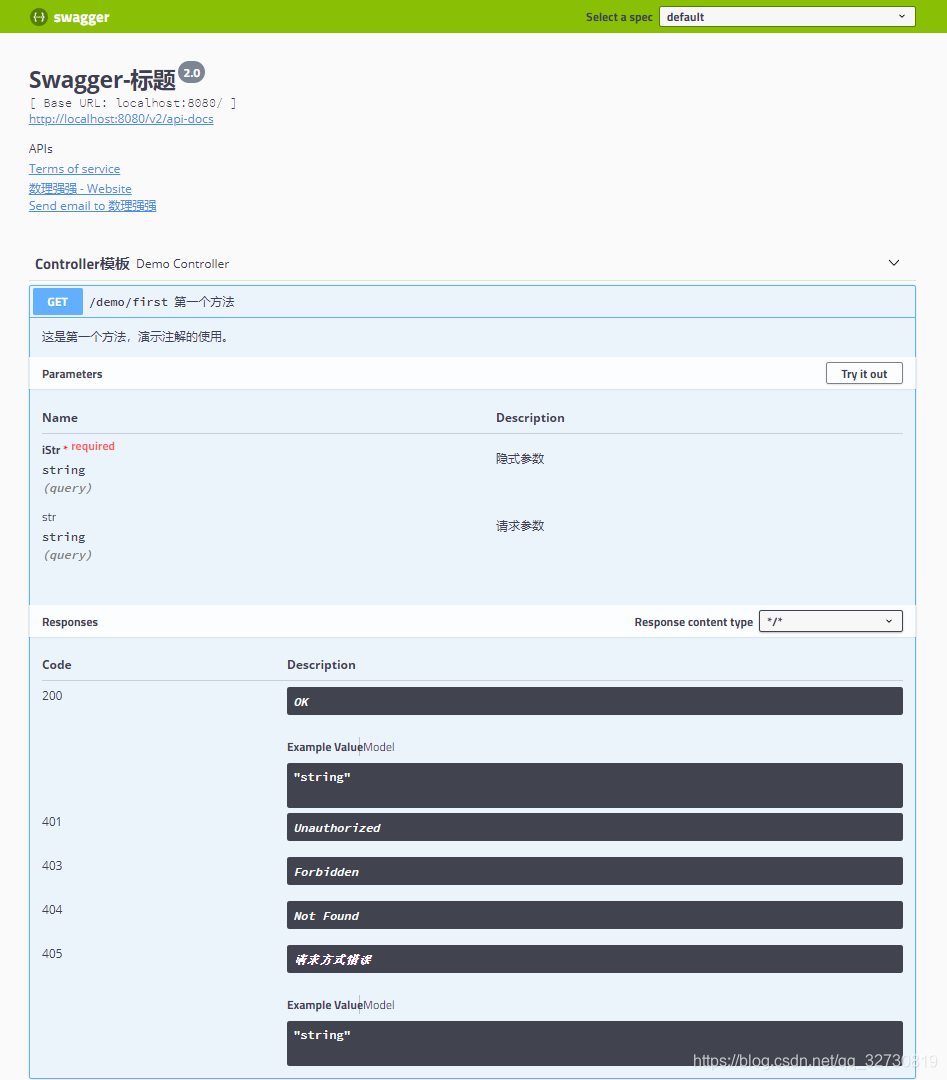
    private ApiInfo apiInfo() {
        return new ApiInfoBuilder()
                .title("Swagger-标题")
                .description("APIs")
                .termsOfServiceUrl("http://localhost:8080/")
                .contact(
                        new Contact(
                                "数理强强",
                                "https://blog.csdn.net/qq_32730819/article/details/106628710",
                                "750646705@qq.com")
                )
                .version("2.0")
                .build();
    }
}
常用注解
@Api 接口类说明
- tag 标签说明
@ApiOperation 接口方法说明
- value 方法说明
- notes 实施说明
@ApiParam 请求参数说明
- value 参数描述
@ApiimplicitParams 接口方法请求参数说明
@ApiImplicitParam 接口方法参数详细说明
- name 参数名
- value 参数描述
- paramType 参数类型 query
- dataType 数据类型
- required = true/false
@ApiResponses 接口方法返回结果说明
@ApiResponse 接口方法返回结果详细说明
- code HTTP Status Code
- message 消息
@ApiModel 请求参数&返回结果实体类对象说明
@ApiModelProperty 具体属性详解
@Slf4j
@RestController
@Api(tags = "Controller模板")
@RequestMapping(value = "demo")
public class DemoController {

    /**
     * first
     *
     * @param str
     * @return
     */
    @ApiOperation(value = "第一个方法", notes = "这是第一个方法,演示注解的使用。")
    @GetMapping(value = "/first")
    @ApiImplicitParams({
            @ApiImplicitParam(name = "iStr", value = "隐式参数", paramType = "query", dataType = "string", required = true)
    })
    @ApiResponses({
            @ApiResponse(code = 405, message = "请求方式错误", response = String.class)
    })
    public String first(
            @RequestParam @ApiParam(value = "请求参数") String str
    ) {
        System.out.println("begin-------------------------------------------");
        log.error("str:{}", str);
        System.out.println("end-------------------------------------------");
        return str;
    }
}
版权声明:本文为qq_32730819原创文章,遵循CC 4.0 BY-SA版权协议,转载请附上原文出处链接和本声明。