1、加入Junit4及SpringJUnit4支持
<!-- junit -->
<dependency>
            <groupId>junit</groupId>
            <artifactId>junit</artifactId>
            <scope>test</scope>
        </dependency>

<!-- spring-test -->
 <dependency>
        <groupId>org.springframework</groupId>
        <artifactId>spring-test</artifactId>
    </dependency>
2、创建测试类
(wins:右键菜单------->转到(G)------->测试(E) 可快捷在test包,相同目录下建立相应的测试类)
(ios:IntelliJ IDEA提供了一个快捷操作Cmd + Shift + T作为类和测试之间的导航。同时允许用户在那里创建一个测试类。)
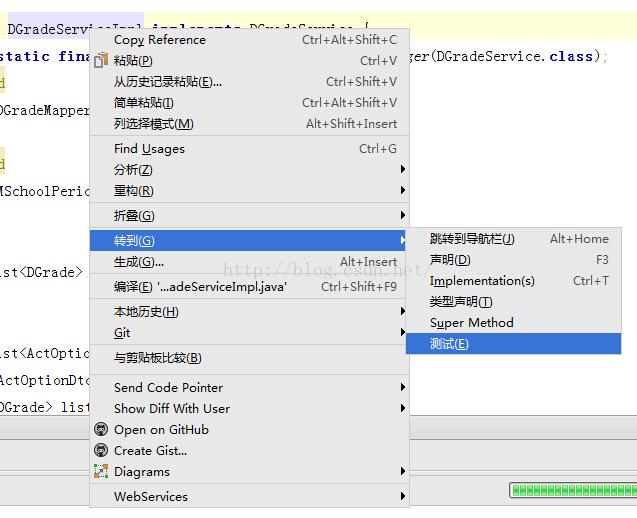
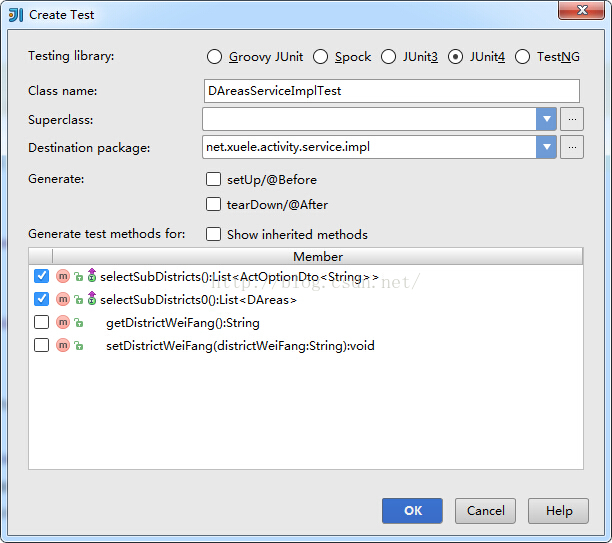
3、生成的代码如下:
package net.wll.web.service.impl;

import org.junit.Test;

import static org.junit.Assert.*;

public class DAreasServiceImplTest {

	@Test
	public void testSelectSubDistricts() throws Exception {

	}

	@Test
	public void testSelectSubDistricts0() throws Exception {

	}
}
4、增加Spring-test支持
package net.xuele.activity.service.impl;

import net.xuele.activity.domain.DAreas;
import net.xuele.activity.service.DAreasService;
import org.junit.Test;
import org.junit.runner.RunWith;
import org.springframework.test.context.ContextConfiguration;
import org.springframework.test.context.junit4.SpringJUnit4ClassRunner;
import javax.annotation.Resource;
import java.util.List;

@RunWith(SpringJUnit4ClassRunner.class)
/** 注入相关的配置文件:可以写入多个配置文件 **/
@ContextConfiguration(locations={"classpath:META-INF/spring/application-services.xml",
		"classpath:META-INF/spring/applicationContext-persist.xml"
})
public class DAreasServiceImplTest {
	@Resource
	private DAreasService dAreasService;

	@Test
	public void testSelectSubDistricts0() throws Exception {
		List<DAreas> dAreases =  this.dAreasService.selectSubDistricts0();
		System.out.println(dAreases.size());
	}
}版权声明:本文为xcwll314原创文章,遵循CC 4.0 BY-SA版权协议,转载请附上原文出处链接和本声明。