应用场景:接口幂等性是用户对于同一操作发起的一次请求或者多次请求的结果。有些用户会恶意点击某个按钮,服务器会执行很多无用的请求,虽然前端可以将按钮制灰也可以实现,但是有些人知道接口地址后会对某个接口用程序频繁发请求导致服务器崩溃。为了解决这个问题就要实现接口的幂等性。
简单实现方案:
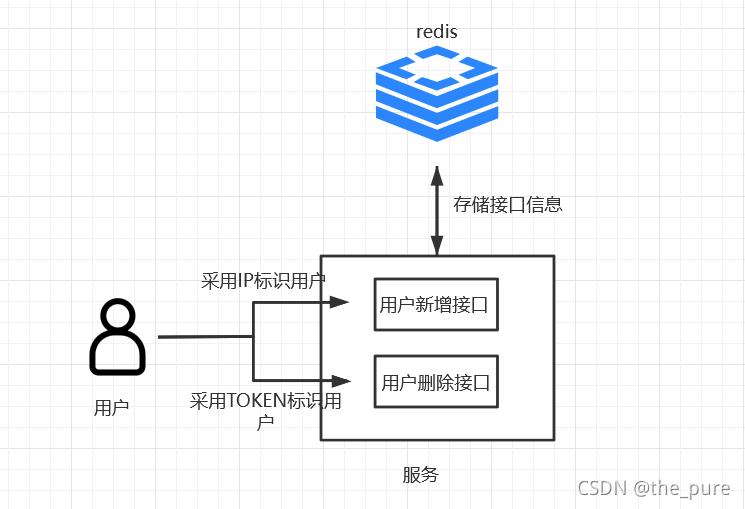
采用IP/Token方式来标识用户,根据具体情况来选择。
流程:
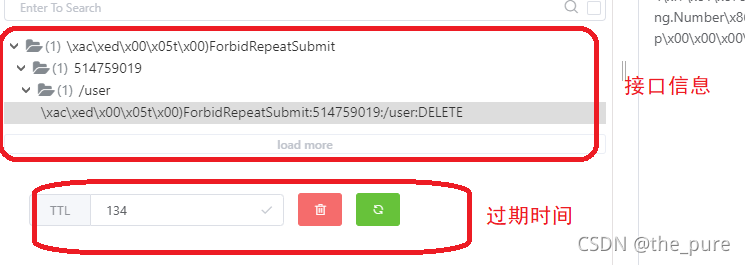
1、用户第一次访问接口时,redis中没有存储该接口的信息,执行方法,并将用户+接口信息存redis设置过期时间存入。
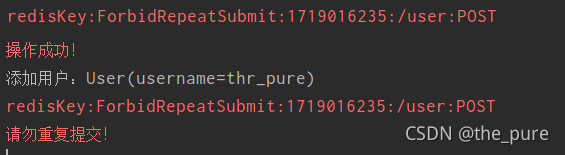
2、用户在过期时间内再次访问接口时,redis中存储有接口信息,不执行方法,即用户重复提交。
实践:
1.自定义注解
/**
 * @Description:
 * @Author: the_pure
 * @CreateDate: 2021/11/18 14:02
 */
@Target({ElementType.METHOD})
@Retention(RetentionPolicy.RUNTIME)
public @interface ForbidRepeatSubmit {
    /**
     * 防止接口重复提交时间 单位秒 默认1s
     * @return
     */
    long time() default 1L;

    /**
     * 判定类型 默认使用IP方式来判定是否同一个人
     * @return
     */
    SubmitEnum type() default SubmitEnum.IP;
}
2.判定类型的枚举
/**
 * @Description:
 * @Author: the_pure
 * @CreateDate: 2021/11/18 14:05
 */
public enum SubmitEnum {
    /**
     * IP锁定
     */
    IP,
    /**
     * TOKEN锁定
     */
    TOKEN
}
3.AOP切面处理
/**
 * @Description:
 * @Author: the_pure
 * @CreateDate: 2021/11/18 14:09
 */
@Aspect
@Component
public class ForbidRepeatSubmitHandler {
    @Autowired
    private RedisTemplate redisTemplate;

    /**
     * 切点
     */
    @Pointcut("@annotation(cn.zk.annatation.ForbidRepeatSubmit)")
    public void pointcut() {}

    /**
     * 环绕通知
     *
     * @return
     */
    @Around("pointcut()&&@annotation(ForbidRepeatSubmit)")
    public Object around(ProceedingJoinPoint joinPoint,ForbidRepeatSubmit ForbidRepeatSubmit) {
        Object obj = null;
        // 操作方法前判定是否提交过
        // 获取request请求
        ServletRequestAttributes attributes = (ServletRequestAttributes) RequestContextHolder
                .getRequestAttributes();
        HttpServletRequest request = attributes.getRequest();
        SubmitEnum type = ForbidRepeatSubmit.type();
        String key = "";
        if(SubmitEnum.IP.equals(type)){// IP
            // ForbidRepeatSubmit+地址+访问路径+访问方法类型
            key = "ForbidRepeatSubmit:"+request.getRemoteAddr().hashCode()
                    +":"+request.getServletPath()
                    +":"+request.getMethod();
        } else {// TOKEN
            // ForbidRepeatSubmit+TOKEN+访问路径+访问方法类型
            key = "ForbidRepeatSubmit:"+request.getHeader("Authorization").hashCode()
                    +":"+request.getServletPath()
                    +":"+request.getMethod();
        }
        System.err.println("redisKey:"+key);

        // 进行操作
        if(redisTemplate.opsForValue().get(key) == null) {
            try {
                obj = joinPoint.proceed();
                System.err.println("操作成功!");
                // 将该操作记录到redis
                redisTemplate.opsForValue().set(key,0,ForbidRepeatSubmit.time(), TimeUnit.SECONDS);
            } catch (Throwable e) {
                e.printStackTrace();
            }
        } else {// 重复提交不操作
            HashMap<String, Object> map = new HashMap<>();
            map.put("success",false);
            map.put("message","请勿重复提交!");
            obj = map;
            System.err.println("请勿重复提交!");
        }
        return obj;
    }
}
4.将注解使用在接口上
/**
 * @Description:
 * @Author: the_pure
 * @CreateDate: 2021/11/18 09:54
 */
@RestController
@RequestMapping("/user")
public class UserController {
   @Autowired
   private IUserService iUserService;

   @PostMapping
   @ForbidRepeatSubmit(type = SubmitEnum.IP,time = 3*60)// IP方式 三分钟内不能重复提交
   public Map<String,Object> add(@RequestBody User user) {
       HashMap<String, Object> map = new HashMap<>();
       try {
           iUserService.add(user);
           map.put("success",true);
       } catch (Exception e) {
           e.printStackTrace();
           map.put("success",false);
       } finally {
           return map;
       }
   }

    @DeleteMapping
    @ForbidRepeatSubmit(type = SubmitEnum.TOKEN,time = 3*60)// TOKEN方式 三分钟内不能重复提交
    public Map<String,Object> remove(@RequestBody Long userId) {
        HashMap<String, Object> map = new HashMap<>();
        try {
            iUserService.remove(userId);
            map.put("success",true);
        } catch (Exception e) {
            e.printStackTrace();
            map.put("success",false);
        } finally {
            return map;
        }
    }
}
验证:
1.使用IP判定方式
1.1.第一次访问接口
postman
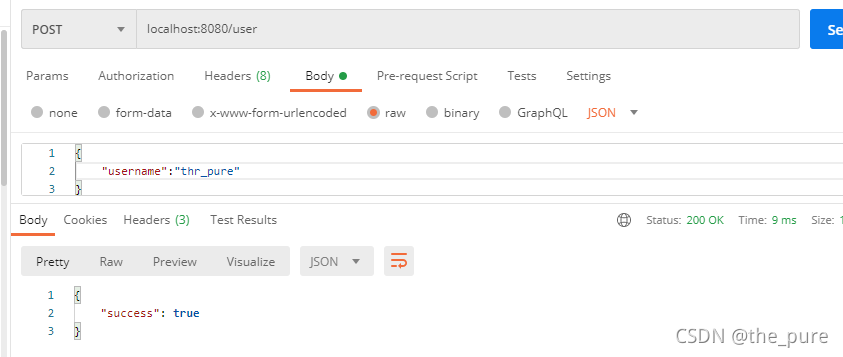
检查redis中是否存入接口信息
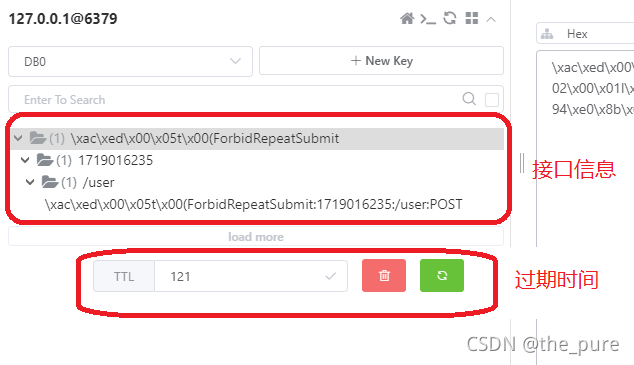
1.2.三分钟内第二次访问接口
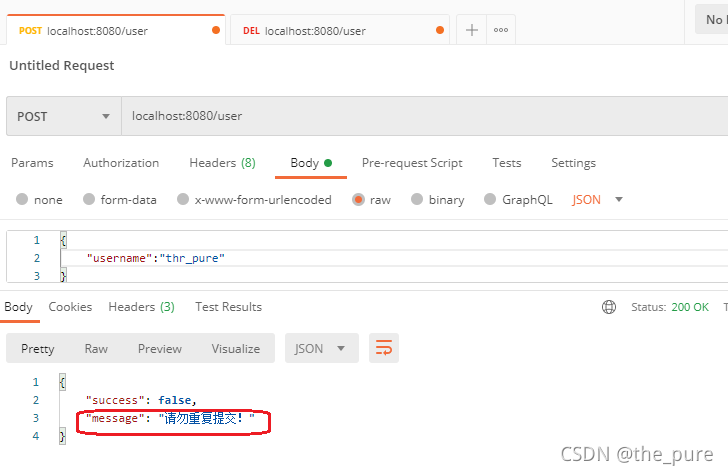
检查控制台输出信息:
2.使用Token判定
2.1.第一次访问接口
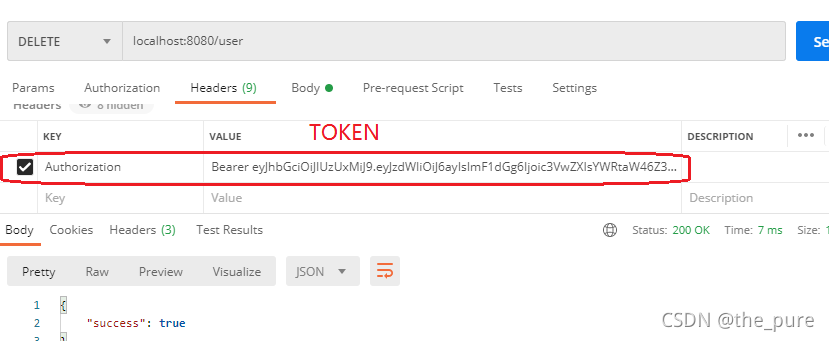
检查redis是否存入接口信息
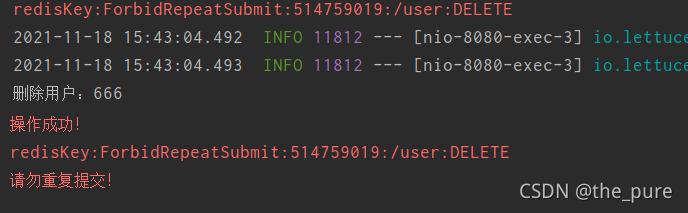
2.2.三分钟内第二次访问接口
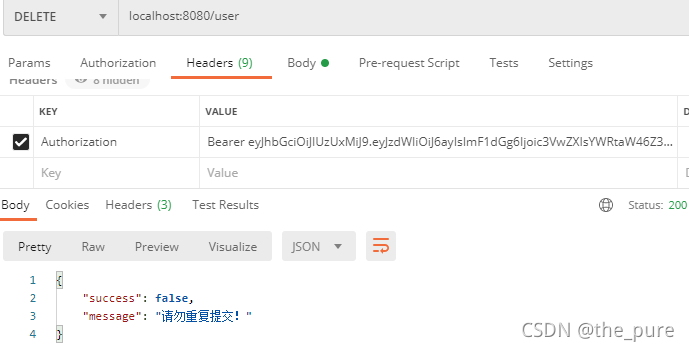
控制台信息:
版权声明:本文为the_pure原创文章,遵循CC 4.0 BY-SA版权协议,转载请附上原文出处链接和本声明。