
一、实验步骤
1、规划拓扑图,划分ip,如上图所示
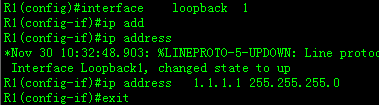
2、配置ip具体如下:(R1/R2/R3/R4操作流程一样,)

3、配置路由,R1---R4运行动态协议RIP,R2----R4运行动态协议ospf,R3----R4运行动态协议eigrp,具体如下:
#R1---R4
R1(config)#router rip
R1(config-router)#ve 2
R1(config-router)#no auto-summary
R1(config-router)#network 1.0.0.0
R1(config-router)#network 14.0.0.0
R4(config)#router rip
R4(config-router)#ve 2
R4(config-router)#no auto-summary
R4(config-router)#network 14.0.0.0
#查看rip路由表

#R2----R4
R2(config)#router ospf 1
R2(config-router)#router-id 2.2.2.2
R2(config-router)#network 2.2.0.0 0.0.255.255 area 0
R2(config-router)#network 24.1.1.0 0.0.0.255 area 0
R4(config)#router ospf 1
R4(config-router)#router-id 4.4.4.4
R4(config-router)#network 24.1.0.0 0.0.255.255 area 0
#查看ospf邻居关系

#R3----R4
R3(config)#router eigrp 89
R3(config-router)#no auto-summary
R3(config-router)#network 34.1.0.0
R3(config-router)#network 3.3.0.0
R4(config)#router eigrp 89
R4(config-router)#no auto-summary
R4(config-router)#network 34.1.0.0
#查看EIGRP邻居表

4、测试:
#R4---R1/R2/R3

#R1ping R2/R3的环回:
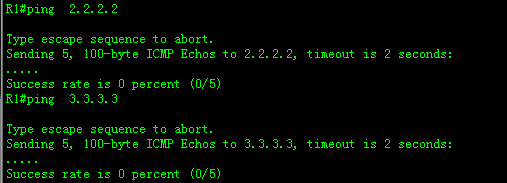
##为什么不通?查看路由表可以看出R1只有直连,没有其他路由。

##先分析实验,R4是一个ASBR,其上运行了3种不同的协议,那如何让3种不同的协议达成共鸣呢?通过路由引入,可以实现不同路由协议的路由学习,进而达到可以互相通信的目的。如思科用的是redistribute(重发布),华为是import-route。那什么是重发布呢?简单的讲,就是运行某个动态协议,把其它协议引到自己的协议中从而产生新路由(可到运行其它协议的路由)即为重发布,具体如下:
#运行RIP协议,把ospf协议 引入rip种
R4(config)#router rip
R4(config-router)#redistribute ospf 1 metric 1
#R1上查看路由表:

#测试:

不通的原因是R1有去目标的路由,但是没有返回的路由。
##解决R1pingR2环回不通的问题,R4上运行OSPF把rip引入,达到双向通信,具体如下:
R4(config)#router ospf 1
R4(config-router)#redistribute rip subnets
#查看路由表:

#测试:

****RIP和OSPF重发布双向通信注意事项****
5、将ospf重发布至RIP时,添加度量值,因为RIP的metric最大15,但导入ospf时其默认度量很大,所以重发布失败,如下:
R4(config)#router rip
R4(config-router)#redistribute ospf 1
#查看路由表为空:

6、将RIP重发布至OSPF时,若是ripv2,必须携带subnets,否则无法导入如下:

#查看ospf路由表为空:

7、将RIP重发布至OSPF时,如果是RIPv1:
#运行RIPV1
R1(config)#router rip
R1(config-router)#version 1
R1(config-router)#network 1.0.0.0
R1(config-router)#network 14.0.0.0
R4(config)#router rip
R4(config-router)#version 1
R4(config-router)#network 14.0.0.0
#重发布引路由
R4(config-router)#router rip
R4(config-router)#redistribute ospf 1 metric 1
R4(config)#router ospf 1
R4(config-router)#redistribute rip
% Only classful networks will be redistributed
(无论是RIPv1还是ripv2都必须携带掩码subnets)
R4(config-router)#redistribute rip subnets
#查看路由表,


##任何方式产生的路由发布进OSPF,默认metric都为20,且不叠加度量值。其类型为OE2。
8、EIGRP和RIP的单点双向重发布:
R4(config)#router rip
R4(config-router)#redistribute eigrp 89 metric 2
R4(config)#router eigrp 89
R4(config-router)#redistribute rip metric 1544 100 255 1 1500
#查看R1路由表:

#查看R3的路由表:

#测试:

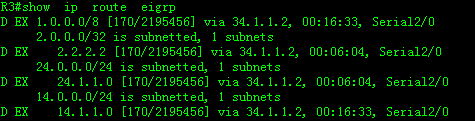
9、EIGRP和OSPF的单点双向重发布:
R4(config)#router ospf 1
R4(config-router)#redistribute eigrp 89 subnets
R4(config)#router eigrp 89
R4(config-router)#redistribute ospf 1 metric 1544 100 255 1 1500
#产看R2路由表:
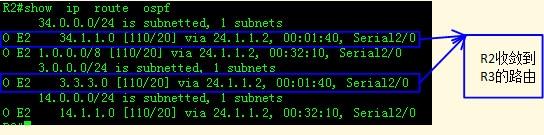
#查看R3的路由:
#测试:

10.全网可达(R4环回除外)
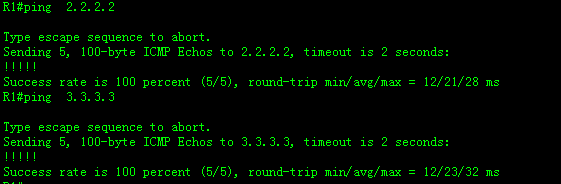
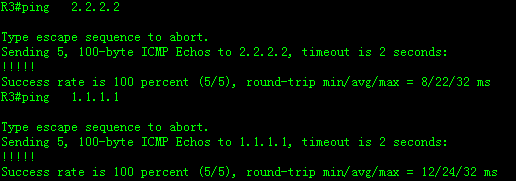
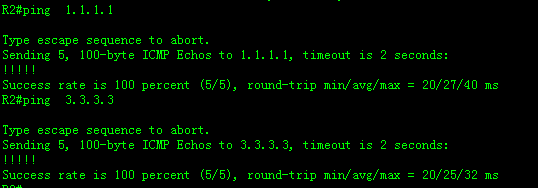
11、将静态、缺省、直连重发布进RIP:
#R2--R4静态路由:删除R2/R4的ospf协议
R2(config)#ip route 0.0.0.0 0.0.0.0 24.1.1.2
R4(config)#ip route 0.0.0.0 0.0.0.0 24.1.1.1
R4(config)#ip route 2.2.2.0 255.255.255.0 24.1.1.1
#运行动态协议rip,随后使用重发布技术引进静态协议
R4(config)#router rip
R4(config-router)#redistribute static
R4(config-router)#redistribute connected
#查看R1路由表:
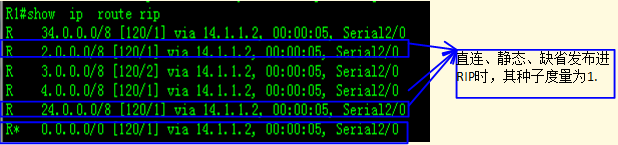
#测试:

12、将静态、直连、缺省重发布进eigrp:
#以R2/R3为例:
R2(config)#ip route 0.0.0.0 0.0.0.0 24.1.1.2
R4(config)#ip route 0.0.0.0 0.0.0.0 24.1.1.1
R4(config)#ip route 2.2.2.0 255.255.255.0 24.1.1.1
R4(config)#router eigrp 89
R4(config-router)#redistribute connected
R4(config-router)#redistribute static
#查看R3路由表(默认种子度量最佳)
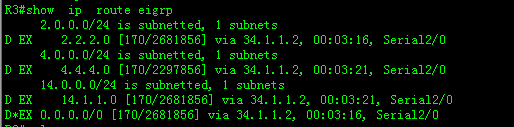
#测试:

13、将静态、直连、缺省重发布进ospf:
#配置ospf环境
R2(config)#router ospf 1
R2(config-router)#router-id 2.2.2.2
R2(config-router)#network 2.2.2.0 255.255.255.0 area 0
R2(config-router)#network 24.1.1.0 255.255.255.0 area 0
R4(config)#router ospf 1
R4(config-router)#router-id 4.4.4.4
R4(config-router)#network 24.1.1.0 255.255.255.0 area 0
#查看R4的邻居表:

#测试:

以R2为例,配静态、缺省,具体如下:
#静态、缺省
R1(config)#ip route 0.0.0.0 0.0.0.0 14.1.1.2
R4(config)#ip route 0.0.0.0 0.0.0.0 14.1.1.1
R4(config)#ip route 1.1.1.0 255.255.255.0 14.1.1.1
#运行OSPF协议,重发布静态、缺省。
R4(config)#router ospf 1
R4(config-router)#redistribute connected subnets
R4(config-router)#redistribute static subnets
#查看R2的路由表:
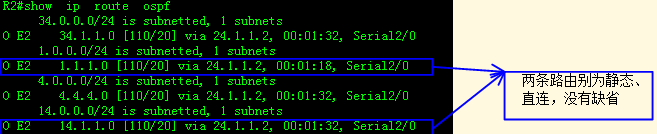
##静态缺省未发布至ospf中,因为ospf协议的缺省只能用命令。
#使用专用命令导入缺省具体如下:
R4(config)#router ospf 1
R4(config-router)#default-information originate
#再次查看路由表:(O*E2为缺省路由)
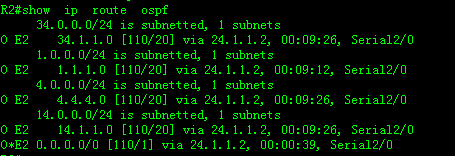
#测试:

14、RIP、ospf、eigrp正常重发布:
R4(config)#router rip
R4(config-router)#default-information originate
#R4的RIP上下发缺省,R1收敛到缺省
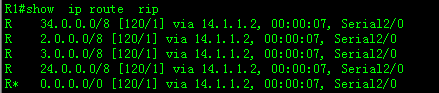
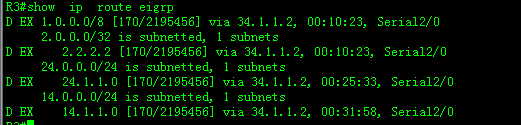
##因为重发布,按理说R3也收敛到缺省,但下图R3没有D* EX的路由,为什么呢?首先,应该重新认识一下重发布双向通信,ASBR在进行重发布时,是将自己的直连路由和通过直连学习到的路由发布给第三方,但不会把和自己直连的路由器学习到的路由发布给第三方,(如本实验在R4的RIP上下发缺省,R1收敛到了,但不会通过重发布把缺省发给R3)这样也避免重发布时的重复更新路由问题,如果ASBR把对端路由器学习到的路由也重发布,会造成路由占用资源。选路不佳等问题出现。
#R1上下发缺省:
R1(config)#router rip
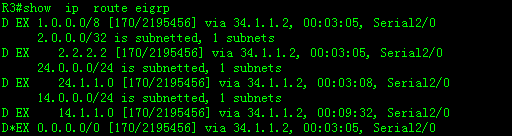
R1(config-router)#default-information originate
##因为R4通过直连收敛到缺省,重发步后R3也收敛到缺省,下图的缺省带D* EX,表明是从其它协议中收敛的路由。
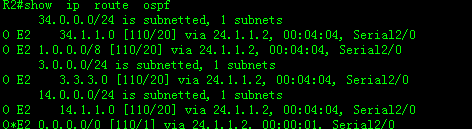
#R2是运行OSPf协议,没有用专项命令前的路由表。

#用专项命令后的路由表:
R4(config)#router ospf 1
R4(config-router)#default-information originate
#查看路由表:
#测试:

(上两张图说明访问某个ip,如果有路由但不通,以UUU结束,如果没有路,则以....结束)
*****本实验注意事项****
1.DV协议默认接受所有重发布进入的路由,包括缺省
2.LS协议在正常发布时收不到缺省,需要专项指令。
3.将外部路由导入OSPF时,默认为OE2,I度量为20,在内部传递时不叠加,OE1初始度量20,但在内部叠加,若存在多台ASBR,可修改为OE1