还在纠结于springboot整合jsp报404错误的小伙伴可以看向这里了,我这个方案使用的是内置的tomcat
1、新建springboot项目

2、写入项目名

3、不用进行dependencies选择,我们自己导

4、继续选择finish按钮
5、先看一下原始目录结构
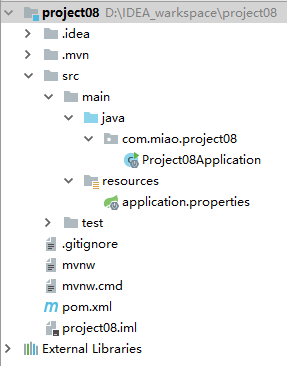
6、修改pom.xml文件的依赖,将原始的dependencies进行覆盖
<dependencies>
		<dependency>
			<groupId>org.springframework.boot</groupId>
			<artifactId>spring-boot-starter</artifactId>
		</dependency>
		<!-- web项目依赖 -->
		<dependency>
			<groupId>org.springframework.boot</groupId>
			<artifactId>spring-boot-starter-web</artifactId>
		</dependency>
		<dependency>
			<groupId>org.springframework.boot</groupId>
			<artifactId>spring-boot-starter-tomcat</artifactId>
		</dependency>
		<dependency>
			<groupId>org.apache.tomcat.embed</groupId>
			<artifactId>tomcat-embed-jasper</artifactId>
			<!--<scope>provided</scope> 注意,这个scope需要被注释掉-->
		</dependency>
		<!-- jsp标签库 -->
		<dependency>
			<groupId>javax.servlet</groupId>
			<artifactId>jstl</artifactId>
		</dependency>
		<dependency>
			<groupId>javax.servlet</groupId>
			<artifactId>javax.servlet-api</artifactId>
			<scope>provided</scope>
		</dependency>
		<dependency>
			<groupId>org.springframework.boot</groupId>
			<artifactId>spring-boot-starter-test</artifactId>
			<scope>test</scope>
		</dependency>
		<dependency>
			<groupId>org.springframework.boot</groupId>
			<artifactId>spring-boot-starter-web</artifactId>
		</dependency>
	</dependencies>
7、创建Controller包和controller类

8、按照如下的目录结构创建webapp包
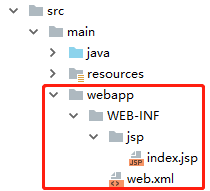
9、index.jsp中的内容
<%@ page language="java" contentType="text/html; charset=UTF-8" pageEncoding="UTF-8"%>
<!DOCTYPE html>
<html lang="zh">
    <head>
        <meta http-equiv="Content-Type" content="text/html; charset=UTF-8"/>
        <title>Full Layout - jQuery EasyUI Demo</title>
    </head>
    <body>

        <h1>终于成功了!</h1>

    </body>
</html>
10、web.xml中的内容
<?xml version="1.0" encoding="UTF-8"?>
<web-app xmlns="http://xmlns.jcp.org/xml/ns/javaee"
         xmlns:xsi="http://www.w3.org/2001/XMLSchema-instance"
         xsi:schemaLocation="http://xmlns.jcp.org/xml/ns/javaee http://xmlns.jcp.org/xml/ns/javaee/web-app_4_0.xsd"
         version="4.0">
</web-app>
11、开始设置application.properties
spring.mvc.view.prefix=/WEB-INF/jsp/
spring.mvc.view.suffix=.jsp
12、大功告成,然后从启动类启动
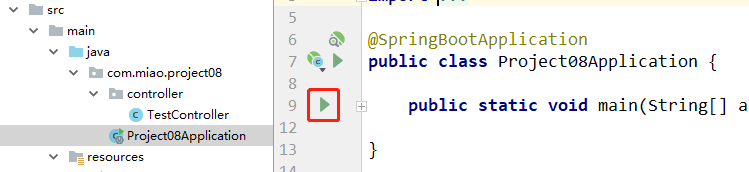
13、访问即可看到成功
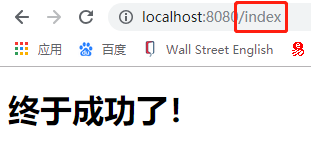
版权声明:本文为zaoanmiao原创文章,遵循CC 4.0 BY-SA版权协议,转载请附上原文出处链接和本声明。