引入
Markdown是一种轻量级标记语言,Qt 是支持 Html 的显示,那么支持 Markdown 吗?答案当然是支持的
效果图: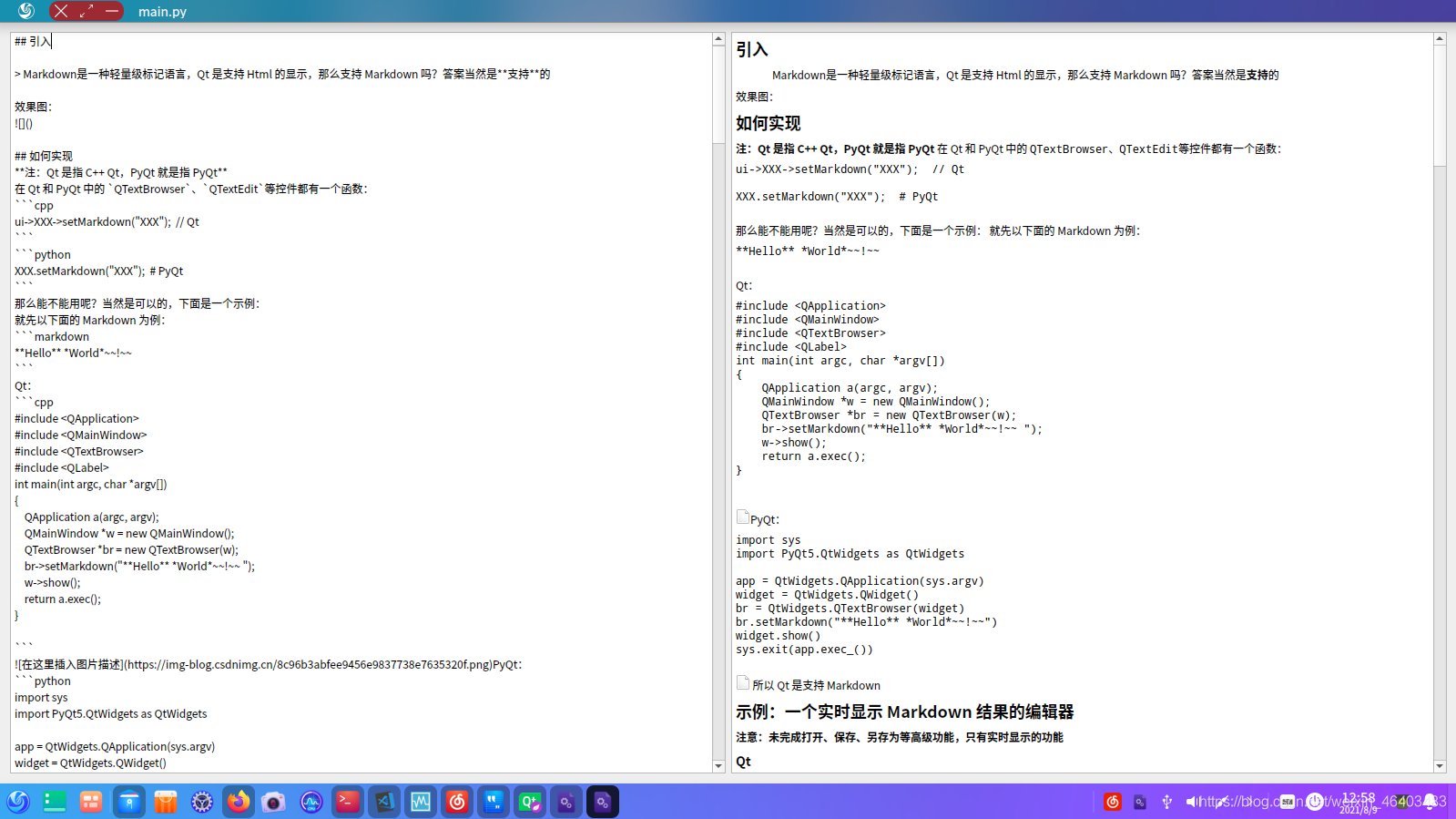
如何实现
注:Qt 是指 C++ Qt,PyQt 就是指 PyQt
在 Qt 和 PyQt 中的 QTextBrowser、QTextEdit等控件都有一个函数:
ui->XXX->setMarkdown("XXX"); // Qt
XXX.setMarkdown("XXX"); # PyQt
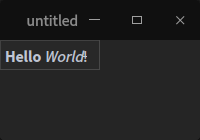
那么能不能用呢?当然是可以的,下面是一个示例:
就先以下面的 Markdown 为例:
**Hello** *World*~~!~~
Qt:
#include <QApplication>
#include <QMainWindow>
#include <QTextBrowser>
#include <QLabel>
int main(int argc, char *argv[])
{
    QApplication a(argc, argv);
    QMainWindow *w = new QMainWindow();
    QTextBrowser *br = new QTextBrowser(w);
    br->setMarkdown("**Hello** *World*~~!~~ ");
    w->show();
    return a.exec();
}
PyQt:
import sys
import PyQt5.QtWidgets as QtWidgets

app = QtWidgets.QApplication(sys.argv)
widget = QtWidgets.QWidget()
br = QtWidgets.QTextBrowser(widget)
br.setMarkdown("**Hello** *World*~~!~~")
widget.show()
sys.exit(app.exec_())

所以 Qt 是支持 Markdown
示例:一个实时显示 Markdown 结果的编辑器
注意:未完成打开、保存、另存为等高级功能,只有实时显示的功能
Qt
main.cpp
#include "mainwindow.h"
#include <QApplication>

int main(int argc, char *argv[])
{
    QApplication a(argc, argv);
    MainWindow w;
    w.show();
    return a.exec();
}
mainwindow.cpp
#include "mainwindow.h"
#include "ui_mainwindow.h"

MainWindow::MainWindow(QWidget *parent) :
    QMainWindow(parent),
    ui(new Ui::MainWindow)
{
    ui->setupUi(this);/*
    ui->textBrowser->setMarkdown("```python\n"
                                 "import os\n"
                                 "```\n"
                                 "**b**\n");*/
}

MainWindow::~MainWindow()
{
    delete ui;
}

void MainWindow::on_textEdit_textChanged()
{
    if (ui->comboBox->currentIndex()==0){
        ui->textBrowser_2->setMarkdown(ui->textEdit->toPlainText());
        return;
    }
    ui->textBrowser_2->setHtml(ui->textEdit->toPlainText());
}

void MainWindow::on_comboBox_editTextChanged(const QString &arg1)
{

}

void MainWindow::on_comboBox_currentIndexChanged(int index)
{
    if (ui->comboBox->currentIndex()==0){
        ui->textBrowser_2->setMarkdown(ui->textEdit->toPlainText());
        return;
    }
    ui->textBrowser_2->setHtml(ui->textEdit->toPlainText());
}
mainwindow.h
#ifndef MAINWINDOW_H
#define MAINWINDOW_H

#include <QMainWindow>

namespace Ui {
class MainWindow;
}

class MainWindow : public QMainWindow
{
    Q_OBJECT

public:
    explicit MainWindow(QWidget *parent = nullptr);
    ~MainWindow();

private slots:
    void on_textEdit_textChanged();

    void on_comboBox_editTextChanged(const QString &arg1);

    void on_comboBox_currentIndexChanged(int index);

private:
    Ui::MainWindow *ui;
};

#endif // MAINWINDOW_H
mainwindow.ui
<?xml version="1.0" encoding="UTF-8"?>
<ui version="4.0">
<class>MainWindow</class>
<widget class="QMainWindow" name="MainWindow">
<property name="geometry">
<rect>
<x>0</x>
<y>0</y>
<width>400</width>
<height>300</height>
</rect>
</property>
<property name="windowTitle">
<string>MainWindow</string>
</property>
<widget class="QWidget" name="centralWidget">
<layout class="QHBoxLayout" name="horizontalLayout_2">
<item>
<widget class="QTextEdit" name="textEdit">
<property name="html">
<string><!DOCTYPE HTML PUBLIC "-//W3C//DTD HTML 4.0//EN" "http://www.w3.org/TR/REC-html40/strict.dtd">
<html><head><meta name="qrichtext" content="1" /><style type="text/css">
p, li { white-space: pre-wrap; }
</style></head><body style=" font-family:'Noto Sans CJK SC'; font-size:10.5pt; font-weight:400; font-style:normal;">
<p style="-qt-paragraph-type:empty; margin-top:0px; margin-bottom:0px; margin-left:0px; margin-right:0px; -qt-block-indent:0; text-indent:0px;"><br /></p></body></html></string>
</property>
</widget>
</item>
<item>
<layout class="QVBoxLayout" name="verticalLayout">
<item>
<widget class="QComboBox" name="comboBox">
<property name="currentText">
<string>Markdown</string>
</property>
<item>
<property name="text">
<string>Markdown</string>
</property>
</item>
<item>
<property name="text">
<string>Html</string>
</property>
</item>
</widget>
</item>
<item>
<widget class="QTextBrowser" name="textBrowser_2"/>
</item>
</layout>
</item>
</layout>
</widget>
<widget class="QMenuBar" name="menuBar">
<property name="geometry">
<rect>
<x>0</x>
<y>0</y>
<width>400</width>
<height>36</height>
</rect>
</property>
</widget>
<widget class="QToolBar" name="mainToolBar">
<attribute name="toolBarArea">
<enum>TopToolBarArea</enum>
</attribute>
<attribute name="toolBarBreak">
<bool>false</bool>
</attribute>
</widget>
<widget class="QStatusBar" name="statusBar"/>
<widget class="QToolBar" name="toolBar">
<property name="windowTitle">
<string>toolBar</string>
</property>
<attribute name="toolBarArea">
<enum>LeftToolBarArea</enum>
</attribute>
<attribute name="toolBarBreak">
<bool>false</bool>
</attribute>
</widget>
<widget class="QToolBar" name="toolBar_2">
<property name="windowTitle">
<string>toolBar_2</string>
</property>
<attribute name="toolBarArea">
<enum>LeftToolBarArea</enum>
</attribute>
<attribute name="toolBarBreak">
<bool>false</bool>
</attribute>
</widget>
</widget>
<layoutdefault spacing="6" margin="11"/>
<resources/>
<connections/>
</ui>
untitled.pro
#-------------------------------------------------
#
# Project created by QtCreator 2021-08-09T11:55:07
#
#-------------------------------------------------

QT       += core gui

greaterThan(QT_MAJOR_VERSION, 4): QT += widgets

TARGET = untitled
TEMPLATE = app

# The following define makes your compiler emit warnings if you use
# any feature of Qt which has been marked as deprecated (the exact warnings
# depend on your compiler). Please consult the documentation of the
# deprecated API in order to know how to port your code away from it.
DEFINES += QT_DEPRECATED_WARNINGS

# You can also make your code fail to compile if you use deprecated APIs.
# In order to do so, uncomment the following line.
# You can also select to disable deprecated APIs only up to a certain version of Qt.
#DEFINES += QT_DISABLE_DEPRECATED_BEFORE=0x060000    # disables all the APIs deprecated before Qt 6.0.0

CONFIG += c++11

SOURCES += \
        main.cpp \
        mainwindow.cpp

HEADERS += \
        mainwindow.h

FORMS += \
        mainwindow.ui

# Default rules for deployment.
qnx: target.path = /tmp/$${TARGET}/bin
else: unix:!android: target.path = /opt/$${TARGET}/bin
!isEmpty(target.path): INSTALLS += target
效果
截图: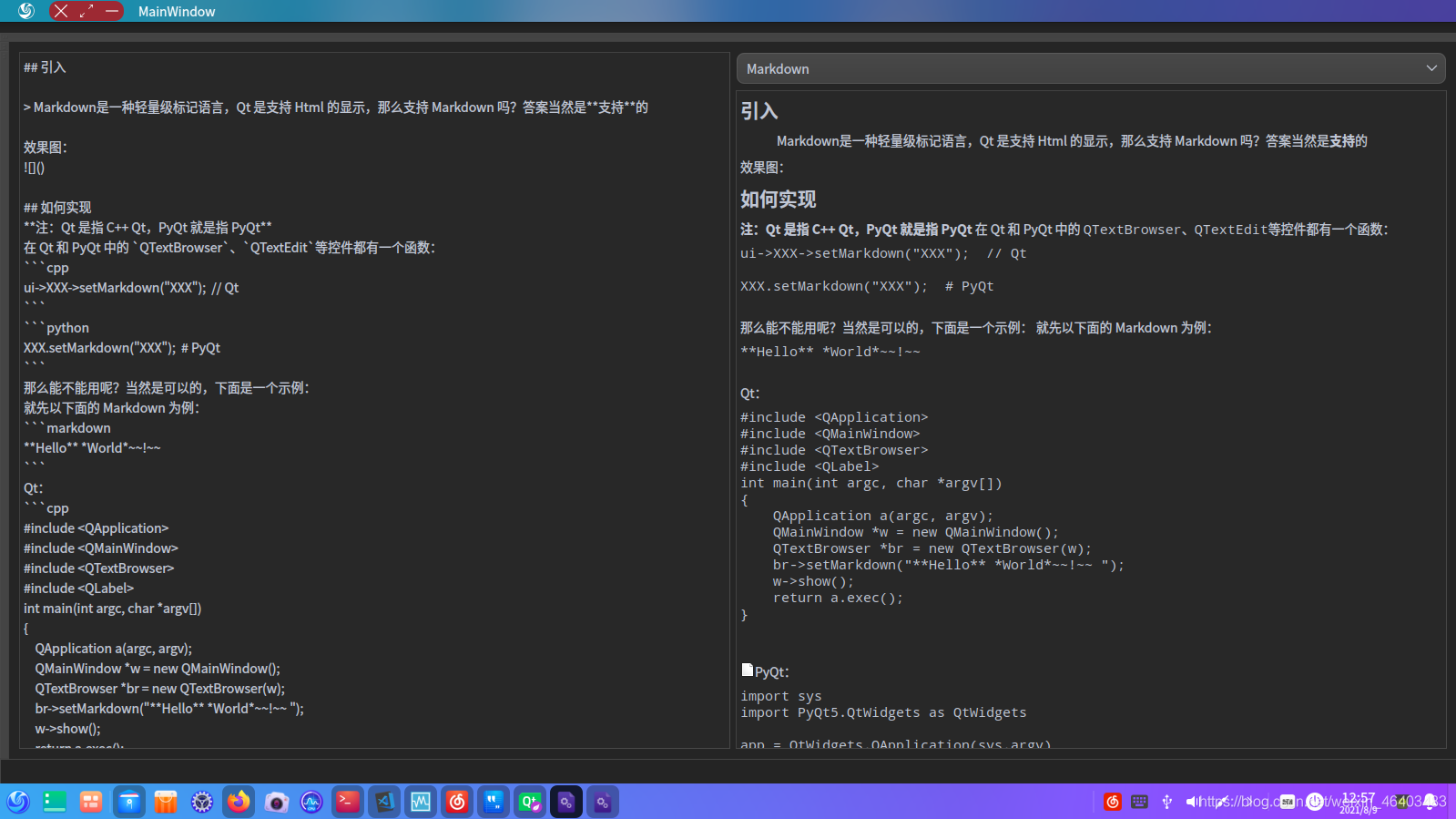
PyQt
main.py
import sys
import PyQt5.QtWidgets as QtWidgets

def Change():
    textBrow.setMarkdown(textEdit.toPlainText())

app = QtWidgets.QApplication(sys.argv)
widget = QtWidgets.QWidget()
hbox = QtWidgets.QHBoxLayout()
textEdit = QtWidgets.QTextEdit()
textBrow = QtWidgets.QTextBrowser()
textEdit.textChanged.connect(Change)
hbox.addWidget(textEdit)
hbox.addWidget(textBrow)
widget.setLayout(hbox)
widget.show()
sys.exit(app.exec_())
效果
截图:
示例项目链接:
- 蓝奏云:https://gfdgdxi.lanzoui.com/b01oibted,密码:4sqa
版权声明:本文为weixin_46403483原创文章,遵循CC 4.0 BY-SA版权协议,转载请附上原文出处链接和本声明。