创作不易,如果觉得这篇文章对你有帮助,欢迎各位老铁点个赞支持下呗,您的支持是我创作的最大动力!
文章目录
1 前言
随着时代的变化,现在分布式服务比较流行,而分布式系统中,Redis服务又是非常重要的一环。那么如何保证Redis服务的高可用性?
接下来,听我慢慢的细说。
本系列文章,笔者准备对互联网缓存利器Redis的使用,做一下简单的总结,内容大概如下:
| 博文内容 | 资源链接 |
|---|---|
| Linux环境下搭建Redis基础运行环境 | https://blog.csdn.net/smilehappiness/article/details/107298145 |
| 互联网缓存利器-Redis的使用详解(基础篇) | https://blog.csdn.net/smilehappiness/article/details/107592368 |
| Redis基础命令使用Api详解 | https://blog.csdn.net/smilehappiness/article/details/107593218 |
| Redis编程客户端Jedis、Lettuce和Redisson的基础使用 | https://blog.csdn.net/smilehappiness/article/details/107301988 |
| 互联网缓存利器-Redis的使用详解(进阶篇) | https://blog.csdn.net/smilehappiness/article/details/107592336 |
| 如何基于Redis实现分布式锁 | https://blog.csdn.net/smilehappiness/article/details/107592896 |
基于Redis的主从复制、哨兵模式以及集群的使用,史上最详细的教程来啦~ | https://blog.csdn.net/smilehappiness/article/details/107433525 |
| Redis相关的面试题总结 | https://blog.csdn.net/smilehappiness/article/details/107592686 |
2 Redis的主从复制(master/slave)
2.1 为什么要进行主从复制
通过持久化功能,Redis保证了即使在服务器重启的情况下数据也不会丢失(AOF持久化方式)(或少量丢失-RDB的最后一次持久化后的数据可能丢失),但是由于数据是存储在一台服务器上的,如果这台服务器出现故障,比如网络故障或者说硬盘坏了,也会导致数据丢失。
所以为了解决单点故障,我们需将数据复制多份到多台不同的服务器上,即使有一台服务器出现故障了,其他服务器依然可以继续提供服务。
那么这就要求当一台服务器上的数据更新后,自动将需要同步更新的数据同步到其他服务器上。
2.2 如何实现数据的自动同步更新
Redis提供了复制(replication)功能来自动实现多台redis服务器的数据同步。
2.3 Redis主从复制实现(一主多从架构)
2.3.1 什么是主从复制
我们可以通过部署多台redis服务,并在配置文件中指定这几台redis之间的主从关系,主节点负责写入数据,同时把写入的数据异步复制到从机器上,这种模式叫做主从复制,即master/slave。(默认情况下,redis的master节点可用于写数据,slave从服务节点只能用于读取数据,向slave写数据会导致错误)
本文笔者以一主多从架构来介绍主从复制。
2.3.2 实现Redis的主从复制
实现Redis的主从复制,只需要修改Redis的主配置文件redis.conf即可。
以下示例中,笔者在一台腾讯云服务器上,部署一主一从Redis服务,然后在一台阿里云服务器部署一台从服务。即实现Redis的一主两从的配置。
基于Redis的redis.conf配置文件,进行主从复制的配置。
主要配置如下:
master主redis配置:
include /usr/local/redis-6.0.5/redis.conf
#protected-mode no (改为不保护,否则远程无法访问)
#bind 127.0.0.1 (注释掉,否则只能本机ip访问,这里可以设置能够访问到ip,从而更加的安全)
#daemonize yes (改为yes表示后台启动redis)
port 6278
pidfile /var/run/redis_6278.pid
logfile redis_6278.log
dbfilename dump_6278.rdb
slave从服务器配置1:
include /usr/local/redis-6.0.5/redis.conf
port 6279
pidfile /var/run/redis_6279.pid
logfile redis_6279.log
dbfilename dump_6279.rdb
slaveof 主节点ip 主节点端口(6278)
masterauth 访问redis主节点时需要的密码(123456)
slave从服务器配置2:
include /usr/local/redis-6.0.5/redis.conf
port 6230
pidfile /var/run/redis_6280.pid
logfile redis_6280.log
dbfilename dump_6280.rdb
slaveof 主节点ip 主节点端口(6278)
masterauth 访问redis主节点时需要的密码(123456)
注意: 实际项目中是在多台Linux服务器上进行配置的(一般一台服务部署一个redis服务),笔者这里由于经济资源有限,只在两台服务进行了操作。在一台服务器上配置两个redis服务时,配置是完全一样的,只是在同一台Linux服务上部署多个redis服务,端口号需要修改,如果不同的服务器部署,是不用修改端口号的)
同一台服务器上,部署多个redis服务,不需要搭建多套redis,只需要解压一份redis,然后配置多个配置文件,即可实现同一台云服务器上的,一主多从或者多主多从。
2.3.3 主从复制的验证
步骤:
- 依次启动主从redis
- 向主redis写入数据
- 查看从redis是否能够获取到主redis写入的数据
- 尝试向从redis服务写数据(会拒绝)
配置主从模式涉及到的相关命令:
# 进入可执行目录下
cd /usr/local/redis-6.0.5/src
# 使用命令行客户端连接redis服务
./redis-cli -p 6278
# 认证(使用redis服务的密码登录)
auth 123456789
# 查看redis服务的角色等信息
info replication
参数说明:
./redis-cli -h ip -p 6278 连接远程redis客户端需指定ip端口(否则操作的是当前redis服务)
auth redis密码 如果redis服务设置了访问密码,需要授权登录
info replication通过该命令,可以查看某个redis服务器所处的角色(master/slave)
搭建完成后,主节点上显示信息如下(即一个主节点下,有两个从节点):
命令行操作不熟练的小伙伴,可以参考我的另一篇博文入门学习下吧:Redis编程客户端的基础使用
注意:当没有配置主从关系时,redis启动后默认都是主master。云服务器防火墙开启后,需要开放6278、6279、6280端口
开启端口命令: firewall-cmd --zone=public --add-port=6278-6280/tcp --permanent
让防火墙配置生效: firewall-cmd --reload
2.3.4 主从复制模式的容灾处理
当master服务出现故障时,主从复制这种模式是不能够自动处理容灾的,需手动将slave中的一个从redis服务,提升为master服务,剩下的slave服务都挂至新的master服务上,这种处理也叫冷处理(人工处理)。
当主节点宕机后,这时候就没有主节点了,两个从节点上看,主机已经宕机了:
处理步骤:
slaveof no one执行此命令,将其中一台slave服务器提升为master节点服务(提升某slave为master)slaveof ip 端口号执行此命令,将slave挂至新的master上,这里的ip和端口号,指的是刚提升为master的那个slave服务的ip和端口号
2.3.5 主从复制原理
2.3.5.1 全量复制
Redis全量复制一般发生在Slave初始化阶段,这时Slave需要将Master上的所有数据都复制一份。
具体步骤如下:
完成上面几个步骤后就完成了slave服务器数据初始化的所有操作,savle从服务器此时可以接收来自用户的读请求。
master/slave主从同步数据的过程本身是异步的,也就是说,master服务执行完客户端请求的命令后,会立即返回结果给客户端,然后异步把同步数据的命令同步给slave服务。这一特征保证启用master/slave主从复制后,master的性能不会受到影响。
注意事项:
如果master/slave因为网络问题断开连接,在这个数据不一致的窗口期间,这个时候,master是无法得知某个命令最终同步给了多少个slave数据库。
对于这种情况,redis提供了一个配置项来限制只有数据至少同步给多少个slave的时候,master才是可写的:
min-replicas-to-write 2 表示只有当2个或以上的slave连接到master,master才是可写的
min-replicas-max-lag 10 表示允许slave失去连接的最大时间,如果10秒还没有接收到slave的响应,则master认为该 slave已断开
如果使用的redis是老版本,配置如下参数即可:
min-slaves-to-write 3
min-slaves-max-lag 10
2.3.5.2 增量复制
从redis2.8这个版本开始,就支持主从复制的断点续传,如果主从复制过程中,网络连接断掉了,那么可以接着上次复制的地方,继续复制下去,而不是从头开始复制一份。
master node会在内存中创建一个backlog,master和slave都会保存一个replica offset还有一个master id,offset就是保存在backlog中的。如果master和slave网络连接断开了,slave会让master从上次的replica offset开始继续复制,但是如果没有找到对应的offset,那么就会执行一次全量同步。
2.3.5.3 无硬盘复制
Redis主从复制是基于RDB方式的持久化实现的,也就是master在后台保存RDB快照,slave接收到rdb文件并载入,但是这种方式会存在一些问题:
当master禁用RDB时,如果执行了复制初始化操作,Redis依然会生成RDB快照,当master下次启动时执行该RDB文件的恢复,可能会造成数据出现问题。
当硬盘性能比较慢的情况下,那初始化复制过程会对性能产生影响,因此2.8.18以后的版本,Redis引入了无硬盘复制选项,可以不需要通过RDB文件去同步,直接发送数据。
通过以下配置来开启该功能:
repl-diskless-sync yesmaster在内存中直接创建rdb,然后发送给slave,不会在自己本地磁盘保存
2.4 主从复制模式小结
- 主从复制模式由一个master和多个slave构成,通过在redis.conf配置文件进行配置来实现主从关系
- 当主redis(master )宕机,写请求将无法执行(
(error) ERR wrong number of arguments for 'set' command) - 当从redis(slave)宕机,读请求的处理性能下降
- redis的master节点可用于写数据,slave从服务节点只能用于读取数据,向slave写数据会导致错误
- 当master发生故障,需手动将其中一台slave使用
slaveof no one命令提升为master,其它slave执行slaveof命令指向这个新的master,从而构成新的主从关系 - 主从复制模式的故障转移需要手动操作,这种处理方式并不智能,要实现自动化处理,这就需要
Sentinel哨兵,实现故障自动转移
3 Redis的哨兵模式(Sentinel-推荐使用)
Sentinel哨兵是Redis官方提供的高可用方案,使用Sentinel哨兵可以监控多个Redis服务实例的运行情况。
3.1 哨兵高可用的基本原理
Sentinel哨兵用来监视Redis的主从服务器,它会不断检查Master和Slave是否正常。如果Sentinel服务挂了,就无法监控,所以
需要多个哨兵,组成Sentinel网络。监控同一个Master的各个Sentinel哨兵会相互通信,组成一个分布式的Sentinel哨兵网络,互相交换彼此关于被监控redis服务器的信息,当一个Sentinel哨兵认为被监控的redis服务器出现故障时,它会向网络中的其它Sentinel哨兵进行确认,判断该服务器是否真的已故障,如果故障的redis服务器为主服务器,那么Sentinel哨兵网络将对故障的主redis服务器进行
自动故障转移,通过将故障的主redis服务器下的某个从服务器提升为新的主服务器,并让其它从服务器转移到新的主服务器下,以此来让整个主从模式重新回到正常状态。待出现故障的旧主服务器重新启动上线时,Sentinel哨兵会让它变成一个从redis服务器,并挂到新的主redis服务器下。
所以说,哨兵是自动实现故障转移,不需要人工干预,是一种高可用的集群方案。
3.2 如何实现Sentinel哨兵
3.2.1 Sentinel哨兵基础配置
哨兵的实现其实非常简单,因为redis官方已经帮我们做好了这一切,我们只需要进行哨兵配置即可实现哨兵模式,从而实现redis服务的高可用。
配置步骤:
在redis主目录下复制三份sentinel.conf文件:
sentinel-26278.conf
sentinel-26279.conf
sentinel-26280.conf
三份sentinel配置文件修改:
这个哨兵配置和redis.conf配置类似。#Sentinel默认端口号为26379 port 26278 protected-mode no(如果你需要在远程的机器上去连接哨兵,则需要修改为yes) #bind 127.0.0.1 (注释掉,否则只能本机ip访问,这里可以设置能够访问到ip,从而更加的安全) #daemonize no(改为yes表示后台启动redis哨兵服务) #指定运行sentinel时的pid文件 pidfile /var/run/redis-sentinel-26278.pid #指定运行sentinel时的哨兵日志文件 logfile "/usr/local/redis-6.0.5/sentinel-26278.log" #如果redis有密码,需要配置master密码 sentinel auth-pass mymaster 123456 #格式:Sentinel monitor <name> <masterIP> <masterPort> <Quorum投票数> #Sentinel会根据Master的配置自动发现Master下的Slave sentinel monitor mymaster 主节点ip 主节点端口 2 #哨兵故障转移默认是30秒后开始,可以修改 sentinel down-after-milliseconds mymaster 30000 # 设置哨兵访问到密码:requirepass <password> # You can configure Sentinel itself to require a password, however when doing requirepass 123456 #其他配置默认即可三个sentinel服务的配置如下:
哨兵6279端口服务配置#哨兵6279端口服务配置 protected-mode no port 26279 daemonize yes pidfile /var/run/redis-sentinel-26279.pid logfile "/usr/local/redis-6.0.5/sentinel-26279.log" dir /tmp sentinel monitor mymaster ip 6278 2 sentinel auth-pass mymaster 123456789 sentinel down-after-milliseconds mymaster 30000 sentinel parallel-syncs mymaster 1 sentinel failover-timeout mymaster 180000 sentinel deny-scripts-reconfig yes #哨兵6280端口服务配置 protected-mode no port 26280 daemonize yes pidfile /var/run/redis-sentinel-26280.pid logfile "/usr/local/redis-6.0.5/sentinel-26280.log" dir /tmp sentinel monitor mymaster ip 6278 2 sentinel auth-pass mymaster 123456789 sentinel down-after-milliseconds mymaster 30000 sentinel parallel-syncs mymaster 1 sentinel failover-timeout mymaster 180000 sentinel deny-scripts-reconfig yes哨兵6280端口服务配置
#哨兵6280端口服务配置
protected-mode no
port 26280
daemonize yes
pidfile /var/run/redis-sentinel-26280.pid
logfile "/usr/local/redis-6.0.5/sentinel-26280.log"
dir /tmp
sentinel monitor mymaster ip 6278 2
sentinel auth-pass mymaster 123456789
sentinel down-after-milliseconds mymaster 30000
sentinel parallel-syncs mymaster 1
sentinel failover-timeout mymaster 180000
sentinel deny-scripts-reconfig yes
哨兵6278端口服务配置
#哨兵6278端口服务配置

# bind 127.0.0.1 192.168.1.1
protected-mode no

# 语法:port <sentinel-port> (The port that this sentinel instance will run on)
port 26278

# 改为yes表示后台启动redis哨兵服务
daemonize yes

# 当开启后台启动时,sentinel会写入pid文件(When running daemonized, Redis Sentinel writes a pid file)
pidfile /var/run/redis-sentinel-26278.pid

# Specify the log file name. Also the empty string can be used to force sentinel to log on the standard output. logs will be sent to /dev/null
# 指定log输出位置,如果是""不指定,就会执行/dev/null
logfile "/usr/local/redis-6.0.5/sentinel-26278.log"

# dir <working-directory>
# Every long running process should have a well-defined working directory.
# For Redis Sentinel to chdir to /tmp at startup is the simplest thing
# for the process to don't interfere with administrative tasks such as
# unmounting filesystems.
dir /tmp

# sentinel monitor <master-name> <ip> <redis-port> <quorum>
#
# Tells Sentinel to monitor this master, and to consider it in O_DOWN
# (Objectively Down) state only if at least <quorum> sentinels agree.
#
# Note that whatever is the ODOWN quorum, a Sentinel will require to
# be elected by the majority of the known Sentinels in order to
# start a failover, so no failover can be performed in minority.
#
# Sentinel会根据Master的配置自动发现Master下的Slave
# Replicas are auto-discovered, so you don't need to specify replicas in
# any way. Sentinel itself will rewrite this configuration file adding
# the replicas using additional configuration options.
# Also note that the configuration file is rewritten when a
# replica is promoted to master.
#
# Note: master name should not include special characters or spaces.
# The valid charset is A-z 0-9 and the three characters ".-_".
# msater-name要求只能是数字、字母、下划线、- .
# 格式:Sentinel monitor <master-name> <masterIP> <masterPort> <Quorum投票数>
sentinel monitor mymaster ip 6278 2

# sentinel auth-pass <master-name> <password>
sentinel auth-pass mymaster 123456789

# sentinel auth-user <master-name> <username>
#
# This is useful in order to authenticate to instances having ACL capabilities,
# that is, running Redis 6.0 or greater. When just auth-pass is provided the
# Sentinel instance will authenticate to Redis using the old "AUTH <pass>"
# method. When also an username is provided, it will use "AUTH <user> <pass>".
# In the Redis servers side, the ACL to provide just minimal access to
# Sentinel instances, should be configured along the following lines:
#
#     user sentinel-user >somepassword +client +subscribe +publish \
#                        +ping +info +multi +slaveof +config +client +exec on

# sentinel down-after-milliseconds <master-name> <milliseconds>
#
# Number of milliseconds the master (or any attached replica or sentinel) should
# be unreachable (as in, not acceptable reply to PING, continuously, for the
# specified period) in order to consider it in S_DOWN state (Subjectively
# Down).
#
# 哨兵故障转移默认是30秒后开始,可以修改
# Default is 30 seconds.
sentinel down-after-milliseconds mymaster 30000

# requirepass <password>
#
# You can configure Sentinel itself to require a password, however when doing
# so Sentinel will try to authenticate with the same password to all the
# other Sentinels. So you need to configure all your Sentinels in a given
# group with the same "requirepass" password. Check the following documentation
# for more info: https://redis.io/topics/sentinel

# sentinel parallel-syncs <master-name> <numreplicas>
#
# How many replicas we can reconfigure to point to the new replica simultaneously
# during the failover. Use a low number if you use the replicas to serve query
# to avoid that all the replicas will be unreachable at about the same
# time while performing the synchronization with the master.
sentinel parallel-syncs mymaster 1

# sentinel failover-timeout <master-name> <milliseconds>
#
# Specifies the failover timeout in milliseconds. It is used in many ways:
#
# - The time needed to re-start a failover after a previous failover was
#   already tried against the same master by a given Sentinel, is two
#   times the failover timeout.
#
# - The time needed for a replica replicating to a wrong master according
#   to a Sentinel current configuration, to be forced to replicate
#   with the right master, is exactly the failover timeout (counting since
#   the moment a Sentinel detected the misconfiguration).
#
# - The time needed to cancel a failover that is already in progress but
#   did not produced any configuration change (SLAVEOF NO ONE yet not
#   acknowledged by the promoted replica).
#
# - The maximum time a failover in progress waits for all the replicas to be
#   reconfigured as replicas of the new master. However even after this time
#   the replicas will be reconfigured by the Sentinels anyway, but not with
#   the exact parallel-syncs progression as specified.
#
# Default is 3 minutes.
sentinel failover-timeout mymaster 180000

# SCRIPTS EXECUTION
#
# sentinel notification-script and sentinel reconfig-script are used in order
# to configure scripts that are called to notify the system administrator
# or to reconfigure clients after a failover. The scripts are executed
# with the following rules for error handling:
#
# If script exits with "1" the execution is retried later (up to a maximum
# number of times currently set to 10).
#
# If script exits with "2" (or an higher value) the script execution is
# not retried.
#
# If script terminates because it receives a signal the behavior is the same
# as exit code 1.
#
# A script has a maximum running time of 60 seconds. After this limit is
# reached the script is terminated with a SIGKILL and the execution retried.

# NOTIFICATION SCRIPT
#
# sentinel notification-script <master-name> <script-path>
#
# Call the specified notification script for any sentinel event that is
# generated in the WARNING level (for instance -sdown, -odown, and so forth).
# This script should notify the system administrator via email, SMS, or any
# other messaging system, that there is something wrong with the monitored
# Redis systems.
#
# The script is called with just two arguments: the first is the event type
# and the second the event description.
#
# The script must exist and be executable in order for sentinel to start if
# this option is provided.
#
# Example:
#
# sentinel notification-script mymaster /var/redis/notify.sh

# CLIENTS RECONFIGURATION SCRIPT
#
# sentinel client-reconfig-script <master-name> <script-path>
#
# When the master changed because of a failover a script can be called in
# order to perform application-specific tasks to notify the clients that the
# configuration has changed and the master is at a different address.
#
# The following arguments are passed to the script:
#
# <master-name> <role> <state> <from-ip> <from-port> <to-ip> <to-port>
#
# <state> is currently always "failover"
# <role> is either "leader" or "observer"
#
# The arguments from-ip, from-port, to-ip, to-port are used to communicate
# the old address of the master and the new address of the elected replica
# (now a master).
#
# This script should be resistant to multiple invocations.
#
# Example:
#
# sentinel client-reconfig-script mymaster /var/redis/reconfig.sh

# SECURITY
#
# By default SENTINEL SET will not be able to change the notification-script
# and client-reconfig-script at runtime. This avoids a trivial security issue
# where clients can set the script to anything and trigger a failover in order
# to get the program executed.

sentinel deny-scripts-reconfig yes

# REDIS COMMANDS RENAMING
#
# Sometimes the Redis server has certain commands, that are needed for Sentinel
# to work correctly, renamed to unguessable strings. This is often the case
# of CONFIG and SLAVEOF in the context of providers that provide Redis as
# a service, and don't want the customers to reconfigure the instances outside
# of the administration console.
#
# In such case it is possible to tell Sentinel to use different command names
# instead of the normal ones. For example if the master "mymaster", and the
# associated replicas, have "CONFIG" all renamed to "GUESSME", I could use:
#
# SENTINEL rename-command mymaster CONFIG GUESSME
#
# After such configuration is set, every time Sentinel would use CONFIG it will
# use GUESSME instead. Note that there is no actual need to respect the command
# case, so writing "config guessme" is the same in the example above.
#
# SENTINEL SET can also be used in order to perform this configuration at runtime.
#
# In order to set a command back to its original name (undo the renaming), it
# is possible to just rename a command to itsef:
#
# SENTINEL rename-command mymaster CONFIG CONFIG
3.2.2 Sentinel哨兵服务的启动
redis安装时,make编译后就在redis主目录下src目录下,产生了redis-sentinel的可执行程序文件,可以在一个redis中运行多个sentinel进程。
启动三个Sentinel哨兵进程,将创建三个监视主服务器的Sentinel实例,执行如下命令:
./redis-sentinel  ../sentinel-26278.conf
./redis-sentinel  ../sentinel-26279.conf
./redis-sentinel  ../sentinel-26280.conf
启动成功后如下图所示:
注意: 哨兵是建立在主从复制基础上的,主从复制搭建完成后,才可以配置哨兵。另外需要注意的是,如果开启了防火墙,需要开启26278、26279、26280这三个端口才可以使用命令行客户端访问sentinel服务。
3.3 验证Sentinel哨兵模式
将主从模式的redis中的主redis服务器关闭,观察从服务器中是否有一台被提升为主服务,如果从服务被提升为了master,说明sentinel哨兵已经实现了故障的自动转移。
3.4 哨兵模式内部原理分析
3.4.1 哨兵模式的机制

当master故障之后,为了解决master选举问题,又引出了一个哨兵单点问题,也就是哨兵的高可用性如何解决?在一个一主多从的Redis系统中,可以使用多个哨兵进行监控任务以保证系统足够稳定,此时哨兵不仅会监控master和slave,同时还会互相监控,这种方式称为哨兵集群,哨兵集群需要解决故障发现、和master决策的协商机制问题。
sentinel节点之间会因为共同监视同一个master从而产生了关联,一个新加入的sentinel节点需要和其他监视相同master节点的sentinel相互感知,大致过程如下:
- 需要相互感知的sentinel都向他们共同监视的master节点订阅channel:sentinel:hello
- 新加入的sentinel节点向这个channel发布一条消息,包含自己本身的信息,这样订阅了这个channel的sentinel就可以发现这个新的sentinel
- 新加入的sentinel和其他sentinel节点建立长连接
3.4.2 哨兵如何对master的故障进行发现
sentinel节点会定期向master节点发送心跳包来判断redis如无master节点的存活状态,一旦master节点没有正确响应,sentinel会把master设置为“主观不可用状态”,然后它会把“主观不可用”发送给其他所有的sentinel节点去确认,当确认的sentinel节点数 > quorum(这个投票数就是上边哨兵里面配置的数量)时,即多个sentinel确认的节点数大于过半的投票数据,则会认为master是“客观不可用”,接着就开始进入选举新的redis master 节点流程。
但是这里又会遇到一个问题,就是sentinel本身是一个集群,如果多个节点同时发现master节点达到客观不可用状态,那谁来决策选择哪个节点作为master redis 呢?
这个时候就需要从sentinel集群中选择一个leader来做决策,而这里用到了一致性算法Raft算法、它和zookeeper Paxos算法类似,都是分布式一致性算法,但是它比Paxos算法要更简单一些;
Raft和Paxos算法一样,也是基于投票算法,只要保证过半数节点通过提议即可。
需要了解Raft算法的可以参考: http://thesecretlivesofdata.com/raft/
3.5 Sentinel哨兵模式小结
主从复制集群模式,由于可以使用多台从服务器,解决了读请求的分担,从服务器故障,会使得读请求能力有所下降,但是当主master服务器故障,写请求将无法进行。
Sentinel哨兵模式会在主master下线后自动执行故障转移操作,提升一台从slave为主master,并让其它从slave挂到新主master下。
具体HA(高可用性7*24h不故障)衡量标准:
- 99%可用性,则一年宕机时间不超过4天
- 99.9%可用性,则一年宕机时间不超过10小时
- 99.99%可用性,则一年宕机时间不超过1小时
- 99.999%可用性,则一年宕机时间不超过6分钟(很难达到这个级别的高可用性)
4 Redis Cluster集群(推荐使用)
4.1 有了哨兵,为什么还需要搭建redis集群
一台服务不能达到高可用,所以说,有时候也需要搭建集群来保证服务的高可用。redis服务中,如果使用了哨兵,也实现了redis服务的高可用了,那么为什么还需要搭建redis集群呢?
使用哨兵模式可以达到redis高可用目的,但是此时的每个Redis存有集群中的所有数据,从而导致集群的总数据存储量受限于可用存储内存最小的节点,形成了木桶效应。
在redis3.0之前,我们需要通过客户端(写代码)去做分片(数据拆分成多份),通过hash方式对key进行分片存储,客户端分片虽然能够解决各个节点的存储压力,但维护成本较高、增加、移除节点比较繁琐。因此在redis3.0版本开始提供了Redis cluster集群功能,集群的特点在于拥有和单机实例一样的性能,同时提供了数据分片存储的支持,以及在主Redis数据库故障后自动故障转移恢复的支持。
redis集群除了实现了服务的高可用,还可以进行数据的分区,另外,动态增减redis节点非常方便,所以说,如果数据量不是特别大的场景,可以直接使用哨兵模式实现高可用即可。如果数据量比较大,需要按照一定的规则分区数据,那么,redis集群就派上用场了。哨兵和集群是两个独立的功能,当不需要对数据进行分片使用哨兵就够了,如果要进行水平扩容,redis cluster是一个比较好的方式。
4.2 集群拓扑结构

一个Redis Cluster由多个Redis节点构成,不同节点组的redis数据没有交集,也就是每个一节点组(一主多从)对应数据的一个分片,节点组内部分为主备(从)两类节点,对应master和slave节点,两者数据准实时一致,通过异步化的主备复制机制来保证。
一个节点组有且只有一个master节点,同时可以有0(没有)到多个slave节点,在这个节点组中只有master节点对用户提供写服务,而一个节点组中的master和slave节点都可以提供读服务。
4.3 Redis的数据分区
Redis cluster从Redis 3.0版本开始支持数据的分区。
Redis cluster的每个节点组都有两种角色可选:主节点(master node)、从节点(slave node)
其中主节点用于存储数据,从节点用于备份主节点的数据。
4.3.1 Redis cluster如何基于数据进行分片
Redis cluster提出哈希槽slot的概念,来实现数据分片。
Redis cluster有16384个哈希槽slot(编号在 0-16383 之间),每个redis的key通过CRC16函数后,对16384取模来决定将key放置哪个哈希槽,集群的每个节点组负责一部分哈希槽。
key的槽位计算公式为:
slot number = crc16(key) % 16384,crc16是一种哈希函数
比如,槽位的值:
512= crc16 (key1) % 16384
10100= crc16 (key2) % 16384
举个例子,比如当前集群有3个节点,那么:
节点 A 包含 0 到 5500号哈希槽,节点 B 包含5501 到 11000 号哈希槽,节点 C 包含11001到16383号哈希槽。上面示例中的槽位值512就会落到节点A,10100就会落到节点B中。
4.3.2 这种哈希槽位的优点
这种结构很容易添加或者删除节点,比如:
- 如果我想新添加一个节点D,我需要从节点 A,B,C中得部分槽到D上即可实现节点的新增
- 如果我想移除节点A,需要将A中的槽移到B和C节点上,然后将没有任何槽的A节点从集群中移除即可
可以实现线上动态扩容
可以在线上动态水平扩容(增减节点组),也不会产生数据不一致的问题,比如正在写的操作失败了、丢失了等,不会产生此类问题
由于从一个节点将哈希槽移动到另一个节点并不会停止服务,所以无论添加删除或者改变某个节点的哈希槽的数量,都不会造成集群不可用的状态。
通常情况下,
一个主下至少部署一个从节点,比如有A,B,C三个节点的集群,在没有从节点复制模型的情况下,如果节点B故障了,那么整个集群就会因为缺少5501-11000这个范围的哈希槽而不可用。如果在集群创建的时候(或者过一段时间)我们为每个节点添加一个从节点A1,B1,C1,那么整个集群便有三个master节点和三个slave节点组成,这样在节点B故障后,集群便会选举B1为新的主节点继续提供服务,整个集群便不会因为槽位找不到而不可用。如果当B节点和B1节点都宕机了,那么集群是不可用的。
4.3.3 Redis cluster哈希槽数量能改变吗
Redis cluster哈希槽数量是16384个,不能改变的,因为算法写死了,哈希槽数量不能变化了,固定是2的14次方。
4.4 搭建Redis Cluster集群
笔者这里以搭建3主3从的redis集群为例,介绍下搭建过程。
4.4.1 手动创建6个Redis实例
在redis安装主目录
/usr/local/redis-6.0.5/下创建目录cluster,然后在它下面创建1001至1006六个文件夹在六个文件夹下分别新建
redis-1001.conf文件,内容如下:port 1001 daemonize yes protected-mode no # 设置集群的redis服务访问密码 requirepass 123456 # 开启集群模式,需设置yes,否则无法计算槽道号,无法创建集群 cluster-enabled yes # 开启集群节点状态记录文件 cluster-config-file cluster-node-1001.conf cluster-node-timeout 5000 # 配置第二种持久化方式aof appendonly yes # The name of the append only file (default: "appendonly.aof") # 标识aof持久化文件名,以端口号区分 appendfilename "appendonly-1001.aof"1001-1006这6个文件夹内除了端口之外内容都一样,只不过端口不同,端口分别修改为1001、1002、1003、1004、1005、1006
其中rdb和aof两种持久化的主要区别为:
- rdb保存的是具体的key-value数据,如name-messi,aof保存的是操作记录,如set name messi
- 因为aof保存的数据更全,redis启动默认加载的是aof,rdb启动可以单独开启
- rdb持久化频率是按照持久化策略来的,容易造成数据丢失,而aof是每秒保存一次数据,数据不容易丢失
- 如果对数据的可靠性要求高,使用aof持久化,如果需要一定的数据恢复能力,但是又不需要很高的可靠性,就选择rdb
4.4.2 复制redis的启动执行命令
复制redis的启动执行命令到cluster目录中:
cp /usr/local/redis-6.0.5/src/redis-server /usr/local/redis-6.0.5/cluster
cp /usr/local/redis-6.0.5/src/redis-cli /usr/local/redis-6.0.5/cluster
4.4.3 启动6个redis实例
进入redis cluster目录:
cd /usr/local/redis-6.0.5/cluster/
分别启动6个redis实例:
./redis-server ./1001/redis-1001.conf
./redis-server ./1002/redis-1002.conf
./redis-server ./1003/redis-1003.conf
./redis-server ./1004/redis-1004.conf
./redis-server ./1005/redis-1005.conf
./redis-server ./1006/redis-1006.conf
启动各个节点,启动成功后如下图所示,发现均是cluster的方式启动,这是创建集群的基础。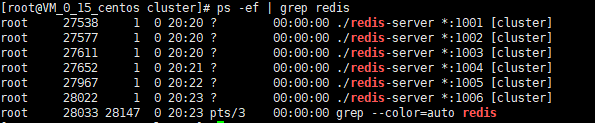
4.4.4 使用这6个redis实例来创建集群
使用这6个redis实例来创建集群:(只需要在任何一台机器上执行以下命令即可)
执行命令:
./redis-cli --cluster create ip1:1001 ip2:1002 ip3:1003 ip4:1004 ip5:1005 ip6:1006 --cluster-replicas 1
这个命令用于创建一个新的集群,参数--replicas 1表示我们希望为集群中的每个主节点创建一个从节点。命令中的其他参数则是这个集群实例的地址列表,3个master及3个slave(3主3从)。
执行命令后,redis-cli会输出如下所示的配置信息需要确认:
如果没问题的话, 则可以输入yes,redis-cli 就会将这份配置应用到集群当中,让各个节点开始互相通讯。(M表示master,S表示slave)
注意: 笔者这里 报了一个警告,实际开发中,一般都不会在同一台机器上搭建所有的redis集群节点。
出现上图所示,这表示集群中的16384个槽都有至少一个主节点在处理,每个主节点下面有一个备用的从节点,集群运作正常。
注意:
此步骤在原来旧版本中,可以使用如下命令创建集群:
./redis-trib.rb create --replicas 1 ip1:1001 ip2:1002 ip3:1003 ip4:1004 ip5:1005 ip6:1006
至此,redis cluster的高可用集群就搭建完成了。
4.5 Redis Cluster集群测试
4.5.1 集群测试
测试Redis集群,最较简单的办法就是使用redis-cli命令行客户端,接下来我们将使用 redis-cli客户端为例来进行测试。
通过redis-cli客户端连接上任意的一个主redis,执行命令:
./redis-cli -c -p 1001
参数说明: 其中-c表示集群模式去连redis,-p表示端口,-h表示ip
比如执行: set k1 v1
key落到别的槽,redis-cli会转发给别的槽去执行
-> Redirected to slot [12706] located at ip:1003
OK
执行: set k2
ip:1001> set k2 hello
-> Redirected to slot [12706] located at ip:1003
OK
ip:1003> get k2
"hello"
只有master节点会分配槽位,slave不会被分配槽,slave复制它的master,来同步备份数据
4.5.2 查看槽位分配情况
执行命令:
./redis-cli --cluster check ip:1001
如果是老版本,执行以下命令:
./redis-trib.rb check ip:1000
执行结果如下图所示:
从图可看出,Redis集群16384个槽位只对master分配,不对slave分配,slave只复制master,不写数据。
使用cluster nodes命令查看集群节点信息
./redis-cli -c -p 1001 cluster nodes
上图信息,从左至右,参数简单说明如下:
- 当前节点ID
- IP : 端口
- 标志: master,slave,myself,fail,…
- 如果是个从节点, 这里是它的主节点的NODE ID
- 集群最近一次向节点发送PING 命令后, 过去多长时间未收到回复
- 节点最近一次返回 PONG 回复的时间
- 节点的配置纪元(configuration epoch):详细信息参考 Redis 集群规范
- 本节点的网络连接情况:例如 connected
4.5.3 集群故障测试
可以使用debug segfault命令执行一个非法的内存访问,从而让 Redis 崩溃,仅在开发测试时用于bug调试:
./redis-cli -p 7001 debug segfault
停掉一个主节点后,该主节点下的从节点1006节点会提升为主节点,再次启动原来的主节点,它将沦为从节点,把1001节点服务停掉后,再次启动1001服务的情况。
查看集群节点槽位分配状况:
./redis-cli --cluster check ip:1001或者./redis-cli -c -p 1001 cluster nodes
S: 93403b2bba99ed84ec5b64ce0bf130d6b6ce5ed5 ip:1001
   slots: (0 slots) slave
   replicates 4f5700cb3ffdd418c402b2967879baa0bccd5026

M: 4f5700cb3ffdd418c402b2967879baa0bccd5026 ip:1006
   slots:[0-5460] (5461 slots) master
   1 additional replica(s)
从这里可以看出,1001服务由master成了slave,它的slave节点1006由slave变成了master,如果再将1006关闭,则1001将再次成为master主节点。
4.6 redis cluster动态水平扩容
4.6.1 添加新主节点
启动新的1007节点,配置和之前一样,只需将端口号改为1007即可。
添加redis-1007.conf配置文件:
port 1007
daemonize yes
protected-mode no

# 设置集群的redis服务访问密码
requirepass 123456

# 开启集群模式,需设置yes,否则无法计算槽道号,无法创建集群
cluster-enabled yes
# 开启集群节点状态记录文件
cluster-config-file cluster-node-1007.conf
cluster-node-timeout 5000

# 配置第二种持久化方式aof
appendonly yes

# The name of the append only file (default: "appendonly.aof")
# 标识aof持久化文件名,以端口号区分
appendfilename "appendonly-1007.aof"
启动redis 1007端口服务实例:
./redis-server ./redis-1007.conf添加新的redis节点
./redis-cli --cluster add-node 新节点ip:1007 masterIP:1003
参数说明: 第一个参数是要添加的节点,第二个参数是集群中任意一个master主节点>>> Send CLUSTER MEET to node ip:1007 to make it join the cluster. [OK] New node added correctly.出现上图所示内容,说明新节点1007现在已经连接上了集群,成为集群的一份子,可以对客户端的命令请求进行转向,且新添加的节点是一个主节点,但是和其他主节点相比:
- 新节点1007没有包含任何哈希槽
- 集群需要将某个从节点升级为新的主节点时,这个新添加的节点不会被选中
- 将集群中的部分哈希槽移动到新节点中,新添加的这个节点才会成为真正的主节点
4.6.2 集群重新分片
重新分片操作基本上就是将某些节点上的哈希槽移动或者分配一些槽位,到另外一些节点上面,和创建集群一样, 重新分片也可以使用 redis-cli 程序来执行。
执行以下命令可以开始一次重新分片操作:
./redis-cli --cluster reshard ip:1003
参数说明: ip:1003是集群中任意一个主节点
提示移动多少个槽( 从0到16384)
How many slots do you want to move (from 1 to 16384)?我们原来是3个master,后面添加一个master 1007,就是四个master了。16384个槽4个节点分,是4096个,我们这里输入4096表示想移动的槽的个数。
提示要把移动的槽给哪个节点,要求输入节点ID
What is the receiving node ID?可以使用以下命令查看各节点:
./redis-cli -p 1007 cluster nodes
master 1007节点的ID是931b40f272e7f3185485612f424bec414187149b,直接复制过来即可提示从哪些节点分哈希槽过来,输入
all表示全部节点进行分配Please enter all the source node IDs. Type 'all' to use all the nodes as source nodes for the hash slots. Type 'done' once you entered all the source nodes IDs. Source node #1:提示:Do you want to proceed with the proposed reshard plan (yes/no)?
输入yes在重新分片结束后可通过如下命令检查集群状态
查看集群节点槽位分配状况:
./redis-cli --cluster check ip:1001或者./redis-cli -c -p 1001 cluster nodes931b40f272e7f3185485612f424bec414187149b 172.11.0.15:1007@11007 myself,master - 0 1595167287000 0 connected
这样就完成了重新分片,这时候新增加的节点,才真正分配了哈希槽,成为了一个真正的主节点。
4.6.3 添加一个从节点
配置一个1008的redis节点,跟上边的1007节点配置方式一样。
启动从节点 7008的redis服务:./redis-server ./redis-1008.conf
启动一个新的Redis实例7008,然后执行以下命令添加从节点:
./redis-cli --cluster add-node ip1:1008 ip2:1001 --cluster-slave --cluster-master-id 931b40f272e7f3185485612f424bec414187149b
参数说明:
ip:1008是要新加的从节点1008
ip2:1001是集群中任意一个主节点
931b40f272e7f3185485612f424bec414187149b是新节点(slave从节点1008)将要挂载到的主节点1007的节点ID
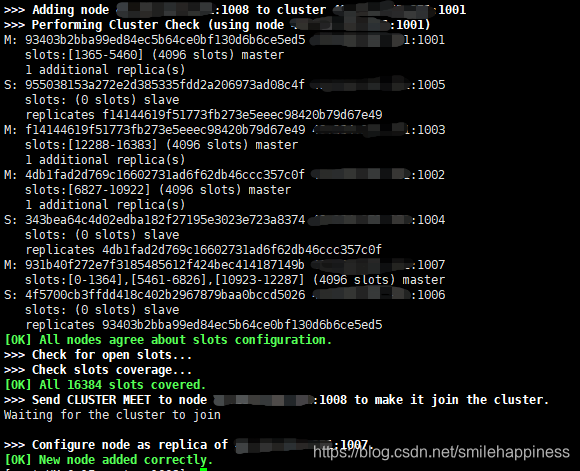
出现上图所示,说明加入从节点,并且设置对应的master节点成功。
4.7 重定向客户端
Redis Cluster并不会代理查询,那么如果客户端访问了一个key并不存在的节点,这个节点是怎么处理的呢?
key的槽位计算公式为:
slot number = crc16(key) % 16384,crc16是一种哈希函数
比如我想获取key为k1的值,k1经过计算出来的槽编号为512,当前节点正好不负责编号为512的槽位,那么就会返回客户端下面信息:
-MOVED 254 127.0.0.1:6381
表示客户端想要的254槽由运行在IP为127.0.0.1,端口为6381的Master实例服务。如果根据key计算得出的槽恰好由当前节点负责,则当前节点会立即返回结果。
例如:
127.0.0.1:1001> set k2 v2
(error) MOVED 449 ip:1007
127.0.0.1:1001> get k2
(error) MOVED 449 ip:1007
127.0.0.1:1001> exit
[root@VM_0_15_centos cluster]# ./redis-cli -p 1007
127.0.0.1:1007> get k2
"v2"
5 Redis分片迁移(面试题:槽位迁移时如何保证数据的一致性)
key的槽位计算公式为:
slot number = crc16(key) % 16384,crc16是一种哈希函数
如:crc16(key) %16384 = 512
在一个稳定的Redis cluster下,每一个哈希槽位slot对应的节点是确定的,但是在某些情况下,节点和分片对应的关系会发生变更 :
- 新加入master节点
- 某个节点宕机
也就是说当动态添加或减少redis node节点时,需要将16384个槽做个再分配,槽中的键值也要迁移。当然,这一过程,在目前实现中,还处于半自动状态,需要人工介入。
5.1 槽位迁移的过程
槽迁移的过程中有一个不稳定状态,这个不稳定状态会有一些规则,这些规则定义客户端的行为,从而使得Redis Cluster不必宕机的情况下可以执行槽的迁移。下图描述了我们迁移编号为100、101、102的槽位的过程中,他们在MasterA节点和MasterB节点中的状态。
5.2 槽位迁移的工作流程
向MasterB发送状态变更命令,把Master B对应的slot状态设置为
IMPORTING状态向MasterA发送状态变更命令,将MasterA对应的slot状态设置
MIGRATING当MasterA的状态设置为MIGRANTING后,表示对应的slot正在迁移,为了保证slot槽位数据的一致性,MasterA此时对于slot内部数据提供读写服务的行为和通常状态下是有区别的。
5.2.1 MIGRATING状态
- 如果客户端访问的Key还没有迁移出去,则正常访问这个key
- 如果key已经迁移或者根本就不存在这个key,则回复客户端
ASK信息让它跳转到MasterB去执行
5.2.2 IMPORTING状态
当MasterB的状态设置为IMPORTING后,表示对应的slot正在向MasterB迁入,即使Master仍然能对外提供该slot的读写服务,但和通常状态下也是有区别的。
当来自客户端的正常访问不是从ASK跳转过来的,说明客户端还不知道迁移正在进行,很有可能操作了一个目前还没迁移完成的并且还存在于MasterA上的key,如果此时这个key在A上已经被修改了,那么B和A的修改则会发生冲突。
所以对于MasterB上的slot上的所有非ASK跳转过来的操作,MasterB都不会进行处理,而是通过MOVED命令让客户端跳转到MasterA上去执行,这样的状态控制保证了同一个key在迁移之前总是在源节点上执行,迁移后总是在目标节点上执行,防止出现两边同时写导致的冲突问题。而且迁移过程中新增的key一定会在目标节点上执行,源节点也不会新增key,使得整个迁移过程既能对外正常提供服务,又能在一定的时间点完成slot的迁移。
6 总结
好啦,废了这么大得劲,终于把这篇博文写完了。本文主要介绍了redis的一些高级用法,主从复制、哨兵以及redis cluster高可用集群,这部分内容因为公司都在用,所以就总结的非常详细,希望对老铁们有所帮助。
如果这篇文章对你有帮助,欢迎给个赞鼓励下呗,如果有问题,欢迎评论交流,大家一起交流探讨下!
写博客是为了记住自己容易忘记的东西,另外也是对自己工作的总结,希望尽自己的努力,做到更好,大家一起努力进步!
如果有什么问题,欢迎大家评论,一起探讨,代码如有问题,欢迎各位大神指正!
给自己的梦想添加一双翅膀,让它可以在天空中自由自在的飞翔!