1.时间类型采用ISO8601标准
如2018-07-26T21:30:08+08:00 表示北京时间2018年7月26日21时30分08秒
2019-11-14T15:26:01.682+08:00 转换为 2019-11-14 15:26:01
正则表达式匹配如下:
regexp_replace('2019-11-14T15:26:01.682+08:00','([A-Z])|([.]).*',' ')
替换完了之后后面有个空格,就看有无需求去除空格,有的话,加上trim();
select trim(regexp_replace('2019-11-14T15:26:01.682+08:00','([A-Z])|([.]).*',' '));
结果如下: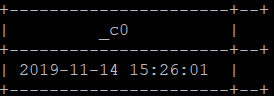
2.时间格式带年月日
(1)2020年10月25日 10:31:12.012 替换为 2020-10-25 10:31:12
这个需要分两步进行:
1.处理中文字符
2.处理毫秒值
正则表达式匹配如下:
这次匹配是将双字符替换,刚好我们的中文就带有双个字符。
regexp_replace('2020年10月25日 10:31:12.012','[^\\x00-\\xff]','-')
select regexp_replace(regexp_replace(regexp_replace('2020年10月25日 10:31:12.012','[^\\x00-\\xff]','-'),'[(.)](\\d+){3}',''),'(\\- )',' ');
结果如下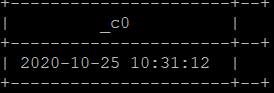
(2)2020年10月25日 10.31.12.012 替换为 2020-10-25 10:31:12
这个也是需要分为两步:
1.处理中文字符
2.处理毫秒值
替换中文字符
regexp_replace('2020年10月25日 10.31.12.012','[^\\x00-\\xff]','-')
去除最后一个‘-’
regexp_replace(regexp_replace('2020年10月25日 10.31.12.012','[^\\x00-\\xff]','-'),'(\\- )')
2.处理毫秒值
select regexp_replace(regexp_replace(regexp_replace('2020年10月25日 10.31.12.012','[^\\x00-\\xff]','-'),'(\\- )',' '),'[(.)](\\d+){3}','');
替换字符
select replace(regexp_replace(regexp_replace(regexp_replace('2020年10月25日 10.31.12.012','[^\\x00-\\xff]','-'),'[(.)](\\d+){3}',''),'(\\- )',' '),'.',':');
最终结果如图所示: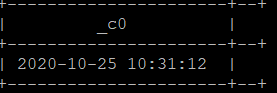
以上就是笔者遇到的时间格式数据,若是读者还遇到其他格式的时间,也尽管提出。
版权声明:本文为weixin_43567891原创文章,遵循CC 4.0 BY-SA版权协议,转载请附上原文出处链接和本声明。