
点赞再看,养成习惯,微信搜一搜【一角钱小助手】关注更多原创技术文章。本文 GitHub org_hejianhui/JavaStudy 已收录,有我的系列文章。
前言
- MySQL索引底层数据结构与算法
- MySQL性能优化原理-前篇
- MySQL性能优化-实践篇1
上一篇 《MySQL性能优化-实践篇1》我们讲了数据库表设计的一些原则,Explain工具的介绍、SQL语句优化索引的最佳实践,本篇继续来聊聊 MySQL 如何选择合适的索引。
MySQL Trace 工具
MySQL 最终是否选择走索引或者一张表涉及多个索引,最终是如何选择索引,可以使用 trace 工具来一查究竟,开启 trace工具会影响 MySQL 性能,所以只能临时分析 SQL 使用,用完之后立即关闭。
案例分析
讲 trace 工具之前我们先来看一个案例:
# 示例表
CREATE TABLE`employees`(
`id` int(11) NOT  NULL AUTO_INCREMENT,
`name` varchar(24) NOT  NULL  DEFAULT '' COMMENT '姓名',
`age` int(11) NOT  NULL  DEFAULT '0' COMMENT '年龄',
`position` varchar(20) NOT  NULL  DEFAULT '' COMMENT '职位',
`hire_time` timestamp NOT  NULL  DEFAULT CURRENT_TIMESTAMP COMMENT '入职时间',
PRIMARY KEY (`id`),
KEY `idx_name_age_position` (`name`,`age`,`position`) USING BTREE
 )ENGINE=InnoDB AUTO_INCREMENT=4  DEFAULT CHARSET=utf8 COMMENT='员工记录表';

INSERT INTO employees(name,age,position,hire_time)VALUES('ZhangSan',23,'Manager',NOW());
INSERT INTO employees(name,age,position,hire_time)VALUES('HanMeimei', 23,'dev',NOW());
INSERT INTO employees(name,age,position,hire_time) VALUES('Lucy',23,'dev',NOW());
MySQL 如何选择合适的索引
EXPLAIN select * from employees where name > 'a';
 如果用name索引需要遍历name字段联合索引树,然后还需要根据遍历出来的主键值去主键索引树里再去查出最终数据,成本比全表扫描还高,可以用覆盖索引优化,这样只需要遍历name字段的联合索引树就能拿到所有结果,如下:
EXPLAIN select name,age,position from employees where name > 'a' ;

EXPLAIN select * from employees where name > 'zzz' ;
对于上面这两种 name>'a' 和 name>'zzz' 的执行结果,mysql最终是否选择走索引或者一张表涉及多个索引,mysql最终如何选择索引,我们可以用trace工具来一查究竟,开启trace工具会影响mysql性能,所以只能临时分析sql使用,用完之后立即关闭。
trace工具用法
开启/关闭Trace
#开启trace
set  session optimizer_trace="enabled=on",end_markers_in_json=on;
#关闭trace
set  session optimizer_trace="enabled=off";
案例1
执行这两句sql
select * from employees where  name >'a' order  by  position;
SELECT * FROM information_schema.OPTIMIZER_TRACE;
提出来trace值,详见注释
{
"steps": [
    {
"join_preparation": { --第一阶段:SQL准备阶段
"select#": 1,
"steps": [
          {
"expanded_query": "/* select#1 */ select `employees`.`id` AS `id`,`employees`.`name` AS `name`,`employees`.`age` AS `age`,`employees`.`position` AS `position`,`employees`.`hire_time` AS `hire_time` from `employees` where (`employees`.`name` > 'a') order by `employees`.`position`"
          }
        ] /* steps */
      } /* join_preparation */
    },
    {
"join_optimization": { --第二阶段:SQL优化阶段
"select#": 1,
"steps": [
          {
"condition_processing": { --条件处理
"condition": "WHERE",
"original_condition": "(`employees`.`name` > 'a')",
"steps": [
                {
"transformation": "equality_propagation",
"resulting_condition": "(`employees`.`name` > 'a')"
                },
                {
"transformation": "constant_propagation",
"resulting_condition": "(`employees`.`name` > 'a')"
                },
                {
"transformation": "trivial_condition_removal",
"resulting_condition": "(`employees`.`name` > 'a')"
                }
              ] /* steps */
            } /* condition_processing */
          },
          {
"substitute_generated_columns": {
            } /* substitute_generated_columns */
          },
          {
"table_dependencies": [ --表依赖详情
              {
"table": "`employees`",
"row_may_be_null": false,
"map_bit": 0,
"depends_on_map_bits": [
                ] /* depends_on_map_bits */
              }
            ] /* table_dependencies */
          },
          {
"ref_optimizer_key_uses": [
            ] /* ref_optimizer_key_uses */
          },
          {
"rows_estimation": [ --预估表的访问成本
              {
"table": "`employees`",
"range_analysis": {
"table_scan": { --全表扫描
"rows": 3,	--扫描行数
"cost": 3.7	--查询成本
                  } /* table_scan */,
"potential_range_indexes": [ --查询可能使用的索引
                    {
"index": "PRIMARY",	--主键索引
"usable": false,
"cause": "not_applicable"
                    },
                    {
"index": "idx_name_age_position", --辅助索引
"usable": true,
"key_parts": [
"name",
"age",
"position",
"id"
                      ] /* key_parts */
                    },
                    {
"index": "idx_age",
"usable": false,
"cause": "not_applicable"
                    }
                  ] /* potential_range_indexes */,
"setup_range_conditions": [
                  ] /* setup_range_conditions */,
"group_index_range": {
"chosen": false,
"cause": "not_group_by_or_distinct"
                  } /* group_index_range */,
"analyzing_range_alternatives": { --分析各个索引使用成本
"range_scan_alternatives": [
                      {
"index": "idx_name_age_position",
"ranges": [
"a < name"	--索引使用范围
                        ] /* ranges */,
"index_dives_for_eq_ranges": true,
"rowid_ordered": false, --使用该索引获取的记录是否按照主键排序
"using_mrr": false,
"index_only": false,	--是否使用覆盖索引
"rows": 3,	--索引扫描行数
"cost": 4.61, --索引使用成本
"chosen": false, --是否选择该索引
"cause": "cost"
                      }
                    ] /* range_scan_alternatives */,
"analyzing_roworder_intersect": {
"usable": false,
"cause": "too_few_roworder_scans"
                    } /* analyzing_roworder_intersect */
                  } /* analyzing_range_alternatives */
                } /* range_analysis */
              }
            ] /* rows_estimation */
          },
          {
"considered_execution_plans": [
              {
"plan_prefix": [
                ] /* plan_prefix */,
"table": "`employees`",
"best_access_path": { --最优访问路径
"considered_access_paths": [ --最终选择的访问路径
                    {
"rows_to_scan": 3,
"access_type": "scan",	--访问类型:为sacn,全表扫描
"resulting_rows": 3,
"cost": 1.6,
"chosen": true,	--确定选择
"use_tmp_table": true
                    }
                  ] /* considered_access_paths */
                } /* best_access_path */,
"condition_filtering_pct": 100,
"rows_for_plan": 3,
"cost_for_plan": 1.6,
"sort_cost": 3,
"new_cost_for_plan": 4.6,
"chosen": true
              }
            ] /* considered_execution_plans */
          },
          {
"attaching_conditions_to_tables": {
"original_condition": "(`employees`.`name` > 'a')",
"attached_conditions_computation": [
              ] /* attached_conditions_computation */,
"attached_conditions_summary": [
                {
"table": "`employees`",
"attached": "(`employees`.`name` > 'a')"
                }
              ] /* attached_conditions_summary */
            } /* attaching_conditions_to_tables */
          },
          {
"clause_processing": {
"clause": "ORDER BY",
"original_clause": "`employees`.`position`",
"items": [
                {
"item": "`employees`.`position`"
                }
              ] /* items */,
"resulting_clause_is_simple": true,
"resulting_clause": "`employees`.`position`"
            } /* clause_processing */
          },
          {
"reconsidering_access_paths_for_index_ordering": {
"clause": "ORDER BY",
"index_order_summary": {
"table": "`employees`",
"index_provides_order": false,
"order_direction": "undefined",
"index": "unknown",
"plan_changed": false
              } /* index_order_summary */
            } /* reconsidering_access_paths_for_index_ordering */
          },
          {
"refine_plan": [
              {
"table": "`employees`"
              }
            ] /* refine_plan */
          }
        ] /* steps */
      } /* join_optimization */
    },
    {
"join_execution": {	--第三阶段:SQL执行阶段


"select#": 1,
"steps": [
          {
"filesort_information": [
              {
"direction": "asc",
"table": "`employees`",
"field": "position"
              }
            ] /* filesort_information */,
"filesort_priority_queue_optimization": {
"usable": false,
"cause": "not applicable (no LIMIT)"
            } /* filesort_priority_queue_optimization */,
"filesort_execution": [
            ] /* filesort_execution */,
"filesort_summary": {
"rows": 3,
"examined_rows": 3,
"number_of_tmp_files": 0,
"sort_buffer_size": 200704,
"sort_mode": ""
            } /* filesort_summary */
          }
        ] /* steps */
      } /* join_execution */
    }
  ] /* steps */
}
结论:全表扫描的成本低于索引扫描,所以MySQL最终选择全表扫描。
案例2
select * from employees where name > 'zzz' order by position;
SELECT * FROM information_schema.OPTIMIZER_TRACE;
结论:查看trace字段可知索引扫描的成本低于全表扫描,所以MySQL最终选择索引扫描。
常见SQL深入优化
Order by与Group by优化
案例1
EXPLAIN select * from employees where name = 'ZhangSan' and position = 'dev' order by age; 分析:
分析:
利用最左前缀法则:中间字段不能断,因此查询用到了 name索引 ,从 key_len = 74 也能看出,age 索引列用在排序过程过程中,因为 Extra 字段里没有 using filesort 。
案例2
EXPLAIN select * from employees where name = 'ZhangSan' order by position;
 分析:
分析:
从 explain 的执行结果来看:key_len = 74,查询使用了 name 索引,由于用了 position 进行排序,跳过了 age,出现了 Using filesort。
案例3
EXPLAIN select * from employees where name = 'ZhangSan' order by age,position
 分析:
分析:
查询只用到索引name,age 和 position 用于排序,无Using filesort。
案例4
EXPLAIN select * from employees where name = 'ZhangSan' order by position,age
 分析:
分析:
和案例3中explain的执行结果一样,但是出现了Using filesort ,因为索引的创建顺序为 name,age,position , 但是排序的时候 age 和 position 颠倒位置了。
案例5
EXPLAIN select * from employees where name = 'ZhangSan' and age = 18 order by position,age
 分析:
分析:
与案例4对比,在Extra中并未出现** Using filesort **,因为 age 为常量,在排序中被优化,所以索引未颠倒,不会出现 Using filesort 。
案例6
EXPLAIN select * from employees where name = 'ZhangSan' order by age asc, position desc;
 分析:
分析:
虽然排序的字段列与索引顺序一样,且 order by 默认升序,这里 position desc 变成列降序,导致与索引的排序方式不同,从而产生 Using filesort 。MySQL8 以上版本有降序索引可以支持该种查询方式。
案例7
EXPLAIN select * from employees where name in ('ZhangSan', 'hjh') order by age, position;
分析:
对于排序来说,多个相等条件也是范围查询。
案例8
EXPLAIN select * from employees where name > 'a' order by name;
 可以用覆盖索引优化
EXPLAIN select name,age,position from employees where name > 'a' order by name;

优化总结
- MySQL支持两种方式的排序
filesort和index。Using index 是指MySQL 扫描索引本身完成排序。index 效率高,filesort 效率低。 - order by 满足两种情况会使用 Using index.
- order by 语句使用索引最左前例。
- 使用 where 子句与 order by 子句条件列组合满足索引最左前例。
order by null 禁止排序。 注意:where 高于 having,能写在 where 中的限定条件就不要去 having 限定了。Using filesort文件排序原理
filesort文件排序方式
- 单路排序:是一次性取出满足条件行的所有字段,然后在
sort buffer中进行排序;用 trace 工具可以看到 sort_mode 信息里显示 < sort_key, additional_fields > 或者 < sort_key, packed_additional_fields >。 - 双路排序(又叫回表排序模式):是首先根据相应的条件取出相应的排序字段和可以直接定位运行数据的行ID,然后在 sort buffer 中进行排序,排序完后需要再次取回其它需要的字段;用 trace 工具可以看到 sort_mode 信息里显示 < sort_key, rowid >
MySQL 通过比较系统变量 max_length_for_sort_data (默认1024字节) 的大小和需要查询的字段总大小来判断使用那种排序模式。
- 如果
max_length_for_sort_data比查询的字段的总长度大,那么使用单路排序模式; - 如果
max_length_for_sort_data比查询字段的总长度小,那么使用双路排序模式。
验证各种排序方式
EXPLAIN select * from employees where name = 'ZhangSan' order by position;
 查看下这条sql对应trace结果如下(只展示排序部分):
set  session optimizer_trace="enabled=on",end_markers_in_json=on; #开启trace
select * from employees where  name = 'ZhangSan' order  by  position;
select * from information_schema.OPTIMIZER_TRACE;
      "join_execution": { --SQL执行阶段
        "select#": 1,
"steps": [
          {
"filesort_information": [
              {
"direction": "asc",
"table": "`employees`",
"field": "position"
              }
            ] /* filesort_information */,
"filesort_priority_queue_optimization": {
"usable": false,
"cause": "not applicable (no LIMIT)"
            } /* filesort_priority_queue_optimization */,
"filesort_execution": [
            ] /* filesort_execution */,
"filesort_summary": { --文件排序信息
"rows": 1, --预计扫描行数
"examined_rows": 1, --参数排序的行
"number_of_tmp_files": 0, --使用临时文件的个数,这个值如果为0代表全部使用的sort_buffer内存排序,否则使用的磁盘文件排序
"sort_buffer_size": 200704, --排序缓存的大小
"sort_mode": "" --排序方式,这里用的单路排序
            } /* filesort_summary */
          }
        ] /* steps */
      } /* join_execution */
修改系统变量 max_length_for_sort_data (默认1024字节) ,employees 表所有字段长度总和肯定大于10字节
set max_length_for_sort_data = 10;
select * from employees where name = 'ZhangSan' order by position;
select * from information_schema.OPTIMIZER_TRACE;
trace排序部分结果:
      "join_execution": {
        "select#": 1,
"steps": [
          {
"filesort_information": [
              {
"direction": "asc",
"table": "`employees`",
"field": "position"
              }
            ] /* filesort_information */,
"filesort_priority_queue_optimization": {
"usable": false,
"cause": "not applicable (no LIMIT)"
            } /* filesort_priority_queue_optimization */,
"filesort_execution": [
            ] /* filesort_execution */,
"filesort_summary": {
"rows": 1,
"examined_rows": 1,
"number_of_tmp_files": 0,
"sort_buffer_size": 53248,
"sort_mode": "" --排序方式,这里用饿的双路排序
            } /* filesort_summary */
          }
        ] /* steps */
      } /* join_execution */
单路排序的详细过程:
- 从索引 name 找到第一个满足 name='ZhangSan' 条件的主键 id;
- 根据主键id取出整行,取出所有字段的值,存入sort_buffer中;
- 从索引name找到下一个满足 name='ZhangSan' 条件的主键 id;
- 重复步骤2、3直到不满足 name='ZhangSan';
- 对 sort_buffer 中的数据按照字段 position 进行排序;
- 返回结果给客户端
双路排序的详细过程:
- 从索引 name 找到第一个满足 name='ZhangSan' 的主键id;
- 根据主键id取出整行,把排序字段 position 和 主键id 这两个字段放到 sort_buffer 中;
- 从索引 name 取下一个满足 name='ZhangSan' 记录的主键id;
- 重复步骤3、4直到不满足 name='ZhangSan';
- 对 sort_buffer 中的字段 position 和 主键id按照 position 进行排序;
- 遍历排序好的 id 和 字段 position,按照 id 的值回到原表中取出所有的字段的值返回给客户端。
对比两个排序模式,单路排序会把所有需要查询的字段都放到 sort_buffer 中,而双路排序只会把主键和需要排序的字段放到 sort_buffer 中进行排序,然后再通过主键回到原表查询需要的字段。
如果MySQL排序内存配置的比较小并且没有条件继续增加了,可以适当把 max_length_for_sort_data 配置小点,让优化器选择使用双路排序算法,可以在 sort_buffer 中一次排序更多的行,只是需要再根据主键回到原表取数据。
如果MySQL排序内存有条件可以配置比较大,可以适当增大 max_length_for_sort_data 的值,让优化器优先选择全字段排序(单路排序),把需要的字段放到 sort_buffer 中,这样排序后就会直接从内存里返回查询结果了。
所以,MySQL 通过 max_length_for_sort_data 这个参数来控制排序,在不同场景使用不同的排序模式,从而提升排序效率。
注意:如果全部使用sort_buffer 内存排序一般情况下效率会高于磁盘文件排序,但不能因为这个就随便增大 sort_buffer(默认1M),MySQL很多参数设置都做过优化的,不要轻易调整。
分页查询优化
在这我们先往 employess 插入一些测试数据
drop  procedure  if  exists insert_emp;
delimiter ;;
create  procedure insert_emp()
begin
declare i int;
set i=1;
	while(i<=100000) do
insert  into employees(name,age,position) values(CONCAT('hjh',i),i,'dev');
set i=i+1;
end while;
end;;
delimiter ;
call insert_emp();
很多时候我们业务系统实现分页功能可能会用如下SQL实现
select * from employees limit 10000,10;
表示从表 employees 中取出从 10001 行开始的 10 行记录。看似只查询了 10 条记录,实际这条 SQL 是先读取 10010 条记录,然后抛弃前 10000 条记录,然后读到后面 10 条想要的数据。因此要查询一张大表比较靠后的数据,执行效率是非常低的。
常见的分页场景优化技巧
- 根据自增且连续的主键排序的分页查询
- 根据非主键字段排序的分页查询
案例1: 根据自增且连续的主键排序的分页查询
首先来看一个根据自增且连续主键排序的分页查询的例子:
select * from employees limit 9000,5;
该 SQL 表示查询从第 9001开始的五行数据,没添加单独 order by,表示通过主键排序。我们再看表 employees ,因为主键是自增并且连续的,所以可以改写成按照主键去查询从第 9001开始的五行数据,如下:
select * from employees where id > 9000 limit 5;
查询结果是一致的,我们再对比一下执行计划:
EXPLAIN select * from employees limit 9000,5;

EXPLAIN select * from employees where id > 9000 limit 5;
 显然改写后的 SQL 走了索引,而且扫描的行数大大减少,执行效率更高。但是,这条改写的 SQL 在很多场景并不实用,因为表中可能某些记录被删后,主键空缺,导致结果不一致,如下图试验所示(先删除一条前面的记录,然后再测试原 SQL 和优化后的 SQL):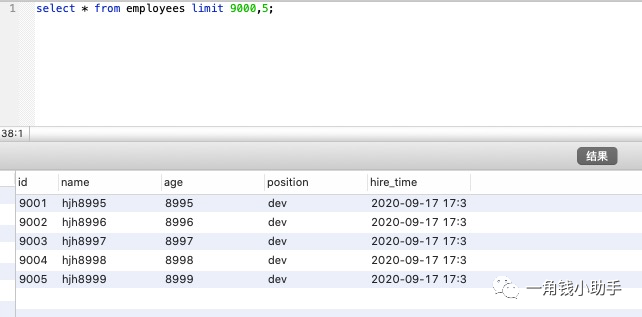
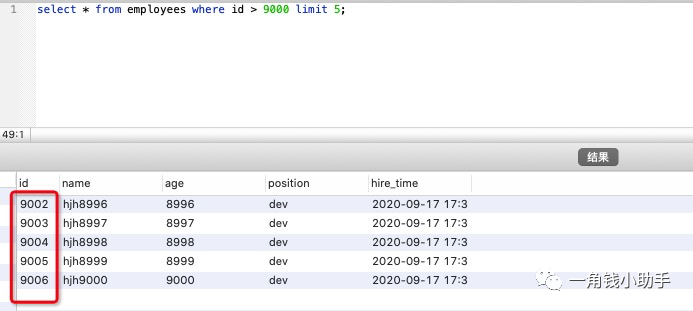 两条 SQL 的结果并不一样,因此,如果主键不连续,不能使用上面描述的优化方法。
另外如果原SQL是order by 非主键的字段,按照上面说的方法改写会导致两条SQL的结果不一致。所以这种改写得满足以下两个条件:
- 主键自增且连续
- 结果是按照主键排序的
案例2: 根据非主键字段排序的分页查询
再看一个根据非主键字段排序的分页查询,SQL 如下:
select * from employees ORDER BY name limit 9000,5;
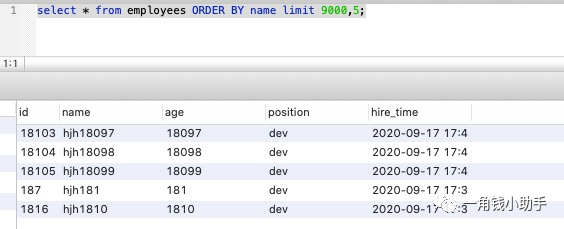
EXPLAIN select * from employees ORDER BY name limit 90000,5;
 发现并没有使用 name 字段的索引(key 字段对应的值为 null),具体原因上前面讲过 : 扫描整个索引并查找到没索引的行(可能要遍历多个索引树)的成本比扫描全表的成本更高,所以优化器放弃使用索引。知道不走索引的原因,那么怎么优化呢? 其实关键是让排序时返回的字段尽可能少,所以可以让排序和分页操作先查出主键,然后根据主键查到对应的记录,SQL 改写如下:
select * from employees e inner join (select id from employees order by name limit 90000,5) ed on e.id = ed.id;
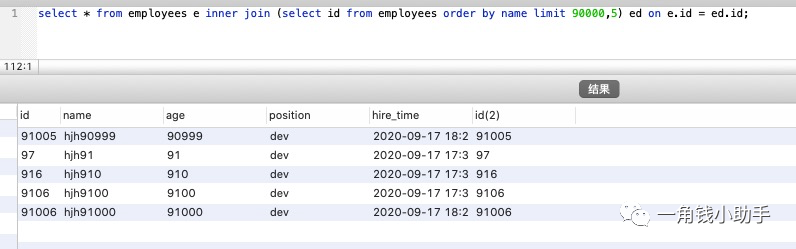 需要的结果与原 SQL 一致,执行时间减少了一半以上,我们再对比优化前后sql的执行计划:
EXPLAIN select * from employees e inner join (select id from employees order by name limit 90000,5) ed on e.id = ed.id;
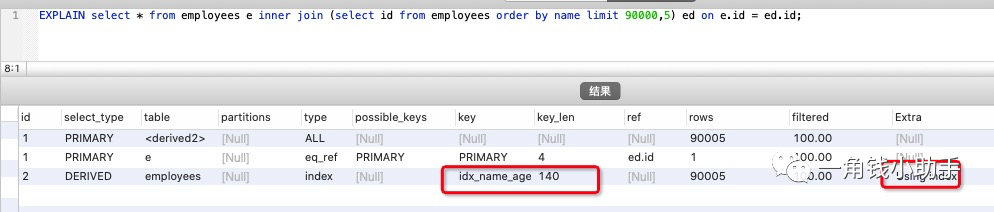 原 SQL 使用的是 filesort 排序,而优化后的 SQL 使用的是索引排序。
Join关联查询优化
#示例表
CREATE  TABLE `t1` (
`id` INT (11) NOT  NULL AUTO_INCREMENT,
`a` INT (11) DEFAULT  NULL,
`b` INT (11) DEFAULT  NULL,
	PRIMARY KEY (`id`),
KEY `idx_a` (`a`)
) ENGINE = INNODB AUTO_INCREMENT = 10001  DEFAULT  CHARSET = utf8;

CREATE  TABLE t2 LIKE t1;
往t1表插入1万行记录,往t2表插入100行记录
#t1 1万条记录
drop procedure  if  exists insert_emp_t1;
delimiter ;;
create  procedure insert_emp_t1()
begin
declare i int;
set i=1;
	while(i<=10000) do
insert  into t1(a,b) values(i,i);
set i=i+1;
end  while;
end;;
delimiter ;
call insert_emp_t1();

#t2 100条记录
drop  procedure  if  exists insert_emp_t2;
delimiter ;;
create  procedure insert_emp_t2()
begin
declare i int;
set i=1;
	while(i<=100) do
insert  into t2(a,b) values(i,i);
set i=i+1;
end  while;
end;;
delimiter ;
call insert_emp_t2();
MySQL 的表关联常见有两种算法
- Nested-Loop Join 算法
- Block Nested-Loop Join 算法
案例1:嵌套循环连接 Nested-Loop Join(NLJ)算法
一次一行循环地从第一张表(称为驱动表)中读取行,在这行数据中取到关联字段,根据关联字段在另一张表(被驱动表)里取出满足条件的行,然后取出两张表的结果合集。
EXPLAIN select * from t1 inner join t2 on t1.a= t2.a;
 从执行计划中可以看到这些信息:
- 驱动表是 t2,被驱动表是 t1。先执行的就是驱动表(执行计划结果的id如果一样则按从上到下顺序执行sql);优化器一般会优先选择小表做驱动表。所以使用 inner join 时,排在前面的表并不一定就是驱动表。
- 使用了 NLJ 算法。一般 join 语句中,如果执行计划 Extra 中未出现 Using join buffer 则表示使用的 join 算法是 NLJ。
上面SQL的大致流程如下:
- 从表 t2 中读取一行数据;
- 从第1步的数据中,取出关键字字段 a,到表 t1 中查找;
- 取出表 t1 中满足条件的行,跟 t2 中获取到的结果合并,作为结果返回给客户端;
- 重复上面 3 步。
整个过程会读取 t2 表的所有数据(扫描100行),然后遍历这每行数据中字段 a 的值,根据 t2 表中的 a 的值索引扫描 t1 表中对应的行(扫描 100次 t1 表的索引,1次扫描可以认为最终只扫描 t1 表一行完整数据,也就是总共 t1 表也扫描了100行)。因此整个过程扫描了 200 行。
如果被驱动表的关联字段没有索引,使用NLJ算法性能会比较低(下面有详细解释),MySQL 会选择 Block Nested-Loop Join 算法。
案例2:基于块的嵌套循环连接 Block Nested-Loop Join(BNL)算法
把驱动表的数据读入到 join_buffer 中,然后扫描被驱动表,把被驱动表每一行取出来跟 join_buffer 中的数据做对比。
EXPLAIN select * from t1 inner join t2 on t1.b= t2.b;
 Extra 中 的Using join buffer (Block Nested Loop)说明该关联查询使用的是 BNL 算法。
上面sql的大致流程如下:
- 把 t2 的所有数据放入到 join_buffer 中
- 把表 t1 中每一行取出来,跟 join_buffer 中的数据做对比
- 返回满足 join 条件的数据
整个过程对表 t1 和 t2 都做了一次全表扫描,因此扫描的总行数为10000(表 t1 的数据总量) + 100(表 t2 的数据总量) = 10100。并且 join_buffer 里的数据是无序的,因此对表 t1 中的每一行,都要做 100 次判断,所以内存中的判断次数是 100 * 10000= 100 万次。
被驱动表的关联字段没索引为什么要选择使用 BNL 算法而不使用 Nested-Loop Join 呢?
如果上面第二条sql使用 Nested-Loop Join,那么扫描行数为 100 * 10000 = 100万次,这个是磁盘扫描。
很显然,用BNL磁盘扫描次数少很多,相比于磁盘扫描,BNJ 的内存计算会快得多。
因此MySQL对于被驱动表的关联字段没索引的关联查询,一般都会使用 BNL 算法。如果有索引一般选择 NLJ 算法,有索引的情况下 NLJ 算法比 BNL算法性能更高。
对于关联SQL的优化
- 关联字段加索引,让mysql做join操作时尽量选择NLJ算法
- 小标驱动大表,写多表连接sql时如果明确知道哪张表是小表可以用
straight_join写法固定连接驱动方式,省去mysql优化器自己判断的时间
straight_join解释
straight_join功能同join类似,但能让左边的表来驱动右边的表,能改表优化器对于联表查询的执行顺序。
比如 : select * from t2 straight_join t1 on t2.a = t1.a; 代表制定mysql选 t2 表作为驱动表。
- straight_join 只适用于inner join,并不适用于left join,right join。(因为left join,right join已经代表指 定了表的执行顺序)
- 尽可能让优化器去判断,因为大部分情况下mysql优化器是比人要聪明的。使用straight_join一定要慎重,因 为部分情况下人为指定的执行顺序并不一定会比优化引擎要靠谱。
in 和 exsits 优化
原则:小表驱动大表,即小的数据集驱动大的数据集。
in:当B表的数据集小于A表的数据集时,in优于exists
select * from A where  id  in(select  id  from B)
#等价于:
for(select  id  from B){
select * from A where A.id = B.id
}
exists:当A表的数据集小于B表的数据集时,exists优于in
将主查询A的数据,放到子查询B中做条件验证,根据验证结果(true或false)来决定主查询的数据是否保留
select * from A where  exists (select  1  from B where B.id=A.id)
#等价于:
for(select * from A){
select * from B where B.id = A.id
}

#A表与B表的ID字段应建立索引
- EXISTS (subquery)只返回TRUE或FALSE,因此子查询中的SELECT * 也可以用SELECT 1替换,官方说法是实际执行时会 忽略SELECT清单,因此没有区别;
- EXISTS子查询的实际执行过程可能经过了优化而不是我们理解上的逐条对比;
- EXISTS子查询往往也可以用JOIN来代替,何种最优需要具体问题具体分析;
Count(*) 查询优化
临时关闭mysql查询缓存,为了查看sql多次执行的真实时间。
set  global query_cache_size=0;
set  global query_cache_type=0;
EXPLAIN  select  count(1) from employees;
EXPLAIN  select  count(id) from employees;
EXPLAIN  select  count(name) from employees;
EXPLAIN  select  count(*) from employees;
 四个sql的执行计划一样,说明这四个sql执行效率应该差不多,区别在于根据某个字段count不会统计字段为null值的数据行。
为什么mysql最终选择辅助索引而不是主键聚集索引?
因为二级索引相对主键索引存储数据更少,检索性能应该更高
常见的优化方法如下:
- 查询MySQL自己维护的总行数
- show table status
- 将总数维护到Redis里
- 增加计数表
查询MySQL自己维护的总行数
对于myisam存储引擎的表做不带where条件的count查询性能是很高的,因为myisam存储引擎的表的总行数会被 mysql存储在磁盘上,查询不需要计算。 对于innodb存储引擎的表mysql不会存储表的总记录行数,查询count需要实时计算。
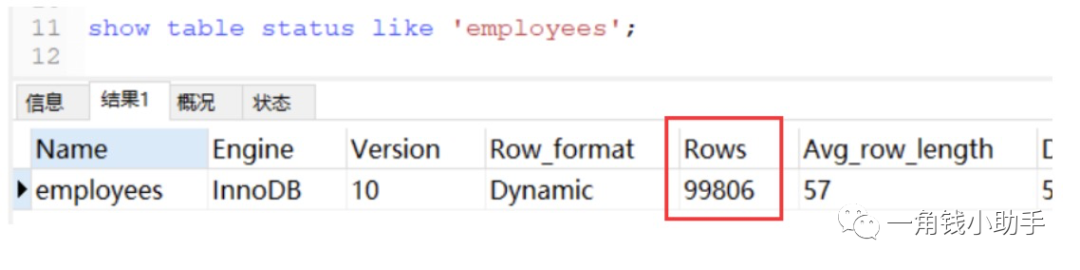
show table status
如果只需要知道表总行数的估计值可以用如下sql查询,性能很高
将总数维护到Redis里
插入或删除表数据行的时候同时维护redis里的表总行数key的计数值(用incr或decr命令),但是这种方式可能不准,很难保证表操作和redis操作的事务一致性。
增加计数表
插入或删除表数据行的时候同时维护计数表,让他们在同一个事务里操作。


部分图片来源于网络,版权归原作者,侵删。?点击阅读原文,查看往期内容!快留言?和我互动吧~