消息队列在项目中的运用是越来越广泛,上篇博客 初探消息队列RabbitMQ 安装上了RabbitMQ,实现了消息队列的生产和消费,那如何与Spring Boot进行整合呢,查阅些资料,记录下来练习的过程,方便备查。
知识学习与回顾
RabbitMQ有6种消息模型,但第6种属于RPC,因此只需要学习五种。其中第3、4、5种都属于是订阅模型,区别在于他们选择的路由方式不同。下图对应的是这几种消息模型。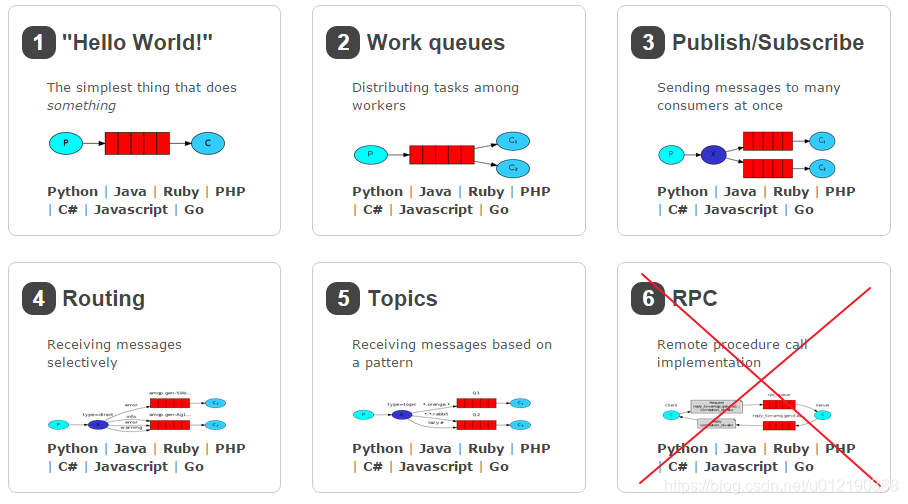
运用Spring Boot进行RabbitMQ的整合,主要通过以下几个步骤。
1、新建项目并引入RabbitMQ依赖
方法一、直接在pom.xml文件中添加以下配置信息
<dependency>
	<groupId>org.springframework.boot</groupId>
	<artifactId>spring-boot-starter-amqp</artifactId>
</dependency>
方法二、项目构建阶段输入 spring for RabbitMQ,即可自动生成依赖。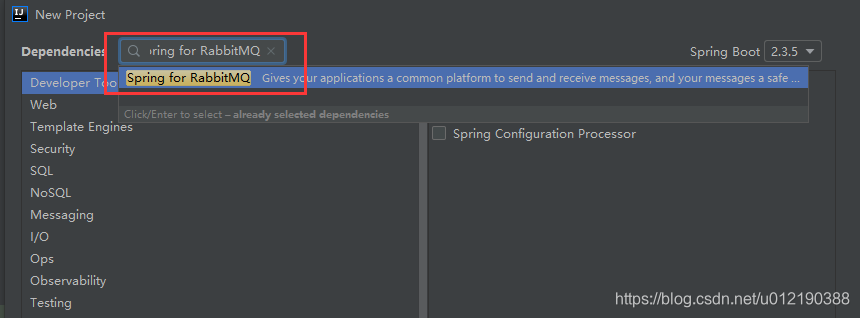
在application.yml文件中添加配置
spring:
  application:
    name : rabbitmq-springboot
  rabbitmq:
    host : 192.168.30.130
    port : 5672
    username : admin
    password : admin
    virtual : /
2、新建测试类
新建测试类SpringbootApplicationTests.java,作为生产者来生产消息。
1) 第一种模型 hello word
生产者模型需要注入 RabbitTemplate 进行消息的生产,hello word 模型的生产者生产消息的程序。
@SpringBootTest(classes = SpringbootApplication.class)
@RunWith(SpringRunner.class)
public class SpringbootApplicationTests {
  // 注入rabbitmqTemplate,来进行消息的发送
  @Autowired
  private RabbitTemplate rabbitTemplate;
  @Test
    public void testHello(){
        // 参数1 队列的名称
        // 参数2 队列的内容
        rabbitTemplate.convertAndSend("hello","hello word 模型");
        System.out.println("hello");
    }
}
消费者进行消息的消费用到 RabbitListener 来监听指定的消息队列。以下是第一种消费者消费的程序。
import org.springframework.amqp.rabbit.annotation.Queue;
import org.springframework.amqp.rabbit.annotation.RabbitHandler;
import org.springframework.amqp.rabbit.annotation.RabbitListener;
import org.springframework.stereotype.Component;
// 保证被工厂扫描到,默认是持久化,非独占
@Component
// 添加监听 消费者
@RabbitListener(queuesToDeclare = @Queue("hello"))
public class Consumer {
    @RabbitHandler
    public void receirve (String message){
        System.out.println("message "+ message);
    }
}
hello word 模型 针对的是一对一的生产者和消费者的关系,但在实际的生产中,可能存在多个消费者都要进行消息的消费。
2)第二种模型 work模型
work 模型是对第一种消息模型的改进,多个消费者可以对消息进行消费。生产者的程序和第一种类似,绑定消息队列,代码如下所示。
@SpringBootTest(classes = SpringbootApplication.class)
@RunWith(SpringRunner.class)
public class SpringbootApplicationTests {

    // 注入rabbitmqTemplate
    @Autowired
    private RabbitTemplate rabbitTemplate;
    // work 模型
   @Test
    public void testWork(){
        rabbitTemplate.convertAndSend("work","work模型");
    }
}
消费者进行消息的消费,代码如下所示。
import org.springframework.amqp.rabbit.annotation.RabbitListener;
import org.springframework.stereotype.Component;

@Component
public class ConsumerWork {
    // 消费者1
    @RabbitListener(queuesToDeclare = @Queue("work"))
    public void receiveOne(String message){
        for (int i = 0; i < 10; i++) {
            System.out.println("message one 消息 >>>> "+ message + i);
        }
    }

    // 消费者2
    @RabbitListener(queuesToDeclare = @Queue("work"))
    public void receiveTwo(String message){
        System.out.println("message two 消息 >>>> "+ message);
    }
}
消费者对消息进行消费,结果各不相同,实现了任务的分发。
由此可以发现个问题,消费者处理消息的时间是不一样的,平均分发可能导致消费快的在等待,应该是将消费快的尽快消费,完成消息任务。接下来引出第三种消息模型。
3)第三种模型 订阅模型
第三种消息模型对上一种模型的改进,对于生产者的程序基本相同,只是更改了消息队列的名称。以
@SpringBootTest(classes = SpringbootApplication.class)
@RunWith(SpringRunner.class)
public class SpringbootApplicationTests {

    // 注入rabbitmqTemplate
    @Autowired
    private RabbitTemplate rabbitTemplate;
    @Test
    public void testTopic(){
        rabbitTemplate.convertAndSend("topics","user.save","user.save");
    }
}
消费者对消息进行消费,设置绑定消息队列的名称,交换机的名称,指定交换机代码如下所示。
@Component
public class FanoutConsumer {
    @RabbitListener(bindings = {
            @QueueBinding(
                    value = @Queue,  //创建临时队列
                    exchange = @Exchange(value = "logs",type = "fanout") //绑定交换机
            )
    })
    public void receivedOne(String message){
        System.out.println("message one 消息 >>>>> " + message);
    }

    // 消费者2
    @RabbitListener(bindings = {
            @QueueBinding(
                    value = @Queue,  //创建临时队列
                    exchange = @Exchange(value = "logs",type = "fanout") //绑定交换机
            )
    })
    public void receivedtwo(String message){
        System.out.println("message two 消息 >>>>> " + message);
    }
}
4)第四种消息模型 Route模型
第四种消费类型是路由转发的原理,对消息进行转发处理,满足规则的进行消费的处理,不满足的可以不进行操作。生产者进行消息生产的代码如下所示。
@SpringBootTest(classes = SpringbootApplication.class)
@RunWith(SpringRunner.class)
public class SpringbootApplicationTests {

    // 注入rabbitmqTemplate
    @Autowired
    private RabbitTemplate rabbitTemplate;
    // 路由模型
    @Test
    public void testRoute(){
        rabbitTemplate.convertAndSend("directs","info","发送info的key的路由信息");
    }
}
消费者在绑定消息队列、交换机时,需要定义好key的范围,满足条件进行消费。
@Component
public class RouteConsumer {
    @RabbitListener(bindings = {
            @QueueBinding(
                    value = @Queue,
                    exchange = @Exchange(value = "directs",type = "direct"),
                    key = {"info","error","warn"}
            )
    })
    public void receiverOne(String message){
        System.out.println("message one >>>> "+message);
    }

    // 消费者2
    @RabbitListener(bindings = {
            @QueueBinding(
                    value = @Queue,
                    exchange = @Exchange(value = "directs",type = "direct"),
                    key = {"info","error","warn"}
            )
    })
    public void receiverTwo(String message){
        System.out.println("message two >>>> "+ message);
    }
}
5)第五种消息模型 Fanout 模型
第五种消息类型是对上一种的改进,绑定交换机时定义的key的范围是有限的,要进行范围的划定,这里需要进行匹配。
@SpringBootTest(classes = SpringbootApplication.class)
@RunWith(SpringRunner.class)
public class SpringbootApplicationTests {

    // 注入rabbitmqTemplate
    @Autowired
    private RabbitTemplate rabbitTemplate;
    // Fanout 广播消息
    @Test
    public void testFanout(){
        rabbitTemplate.convertAndSend("logs","Fanous模型发送的数据");
    }
}
消费者的匹配规则需要进行提前定义,满足规则的都是可以进行消费。
@Component
public class TopicConsumer {
    @RabbitListener(bindings = {
            @QueueBinding(
                    value = @Queue,
                    exchange = @Exchange(type = "topics",name = "topic"),
                    key = {"user.save","user.*"}
            )
    })
    public void receivedOne(String message){
        System.out.println("message one >>>>>> "+message);
    }

    // 消费者2
    @RabbitListener(bindings = {
            @QueueBinding(
                    value = @Queue,
                    exchange = @Exchange(type = "topics",name = "topic"),
                    key = {"user.save","order.*"}
            )
    })
    public void receivedTwo(String message){
        System.out.println("message two >>>>>> "+message);
    }
}
* 代码全部,满足order开头的消息都是可以进行处理。
参考博客
【1】https://www.cnblogs.com/ifme/p/12024064.html