1.占位符
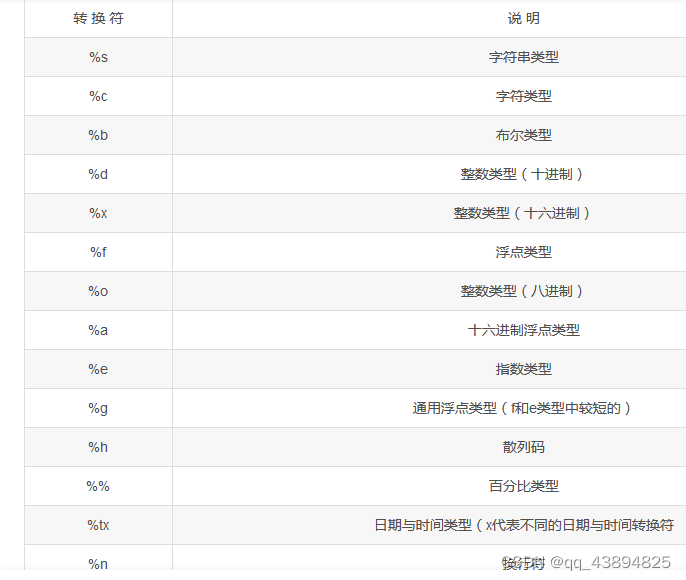
2-1 .String.format() 接收URL的参数
//前端往服务器端传递参数
@Controller
public class DeliveryParamController {

//http://localhost:8080/mvc/pass-one?username=张三&password=123456
    @RequestMapping("/pass-one") //
    public String passOne(String username, String password) {
        System.out.println(String.format("Username: %s, Password: %s", username, password));
        return "index";
    }
2-1-2 @RequestMapping(“/pass-one”) //指定路径
2-1-3 %s 占位符 表示要传入 字符串
2-2 通过UserDao对象传参数String.format() 接收URL的参数
2-2-1 @RequestMapping(“/pass-one”) //指定路径
2-2-1-1 定义一个UserDto并有username,password,id变量
@Data
public class UserDto {
    private String username;
    private String password;
    private Integer id;
}
2-2-1-2定义一个controller %d 是十进制整数
    //http://localhost:8080/mvc/pass-two?username=张三&password=abclmn&id=12345
    @RequestMapping("/pass-two")
    public String passTwo(UserDto userDto) {
    //通过 userDto的get方法得到传入的 参数值
        System.out.println(String.format("Id: %d, Username: %s, Password: %s",
                userDto.getId(), userDto.getUsername(), userDto.getPassword()));
        return "index";
    }
2-2-1-3 Dto用来接收前端传过来的数据
2-3 把参数放在 两个/ / 中间的位置
/**
     * 1. {名称} 是路径的占位,用户在访问的时候必须要传递具体的值。
     * 2. 必须要在路径中用户 @PathVariable 将路径的中的参数与具体的形参绑定。
     *  http://localhost:8080/mvc/path-param/780
     * 780就是 插入的  @pathParam位置参数的值
     */
@RequestMapping("/path-param/{id}")
//public String pathParam(@PathVariable("id") Integer id,@PathVariable("name")String username)
    public String pathParam(@PathVariable("id") Integer id) {
        System.out.println(String.format("ID: %d", id));
        return "index";
    }
2-3-1 @PathVariable(“id”)
@RequestMapping(“/path-param/{id}”)
路径变量注解 ,两个路径 / / 之间的变量,可以写多个
2-3-2 780就是 插入的 @pathParam位置参数的值
2-4 传日期格式的参数
    /**
     * http://localhost:8080/mvc/date-pass?name=张三&birthday=2021-08-12
     */
    @RequestMapping("/date-pass")
    public String datePass(String name, @DateTimeFormat(pattern = "yyyy-MM-dd") Date birthday) {
        System.out.println(String.format("Name: %s, Birthday: %s", name, birthday));
        return "index";
    }
2-4 -1@DateTimeFormat(pattern = “yyyy-MM-dd”)
指定日期格式
指定格式
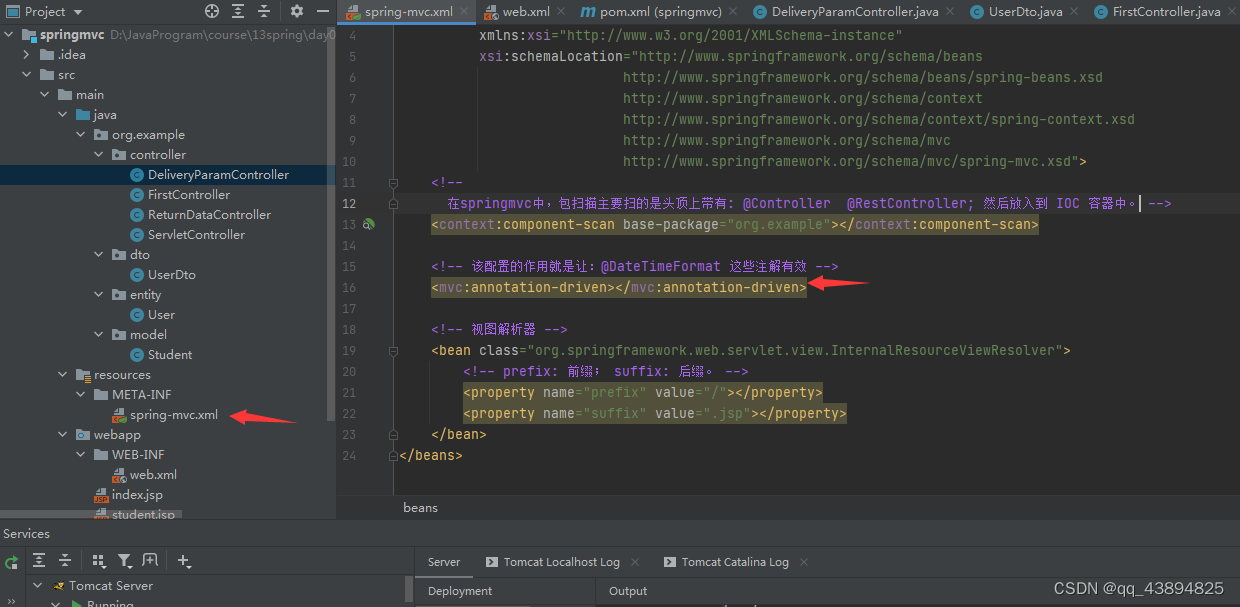
2-4-2 激活@@DateTimeFormat
   <!--激活 该配置的作用就是让:@DateTimeFormat 这些注解有效 -->
<!--激活     tx:annotation-driven和他功能类似 也是    激活    -->
    <mvc:annotation-driven></mvc:annotation-driven>
2-5 多参数传递
<div>
          爱好:
	<input type="checkbox" name="hobby" value="sport>"/> 运动       √
	<input type="checkbox" name="hobby" value="movie>"/> 电影
	<input type="checkbox" name="hobby" value="swim>"/> 游泳        √
	<input type="checkbox" name="hobby" value="coding>"/> 写代码    √
 </div>
      <input type="submit" value="提交"/>
 /**
     * 1.URL
     * 2.二进制。  32  64
     *
     * http://localhost:8080/mvc/multi-param?hobby=sport&hobby=swim&hobby=coding
     * @return
     */
    @RequestMapping("/multi-param")
    public String multiParam(String[] hobby) {
        Stream.of(hobby).forEach(System.out::println);
        return "index";
    }
3 Json数据请求
3-0需要依赖
   <dependency>
      <groupId>com.fasterxml.jackson.core</groupId>
      <artifactId>jackson-databind</artifactId>
      <version>2.13.3</version>
    </dependency>
    @RequestMapping("/json-param")
    //请求体@RequestBody,只存在一个
    public String jsonParam(@RequestBody UserDto userDto) {
        System.out.println(String.format("Id: %d, Username: %s, Password: %s",
                userDto.getId(), userDto.getUsername(), userDto.getPassword()));
        return "index";
    }
3-1.前端发送一个JSON数据,请求的方式必须是 POST 请求(???);
3-2.请求头信息: Content-Type: application/json.
3- 3.服务器端必须要使用对象或者数组来接受。
User user = new User(); {“id”: 1, “name”: “张三”}
List users = Arrays.asList(u1, u2); [{}, {}]
3- 4.服务器在通过对象来接收参数的对象前一定要带上 @RequestBody 这样一个注解
3- 5.要引入 jackson 这样一个对象转json(json转对象)的一个依赖。
4.0链接 HTTP Client 终端endpoints
版权声明:本文为qq_43894825原创文章,遵循CC 4.0 BY-SA版权协议,转载请附上原文出处链接和本声明。