什么是进程
计算机程序只是存储在磁盘上的可执行二进制文件,只有把他们加载到内存中并被操作系统调用,才拥有生命周期。进程(有时称为重量级进程)则是一个执行中的程序,每个进程都拥有自己的独立的地址空间,内存,数据栈,以及其他用于跟踪执行的辅助数据,操作系统管理其上所有进程的执行,并为这些进程合理的分配时间。进程也可以通过派生(fork或者spawn)新的进程来执行其他任务,不过因为每个新进程都拥有自己的内存和数据栈等,所以只能采用进程间通信(ipc)的方式共享信息。
什么是线程
线程(有时候称为轻量级进程)与进程类似,不过他们是在同一个进程下执行的,共享相同的上下文。
线程包括开始,执行顺序和结束三部分,他有一个指令指针,用于记录当前运行的上下文,当其他线程运行的时候,它可以被抢占(中断)和临时挂起(也称为睡眠)——–这种做法叫做让步
一个进程中的各个线程共享同一片数据空间,因此相对于独立的进程而言,线程间的信息共享和通信更加容易,线程一般以并发形式执行的,正式由于这种并行和数据共享机制,使得多任务之间的协作成为可能,当然在单核CPU系统中,真正的并发是不可能的,所以线程的执行实际上是这样规划的:每个线程运行一小会,然后让步给其他线程(再次排队等待更多的CPU时间),在整个进程的执行过程中,每个线程执行他自己特定的任务,在必要时和其他线程进程结果通信。
当然这种共享不是没有风险,如果两个或者多个线程访问同一片数据,由于数据访问顺序不同,可能导致结果不一样,这种情况通常称为竞态条件。不过可以使用同步原语来解决这个问题。
另一个需要注意的问题就是,线程无法给予公平的执行时间,这是因为一些函数会在完成钱保持阻塞状态,如果没有专门为多线程情况进行修改,会导致cpu的时间分配向这些贪婪的函数倾斜。
进程和线程的关系
(1)一个线程只能属于一个进程,而一个进程可以有多个线程,但至少有一个线程。
(2)资源分配给进程,同一进程的所有线程共享该进程的所有资源。
(3)处理机分给线程,即真正在处理机上运行的是线程。
(4)线程在执行过程中,需要协作同步。不同进程的线程间要利用消息通信的办法实现同步。线程是指进程内的一个执行单元,也是进程内的可调度实体.
进程与线程的区别
(1)调度:线程作为调度和分配的基本单位,进程作为拥有资源的基本单位
(2)并发性:不仅进程之间可以并发执行,同一个进程的多个线程之间也可并发执行
(3)拥有资源:进程是拥有资源的一个独立单位,线程不拥有系统资源,但可以访问隶属于进程的资源.
(4)系统开销:在创建或撤消进程时,由于系统都要为之分配和回收资源,导致系统的开销明显大于创建或撤消线程时的开销。
可能比较抽象,这里大神写了一篇浅显易懂的
进程与线程的一个简单解释
全局解释器锁GIL
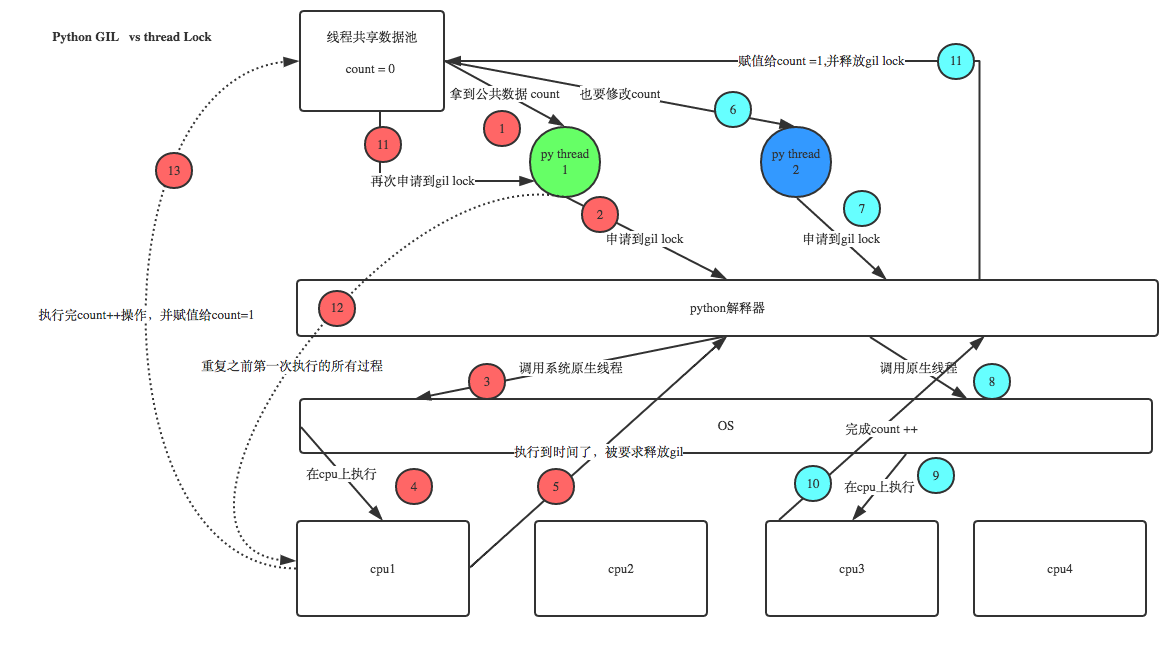
由于python代码的执行是由python虚拟机来控制的,python在设计之初就考虑到了要在主循环中同时只有一个线程在执行,就像单个CPU进程中运行多个进程一样,内存中可以存放多个程序 ,但在任意时刻,只有一个程序在CPU上执行,同样地,虽然Pyhton解释器中可以“运行”多个线程,但在任意时刻,只有一个线程在解释器中运行
对Python虚拟机的访问使用GIL来控制的,正是这个琐能保证同一时刻只有一个线程在运行。在多线程环境中,Python虚拟机按照一下方式执行:
设置 GIL
切换到一个线程去运行
运行
把线程设置为睡眠状态
解锁GIL
再次重复以上步骤注意:在调用外部代码(C或者C++)的时候,GIL将会被锁定,直到这个函数结束位置。例如,对所有面向I/O的程序来说,GIL会在这个I/O(比如读写文件)调用之前被释放,以允许其他线程在这个线程等待I/O的时候运行。而对于那些没有太多I/O操作的代码而言,更加倾向于在该线程整个时间片内始终占有处理器,换句话说,I/O密集型的Python程序比计算密集型的代码能够更好的利用多线程环境。
python使用兼容POSIX的线程,也就是众所周知的pthread。
Queue模块
FIFO(先进先出)
Queue(maxsize=0) #设置队列的最大长度
q=Queue.Queue(5)
q.qsize(self) #返回队列的大小
q.empty(self) #判断队列是否为空,为空就返回True
q.full(self) #判断队列是否为满。满就返回True
q.put(self, item, block=True, timeout=None) #向队列中加入数据,如果队列满了又没有设置超时时间,程序就会阻塞
q.put_nowait(self, item) #向队列中加入数据,如果队列满了就抛出异常
q.get(self, block=True, timeout=None) #从队列中获取数据,如果队列是空的又没有设置超时时间,程序也会阻塞
q.get_nowait(self) #从队列中获取数据,如果队列为空就抛出异常
>>> import Queue
>>> q=Queue.Queue(5)
>>>q.empty()
True
>>> q.put('1')
>>> q.put([1,2,3,4,5])
>>> class P(object):
...     pass
...
>>> q.put(P())
>>> q.qsize()
3
>>> q.put(2)
>>> q.full()
False
>>> q.put('asdas')
>>> q.put('qq')  #这里就阻塞了,由于超过了队列的最大长度

##解决办法
>>> q.put('qq',timeout=3)  #这样就会报错,或者用q.put_nowait('qq')
Traceback (most recent call last):
  File "<stdin>", line 1, in <module>
  File "D:\Python27\lib\Queue.py", line 134, in put
    raise Full
Queue.Full
>>>
>>>q.full()
True

>>>
>>> q.get()  #先进先出
'1'
>>> q.get()
[1, 2, 3, 4, 5]
>>> q.full()
False
>>>
先进后出
Queue.LifoQueue(maxsize)
import Queue
q=Queue.LifoQueue(5)
q.put(1)
q.put(2)
q.put('3')

print q.get()  #3
print q.get()  #2
print q.full()  #True
优先级队列
Queue.PriorityQueue(maxsize)优先级越小越优先
q=Queue.PriorityQueue(5)

q.put((3,'a'))    #传入一个元组,元组中第一个元素为优先级,第二个为数据
q.put((6,'c'))
q.put((1,'d'))
q.put((5,'g'))

print q.get() #(1, 'd')
print q.get() #(3, 'a')
print q.get() #(5, 'g')
threading模块
threading模块对象
Thread 表示一个线程的执行对象
Lock    锁原语对象
RLcok   可重入锁对象,使单线程可以再次获得已经获得了的锁(递归锁定)
Condition   条件变量对象能让一个线程停下来,等待其他线程满足了某个“条件”。如,状态的改变和值的改变
Event   通用的条件变量,多个线程可以等待某个事件的发生,在发生事件之后,所有的线程都会被激活
Semaphore   为等待锁的线程提供一个类似‘等候室’的结构
BoundedSemaphore    与Semaphore类似,只是他不允许超过初始值
Timer   与Thread类似,只是他要等待一段时间后才开始运行
threading模块中函数
activeCount()  当前活动的线程对象的数量
currentThread() 返回当前线程的对象
enumerate()     返回当前活动线程的列表
settrace()  为所有线程设置一个跟踪函数
setprofile()    为所有线程设置一个profile函数
守护线程
守护线程一般是一个等待客户请求的服务器,如果没有客户提出请求,他就在那等着,如果你设定一个线程为守护线程,就表示你在说这个线程是不重要的,在进程退出的时候,不用等待这个线程退出,直接就退出了。
也就是说,如果你的主线程要退出了,你不想等待其他哪些什么子线程完成,那么就可以设定这些线程为daemon属性,即在线程开始(thread.start() )的之前,调用setDaemon()函数设定线程的daemon标志(setDaemon(True))就表示这个线程不重要了。
def run(n):

    print('[%s]------running----\n' % n)
    time.sleep(2)
    print('--done--')

def main():
    for i in range(5):
        t = threading.Thread(target=run,args=[i,])
        t.start()
        print('starting thread', t.getName())


m = threading.Thread(target=main,args=[])
m.setDaemon(True) #将main线程设置为Daemon线程,它做为程序主线程的守护线程,当主线程退出时,m线程也会退出,由m启动的其它子线程会同时退出,不管是否执行完任务
m.start()
m.join()
print("---main thread done----")
以上这个程序是无法完全执行的,因为执行到在子线程执行到中途时守护线程就关闭了,然后其他所有的子线程也关闭了
直接调用线程
t1=time.time()
def test(num):
    print"this is %s"%num
    time.sleep(3)

l_list=[]
for i in range(10):  #10个线程执行程序
    t=threading.Thread(target=test,args=(3,))
    t.start()
    l_list.append(t)

for i in l_list:
    i.join()#same as wait.等待其他线程执行完毕后在继续运行主线程

print "___main____"
print int(time.time())-int(t1)

结果:
this is 3
this is 3
this is 3
this is 3
this is 3
this is 3
this is 3
this is 3
this is 3
this is 3
___main____
3.00300002098

Process finished with exit code 0
多线程继承
class MyThread(threading.Thread):
    def __init__(self,num):
        super(MyThread,self).__init__()
        self.num=num

    #重写这个方法
    def run(self):
        print "this is %s"%self.num
        time.sleep(3)

l_list=[]
for i in range(10):
    x=MyThread(3)
    x.start()
    l_list.append(x)

for i in l_list:
    i.join()


print "---main----"
print time.time()-t1
单线程与多线程对比
#coding:utf-8

#单线程

import threading
from time import ctime,sleep

class Mythread(threading.Thread):
    def __init__(self,func,args,name=''):
        super(Mythread,self).__init__()
        self.name=name
        self.func=func
        self.args=args


    def run(self):
        print('starting',self.name,'at:',ctime())
        self.res=self.func(self.args)
        print(self.name,'finished at:',ctime())

    def getResult(self):
        return self.res

def fib(x):
    '斐波那契数列'
    sleep(0.005)
    if x<2:return 1
    return (fib(x-1)+fib(x-2))

def fac(x):
    '阶乘'
    sleep(0.1)
    if x<2:return 1
    return (x*fac(x-1))

def sum(x):
    sleep(0.1)
    if x<2:return 1
    return (x+sum(x-1))

func=[fib,fac,sum]
n=12

def main():
    nfunc=range(len(func))
    print('***SINGLE THREAD')
    for i in nfunc:
        print('starting',func[i].__name__,'at:',ctime())
        print(func[i](n))
        print(func[i].__name__,'finished at:',ctime())

    print('\n***MUTIPLE THREAD')
    threads=[]
    for i in nfunc:
        t=Mythread(func[i],(n),func[i].__name__)
        threads.append(t)

    for i in nfunc:
        threads[i].start()

    for i in nfunc:
        threads[i].join()
        print(threads[i].getResult())

    print('all Done')
if __name__ == '__main__':
    main()
多线程实践
由于python虚拟机是单线程(GIL)的原因,只有线程在执行I/O密集型的应用才能更好的发挥python的并发性。
线程锁(互斥锁Mutex)
一个进程下可以启动多个线程,多个线程共享父进程的内存空间,也就意味着每个线程可以访问同一份数据,此时,如果2个线程同时要修改同一份数据,就会出现意想不到的状况。
示例
num=100
def test():
    global num
    print "{:-^30}".format("start")
    time.sleep(1)
    num-=1

def main():
    l_list=[]
    for i in range(100):
        t=threading.Thread(target=test)
        t.start()
        l_list.append(t)

    for i in l_list:
        i.join()

    print "finish----%s"%num
main()运行这个程序你会发现有可能每次出现的结果会不一样,尤其是当公共变量的数值越大的时候,这个结果越不靠谱。
很简单,假设你有A,B两个线程,此时都 要对num(公共变量) 进行减1操作, 由于2个线程是并发同时运行的,所以2个线程很有可能同时拿走了num=100这个初始变量交给cpu去运算,当A线程去处完的结果是99,但此时B线程运算完的结果也是99,两个线程同时CPU运算的结果再赋值给num变量后,结果就都是99。
解决办法就是加锁:每个线程在要修改公共数据时,为了避免自己在还没改完的时候别人也来修改此数据,可以给这个数据加一把锁, 这样其它线程想修改此数据时就必须等待你修改完毕并把锁释放掉后才能再访问此数据。
#互斥锁对象
lock=threading.Lock()

#加锁
lock.acquire()

#释放锁
lock.release()
升级版
lock=threading.Lock()
num=100
def test():
    global num #由于我们需要改变他的值所有需要申明全局变量
    print "{:-^30}".format("start")
    time.sleep(1)
    lock.acquire() #加锁
    num-=1
    lock.release() #释放锁

def main():
    l_list=[]
    for i in range(100):
        t=threading.Thread(target=test)
        t.start()
        l_list.append(t)

    for i in l_list:
        i.join()

    print "finish----%s"%num
main()
这样结果就不会出问题了
递归锁
就是在一个大锁里面加一个子锁
import threading,time

def run1():
    print("grab the first part data")
    lock.acquire()
    global num
    num +=1
    lock.release()
    return num
def run2():
    print("grab the second part data")
    lock.acquire()
    global  num2
    num2+=1
    lock.release()
    return num2
def run3():
    lock.acquire()
    res = run1()
    print('--------between run1 and run2-----')
    res2 = run2()
    lock.release()
    print(res,res2)


if __name__ == '__main__':

    num,num2 = 0,0
    lock = threading.RLock()   #生成一个递归锁对象,不能用Lock,因为这个Lock不支持多锁
    for i in range(10):
        t = threading.Thread(target=run3)
        t.start()

while threading.active_count() != 1: #返回此时的线程运行的数量
    print(threading.active_count())
else:
    print('----all threads done---')
    print(num,num2)
Semaphore(信号量)
互斥锁同时只允许一个线程更改数据,而Semaphore是同时允许一定数量的线程更改数据 ,跟锁 的使用方法一样
def run(n):
    sem.acquire()
    time.sleep(2)
    print "run the thread %s\n"%n
    sem.release()


if __name__ == '__main__':
    num=0
    sem=threading.Semaphore(3)#最多允许3个线程更改锁中是数据
    for i in range(20):
        t=threading.Thread(target=run,args=(i,))
        t.start()

    while threading.active_count()!=1:
        pass
    else:
        print "---finish----"
        print num
run the thread 2
run the thread 1
run the thread 0
run the thread 5
run the thread 3
run the thread 4
……
线程间同步与交互
threading.Event机制
threading.Event机制类似于一个线程向其它多个线程发号施令的模式,其它线程都会持有一个threading.Event的对象,这些线程都会等待这个事件的“发生”,如果此事件一直不发生,那么这些线程将会阻塞,直至事件的“发生”。
假设下面一个场景,十字路口场景,红灯车就停下,黄灯和绿灯车就可以走,而红绿灯就相当于一个线程,车就相当于其他线程,红绿灯来发号施令让车什么时候可以过,什么时候不可以过。
import threading
import random


def light():
    if not event.isSet():#如果阻塞
        event.set()  #wait就不阻塞,也就是绿灯状态
    count=0
    while True:
        if count<10:
            print "\033[42;1m--green light on--\033[0m"
        elif count<13:
            print "\033[43;1m--yellow light on---\033[0m"
        elif count<20:
            if event.isSet():
                event.clear() #阻塞
            print "\033[41;1m--red light on---\033[0m"

        else: #大于20的时候就重新计时
            count=0
            event.set()   #打开绿灯,wait不阻塞了
        time.sleep(1)
        count+=1


def car(i):
    while 1:
        #多久来一趟车
        car=random.randrange(10)
        time.sleep(car)
        #判断是否为绿灯
        if event.isSet():
            print "car [%s] is running:"%i
        else:
            print "car [%s] waiting for the red light"%i
            event.wait()  #先阻塞,即让车停下来等着绿灯亮,等着程序释放阻塞

if __name__ == '__main__':
    #创建一个event对象
    event=threading.Event()
    #这个event对象就是红绿灯
    th=threading.Thread(target=light)
    th.start()
    #每次到红绿灯下都有三辆车
    for i in range(3):
        t=threading.Thread(target=car,args=(i,))
        t.start()
生产者与消费者模型
在并发编程中使用生产者和消费者模式能够解决绝大多数并发问题。该模式通过平衡生产线程和消费线程的工作能力来提高程序的整体处理数据的速度。
为什么要使用生产者和消费者模式
在线程世界里,生产者就是生产数据的线程,消费者就是消费数据的线程。在多线程开发当中,如果生产者处理速度很快,而消费者处理速度很慢,那么生产者就必须等待消费者处理完,才能继续生产数据。同样的道理,如果消费者的处理能力大于生产者,那么消费者就必须等待生产者。为了解决这个问题于是引入了生产者和消费者模式。
什么是生产者消费者模式
生产者消费者模式是通过一个容器来解决生产者和消费者的强耦合问题。生产者和消费者彼此之间不直接通讯,而通过阻塞队列来进行通讯,所以生产者生产完数据之后不用等待消费者处理,直接扔给阻塞队列,消费者不找生产者要数据,而是直接从阻塞队列里取,阻塞队列就相当于一个缓冲区,平衡了生产者和消费者的处理能力。
例子
import threading
import time
import Queue

def producer(q,name):
    count=0
    while True: #一直生产
        for i in range(2): #一次性可以生产两个产品
            count+=1
            print "%s 生产了[%d]产品" % (name, count)
            q.put(count)


def consumer(q,name):

    data=q.get()
    print "[%s] 得到一个产品 [%d]" % (name,data)

def main():

    q=Queue.Queue()
    p1=threading.Thread(target=producer,args=(q,'xiaomi'))


    #三个消费者
    c1=threading.Thread(target=consumer,args=(q,'C1'))
    c2=threading.Thread(target=consumer,args=(q,'C2'))
    c3=threading.Thread(target=consumer,args=(q,'C3'))
    p1.start()
    c1.start()
    c2.start()
    c3.start()
    "生产了两个产品,但消费者有三个"
if __name__ == '__main__':
    main()

****************结果**************
就会陷入死循环,生产者一直在生产,但是却没有了消费者,这就造成了资源的
浪费,我们应该想办法在消费者没有产品饭时候通知生产者生产产品
join()和task_done()
task_done()
Indicate that a formerly enqueued task is complete.
用来指明前一个队列的任务完成了
Used by Queue consumer threads. (队列的消费者线程使用) For each get() used to fetch a task,a subsequent call to task_done() tells the queue that the processing on the task is complete.(每一次使用get()函数取得一个任务,随后调用task_done()函数告诉队列这个任务完成了)
(用于表示队列中某个元素已经执行完成,该方法会被下面的join()使用)
join()
保持阻塞状态,直到处理了队列中的所有项目为止。在将一个项目添加到该队列时,未完成的任务的总数就会增加。当使用者线程调用 task_done() 以表示检索了该项目、并完成了所有的工作时,那么未完成的任务的总数就会减少。当未完成的任务的总数减少到零时,join() 就会结束阻塞状态。(在队列中所有元素执行完毕并调用上面的task_done()信号之前,保持阻塞)
import Queue
def producer(q,name):
    count=0
    while True:
        for i in range(2):
            count+=1
            print "%s 生产了[%d]个产品" % (name, count)
            q.put(count)
        q.join() #等待队列通知队列中没有了
        print "没有产品了"

def consumer(q,name):

    data=q.get()
    print "%s 得到一个产品[%s]"%(name,data)
    q.task_done()  #告诉队列,消费者的任务完成了

def main():

    q=Queue.Queue()
    p1=threading.Thread(target=producer,args=(q,'xiaomi'))


    #三个消费者
    c1=threading.Thread(target=consumer,args=(q,'C1'))
    c2=threading.Thread(target=consumer,args=(q,'C2'))
    c3=threading.Thread(target=consumer,args=(q,'C3'))
    c4=threading.Thread(target=consumer,args=(q,'C4'))
    p1.start()
    c1.start()
    c2.start()
    c3.start()
    # c4.start()
if __name__ == '__main__':
    main()
**************RESULT***************
"""
xiaomi 生产了[1]个产品
xiaomi 生产了[2]个产品
C1 得到一个产品[1]
C2 得到一个产品[2]
没有产品了
xiaomi 生产了[3]个产品

xiaomi 生产了[4]个产品
C3 得到一个产品[3]
阻塞。。。这里由于没有消费者了,而队列中还有产品,因此生产停止生产
"""
增加生产者
import random
def producer(q,name):
    count=0
    while True:
        #每一次做的时间不一样
        time.sleep(random.randrange(0,2))
        for i in range(2):
            count+=1
            print "%s 生产了[%d]个产品" % (name, count)
            q.put(count)
        q.join() #等待队列通知,得到队列空的信息,然后阻塞接解除继续生产
        print "没有产品了"

def consumer(q,name):

    data=q.get()
    print "%s 得到一个产品[%s]"%(name,data)
    q.task_done()  #告诉队列,消费者的任务完成了

def main():

    q=Queue.Queue()
    p1=threading.Thread(target=producer,args=(q,'xiaomi'))
    p2 = threading.Thread(target=producer, args=(q, 'meizu'))


    #三个消费者
    c1=threading.Thread(target=consumer,args=(q,'C1'))
    c2=threading.Thread(target=consumer,args=(q,'C2'))
    c3=threading.Thread(target=consumer,args=(q,'C3'))
    c4=threading.Thread(target=consumer,args=(q,'C4'))
    p1.start()
    p2.start()
    c1.start()
    c2.start()
    c3.start()
    c4.start()
if __name__ == '__main__':
    main()

 **************RESULT***************
meizu 生产了[1]个产品
meizu 生产了[2]个产品
C1 得到一个产品[1]
C2 得到一个产品[2]
没有产品了
meizu 生产了[3]个产品
meizu 生产了[4]个产品
C3 得到一个产品[3]
C4 得到一个产品[4]
没有产品了
meizu 生产了[5]个产品
meizu 生产了[6]个产品
xiaomi 生产了[1]个产品
xiaomi 生产了[2]个产品
。。。。
待续
多进程multiprocessing
这个模块的使用和多线程类似,但是多进程绕过了GIL的束缚,使得多进程早多核CPU的环境中更加高效。
进程间数据互访
这个有两种方法
队列Queue
这里需要使用mutiprocessing中自带的的队列模块,因为这个队列模块已经
封装好了,不需要再进行修改,可以直接用。
否则如果使用原生队列
import Queue
def get(q):
    data=q.get()
    print "get data >>>",data


def put(q):
    q.put('bingo')

    print "queue size %s"%q.qsize()

def main():

    q=Queue.Queue()
    q.put('[1,23,4,66,7]')
    q.put('zhou')
    p1=Process(target=get,args=(q,))
    p2=Process(target=put,args=(q,))
    p1.start()
    p2.start()
    p1.join()
    p2.join()
    print q.qsize()
if __name__ == '__main__':
    freeze_support() #在windows下python会提醒你加上这个方法,否则无法生成进程
    main()
结果:
TypeError: can't pickle thread.lock objects所以我们需要使用封装好的队列就行
from multiprocessing import Process,Queue,freeze_support

def get(q):
    data=q.get()
    print "get data >>>",data


def put(q):
    q.put('bingo')

    print "queue size %s"%q.qsize()

def main():

    q=Queue()
    q.put('1231')
    q.put('cmustard')
    #生成两个进程
    p1=Process(target=get,args=(q,))
    p2=Process(target=put,args=(q,))
    p1.start()
    p2.start()
    p1.join()
    p2.join()
    print q.qsize()
if __name__ == '__main__':
    freeze_support()
    main()
结果:
get data >>> 1231
queue size 2
2
Pipes
Pipe()返回一组被一个默认是双工的pipe(管道) 连接的连接对象
管道(pipe)
管道可用于具有亲缘关系进程间的通信,有名管道克服了管道没有名字的限制,因此,除具有管道所具有的功能外,它还允许无亲缘关系进程间的通信;
实现机制:
管道是由内核管理的一个缓冲区,相当于我们放入内存中的一个纸条。管道的一端连接一个进程的输出。这个进程会向管道中放入信息。管道的另一端连接一个进程的输入,这个进程取出被放入管道的信息。一个缓冲区不需要很大,它被设计成为环形的数据结构,以便管道可以被循环利用。当管道中没有信息的话,从管道中读取的进程会等待,直到另一端的进程放入信息。当管道被放满信息的时候,尝试放入信息的进程会等待,直到另一端的进程取出信息。当两个进程都终结的时候,管道也自动消失。
from multiprocessing import Process, Pipe

def f(conn):
    conn.send([42, None, 'hello'])
    conn.close()

if __name__ == '__main__':
    parent_conn, child_conn = Pipe()
    p = Process(target=f, args=(child_conn,))
    p.start()
    print parent_conn.recv()   # prints "[42, None, 'hello']"
    p.join()
进程间同步
如果在多进程I/O中,如果我们不使用锁,那么多进程的输出将会变得一团糟
示例:
from multiprocessing import Process,Lock,freeze_support
def foo(l,i):

    print "hello world",i


if __name__ == '__main__':
    l=Lock()
    l_list=[]
    for i in range(20):
        P=Process(target=foo,args=(l,i))
        P.start()
        l_list.append(P)
结果
hhello world 0
ello worldhhhello world hhello world ello worldhello world 15h4hello worldello worldh h1* hhh
ello world 16
hello world 17
ello worldello world
8ello worldhello worldh

ello worldh ello world6

 ello world ello world  ello world
91014 12 37518


13hello world 19
2


11
然后我们在需要输出的地方加锁:
from multiprocessing import Process,Lock,freeze_support
def foo(l,i):
    l.acquire()
    try:
        print "hello world",i
    finally:
        l.release()

if __name__ == '__main__':
    l=Lock()
    l_list=[]
    for i in range(20):
        P=Process(target=foo,args=(l,i))
        P.start()
        l_list.append(P)
结果就正常了
hello world 0
hello world 1
hello world 2
hello world 3
hello world 4
hello world 5
hello world 6
hello world 7
hello world 10
hello world 11
hello world 12
hello world 14
hello world 13
hello world 8
hello world 15
hello world 9
hello world 16
hello world 17
hello world 18
hello world 19
进程池
进程池内部维护一个进程序列,当使用时,则去进程池中获取一个进程,如果进程池序列中没有可供使用的进进程,那么程序就会等待,直到进程池中有可用进程为止。
POOL提供了两个方法
apply_async(func, args=(), kwds={}, callback=None) 可以回调函数,与apply用法一致,但它是非阻塞的且支持结果返回后进行回调,这个的作用就是可以让父进程访问子进程的数据
apply(func, args=(), kwds={}) 不可以回调函数用于传递不定参数,同python中的apply函数一致(不过内置的apply函数从2.3以后就不建议使用了),主进程会阻塞于函数。基本不怎么用
from multiprocessing import Pool,freeze_support
import time

def foo(i):
    time.sleep(2)
    return i+100

def bar(args):
    print (">>>exec done",args)

def f(i):
    time.sleep(2)
    print(">>>exec done",i+100)

if __name__ == '__main__':
    freeze_support()
    pool=Pool(3)   #设置进程池中可获取的进程数量,即允许同时运行的子进程的数量为3

    for i in range(10):
        pool.apply_async(func=foo,args=(i,),callback=bar)  #callback就是将foo函数的返回值调入到bar函数中
        #pool.apply(func=f,args=(i,)) #使用这个就到达串行输出的形式了
    print('end')
    pool.close() #这个方法必须在join前面,否则会出现断言错误
    pool.join() #进程池中进程执行完毕后在关闭,如果注释,那么程序直接关闭

"这个的结果就是间隔2s出现3个输出"
使用pool.apply_async()回调参数,让父进程访问子进程的数据
from multiprocessing import Pool,freeze_support
import time
data=[] #父进程的列表

def foo(i):
    time.sleep(2)
    return i+100

def bar(args):
    print (">>>exec done",args)
    data.append(args)  #父进程获取子进程的数据

if __name__ == '__main__':
    freeze_support()
    pool=Pool(3)   #设置进程池中可获取的进程数量

    for i in range(10):
        pool.apply_async(func=foo,args=(i,),callback=bar)  #callback就是将foo函数的返回值调入到bar函数中

    print('end')
    pool.close() #这个方法必须在join前面,否则会出现断言错误
    pool.join() #进程池中进程执行完毕后在关闭,如果注释,那么程序直接关闭
    print">>>",data    #>>> [100, 101, 102, 103, 104, 105, 106, 107, 108, 109]
Manager
Manager提供一种让不同的进程分享数据的一种方式
通过Manager()返回的一个manager对象控制一个服务器进程,它保持住Python对象并允许其它进程使用代理操作它们。
Manager()返回的manager支持的类型有list, dict, Namespace, Lock, RLock, Semaphore, BoundedSemaphore, Condition, Event, Queue, Value和Array
示例,下面的列表为什么为空
#!_*_coding:utf-8_*_

from multiprocessing import Process, Manager,freeze_support
import os

manager = Manager()
vip_list = []  #用一个普通的列表获取子进程的数据


def testFunc(cc):
    vip_list.append(cc)
    print 'process id:', os.getpid()


def main():
    threads = []
    for ll in range(10):
        t = Process(target=testFunc, args=(ll,))
        threads.append(t)
        t.start()

    for j in range(len(threads)):
        threads[j].join()

    print "------------------------"
    print 'process id:', os.getpid()
    print vip_list

if __name__ == '__main__':
    main()
结果:
process id: 1662
process id: 1660
process id: 1661
process id: 1664
process id: 1665
process id: 1663
process id: 1666
process id: 1669
process id: 1668
process id: 1667
------------------------
process id: 1657
[]
为什么列表为空呢,因为进程之间是不能访问和共享数据的,因此这的父进程的列表是无法访问子进程的列表的,当然manager提供了一种可以让进程间访问的列表
#!_*_coding:utf-8_*_

from multiprocessing import Process, Manager,freeze_support
import os

manager = Manager()
vip_list = manager.list()   #这里使用的是manager封装好的列表,因此可以让进程之间互访

def testFunc(cc):
    vip_list.append(cc)
    print 'process id:', os.getpid()


def main():
    threads = []
    for ll in range(10):
        t = Process(target=testFunc, args=(ll,))
        threads.append(t)
        t.start()

    for j in range(len(threads)):
        threads[j].join()

    print "------------------------"
    print 'process id:', os.getpid()
    print vip_list

if __name__ == '__main__':

    main()
结果:
process id: 1899
process id: 1901
process id: 1905
process id: 1903
process id: 1900
process id: 1898
process id: 1897
process id: 1902
process id: 1895
process id: 1896
------------------------
process id: 1890
[4, 6, 9, 8, 5, 3, 2, 7, 0, 1]
数据共享内存
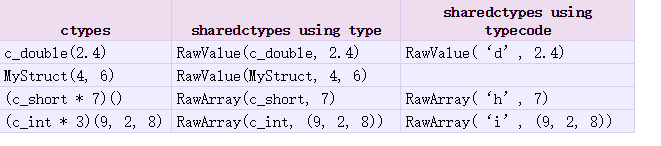
数据可以使用Value或Array存储在共享内存中
Value(typecode_or_type, *args, **kwds)
Array(typecode_or_type, size_or_initializer, **kwds)
都是返回一个同步的可分享的对象
typecode_or_type参数有:’d’和’i’参数是array模块使用的类型码:’d’表示一个双精度浮点数,’i’表示一个有符号的整数。这些共享的对象将是进程和线程安全的。
from multiprocessing import Process, Value, Array

def f(num, arr):
    num.value = 3.1415927
    for i in range(len(arr)):
        arr[i] = -arr[i]

if __name__ == '__main__':
    num = Value('d', 0.0) #创建一个进程间可共享的双精度浮点数,初始值为0.0
    arr = Array('i', range(10))#创建一个从0到9组成的可共享的数组
    print num.value #0.0
    p = Process(target=f, args=(num, arr))
    p.start()
    p.join()

    print num.value
    print arr[:]
结果:
0.0
3.1415927
[0, -1, -2, -3, -4, -5, -6, -7, -8, -9]
其他的用法,列表和字典
from multiprocessing import Process, Manager

def f(d, l):
    d[1] = '1'
    d['2'] = 2
    d[0.25] = None
    l.reverse()

if __name__ == '__main__':
    manager = Manager()

    d = manager.dict()  #创建一个可共享的字典
    l = manager.list(range(10)) #创建一个可共享的列表

    p = Process(target=f, args=(d, l))
    p.start()
    p.join()

    print d     #{0.25: None, 1: '1', '2': 2}
    print l     #[9, 8, 7, 6, 5, 4, 3, 2, 1, 0]