Binder
Binder机制优点:
- 只需要进行一次数据拷贝,性能上仅次于共享内存。
- 基于C/S架构,职责明确,架构清晰,稳定性较好。
- 安全性好,为每个App分配UID,UID是鉴别进程身份的标志。
内存映射:(一次copy的原因)
Binder IPC 机制中涉及到的内存映射通过 mmap() 来实现,mmap() 是操作系统中一种内存映射的方法。内存映射简单的讲就是将用户空间的一块内存区域映射到内核空间。映射关系建立后,用户对这块内存区域的修改可以直接反应到内核空间;反之内核空间对这段区域的修改也能直接反应到用户空间。
Binder IPC 通信过程:
- 首先 Binder 驱动在内核空间创建一个数据接收缓存区;
- 接着在内核空间开辟一块内核缓存区,建立内核缓存区和内核中数据接收缓存区之间的映射关系,以及内核中数据接收缓存区和接收进程用户空间地址的映射关系;
- 发送方进程通过系统调用 copy_from_user() 将数据 copy 到内核中的内核缓存区,内核缓存区映射到接收区,接收区又映射到用户空间地址,因此也就相当于把数据发送到了接收进程的用户空间,这样便完成了一次进程间的通信。
Binder通讯模型:
Binder是基于C/S架构的,包含4个角色:Client、Server、Binder驱动和ServiceManager。
- Binder驱动:类似网络通信中的路由器,负责将Client的请求转发到具体的Server中执行,并将Server返回的数据传回给Client。
- ServiceManager:类似网络通信中的DNS服务器,负责将Client请求的Binder描述符转化为具体的Server地址,以便Binder驱动能够转发给具体的Server。Server如需提供Binder服务,需要向ServiceManager注册。
通信过程:
- Server向ServiceManager注册。Server通过Binder驱动向ServiceManager注册,声明可以对外提供服务。ServiceManager中会保留一份映射表。
- Client向ServiceManager请求Server的Binder引用。Client想要请求Server的数据时,需要先通过Binder驱动向ServiceManager请求Server的Binder引用(代理对象),ServiceManager根据Server服务名找到对应的Server,然后向具体的Server发送请求。
- 创建远程代理对象。Server响应请求后,通过Binder驱动将结果返回给Client。Client在收到该Server的Binder引用信息之后,就根据该Binder引用信息创建一个Server对应的远程代理对象,Client通过调用该远程服务的接口,就相当于在调用Server的服务接口一样。
Client和Server通信:
Client要和Server通信,它就是通过保存一个Server对象的Binder引用,再通过该Binder引用在内核中找到对应的Binder实体,进而找到Server对象,然后将通信内容发送给Server对象。
Client进程将需要传送的数据写入到Parcel对象中调用BinderProxy的transact()将上述数据发送到Binder驱动(通过BpBinder)Binder驱动找到Binder引用对应的Binder实体,通过Binder实体找到用户空间的Server对象,Server收到Binder驱动通知后,Server 进程通过回调Binder对象onTransact()进行数据解包和调用目标方法,Binder驱动根据代理对象沿原路将结果返回并通知Client进程获取返回结果,唤醒Client线程,接收结果。

AIDL Android Interface Definition Language(Android接口定义语言)
AIDL是基于Binder的,作用是实现进程间的通信。如果需要操作非基础类型的数据,需要序列化。
首先是定义一个Person类继承Parcelable。
package com.example.mylibrary

import android.os.Parcel
import android.os.Parcelable

class Person():Parcelable {

    var name:String = ""
    var age:Int = 0

    constructor(parcel: Parcel):this(){
        name = parcel.readString().toString()
        age = parcel.readInt()
    }

    constructor(name: String,age: Int):this(){
        this.name = name
        this.age = age
    }

    override fun writeToParcel(dest: Parcel?, flags: Int) {
        dest?.writeString(name)
        dest?.writeInt(age)
    }

    fun readFromParcel(parcel: Parcel): Person? {
        name = parcel.readString().toString()
        age = parcel.readInt()
        return this
    }


    override fun describeContents(): Int {
        return 0
    }

    companion object CREATOR : Parcelable.Creator<Person> {
        override fun createFromParcel(parcel: Parcel): Person {
            return Person(parcel)
        }

        override fun newArray(size: Int): Array<Person?> {
            return arrayOfNulls(size)
        }
    }
}
要能操作Person类还需要定义一个AIDL文件
// Person.aidl
package com.example.mylibrary;

// Declare any non-default types here with import statements

parcelable Person;
接下来创建自己的AIDL文件,然后声明自己需要的方法。
// IMyAidlInterface.aidl
package com.example.mylibrary;
import com.example.mylibrary.Person;

// Declare any non-default types here with import statements

interface IMyAidlInterface {
    /**
     * Demonstrates some basic types that you can use as parameters
     * and return values in AIDL.
     */

    List<Person> getPeople();
    void addPerson(in Person person);
    Person updatePerson(inout Person person);
    Person updatePerson2(inout Person person);
}
关于参数前的in、out和inout,跨进程时,in参数会把参数的内容传给aidl,但其改动不会同步到调用进程;out参数不会把参数的属性传给aidl(aidl获取的参数对象属性为空),但其改动会同步到调用进程;inout参数则是in和out的综合。不跨进程时,三者则是摆设。
上面一定要导入Person类的正确地址,不然aidl生成对应的java找不到。同步一下。

3、有了接口文件,我们需要定义一个服务类,实现接口方法,在onBind返回实例。
package com.example.mylibrary

import android.app.Service
import android.content.Intent
import android.os.IBinder
import android.util.Log
import kotlin.random.Random

class PersonService: Service() {
    var personList:ArrayList<Person> = ArrayList()
    var random = Random(1)

    init {
        val p  = Person("AAAA",20)
        personList.add(p)
    }

    private var personManager = object : IMyAidlInterface.Stub(){
        override fun addPerson(person: Person?) {
            val isNull = person == null // 参数为in
            Log.e("aaa","in person is null--$isNull")
            if (person != null) {
                personList.add(person)
            }
        }

        override fun updatePerson(person: Person): Person {
            personList.set(0,person)
            return person
        }

        override fun getPeople(): MutableList<Person> {
            return personList
        }

        override fun updatePerson2(person: Person): Person {
            val p1 = Person()
            p1.age = random.nextInt() % 40
            p1.name = "mike"
            personList[1] = p1
            return p1
        }

    }
    override fun onBind(intent: Intent?): IBinder? {
        Log.e("bbbbb","有连接请求");
        Log.e("cccc",intent.toString());
        return personManager;
    }
}
4、在manifest中声明
        <service android:name="com.example.mylibrary.PersonService"
            android:exported="false"
            android:process=":remote">
            <intent-filter>
                <action android:name="com.example.text" />
                <category android:name="android.intent.category.DEFAULT"/>
            </intent-filter>
        </service>
android:exported 该属性用来标示,其它应用的组件是否可以唤醒service或者和这个service进行交互:true可以,false不可以。如果为false,只有同一个应用的组件或者有着同样user ID的应用可以启动这个service或者绑定这个service。
android:process=":remote" 让服务在指定进程名中启动,这里选择”remote”这个名字是随意主观的,你能用其他名字来让这个服务在另外的进程中运行。冒号’:’这个前缀将把这个名字附加到你的包所运行的标准进程名字的后面作为新的进程名称。
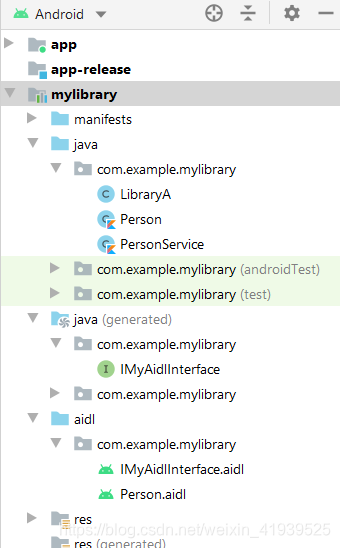
现在的结构是这样的。
5、在主app中使用这个服务
前提:app已经依赖了mylibrary这个module
package com.example.text

import android.content.ComponentName
import android.content.Context
import android.content.Intent
import android.content.ServiceConnection
import android.os.Bundle
import android.os.IBinder
import android.util.Log
import androidx.appcompat.app.AppCompatActivity
import com.example.mylibrary.IMyAidlInterface
import com.example.mylibrary.Person
import com.example.mylibrary.PersonService


class MainActivity : AppCompatActivity() {
    private var isConnected = false
    lateinit var peopleManager:IMyAidlInterface
    private val p = Person("Dustin", 27)

    override fun onCreate(savedInstanceState: Bundle?) {
        super.onCreate(savedInstanceState)
        setContentView(R.layout.activity_main)
    }

    private val connection: ServiceConnection = object : ServiceConnection {
        override fun onServiceConnected(name: ComponentName, service: IBinder) {
            peopleManager = IMyAidlInterface.Stub.asInterface(service) // 此处的service,就是Service的onBind()方法返回的Stub,必须经过这个方法才能还原成Stub类对象
            isConnected = true
            show()
            logger("before add")
            logger(p.name+"aaaaaaaaaaaaaaaaa")
            logger("=================")
            peopleManager.addPerson(p)
            show()
            logger("=================")
            peopleManager.updatePerson(p)
            logger(p.name+"aaaaaaaaaaaaaaaaa")

            show()
            logger("=================")
            peopleManager.updatePerson2(p)
            show()
        }

        override fun onServiceDisconnected(name: ComponentName) {
            logger(name.toString() + "已经断开连接")
            isConnected = false
        }
    }

    fun show(){
        for (i:Int in 0 until peopleManager.people.size){
            logger(peopleManager.people[i].name)
            logger(peopleManager.people[i].age.toString())
        }
    }

    private fun logger(info: String) {
        Log.e("FragmentActivity.TAG", info)
    }


    override fun onStop() {
        super.onStop()
        tryDisconnectService()
    }

    override fun onStart() {
        super.onStart()
        tryConnectService()
    }

    private fun tryConnectService() {
        logger("try to connect service")
        if (!isConnected) {
            val intent = Intent(this, PersonService::class.java)
            bindService(intent, connection, Context.BIND_AUTO_CREATE)
        }
    }

    private fun tryDisconnectService() {
        logger("try to disconnect service")
        if (isConnected) {
            unbindService(connection)
            isConnected = false
        }
    }

}
结果:
服务进程:

app进程:

我们还没测试过out,我们把AIDL文件的
    Person updatePerson(inout Person person);
改为
    Person updatePerson(out Person person);
同步,再运行。
看到updatePerson(out Person person);改变不了服务类的数据了。

但是传到服务进程的值并不为空。
分析一下 mAidlInterface = IMyAidlInterface.Stub.asInterface(service)
public static IMyAidlInterface asInterface(IBinder obj){
    if ((obj==null)) {
        return null;
    }
    IInterface iin = obj.queryLocalInterface(DESCRIPTOR);
    if (((iin!=null)&&(iin instanceof IMyAidlInterface))) {
        return ((IMyAidlInterface)iin);
    }
    return new Stub.Proxy(obj);
}
private static class Proxy implements IMyAidlInterface{
private IBinder mRemote;
Proxy(IBinder remote){
mRemote = remote;
}
@Override public IBinder asBinder(){
return mRemote;
}
public String getInterfaceDescriptor(){
return DESCRIPTOR;
}
@Override public void myMethod() throws RemoteException{
android.os.Parcel _data = android.os.Parcel.obtain();
android.os.Parcel _reply = android.os.Parcel.obtain();
try {
_data.writeInterfaceToken(DESCRIPTOR);
mRemote.transact(Stub.TRANSACTION_myMethod, _data, _reply, 0);
_reply.readException();
}
finally {
_reply.recycle();
_data.recycle();
}
}
}Stub.Proxy同样实现了我们定义的功能接口,而且包含一个BinderProxy对象,当我们在Client进程中调用我们所定义的功能方法时,其实就是调用Stub.Proxy中实现的方法。 在实现该功能方法时,它首先将参数序列化,然后调用BinderProxy的transact()方法,调用该方法以后,Binder驱动会唤醒Server进程中的本地Binder对象, 并调用它的onTransact()方法。
    @Override
    public boolean onTransact(int code, Parcel data, Parcel reply, int flags) throws RemoteException{
        switch (code){
        case INTERFACE_TRANSACTION:
            {
            reply.writeString(DESCRIPTOR);
            return true;
            }
        case TRANSACTION_myMethod:
            {
            data.enforceInterface(DESCRIPTOR);
            this.myMethod();
            reply.writeNoException();
            return true;
            }
        }
        return super.onTransact(code, data, reply, flags);
    }
TRANSACTION_myMethod,是一个整型,也就是说在Binder中对每一个方法都进行了编号,在transact()方法中传入编号,然后在onTransact()方法中,根据请求的变化调用相应的方法。这里我们看到data接收参数,然后调用本地Binder中定义的功能方法,这里是抽象方法,留有子类实现,最后将结果写入到_reply中,由Binder驱动负责将返回值传递到BinderProxy的transact()方法中的_reply。
Service接口方法调用流程小结
- 客户端调用bindService绑定服务时,将触发Service的onBind监听方法。该方法将调用asBinder方法,返回一个Binder对象。
- 客户端将通过onServiceConnected回调函数,获取到该Binder对象(以传参的形式传入)。
- 客户端获取到Binder对象后,可调用stub.asInterface方法,将其转换为service实现类的对象。
- 在asInterface方法中,将判断service与当前进程,是否在同一进程中。若是,则返回stub本身,否则返回stub.proxy。返回结果将作为Service实现类的实例。
- 在通过Service实现类的实例调用接口方法时,若为同一进程,则直接调用方法本身。若为跨进程,则调用stub.proxy的对应接口方法,通过Transact方法将信息传送到服务端。此时,客户端将挂起,等待结果返回。
- 服务端接收到信息,通过onTransact()方法,根据方法的唯一标识,将信息转发至各对应方法。
- 信息处理完成后,再由服务端onTransact返回结果。
文章推荐:
https://blog.csdn.net/weixin_44339238/article/details/110942282