在真机上测试时用一会就出现如下信息,且应用挂掉。
Restore the connection to ““XXX”的 iPod” and run “XXX” again, or if “XXX” is still running, you can attach to it by selecting Debug > Attach to Process > XXX.
这是因为应用程序突然消耗了大量内存,然后再分配调度内存的时候,出现错误,致使系统将APP进程关闭。
可以去查看一下是不是加载了大量的图片等等,或者哪里有消耗内存的地方修改一下。
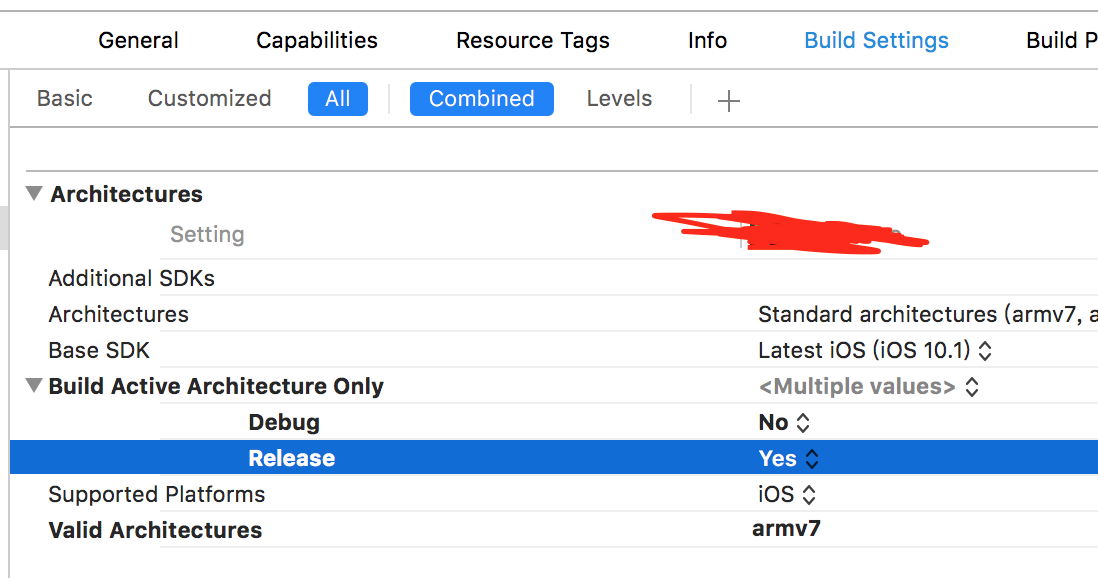
可以设置成这样先跑跑
版权声明:本文为qcx321原创文章,遵循CC 4.0 BY-SA版权协议,转载请附上原文出处链接和本声明。