C:\Users\admin>npm install chromeos-apk -g
npm ERR! code EPERM
npm ERR! syscall mkdir
npm ERR! path C:\Program Files\nodejs\node_cache\node_modules\.staging
npm ERR! errno -4048
npm ERR! Error: EPERM: operation not permitted, mkdir 'C:\Program Files\nodejs\node_cache\node_modules\.staging'
npm ERR!  [OperationalError: EPERM: operation not permitted, mkdir 'C:\Program Files\nodejs\node_cache\node_modules\.staging'] {
npm ERR!   cause: [Error: EPERM: operation not permitted, mkdir 'C:\Program Files\nodejs\node_cache\node_modules\.staging'] {
npm ERR!     errno: -4048,
npm ERR!     code: 'EPERM',
npm ERR!     syscall: 'mkdir',
npm ERR!     path: 'C:\\Program Files\\nodejs\\node_cache\\node_modules\\.staging'
npm ERR!   },
npm ERR!   stack: "Error: EPERM: operation not permitted, mkdir 'C:\\Program Files\\nodejs\\node_cache\\node_modules\\.staging'",
npm ERR!   errno: -4048,
npm ERR!   code: 'EPERM',
npm ERR!   syscall: 'mkdir',
npm ERR!   path: 'C:\\Program Files\\nodejs\\node_cache\\node_modules\\.staging',
npm ERR!   parent: 'chromeos-apk'
npm ERR! }
npm ERR!
npm ERR! The operation was rejected by your operating system.
npm ERR! It's possible that the file was already in use (by a text editor or antivirus),
npm ERR! or that you lack permissions to access it.
npm ERR!
npm ERR! If you believe this might be a permissions issue, please double-check the
npm ERR! permissions of the file and its containing directories, or try running
npm ERR! the command again as root/Administrator.

npm ERR! A complete log of this run can be found in:
npm ERR!     C:\Users\admin\AppData\Roaming\npm-cache\_logs\2020-03-21T09_36_33_126Z-debug.log
在Windows10系统中利用npm安装chromeos-apk出现“Error: EPERM: operation not permitted, mkdir 'C:\Program Files\nodejs\node_cache\node_modules\.staging'”的问题。
在晚上查找了各种解决方法后,找到解决方法,如下。
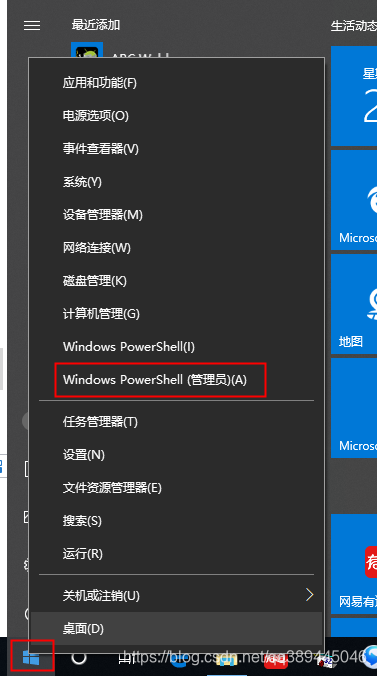
以管理员身份运行CMD命令提示符。
鼠标右击“开始”菜单,点击“Windows PowerShell(管理员)(A)”
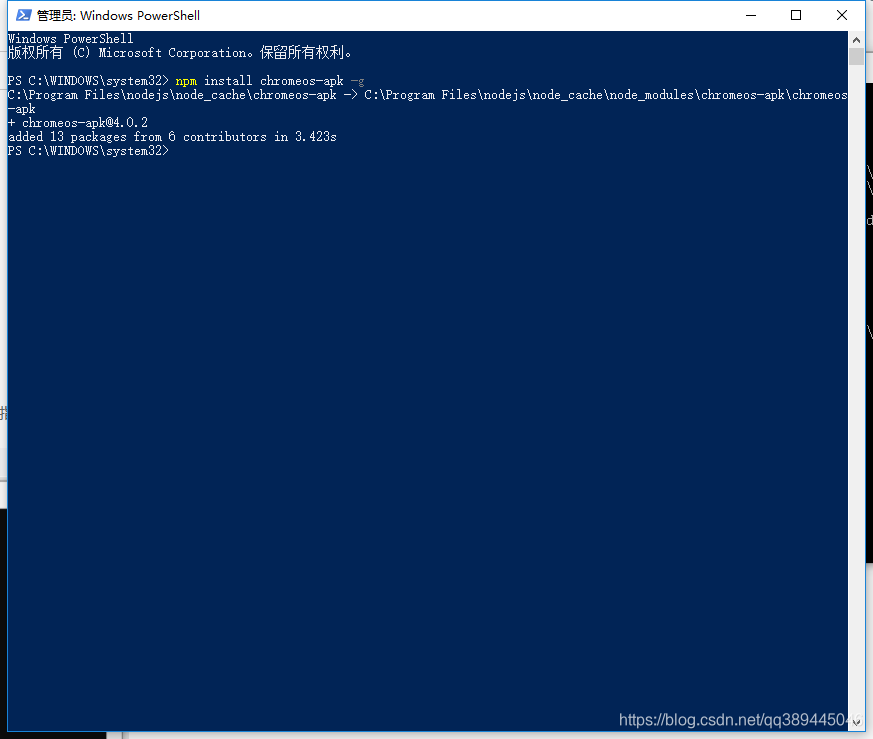
输入命令,提示安装成功
版权声明:本文为qq389445046原创文章,遵循CC 4.0 BY-SA版权协议,转载请附上原文出处链接和本声明。