 关注"AI机器学习与深度学习算法"公众号 选择" 星标 "公众号,原创干货,第一时间送达
index_select 选择函数
torch.index_select(input,dim,index,out=None) 函数返回的是沿着输入张量的指定维度的指定索引号进行索引的张量子集,其中输入张量、指定维度和指定索引号就是 torch.index_select(input,dim,index,out=None) 函数的三个关键参数,函数参数有:
- input(Tensor) - 需要进行索引操作的输入张量;
- dim(int) - 需要对输入张量进行索引的维度;
- index(LongTensor) - 包含索引号的 1D 张量;
- out(Tensor, optional) - 指定输出的张量。比如执行 torch.zeros([2, 2], out = tensor_a),相当于执行 tensor_a = torch.zeros([2, 2]);
接下来使用 torch.index_select(input,dim,index,out=None) 函数分别对 1D 张量、2D 张量和 3D 张量进行索引。
>>> import torch
>>> # 创建1D张量
>>> a = torch.arange(0, 9)
>>> print(a)

tensor([0, 1, 2, 3, 4, 5, 6, 7, 8])

>>> # 获取1D张量的第1个维度且索引号为2和3的张量子集
>>> print(torch.index_select(a, dim = 0, index = torch.tensor([2, 3])))

tensor([2, 3])

>>> # 创建2D张量
>>> b = torch.arange(0, 9).view([3, 3])
>>> print(b)

tensor([[0, 1, 2],
        [3, 4, 5],
        [6, 7, 8]])

>>> # 获取2D张量的第2个维度且索引号为0和1的张量子集(第一列和第二列)
>>> print(torch.index_select(b, dim = 1, index = torch.tensor([0, 1])))

tensor([[0, 1],
        [3, 4],
        [6, 7]])

>>> # 创建3D张量
>>> c = torch.arange(0, 9).view([1, 3, 3])
>>> print(c)

tensor([[[0, 1, 2],
         [3, 4, 5],
         [6, 7, 8]]])

>>> # 获取3D张量的第1个维度且索引号为0的张量子集
>>> print(torch.index_select(c, dim = 0, index = torch.tensor([0])))

tensor([[[0, 1, 2],
         [3, 4, 5],
         [6, 7, 8]]])
「由于 index_select 函数只能针对输入张量的其中一个维度的一个或者多个索引号进行索引,因此可以通过 PyTorch 中的高级索引来实现。」
- 获取 1D 张量 a 的第 1 个维度且索引号为 2 和 3 的张量子集:
torch.index_select(a, dim = 0, index = torch.tensor([2, 3]))a[[2, 3]]; - 获取 2D 张量 b 的第 2 个维度且索引号为 0 和 1 的张量子集(第一列和第二列):
torch.index_select(b, dim = 1, index = torch.tensor([0, 1]))b[:, [0, 1]]; - 创建 3D 张量 c 的第 1 个维度且索引号为 0 的张量子集:
torch.index_select(c, dim = 0, index = torch.tensor([0]))c[[0]];
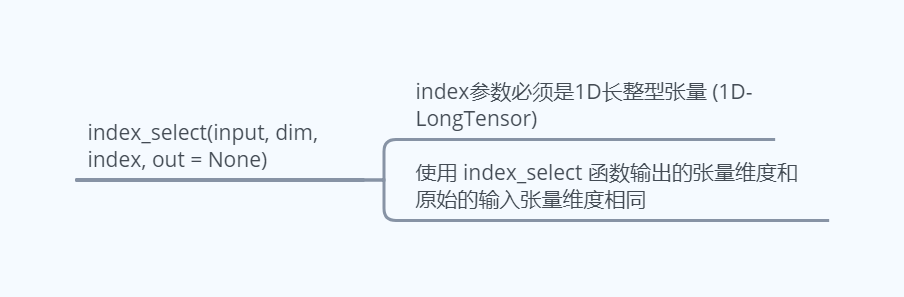
index_select 函数虽然简单,但是有几点需要注意:
- index 参数必须是 1D 长整型张量 (1D-LongTensor);
>>> import torch
>>> index1 = torch.tensor([1, 2])
>>> print(index.type())

torch.LongTensor

>>> index2 = torch.tensor([1., 2.])
>>> print(index2.type())

torch.FloatTensor

>>> index3 = torch.tensor([[1, 2]])
>>> # 创建1D张量
>>> a = torch.arange(0, 9)
>>> print(torch.index_select(a, dim = 0, index = index1))

tensor([1, 2])

>>> # print(torch.index_select(a, dim = 0, index = index2))

RuntimeError: index_select(): Expected dtype int64 for index

>>> # print(torch.index_select(a, dim = 0, index = index3))

IndexError: index_select(): Index is supposed to be a vector
- 使用 index_select 函数输出的张量维度和原始的输入张量维度相同。这也是为什么即使在对输入张量的其中一个维度的一个索引号进行索引 (此时可以使用基本索引和切片索引) 时也需要使用 PyTorch 中的高级索引方式才能与 index_select 函数等价的原因所在;
>>> import torch
>>> # 创建2D张量
>>> d = torch.arange(0, 4).view([2, 2])
>>> # 使用index_select函数索引
>>> d1 = torch.index_select(d, dim = 0, index = torch.tensor([0]))
>>> print(d1)

tensor([[0, 1]])

>>> print(d1.size())

torch.Size([1, 2])

>>> # 使用PyTorch中的高级索引
>>> d2 = d[[0]]
>>> print(d2)

tensor([[0, 1]])

>>> print(d2.size())

torch.Size([1, 2])

>>> # 使用基本索引和切片索引
>>> d3 = d[0]
>>> print(d3)

tensor([0, 1])

>>> print(d3.size())

torch.Size([2])
通过上面的代码可以看出,三种方式索引出来的张量子集中的元素都是一样的,不同的是索引出来张量子集的形状,index_select 函数对输入张量进行索引可以使用高级索引实现。

版权声明:本文为weixin_39942108原创文章,遵循CC 4.0 BY-SA版权协议,转载请附上原文出处链接和本声明。