一、背景
众所周知,单k8s集群可以通过ingress-controller,解析ingress资源,将对应的请求发送到对应的pod中。
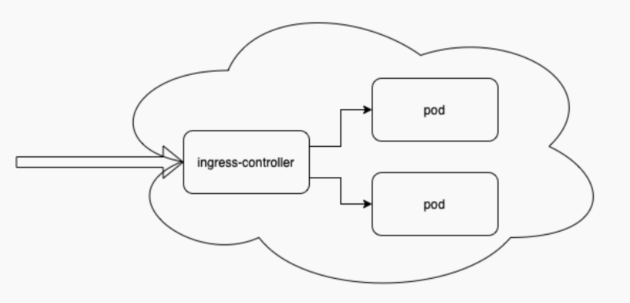
/ 单k8s集群
单k8s集群问题
但在实际⽣产中,node机器可能会分布在不同的区域,各区域间⽹络波动较⼤,调度将变得⾮常困难。
此时就会考虑使⽤多 k8s 集群。
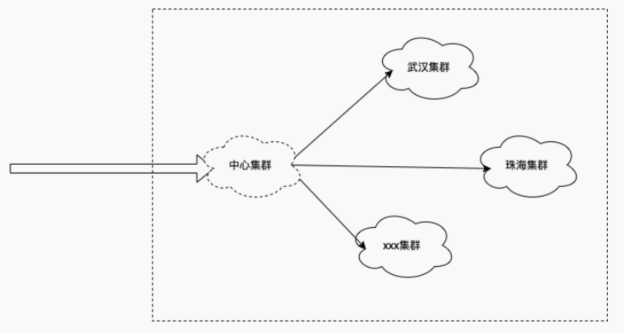
/ 多k8s集群
多k8s集群问题
但在使用多k8s集群时,中⼼集群又该如何⾃定义策略调度到不同的集群?
⽐如:
武汉集群⽹络好,想要80%的请求调度到武汉集群,20%的请求调度到珠海集群。
如果使⽤扁平⽹络架构,每个集群中的 node 都是可以互相访问的,此时每⼀个集群都要部署
ingress-controller,就会造成资源浪费以及流量转发次数过多。
二、解决思路
为了解决上述问题,我们可以在中⼼集群部署⼀个 Ingress-controller,从crd资源中读取路由策略,修改ingress-controller中的nginx配置,通过 split_clients 路由到不同的集群中。
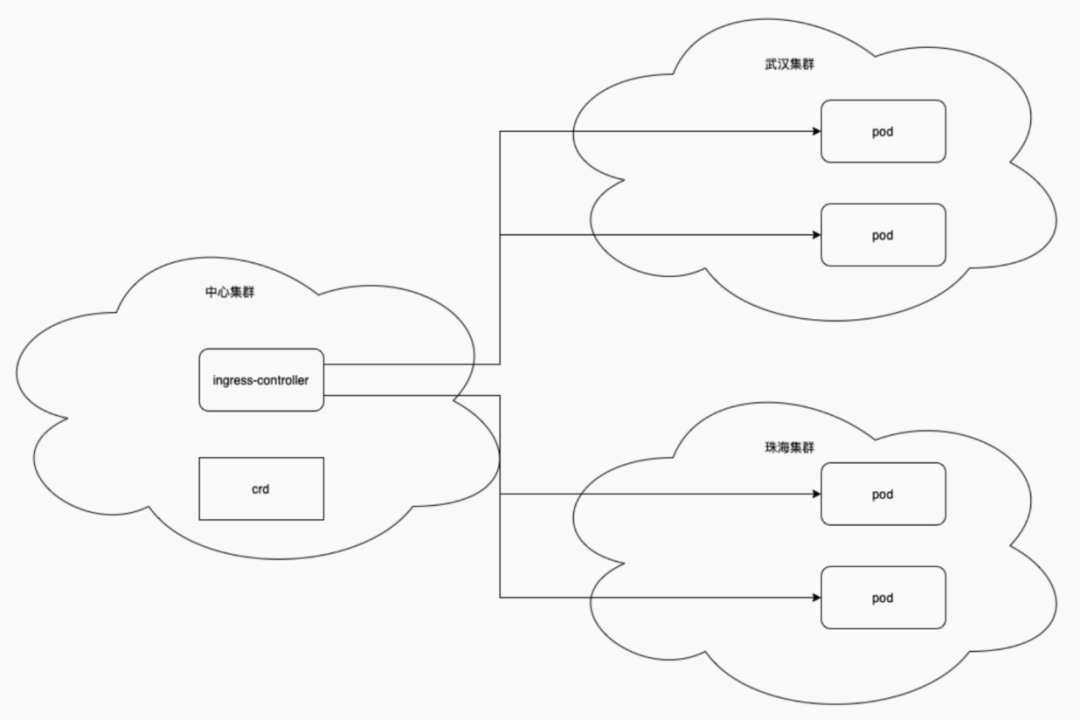
该流量模型可通过ingress-controller中的nginx配置实现。
nginx路由规则
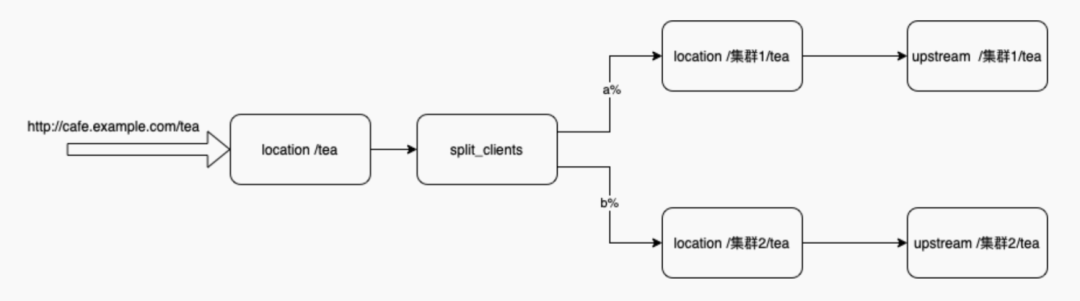
当收到 http://cafe.example.com/tea 请求时,先匹配到 location /tea{...}。
然后通过 split_clients, 按集群重新分配 location。a% 的流量路由到 location / 集群 1/tea,b% 的流量路由到lcoation /集群 2/tea。
然后分别 upstream 分配到各⾃集群的 pod 中。
nginx.conf配置⽂件参考
upstream 集群1-服务1-80 {zone 集群1-服务1-80 256k;random two least_conn;server 集群1podIP:集群1podPort max_fails=1 fail_timeout=10s max_conns=0;server 集群1podIP:集群1podPort max_fails=1 fail_timeout=10s max_conns=0;server 集群1podIP:集群1podPort max_fails=1 fail_timeout=10s max_conns=0;}upstream 集群2-服务1-80 {zone 集群2-服务1-80 256k;random two least_conn;server 集群2podIP:集群2podPort max_fails=1 fail_timeout=10s max_conns=0;server 集群2podIP:集群2podPort max_fails=1 fail_timeout=10s max_conns=0;server 集群2podIP:集群2podPort max_fails=1 fail_timeout=10s max_conns=0;}upstream 集群1-服务2-80 {zone 集群1-服务2-80 256k;random two least_conn;server 集群1podIP:集群1podPort max_fails=1 fail_timeout=10s max_conns=0;server 集群1podIP:集群1podPort max_fails=1 fail_timeout=10s max_conns=0;}upstream 集群2-服务2-80 {zone 集群2-服务2-80 256k;random two least_conn;server 集群2podIP:集群2podPort max_fails=1 fail_timeout=10s max_conns=0;server 集群2podIP:集群2podPort max_fails=1 fail_timeout=10s max_conns=0;}split_clients $request_id $服务1 {* /集群1-服务1;}split_clients $request_id $服务2 {a% /集群1-服务2;b% /集群2-服务2;}server {listen 80;listen [::]:80;server_tokens on;server_name cafe.example.com;set $resource_type "ingress";set $resource_name "cafe-ctp";set $resource_namespace "default";location /tea {rewrite ^ $服务1 last;}location /coffee {rewrite ^ $服务2 last;}location /集群1-服务1 {set $service "";proxy_http_version 1.1;proxy_connect_timeout 60s;proxy_read_timeout 60s;proxy_send_timeout 60s;client_max_body_size 1m;proxy_set_header Host $host;proxy_set_header X-Real-IP $remote_addr;proxy_set_header X-Forwarded-For $proxy_add_x_forwarded_for;proxy_set_header X-Forwarded-Host $host;proxy_set_header X-Forwarded-Port $server_port;proxy_set_header X-Forwarded-Proto $scheme;proxy_buffering on;proxy_pass http://集群1-服务1-80;}location /集群1-服务2 {set $service "";proxy_http_version 1.1;proxy_connect_timeout 60s;proxy_read_timeout 60s;proxy_send_timeout 60s;client_max_body_size 1m;proxy_set_header Host $host;proxy_set_header X-Real-IP $remote_addr;proxy_set_header X-Forwarded-For $proxy_add_x_forwarded_for;proxy_set_header X-Forwarded-Host $host;proxy_set_header X-Forwarded-Port $server_port;proxy_set_header X-Forwarded-Proto $scheme;proxy_buffering on;proxy_pass http://集群1-服务2-80;}location /集群2-服务2 {set $service "";proxy_http_version 1.1;proxy_connect_timeout 60s;proxy_read_timeout 60s;proxy_send_timeout 60s;client_max_body_size 1m;proxy_set_header Host $host;proxy_set_header X-Real-IP $remote_addr;proxy_set_header X-Forwarded-For $proxy_add_x_forwarded_for;proxy_set_header X-Forwarded-Host $host;proxy_set_header X-Forwarded-Port $server_port;proxy_set_header X-Forwarded-Proto $scheme;proxy_buffering on;proxy_pass http://集群2-服务2-80;}}
ingress-controller的作⽤
此时,对于ingress-controller需要做的内容就是整合资源并修改配置⽂件,然后重启nginx使配置⽂件⽣效。根据crd实现split_clients配置,根据service和 endpoints实现upstream的配置。
三、方案实现
step 1: 搭建多集群扁平⽹络
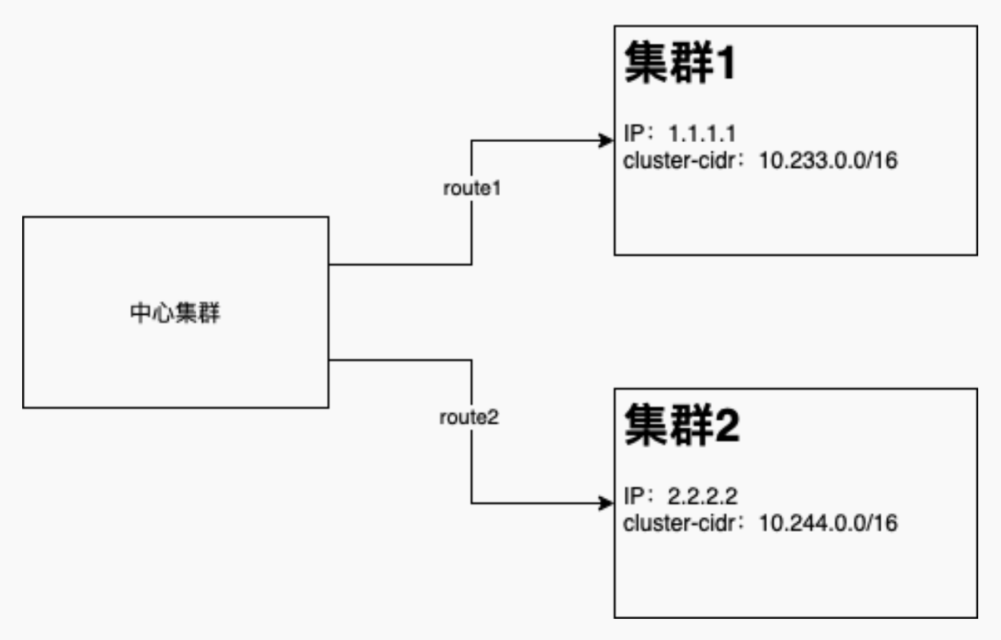
通过静态route⽅式实现,在中⼼集群添加两条 route 策略:
route add -net 10.233.0.0 netmask 255.255.0.0 gw 1.1.1.1 dev xxx
route add -net 10.244.0.0 netmask 255.255.0.0 gw 2.2.2.2 dev xxx
Step 2:修改 ingress-controller
源码分析
GitHub地址:
https://github.com/nginxinc/kubernetes-ingress
原型开发
注:原型开发只是⼀个 demo 版本,仅⽀持少量基本功能
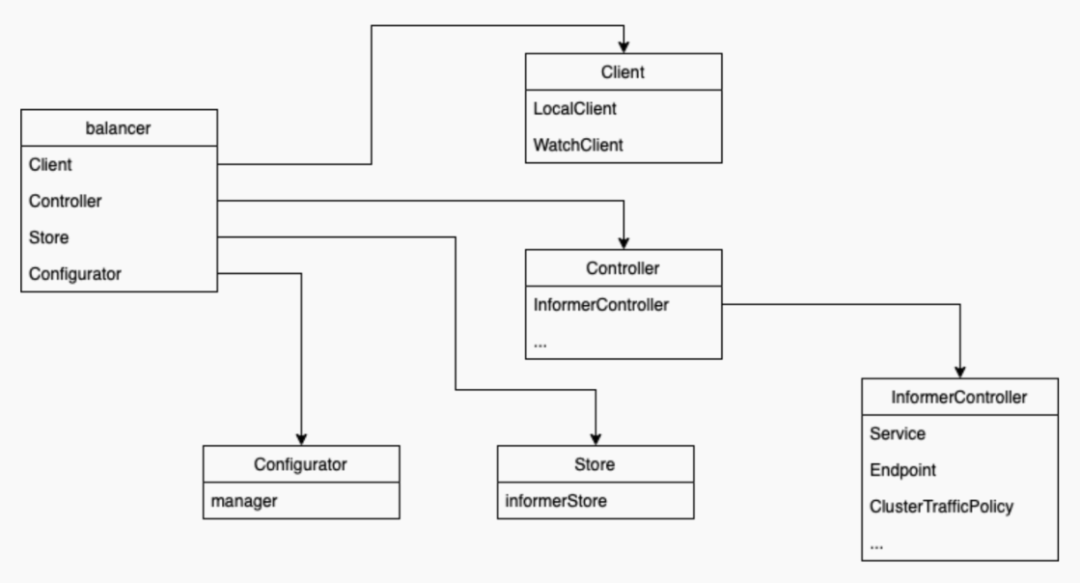
基于源码分析,剥离出以下⼏个组件:
balancer:核⼼控制器。
Client:各个 cluster 的客户端信息。通过 k8s 配置信息,连接 k8s 的 apiserver。
Controller:k8s 的资源交互。定义如何处理监听到的 k8s 资源变更。
Store:k8s 资源存储。
Configurator:k8s 资源整合,转换并更新为 nginx 配置。
代码逻辑如下:
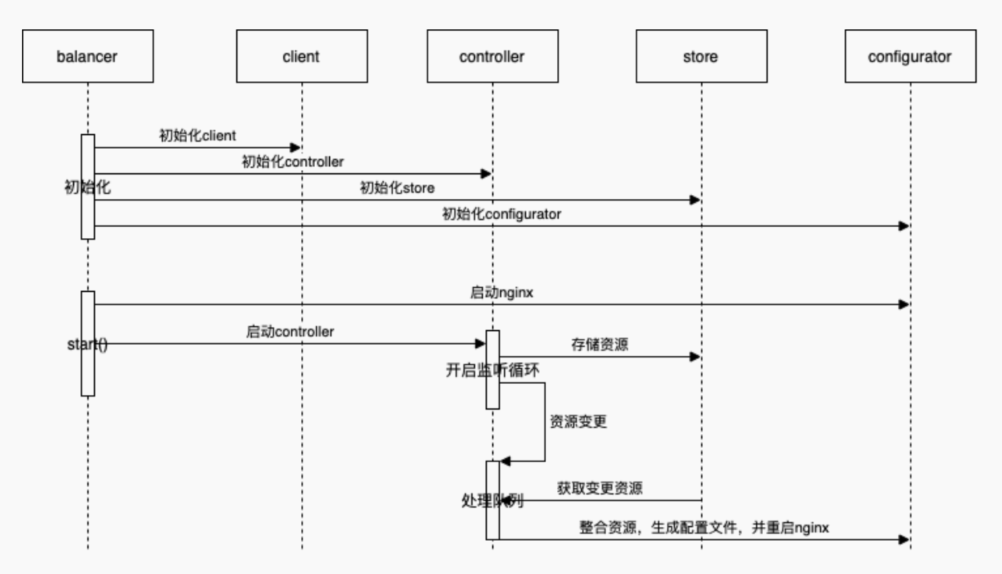
启动项⽬时,先初始化 balancer,然后再启动 balancer。
初始化balancer:
初始化 client:通过指定的 k8s 配置信息(该配置信息通过 configmap 的⽅式,配置到容器的环境变量中),初始化 k8s 的 apiserver 客户端。client 包含 localClient 和 watchClient。localClient 是 ingress-controller 所在的 k8s 环境,即中⼼集群;watchClient 是⼀个数组,存储 被管理的集群。
初始化 controller:实现 Controller 接⼝,⼀个 controller 对应⼀种资源的监听处理。⽬前所涉及到的 InformerController 资源有:CRD,Service,Endpoints。
初始化 store:实现 InformerStore 接⼝,存储所有的 informer 资源。⽬前使⽤内存的⽅式实现。
初始化 configurator:实现 Configurator 接⼝,包含 nginx 的启动,重构及停⽌。⽬前通过执⾏nginx ⼆进制命令的⽅式实现。
启动balancer
启动 nginx:通过 Confugurator 的 start 接⼝启动 nginx。⽣成 nginx.conf ⽂件,执⾏ nginx 命令
启动 controller:启动 controller 时,先把所有获取到的资源,存⼊ store 中。
开启循环监听:将所识别到的资源变更存⼊⼀个处理队列中。
轮询处理队列:从 store 中获取实际变更资源,然后通过 configurator 对这些资源进⾏整合, 并⽣成对应的配置⽂件,执⾏ nginx -s reload 命令。
新增crd资源
crd资源定义:
https://kubernetes.io/zh-cn/docs/tasks/extend-kubernetes/custom-resources/c
ustom-resource-definitions/
crd 资源
apiVersion: apiextensions.k8s.io/v1kind: CustomResourceDefinitionmetadata:annotations:controller-gen.kubebuilder.io/version: v0.8.0creationTimestamp: nullname: clustertrafficpolicies.k8s.nginx.orgspec:group: k8s.nginx.orgnames:kind: ClusterTrafficPolicylistKind: ClusterTrafficPolicyListplural: clustertrafficpoliciesshortNames:- ctpsingular: clustertrafficpolicyscope: Namespacedversions:- name: v1schema:openAPIV3Schema:description: muticluster traffic policy for same service.type: objectproperties:apiVersion:description: 'APIVersion defines the versioned schema of thisrepresentation of an object. Servers should convert recognized schemas tothe latest internal value, and may reject unrecognized values. More info:https://git.k8s.io/community/contributors/devel/sig-architecture/apiconventions.md#resources'type: stringkind:description: 'Kind is a string value representing the RESTresource this object represents. Servers may infer this from the endpointthe client submits requests to. Cannot be updated. In CamelCase. More info:https://git.k8s.io/community/contributors/devel/sig-architecture/apiconventions.md#types-kinds'type: stringmetadata:type: objectspec:description: VirtualServerSpec is the spec of theVirtualServer resource.type: objectproperties:defaultBackend:type: objectdescription: defaultBackend is the backend that shouldhandle requests that don't match any ruleproperties:service:type: objectdescription: service refernences a Service asBackend.properties:namespace:type: stringname:type: stringport:type: objectdescription: Port of the referenced seriviceproperties:name:type: stringnumber:type: integerclusterTrafficPolicy:type: arrayitems:description: cluster traffic policy for muticlustertype: objectproperties:name:type: stringdescription: the cluster name which is definedin ingress-watch-clusterweight:type: integerdescription: the weight for current clusterrules:type: arrayitems:description: a list of host rules used to configure theclustertrafficpolicytype: objectproperties:host:type: stringdescription: host is the fully qualified domainname of a network host, as defined by RFC 3986http:type: objectdescription: a list of http selectors pointing tobackends.properties:paths:type: arrayitems:type: objectdescription: a collection of paths that maprequests to backendsproperties:path:type: stringpathType:type: stringbackend:type: objectproperties:service:type: objectdescription: service refernences aService as Backend.properties:namespace:type: stringname:type: stringport:type: objectdescription: Port of thereferenced seriviceproperties:name:type: stringnumber:type: integerclusterTrafficPolicy:type: arrayitems:description: cluster traffic policyfor muticlustertype: objectproperties:name:type: stringdescription: the cluster namewhich is defined in ingress-watch-clusterweight:type: integerdescription: the weight forcurrent clusterserved: truestorage: truesubresources:status: { }status:acceptedNames:kind: ""plural: ""conditions: [ ]storedVersions: [ ]
使⽤code-generator⽣成go代码:
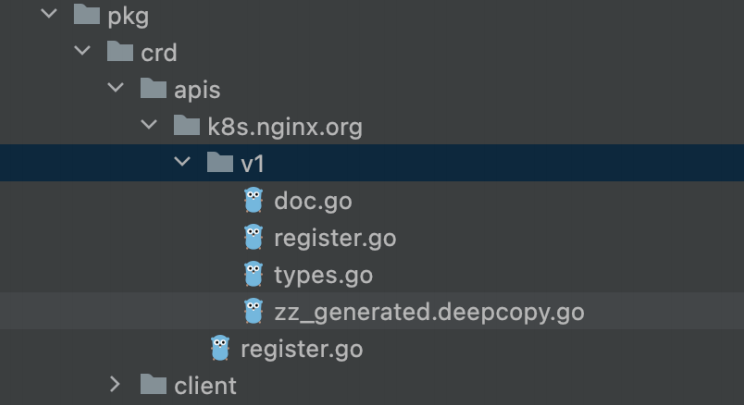
需⾃定义的⽂件:
doc.go:定义包名注释
types.go:定义代码⽣⽣成注释及crd结构体
register.go:注册到api-server中
运⾏脚本:
https://github.com/kubernetes/code-generator/blob/master/generate-groups.sh.
脚本⽣成⽂件:
zz_generated.deepcopy.go
client⽬录下所有⽂件