需求
某分布式系统中,主节点可以有多台,可以动态上下线,任意一台客户端都能实时感知到主节点服务器的上下线。
需求分析

具体实现
(1)先在集群上创建/servers 节点

(2)在 Idea 中创建包名:com.gk.case1
(3)服务器端向 Zookeeper 注册代码
package com.gk.case1;

import org.apache.zookeeper.*;

import java.io.IOException;

/**
 * create with IntelliJ IDEA
 *
 * @Project :zookeeper
 * @Package :com.gk.case1
 * @ClassName :
 * @CreateTime :2022/4/128:53
 * @Version :1.0
 * @Author :锦林
 * @Email :836658031@qq.com
 **/
public class DistributeServer {

    private String connectString = "hadoop102:2181,hadoop103:2181,hadoop104:2181";
    private int sessionTimeout = 2000;
    private ZooKeeper zk = null;
    private String pareNode = "/servers";

    // 创建到zk的客户端连接
    public void getConnect() throws IOException {
        zk = new ZooKeeper(connectString, sessionTimeout, new Watcher() {
            public void process(WatchedEvent watchedEvent) {

            }
        });
    }

    // 注册服务器
    public void registerServer(String hostname) throws KeeperException, InterruptedException {

        String create = zk.create(pareNode + "/server", hostname.getBytes(), ZooDefs.Ids.OPEN_ACL_UNSAFE, CreateMode.EPHEMERAL_SEQUENTIAL);
        System.out.println(hostname + " is online " + create);
    }

    // 业务功能
    public void business(String hostname) throws InterruptedException {
        System.out.println(hostname + " is working ...");
        Thread.sleep(Long.MAX_VALUE);
    }

    public static void main(String[] args) throws Exception {

        // 1 获取zk连接
        DistributeServer server = new DistributeServer();
        server.getConnect();

        // 2 利用zk连接注册服务器信息
        server.registerServer(args[0]);

        // 3 启动业务功能
        server.business(args[0]);
    }
}
(4)客户端代码
package com.gk.case1;

import org.apache.zookeeper.KeeperException;
import org.apache.zookeeper.WatchedEvent;
import org.apache.zookeeper.Watcher;
import org.apache.zookeeper.ZooKeeper;

import java.io.IOException;
import java.util.ArrayList;
import java.util.List;


/**
 * create with IntelliJ IDEA
 *
 * @Project :zookeeper
 * @Package :com.gk.case1
 * @ClassName :
 * @CreateTime :2022/4/129:04
 * @Version :1.0
 * @Author :锦林
 * @Email :836658031@qq.com
 **/
public class DistributeClient {

    private String connectString = "hadoop102:2181,hadoop103:2181,hadoop104:2181";
    private int sessionTimeout = 2000;
    private ZooKeeper zk = null;
    private String parentNode = "/servers";

    // 创建到zk的客户端连接
    public void getConnect() throws IOException {
        zk = new ZooKeeper(connectString, sessionTimeout, new Watcher() {
            public void process(WatchedEvent watchedEvent) {
                try {
                    getServerList();
                } catch (KeeperException e) {
                    e.printStackTrace();
                } catch (InterruptedException e) {
                    e.printStackTrace();
                }
            }
        });
    }

    // 获取服务器列表信息
    public void getServerList() throws KeeperException, InterruptedException {

        // 1 获取服务器节点信息,并且对父节点进行监听
        List<String> children = zk.getChildren(parentNode, true);

        // 2 存储服务器信息列表
        ArrayList<String> servers = new ArrayList<String>();

        // 3 遍历所有节点,获取节点中的主机名称信息
        for (String child : children) {
            byte[] data = zk.getData(parentNode + "/" + child, false, null);

            servers.add(new String(data));
        }

        // 4 打印服务器列表信息
        System.out.println(servers);
    }

    // 业务功能
    public void business() throws Exception {
        System.out.println("client is working ...");
        Thread.sleep(Long.MAX_VALUE);
    }

    public static void main(String[] args) throws Exception {

        // 1 获取zk连接
        DistributeClient client = new DistributeClient();
        client.getConnect();

        // 2 获取servers的子节点信息,从中获取服务器信息列表
        client.getServerList();

        // 3 业务进程启动
        client.business();
    }
}
测试
1)在 Linux 命令行上操作增加减少服务器
(1)启动 DistributeClient 客户端

(2)在 hadoop102 上 zk 的客户端/servers 目录上创建临时带序号节点

(3)观察 Idea 控制台变化
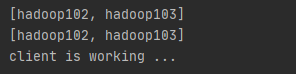
(4)执行删除操作

(5)观察 Idea 控制台变化

2)在 Idea 上操作增加减少服务器
(1)启动 DistributeClient 客户端(如果已经启动过,不需要重启)
(2)启动 DistributeServer 服务
①点击 Edit Configurations…

②在弹出的窗口中(Program arguments)输入想启动的主机,例如,hadoop102

③ 回 到 DistributeServer 的 main 方 法 , 右 键 , 在 弹 出 的 窗 口 中 点 击 Run “DistributeServer.main()”
④观察 DistributeServer 控制台,提示 hadoop102 is working

⑤观察 DistributeClient 控制台,提示 hadoop102 已经上线

版权声明:本文为weixin_47260194原创文章,遵循CC 4.0 BY-SA版权协议,转载请附上原文出处链接和本声明。