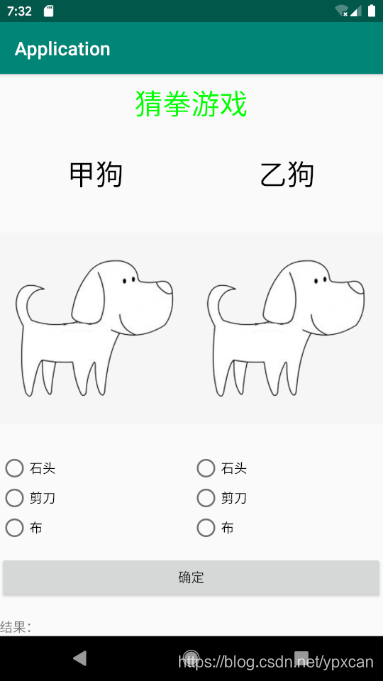
学android已经两周了,这周设计了一个小游戏,猜拳游戏,先看一下界面

再看一下布局
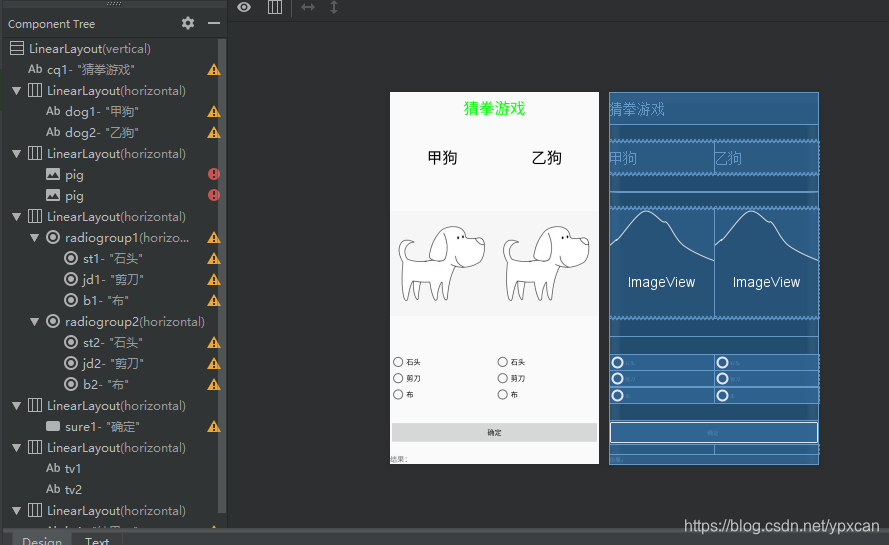
我选用的是线性布局,并且通过线性布局的镶嵌,完成了这个小游戏的设计。
activity代码:
<?xml version="1.0" encoding="utf-8"?>
<LinearLayout xmlns:android="http://schemas.android.com/apk/res/android"
    xmlns:app="http://schemas.android.com/apk/res-auto"
    xmlns:tools="http://schemas.android.com/tools"
    android:layout_width="match_parent"
    android:layout_height="match_parent"
    android:orientation="vertical"
    tools:context=".MainActivity">
    <TextView
        android:id="@+id/cq1"
        android:layout_width="match_parent"
        android:layout_height="62dp"
        android:gravity="center"
        android:text="猜拳游戏"
        android:textColor="#00FF00"
        android:textSize="80px" />
    <LinearLayout
        android:layout_width="match_parent"
        android:layout_height="wrap_content"
        android:layout_weight="1"
        android:gravity="center"
        android:orientation="horizontal">

        <TextView
            android:id="@+id/dog1"
            android:layout_width="0dp"
            android:layout_height="64dp"
            android:layout_weight="1"
            android:gravity="center"
            android:text="甲狗"
            android:textColor="#000000"
            android:textSize="80px" />
        <TextView
            android:id="@+id/dog2"
            android:layout_width="0dp"
            android:layout_height="64dp"
            android:gravity="center"
            android:text="乙狗"
            android:textColor="#000000"
            android:textSize="80px"
            android:layout_weight="1"/>
    </LinearLayout>
    <LinearLayout
        android:layout_width="match_parent"
        android:layout_height="wrap_content"
        android:layout_weight="1"
        android:gravity="center"
        android:orientation="horizontal">

        <ImageView
            android:id="@+id/pig"
            android:layout_width="0dp"
            android:layout_height="216dp"
            android:layout_weight="1"
            android:src="@drawable/timg" />
        <ImageView
            android:id="@+id/pig"
            android:layout_width="0dp"
            android:layout_height="216dp"
            android:layout_weight="1"
            android:src="@drawable/timg" />
    </LinearLayout>

    <LinearLayout
        android:layout_width="match_parent"
        android:layout_height="wrap_content"
        android:layout_weight="1"
        android:gravity="center"
        android:orientation="horizontal">

        <RadioGroup
            android:id="@+id/radiogroup1"
            android:layout_width="match_parent"
            android:layout_height="wrap_content"
            android:layout_weight="1">

            <RadioButton
                android:id="@+id/st1"
                android:layout_width="match_parent"
                android:layout_height="wrap_content"
                android:text="石头" />

            <RadioButton
                android:id="@+id/jd1"
                android:layout_width="match_parent"
                android:layout_height="wrap_content"
                android:text="剪刀" />

            <RadioButton
                android:id="@+id/b1"
                android:layout_width="match_parent"
                android:layout_height="wrap_content"
                android:text="布" />
        </RadioGroup>

        <RadioGroup
            android:id="@+id/radiogroup2"
            android:layout_width="match_parent"
            android:layout_height="wrap_content"
            android:layout_weight="1">

            <RadioButton
                android:id="@+id/st2"
                android:layout_width="match_parent"
                android:layout_height="wrap_content"
                android:text="石头" />

            <RadioButton
                android:id="@+id/jd2"
                android:layout_width="match_parent"
                android:layout_height="wrap_content"
                android:text="剪刀" />

            <RadioButton
                android:id="@+id/b2"
                android:layout_width="match_parent"
                android:layout_height="wrap_content"
                android:text="布" />
        </RadioGroup>
    </LinearLayout>
    <LinearLayout
        android:layout_width="match_parent"
        android:layout_height="wrap_content">

        <Button
            android:id="@+id/sure1"
            android:layout_width="match_parent"
            android:layout_height="match_parent"
            android:text="确定" />
    </LinearLayout>
    <LinearLayout
        android:layout_width="match_parent"
        android:layout_height="wrap_content">
        <TextView
            android:id="@+id/tv1"
            android:layout_width="match_parent"
            android:layout_height="wrap_content"
            android:text=""
            android:layout_weight="1"/>
        <TextView
            android:id="@+id/tv2"
            android:layout_width="match_parent"
            android:layout_height="wrap_content"
            android:text=""
            android:layout_weight="1"/>
    </LinearLayout>
    <LinearLayout
        android:layout_width="match_parent"
        android:layout_height="wrap_content">
        <TextView
            android:id="@+id/jg1"
            android:layout_width="match_parent"
            android:layout_height="wrap_content"
            android:text="结果:"/>
    </LinearLayout>
</LinearLayout>
java代码:
package com.example.application;

import androidx.appcompat.app.AppCompatActivity;

import android.view.View;
import android.widget.Button;
import android.widget.ImageView;
import android.widget.RadioButton;
import android.widget.RadioGroup;
import android.app.Activity;
import android.os.Bundle;
import android.widget.TextView;
import android.widget.Toast;
import android.widget.RadioGroup.OnCheckedChangeListener;
import android.widget.Toast;
import android.os.Bundle;

public class MainActivity extends AppCompatActivity {
    private Button button1;
    private TextView tv1;
    private TextView tv2;
    private TextView jg1;
    private RadioGroup radioGroup1;
    private RadioGroup radioGroup2;

    @Override
    protected void onCreate(Bundle savedInstanceState) {
        super.onCreate(savedInstanceState);
        setContentView(R.layout.activity_main);
        tv1 = (TextView)findViewById(R.id.tv1);
        tv2 = (TextView)findViewById(R.id.tv2);
        jg1 = (TextView)findViewById(R.id.jg1);
        button1 = (Button)findViewById(R.id.sure1);
        radioGroup1 = (RadioGroup)findViewById(R.id.radiogroup1);
        radioGroup2 = (RadioGroup)findViewById(R.id.radiogroup2);
        radioGroup1.setOnCheckedChangeListener(new OnCheckedChangeListener() {
            public void onCheckedChanged(RadioGroup arg0, int arg1) {
                //获取变更后的选中项的ID
                int radioButtonId = arg0.getCheckedRadioButtonId();
                //根据ID获取RadioButton的实例
                RadioButton rb = (RadioButton)MainActivity.this.findViewById(radioButtonId);
                //更新文本内容,以符合选中项
                tv1.setText("甲出的是:" + rb.getText());
            }
        });
        radioGroup2.setOnCheckedChangeListener(new OnCheckedChangeListener() {
            public void onCheckedChanged(RadioGroup arg0, int arg1) {
                //获取变更后的选中项的ID
                int radioButtonId = arg0.getCheckedRadioButtonId();
                //根据ID获取RadioButton的实例
                RadioButton rb = (RadioButton)MainActivity.this.findViewById(radioButtonId);
                //更新文本内容,以符合选中项
                tv2.setText("乙出的是:" + rb.getText());
            }
        });
        button1.setOnClickListener(new View.OnClickListener() {
            public void onClick(View view) {
                if(tv1.getText().equals("甲出的是:剪刀") && tv2.getText().equals("乙出的是:布")){
                    jg1.setText("结果:甲赢");
                }
                else if(tv1.getText().equals("甲出的是:剪刀") && tv2.getText().equals("乙出的是:石头")){
                        jg1.setText("结果:乙赢");
                }
                else if(tv1.getText().equals("甲出的是:剪刀") && tv2.getText().equals("乙出的是:剪刀")){
                    jg1.setText("结果:平局");
                }
                else if(tv1.getText().equals("甲出的是:石头") && tv2.getText().equals("乙出的是:石头")){
                    jg1.setText("结果:平局");
                }
                else if(tv1.getText().equals("甲出的是:石头") && tv2.getText().equals("乙出的是:布")){
                    jg1.setText("结果:乙赢");
                }
                else if(tv1.getText().equals("甲出的是:石头") && tv2.getText().equals("乙出的是:剪刀")){
                    jg1.setText("结果:甲赢");
                }
                else if(tv1.getText().equals("甲出的是:布") && tv2.getText().equals("乙出的是:剪刀")){
                    jg1.setText("结果:乙赢");
                }
                else if(tv1.getText().equals("甲出的是:布") && tv2.getText().equals("乙出的是:石头")){
                    jg1.setText("结果:甲赢");
                }
                else if(tv1.getText().equals("甲出的是:布") && tv2.getText().equals("乙出的是:布")){
                    jg1.setText("结果:平局");
                }

            }
        });
    }
}
有什么不懂的可以评论区问
版权声明:本文为ypxcan原创文章,遵循CC 4.0 BY-SA版权协议,转载请附上原文出处链接和本声明。