需求:一般在scroll-view中会放置一个list列表,当列表条目增加的时候,使其自动滚动到底部显示最后一条
效果图下图:
刚开始进入的时候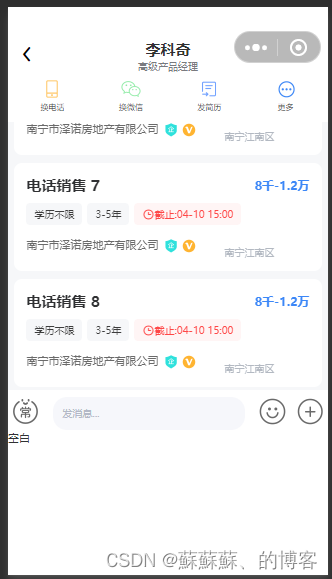
这里自动撑开了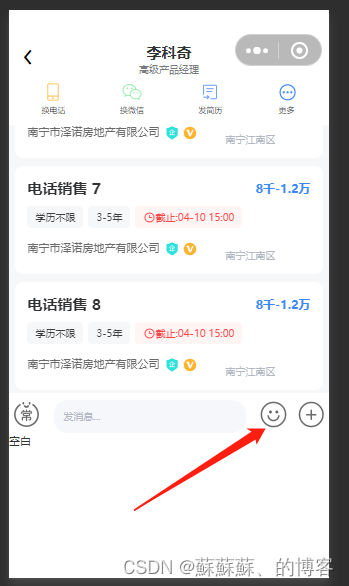
点击加号图标 恢复原来的样子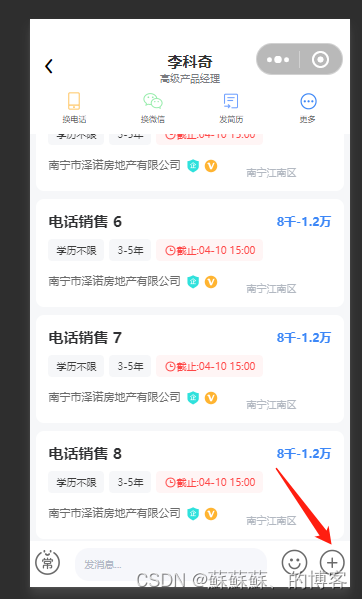
实现了聊天自动滚动到底部
这是最终效果图 其他的可以自己自行补全
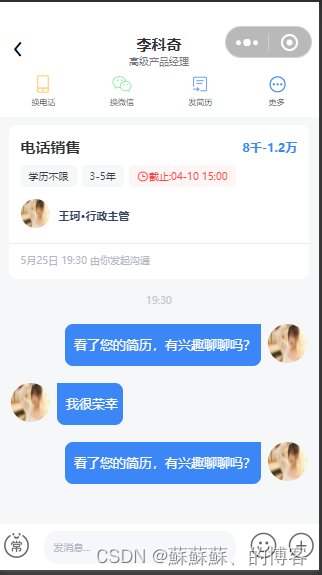
全部代码都在这里了 包括样式 ,图片自己随便放上去就行了 希望帮住到大家 不喜勿喷
**
前提条件 uniapp uview-ui 必须引入 不然样式会出错
**
<template>
	<view>
		<view class="indexTop">
			<view class="location">
				<view class="" style="">
					<u-icon name="arrow-left" color="#000000" size="44"></u-icon>
				</view>
			</view>
			<view class="navName">
				<view class="name">
					李科奇
				</view>
				<view class="jobName">
					高级产品经理
				</view>
			</view>

			<view class="menu">
				<view class="mentItem">
					<view class="">
						<img src="/static/img/chat_phone.png" alt="">
					</view>
					<view class="mentItemTxt">
						换电话
					</view>
				</view>

				<view class="mentItem marginLeft124">
					<view class="">
						<img src="/static/img/chat_weixin.png" alt="">
					</view>
					<view class="mentItemTxt">
						换微信
					</view>
				</view>

				<view class="mentItem marginLeft124">
					<view class="">
						<img src="/static/img/chat_jianli.png" alt="">
					</view>
					<view class="mentItemTxt">
						发简历
					</view>
				</view>

				<view class="mentItem marginLeft124">
					<view class="">
						<img src="/static/img/chat_gengduo.png" alt="">
					</view>
					<view class="mentItemTxt">
						更多
					</view>
				</view>
			</view>
		</view>
		<view class="" style="width: 100%;height: 270rpx;"></view>


		<view class="scrollViewContent" id="scrollViewContent" :style="{height: contentViewHeight + 'px'}">

			<scroll-view class="scrollview" id="scrollview" scroll-y="true" :scroll-top="scrollTop"
				:style="{height: contentViewHeight + 'px'}">
				<view id="msglistview">

					<!-- 求职者 -->
					<view class="job">
						<view class="jobName">
							<view class="position">
								电话销售
							</view>

							<view class="price">
								8千-1.2万
							</view>
						</view>
						<view class="tabs">
							<view class="tab">
								学历不限
							</view>

							<view class="tab margin-left">
								3-5年
							</view>
							<view class="tabRed">
								<u-icon name="clock" color="#FF4747" size="30" top="3"></u-icon>
								截止:04-10 15:00
							</view>
						</view>

						<view class="company">
							<view class="companyName">
								<view class="img">
									<img src="/static/img/test.jpg" alt="">
								</view>
								<view class="name">
									王珂·行政主管
								</view>
							</view>

						</view>
						<u-gap height="1" bg-color="#E9E9E9" margin-top="29"></u-gap>
						<view class="time">
							5月25日 19:30 由你发起沟通
						</view>
					</view>

					<!-- hr -->
						<!-- <view class="content">
							<view class="userInfo">
								<view class="">
									<view class="name">
										李科奇
									</view>
									<view class="job_zhiwei">
										前端工程师
									</view>
								</view>
								<view class="imgs">
									<view class="sex">
										<img src="/static/img/man.png" alt="">
									</view>
									<view class="userImg">
										<img src="/static/img/test.jpg" alt="">
									</view>


								</view>
							</view>

							<view class="lianxi">
								<view class="lianxiItem">
									<view class="">
										<img src="/static/img/bao.png" alt="">
									</view>
									<view class="tiemTxt">
										10经验
									</view>
								</view>

								<view class="lianxiItem" style="margin-left: 10%;">
									<view class="">
										<img src="/static/img/bao.png" alt="">
									</view>
									<view class="tiemTxt">
										研究生
									</view>
								</view>

								<view class="lianxiItem" style="margin-left: 10%;">
									<view class="">
										<img src="/static/img/bao.png" alt="">

									</view>
									<view class="tiemTxt">
										13652641563
									</view>
								</view>

							</view>

							<u-gap height="1" bg-color="#E9E9E9" margin-top="29"></u-gap>
							<view class="time">
								5月25日 19:30 由你发起沟通
							</view>
						</view> -->

					<view class="chattTime">
						19:30
					</view>

					<view class="users" v-for="(item,index) in messageData" :key="index">
						<view class="chater" v-if="userId == item.user_id">
							<view class="chaterMsg">
								<view class="msgTxt">
									{{item.msg}}
								</view>

							</view>
							<view class="chaterImg">
								<img :src="item.cover" alt="">
							</view>
						</view>

						<view class="chatted" v-else>
							<view class="chattedImg">
								<img :src="item.cover" alt="">
							</view>

							<view class="chattedMsg">
								<view class="msgTxt">
									{{item.msg}}
								</view>

							</view>

						</view>
					</view>


				</view>

			</scroll-view>
		</view>
		<view class="footer">
			<view class="caidan">
				<view class="chang">
					<img src="/static/img/chat_chang.png" alt="">
				</view>
				<view class="input" style="margin-left: 4%;">
					<u-input
					v-model="value"
					type="text"
					:border="false"
					:clearable="false"
					placeholder="发消息..."
					placeholder-style="font-size: 24rpx;font-family: PingFang SC, PingFang SC-Regular;font-weight: 400;color: #b3b9c7;"
					:custom-style="{
						'backgroundColor':' #f6f7fb',
						'borderRadius': '34rpx',
						'padding':'1% 0 1% 5%'
					}"
					@confirm="sendMsg()"
					/>
				</view>
				<view class="emoji" style="margin-left: 4%;">
					<img src="/static/img/chat_emoji.png" alt="" @click="clickEmoji()">
				</view>
				<view class="jia" style="margin-left: 3%;">
					<img src="/static/img/chat_jia.png" alt="" @click="clickJia()">
				</view>
			</view>
			<view class="footerMenu" v-show="footerShow">
				空白
			</view>
		</view>
	</view>
</template>
js部分
<script>
	export default {
		data() {
			return {
				value:'',
				footerShow:false,
				contentViewHeight: 0,
				list:[1],
				scrollTop:'',
				windowH:0,
				userId:1,
				messageData:[
					{user_id:'1',username:'大蘓',cover:'/static/img/test.jpg',img:'',voice:'',msg:'看了您的简历,有兴趣聊聊吗?'},
					{user_id:'2',username:'大蘓',cover:'/static/img/test.jpg',img:'',voice:'',msg:'我很荣幸'},
					{user_id:'1',username:'大蘓',cover:'/static/img/test.jpg',img:'',voice:'',msg:'看了您的简历,有兴趣聊聊吗?'},
				],

			}
		},
		created () {
		 	const res = uni.getSystemInfoSync();   //获取手机可使用窗口高度     api为获取系统信息同步接口
			this.windowH = res.windowHeight;
		  this.contentViewHeight =(405*this.windowH/568); //像素   因为给出的是像素高度 然后我们用的是upx  所以换算一下
			this.scrollToBottom();
		},
		updated() {
			//调用滚动到底部的方法
			this.scrollToBottom();
		},
		methods: {
			clickEmoji(){
				this.contentViewHeight = this.contentViewHeight - (140*this.windowH/568);
				this.footerShow = true;
			},
			//设置页面滚动到底部
			scrollToBottom() {
			 	let that = this
			    let query = uni.createSelectorQuery()
			    query.select('#scrollview').boundingClientRect()
			    query.select('#msglistview').boundingClientRect()
			    query.exec((res) => {
				     //获取所有内部子元素的高度
				     //判断子元素高度是否大于显示高度
				     if(res[1].height > res[0].height){
					      // 用子元素的高度减去显示的高度就获益获得滚动的高度
					      that.scrollTop = res[1].height - res[0].height + (20*this.windowH/568)
				     }
			    })
				console.log(this.scrollTop)
			  },

			clickJia(){
				this.contentViewHeight = this.contentViewHeight + (140*this.windowH/568);
				this.footerShow = false;

			},
			sendMsg(){
				console.log('来了 宝贝')
				let obj = new Object;
				obj.user_id = 1;
				obj.msg = this.value;
				obj.img = '';
				obj.voice = '';
				obj.cover = '/static/img/test.jpg'
				this.messageData.push(obj);
				this.value = '';
			}


		}
	}
</script>

<style lang="scss">
@import 'chat.scss'
</style>
css 部分 因为之前整合过 所以 是有点乱的 不过都是全的 图片 都可以自己随便搞
page{
	background-color: #F6F7F9;
}
.indexTop{
	width: 100%;
	position: fixed;
	padding-top:10%;
	background-color: #ffffff;
	top: 0;
	z-index: 1;
	height: 270rpx;
	.location{
		position: absolute;
		margin-left: 3%;
		margin-top: 15rpx;

	}
	.navName{
		width: 100%;
		text-align: center;
		font-size: 36rpx;
		font-weight: bolder;
		.jobName{
			font-size: 24rpx;
			font-family: PingFang SC, PingFang SC-Regular;
			font-weight: 400;
			text-align: left;
			color: #797a7f;
			text-align: center;
		}
	}
	.menu{
		width: 100%;
		display: flex;
		justify-content: center;
		align-items: center;
		background-color: #ffffff;
		padding-top: 16rpx;
		padding-bottom: 5rpx;
		.mentItem{
			text-align: center;
			img{
				width: 20px;
				height: 20px;
				object-fit: contain;
			}
			.mentItemTxt{
				font-size: 20rpx;
				font-family: PingFang SC, PingFang SC-Regular;
				font-weight: 400;
				color: #3d3d3d;
			}
		}
		.marginLeft124{
			margin-left: 17%;
		}
	}
}

.footer{
	width: 100%;
	position: fixed;
	bottom: 0;
	background-color: #ffffff;
	padding-top: 2%;
	padding-bottom: 2%;
	.caidan{
		width: 100%;

		display: flex;
		justify-content: center;
		align-items: center;
		.chang{
			img{
				width: 29px;
				height: 29px;
			}
		}
		.input{
			width: 60%;
		}
		.emoji{
			img{
				width: 29px;
				height: 29px;
			}
		}
		.jia{
			img{
				width: 29px;
				height: 29px;
			}
		}
	}
	.footerMenu{
		width: 100%;
		height: 328rpx;
	}
}

.scrollViewContent{
	width: 100%;
	.scrollview{
		width: 100%;
		.job{
			width: 94%;
			margin-left: 3%;
			background-color: #FFFFFF;
			border-radius: 20rpx;
			padding-top: 30rpx;
			padding-bottom: 30rpx;
			margin-top: 20rpx;
			.jobName{
				display: flex;
				justify-content: space-between;
				align-items: center;
				padding-left: 30rpx;
				padding-right: 30rpx;
				.position{
					font-size: 36rpx;
					font-weight: bold;
				}
				.price{
					font-size: 30rpx;
					font-weight: bold;
					color: #3C87F7;
				}
			}
			.tabs{
				width: 100%;
				display: flex;
				justify-content: left;
				flex-wrap: wrap;
				margin-top: 10rpx;
				padding-left: 30rpx;
				padding-right: 30rpx;
				.tab{
					padding: 10rpx 20rpx 10rpx 20rpx;
					background-color: #F6F7F9;
					border-radius: 10rpx;
					font-size: 24rpx;
					color: #3D3D3D;

					margin-top: 10rpx;
				}
				.margin-left{
					margin-left: 12rpx;
				}
				.tabRed{
					padding: 10rpx 20rpx 10rpx 20rpx;
					background-color: #FFF5F5;
					border-radius: 10rpx;
					font-size: 24rpx;
					color: #FF4747;
					margin-left: 12rpx;
					margin-top: 10rpx;

				}
			}
			.company{
				width: 100%;
				display: flex;
				margin-top: 30rpx;
				padding-left: 30rpx;
				padding-right: 30rpx;
				.companyName{
					font-size: 28rpx;
					font-family: PingFang SC, PingFang SC-Bold;
					font-weight: 700;
					color: #344363;
					display: flex;
					align-items: center;
					img{
						width: 29px;
						height: 29px;
						object-fit: contain;
						border-radius: 50%;
					}
					.name{
						margin-left: 23rpx;
					}
				}
				// .companyLoca{
				// 	font-size: 24rpx;
				// 	color: #B3B9C2;
				// 	padding-top: 20rpx;
				// }
			}

		}

		.content{
			width: 94%;
			background-color: #ffffff;
			margin-left: 3%;
			margin-top: 36rpx;
			padding-bottom: 36rpx;
			border-radius: 30rpx;
			padding-top: 49rpx;
			.jianliXz{
				img{
					width: 20px;
					height: 20px;
					object-fit: contain;
				}
			}
			.userInfo{
				width: 100%;
				display: flex;
				justify-content: space-between;
				align-items: center;
				padding-left: 50rpx;
				padding-right: 40rpx;
				.name{
					font-size: 42rpx;
					font-family: PingFang SC, PingFang SC-Bold;
					font-weight: 700;
					color: #1b1e27;
				}
				.job_zhiwei{
					margin-top: 11rpx;
					font-size: 32rpx;
					font-family: PingFang SC, PingFang SC-Regular;
					font-weight: 400;
					text-align: left;
					color: #797a7f;
				}
				.imgs{
					.sex{
						position: absolute;
						margin-top: 10rpx;
						margin-left: 100rpx;
						img{
							width: 16px;
							height: 16px;
							object-fit: contain;
						}
					}
					.userImg{
						img{
							width: 130rpx;
							height: 130rpx;
							object-fit: contain;
							border-radius: 50%;
						}
					}

				}

			}
			.lianxi{
				width: 100%;
				display: flex;
				justify-content: left;
				align-items: center;
				padding-left: 50rpx;
				padding-right: 40rpx;
				margin-top: 38rpx;
				.lianxiItem{
					display: flex;
					img{
						width: 18px;
						height: 18px;
					}
					.tiemTxt{
						margin-left: 5rpx;
						padding-top: 5rpx;
						font-size: 28rpx;
						font-family: PingFang SC, PingFang SC-Regular;
						font-weight: 400;
						color: #797a7f;
					}
				}
			}
		}
		.time{
			margin-top: 22rpx;
			padding-left: 30rpx;
			padding-right: 30rpx;
			font-size: 24rpx;
			font-family: PingFang SC, PingFang SC-Regular;
			font-weight: 400;
			color: #b3b9c2;

		}

		.chattTime{
			margin-top: 33rpx;
			text-align: center;
			font-size: 24rpx;
			font-family: PingFang SC, PingFang SC-Regular;
			font-weight: 400;
			color: #c7c7c7;
		}

		.users{
			width: 100%;
			.chater{
				width:100%;
				display: flex;
				justify-content: flex-end;
				margin-top: 40rpx;
				padding-right: 30rpx;
				.chaterImg{
					img{
						width: 39px;
						height: 39px;
						object-fit: contain;
						border-radius: 50%;
					}
				}
				.chaterMsg{
					width: 64%;
					display: flex;
					justify-content: flex-end;
					margin-right: 18rpx;
					.msgTxt{
						padding: 30rpx 12rpx 30rpx 22rpx;
						text-align: right;
						background-color: #3C87F7;
						border-top-left-radius: 20rpx;
						border-bottom-left-radius: 20rpx;
						border-bottom-right-radius: 20rpx;
						font-size: 32rpx;
						font-family: PingFang SC, PingFang SC-Regular;
						font-weight: 400;
						color: #ffffff;
					}
				}

			}
			.chatted{
				width:100%;
				display: flex;
				justify-content: flex-start;
				margin-top: 40rpx;
				padding-left: 30rpx;
				.chattedImg{
					img{
						width: 39px;
						height: 39px;
						object-fit: contain;
						border-radius: 50%;
					}
				}
				.chattedMsg{
					width: 64%;
					display: flex;
					justify-content: flex-start;
					margin-left: 18rpx;
					.msgTxt{
						padding: 30rpx 12rpx 30rpx 22rpx;
						text-align: left;
						background-color: #3C87F7;
						border-top-right-radius: 20rpx;
						border-bottom-left-radius: 20rpx;
						border-bottom-right-radius: 20rpx;
						font-size: 32rpx;
						font-family: PingFang SC, PingFang SC-Regular;
						font-weight: 400;
						color: #ffffff;
					}
				}

			}
		}

	}
}
版权声明:本文为qq_36639113原创文章,遵循CC 4.0 BY-SA版权协议,转载请附上原文出处链接和本声明。