安装
# 下载及操作目录
mkdir /root/redis
cd /root/redis

# 安装 gcc 套装
yum install -y cpp binutils glibc glibc-kernheaders glibc-common glibc-devel gcc mak
# 升级gcc
yum -y install centos-release-scl
yum -y install devtoolset-9-gcc devtoolset-9-gcc-c++ devtoolset-9-binutils
scl enable devtoolset-9 bash
# 设置永久升级
echo "source /opt/rh/devtoolset-9/enable" >> /etc/profile
source /etc/profile

# 下载解压 Redis 包
wget https://download.redis.io/releases/redis-6.0.9.tar.gz
tar zxvf redis-6.0.9.tar.gz

# 编译安装
cd redis-6.0.9
make
make PREFIX=/usr/local/redis install
配置
创建相关目录
# 数据目录
mkdir -p /ware/redis/data/

# 日志目录
mkdir -p /ware/redis/logs/

# 配置文件目录
mkdir -p /etc/redis/
配置文件:vi /etc/redis/redis_6379.conf
# ./redis-server /path/to/redis.conf

# 1k => 1000 bytes
# 1kb => 1024 bytes
# 1m => 1000000 bytes
# 1mb => 1024*1024 bytes
# 1g => 1000000000 bytes
# 1gb => 1024*1024*1024 bytes
#
# units are case insensitive so 1GB 1Gb 1gB are all the same.

################################## INCLUDES ###################################

# include /path/to/local.conf
# include /path/to/other.conf

################################## MODULES #####################################

# loadmodule /path/to/my_module.so
# loadmodule /path/to/other_module.so

################################## NETWORK #####################################

# bind 127.0.0.1
protected-mode yes
port 6379
tcp-backlog 10240
timeout 0
tcp-keepalive 300

################################# TLS/SSL #####################################

# port 0
# tls-port 6379
# tls-cert-file redis.crt
# tls-key-file redis.key
# tls-dh-params-file redis.dh
# tls-ca-cert-file ca.crt
# tls-ca-cert-dir /etc/ssl/certs
# tls-auth-clients no
# tls-auth-clients optional
# tls-replication yes
# tls-cluster yes
# tls-protocols "TLSv1.2 TLSv1.3"
# tls-ciphers DEFAULT:!MEDIUM
# tls-ciphersuites TLS_CHACHA20_POLY1305_SHA256
# tls-prefer-server-ciphers yes
# tls-session-caching no
# tls-session-cache-size 5000
# tls-session-cache-timeout 60

################################# GENERAL #####################################

daemonize yes
supervised no
pidfile /var/run/redis_6379.pid
loglevel notice
logfile "/ware/redis/logs/redis_6379.log"
# syslog-enabled no
# syslog-ident redis
# syslog-facility local0
databases 16
always-show-logo yes

################################ SNAPSHOTTING  ################################

save 900 1
save 300 10
save 200 50
save 100 1000
save 80 5000
save 60 10000
stop-writes-on-bgsave-error yes
rdbcompression yes
rdbchecksum yes
dbfilename redis-dump_6379.rdb
rdb-del-sync-files no
dir /ware/redis/data/

################################# REPLICATION #################################

# replicaof <masterip> <masterport>
# masterauth foo
# masteruser <username>
replica-serve-stale-data yes
replica-read-only yes
repl-diskless-sync no
repl-diskless-sync-delay 5
repl-diskless-load disabled
# repl-ping-replica-period 10
# repl-timeout 60
repl-disable-tcp-nodelay no
# repl-backlog-size 1mb
# repl-backlog-ttl 3600
replica-priority 100
# min-replicas-to-write 3
# min-replicas-max-lag 10
# replica-announce-ip 5.5.5.5
# replica-announce-port 1234

############################### KEYS TRACKING #################################

# tracking-table-max-keys 1000000

################################## SECURITY ###################################

acllog-max-len 128
requirepass 【PASSWD】 # 认证密码
# rename-command CONFIG ""

################################### CLIENTS ####################################

# maxclients 10000

############################## MEMORY MANAGEMENT ################################

# maxmemory <bytes>
# maxmemory-policy noeviction
# maxmemory-samples 5
# replica-ignore-maxmemory yes
# active-expire-effort 1

############################# LAZY FREEING ####################################

lazyfree-lazy-eviction no
lazyfree-lazy-expire no
lazyfree-lazy-server-del no
replica-lazy-flush no
lazyfree-lazy-user-del no

################################ THREADED I/O #################################

# io-threads 4
# io-threads-do-reads no

############################ KERNEL OOM CONTROL ##############################

oom-score-adj no
oom-score-adj-values 0 200 800

############################## APPEND ONLY MODE ###############################

appendonly yes
appendfilename "redis-appendonly_6379.aof"
# appendfsync always
appendfsync everysec
# appendfsync no
no-appendfsync-on-rewrite no
auto-aof-rewrite-percentage 100
auto-aof-rewrite-min-size 64mb
aof-load-truncated yes
aof-use-rdb-preamble yes

################################ LUA SCRIPTING  ###############################

lua-time-limit 5000

################################ REDIS CLUSTER  ###############################

#cluster-enabled yes
#cluster-config-file nodes-6379.conf
# cluster-node-timeout 15000
# cluster-replica-validity-factor 10
# cluster-migration-barrier 1
# cluster-require-full-coverage yes
# cluster-replica-no-failover no
# cluster-allow-reads-when-down no

########################## CLUSTER DOCKER/NAT support  ########################

# cluster-announce-ip 10.1.1.5
# cluster-announce-port 6379
# cluster-announce-bus-port 6380

################################## SLOW LOG ###################################

slowlog-log-slower-than 10000
slowlog-max-len 128

################################ LATENCY MONITOR ##############################

latency-monitor-threshold 0

############################# EVENT NOTIFICATION ##############################

notify-keyspace-events ""

############################### GOPHER SERVER #################################

# gopher-enabled no

############################### ADVANCED CONFIG ###############################

hash-max-ziplist-entries 512
hash-max-ziplist-value 64
list-max-ziplist-size -2
list-compress-depth 0
set-max-intset-entries 512
zset-max-ziplist-entries 128
zset-max-ziplist-value 64
hll-sparse-max-bytes 3000
stream-node-max-bytes 4096
stream-node-max-entries 100
activerehashing yes
client-output-buffer-limit normal 0 0 0
client-output-buffer-limit replica 256mb 64mb 60
client-output-buffer-limit pubsub 32mb 8mb 60
# client-query-buffer-limit 1gb
# proto-max-bulk-len 512mb
hz 10
dynamic-hz yes
aof-rewrite-incremental-fsync yes
rdb-save-incremental-fsync yes
# lfu-log-factor 10
# lfu-decay-time 1

########################### ACTIVE DEFRAGMENTATION #######################

jemalloc-bg-thread yes
# server_cpulist 0-7:2
# bio_cpulist 1,3
# aof_rewrite_cpulist 8-11
# bgsave_cpulist 1,10-11
服务文件:vi /usr/lib/systemd/system/redis.service
[Unit]
Description=redis 6379
Documentation=https://redis.io/documentation/
After=network.target remote-fs.target nss-lookup.target

[Service]
Type=forking
PIDFile=/var/run/redis_6379.pid
ExecStart=/usr/local/redis/bin/redis-server /etc/redis/redis_6379.conf
ExecReload=/bin/kill -s HUP $MAINPID
ExecStop=/bin/kill -s QUIT $MAINPID
PrivateTmp=true

[Install]
WantedBy=multi-user.target
启动&自启动
systemctl enable redis
systemctl start redis
集群配置
安装和Redis的单机部署一样,只需要修改redis.conf文件配置,分别修改redis-6379.conf redis-6380.conf redis-6381.conf 三个配置文件
# ./redis-server /path/to/redis.conf

# 1k => 1000 bytes
# 1kb => 1024 bytes
# 1m => 1000000 bytes
# 1mb => 1024*1024 bytes
# 1g => 1000000000 bytes
# 1gb => 1024*1024*1024 bytes
#
# units are case insensitive so 1GB 1Gb 1gB are all the same.

################################## INCLUDES ###################################

# include /path/to/local.conf
# include /path/to/other.conf

################################## MODULES #####################################

# loadmodule /path/to/my_module.so
# loadmodule /path/to/other_module.so

################################## NETWORK #####################################

# bind 127.0.0.1
protected-mode yes  #
port 6379
tcp-backlog 10240
timeout 0
tcp-keepalive 300

################################# TLS/SSL #####################################

# port 0
# tls-port 6379
# tls-cert-file redis.crt
# tls-key-file redis.key
# tls-dh-params-file redis.dh
# tls-ca-cert-file ca.crt
# tls-ca-cert-dir /etc/ssl/certs
# tls-auth-clients no
# tls-auth-clients optional
# tls-replication yes
# tls-cluster yes
# tls-protocols "TLSv1.2 TLSv1.3"
# tls-ciphers DEFAULT:!MEDIUM
# tls-ciphersuites TLS_CHACHA20_POLY1305_SHA256
# tls-prefer-server-ciphers yes
# tls-session-caching no
# tls-session-cache-size 5000
# tls-session-cache-timeout 60

################################# GENERAL #####################################

daemonize yes
supervised no
pidfile /var/run/redis_6379.pid
loglevel notice
logfile "/ware/redis/logs/redis_6379.log"
# syslog-enabled no
# syslog-ident redis
# syslog-facility local0
databases 16
always-show-logo yes

################################ SNAPSHOTTING  ################################

save 900 1
save 300 10
save 200 50
save 100 1000
save 80 5000
save 60 10000
stop-writes-on-bgsave-error yes
rdbcompression yes
rdbchecksum yes
dbfilename redis-dump_6379.rdb
rdb-del-sync-files no
dir /ware/redis/data/

################################# REPLICATION #################################

# replicaof <masterip> <masterport>
masterauth XZvDy48wDJE29Llz    #当master服务设置了密码保护后,slave服务连接master的密码
# masteruser <username>
replica-serve-stale-data yes
replica-read-only yes
repl-diskless-sync no
repl-diskless-sync-delay 5
repl-diskless-load disabled
# repl-ping-replica-period 10
# repl-timeout 60
repl-disable-tcp-nodelay no
# repl-backlog-size 1mb
# repl-backlog-ttl 3600
replica-priority 100
# min-replicas-to-write 3
# min-replicas-max-lag 10
# replica-announce-ip 5.5.5.5
# replica-announce-port 1234

############################### KEYS TRACKING #################################

# tracking-table-max-keys 1000000

################################## SECURITY ###################################

acllog-max-len 128
requirepass XZvDy48wDJE29Llz   #Redis认证密码
# rename-command CONFIG ""

################################### CLIENTS ####################################

# maxclients 10000

############################## MEMORY MANAGEMENT ################################

# maxmemory <bytes>
# maxmemory-policy noeviction
# maxmemory-samples 5
# replica-ignore-maxmemory yes
# active-expire-effort 1

############################# LAZY FREEING ####################################

lazyfree-lazy-eviction no
lazyfree-lazy-expire no
lazyfree-lazy-server-del no
replica-lazy-flush no
lazyfree-lazy-user-del no

################################ THREADED I/O #################################

# io-threads 4
# io-threads-do-reads no

############################ KERNEL OOM CONTROL ##############################

oom-score-adj no
oom-score-adj-values 0 200 800

############################## APPEND ONLY MODE ###############################

appendonly yes
appendfilename "redis-appendonly_6379.aof"
# appendfsync always
appendfsync everysec
# appendfsync no
no-appendfsync-on-rewrite no
auto-aof-rewrite-percentage 100
auto-aof-rewrite-min-size 64mb
aof-load-truncated yes
aof-use-rdb-preamble yes

################################ LUA SCRIPTING  ###############################

lua-time-limit 5000

################################ REDIS CLUSTER  ###############################

cluster-enabled yes
cluster-config-file nodes-6379.conf
# cluster-node-timeout 15000
# cluster-replica-validity-factor 10
# cluster-migration-barrier 1
# cluster-require-full-coverage yes   # yes使用全部slot,可能需要再次分配,  no不使用全部slot,巨坑
# cluster-replica-no-failover no
# cluster-allow-reads-when-down no

########################## CLUSTER DOCKER/NAT support  ########################

# cluster-announce-ip 10.1.1.5
# cluster-announce-port 6379
# cluster-announce-bus-port 6380

################################## SLOW LOG ###################################

slowlog-log-slower-than 10000
slowlog-max-len 128

################################ LATENCY MONITOR ##############################

latency-monitor-threshold 0

############################# EVENT NOTIFICATION ##############################

notify-keyspace-events ""

############################### GOPHER SERVER #################################

# gopher-enabled no

############################### ADVANCED CONFIG ###############################

hash-max-ziplist-entries 512
hash-max-ziplist-value 64
list-max-ziplist-size -2
list-compress-depth 0
set-max-intset-entries 512
zset-max-ziplist-entries 128
zset-max-ziplist-value 64
hll-sparse-max-bytes 3000
stream-node-max-bytes 4096
stream-node-max-entries 100
activerehashing yes
client-output-buffer-limit normal 0 0 0
client-output-buffer-limit replica 256mb 64mb 60
client-output-buffer-limit pubsub 32mb 8mb 60
# client-query-buffer-limit 1gb
# proto-max-bulk-len 512mb
hz 10
dynamic-hz yes
aof-rewrite-incremental-fsync yes
rdb-save-incremental-fsync yes
# lfu-log-factor 10
# lfu-decay-time 1

########################### ACTIVE DEFRAGMENTATION #######################

jemalloc-bg-thread yes
# server_cpulist 0-7:2
# bio_cpulist 1,3
# aof_rewrite_cpulist 8-11
# bgsave_cpulist 1,10-11
服务文件:
vi /usr/lib/systemd/system/redis-6379.service
vi /usr/lib/systemd/system/redis-6380.service
vi /usr/lib/systemd/system/redis-6381.service
[Unit]
Description=redis 6379
Documentation=https://redis.io/documentation/
After=network.target remote-fs.target nss-lookup.target

[Service]
Type=forking
PIDFile=/var/run/redis_6379.pid
ExecStart=/usr/local/redis/bin/redis-server /etc/redis/redis_6379.conf
ExecReload=/bin/kill -s HUP $MAINPID
ExecStop=/bin/kill -s QUIT $MAINPID
PrivateTmp=true

[Install]
WantedBy=multi-user.target
集群配置:
redis-cli -a XZvDy48wDJE29Llz --cluster create --cluster-replicas 1 192.168.0.113:6379 192.168.0.113:6380 192.168.0.113:6381 192.168.0.27:6379 192.168.0.27:6380 192.168.0.27:6381
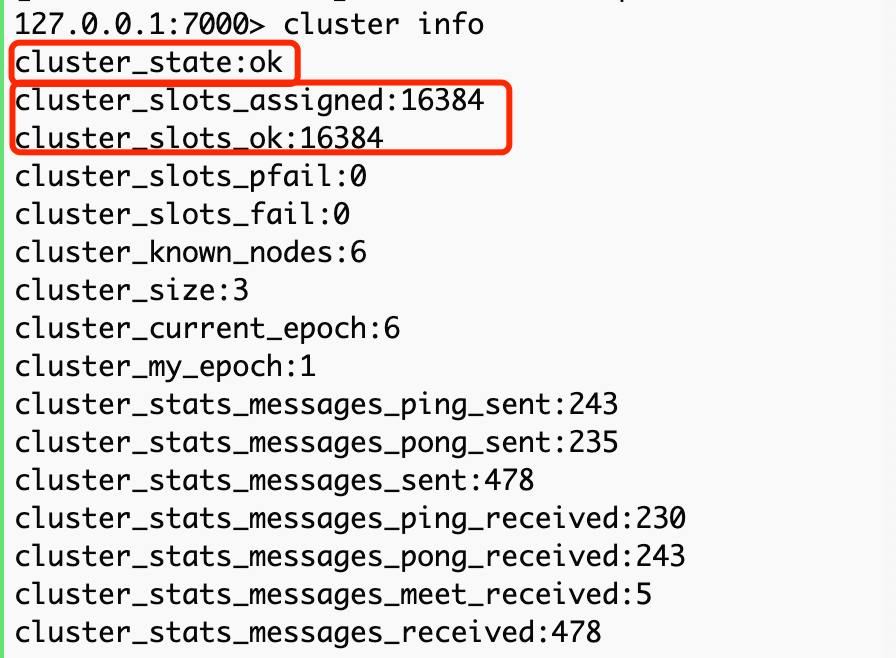
查看集群状态:
redis-cli -p 6379
auth 密码
cluster info #查看集群中的状态。
版权声明:本文为ArrogantB原创文章,遵循CC 4.0 BY-SA版权协议,转载请附上原文出处链接和本声明。